The Tech Edvocate

Top Menu

  • Advertisement
  • Apps
  • Home Page
  • Home Page Five (No Sidebar)
  • Home Page Four
  • Home Page Three
  • Home Page Two
  • Home Tech2
  • Icons [No Sidebar]
  • Left Sidbear Page
  • Lynch Educational Consulting
  • My Account
  • My Speaking Page
  • Newsletter Sign Up Confirmation
  • Newsletter Unsubscription
  • Our Brands
  • Page Example
  • Privacy Policy
  • Protected Content
  • Register
  • Request a Product Review
  • Shop
  • Shortcodes Examples
  • Signup
  • Start Here
    • Governance
    • Careers
    • Contact Us
  • Terms and Conditions
  • The Edvocate
  • The Tech Edvocate Product Guide
  • Topics
  • Write For Us
  • Advertise

Main Menu

  • Start Here
    • Our Brands
    • Governance
      • Lynch Educational Consulting, LLC.
      • Dr. Lynch’s Personal Website
      • Careers
    • Write For Us
    • The Tech Edvocate Product Guide
    • Contact Us
    • Books
    • Edupedia
    • Post a Job
    • The Edvocate Podcast
    • Terms and Conditions
    • Privacy Policy
  • Topics
    • Assistive Technology
    • Child Development Tech
    • Early Childhood & K-12 EdTech
    • EdTech Futures
    • EdTech News
    • EdTech Policy & Reform
    • EdTech Startups & Businesses
    • Higher Education EdTech
    • Online Learning & eLearning
    • Parent & Family Tech
    • Personalized Learning
    • Product Reviews
  • Advertise
  • Tech Edvocate Awards
  • The Edvocate
  • Pedagogue
  • School Ratings

logo

The Tech Edvocate

  • Start Here
    • Our Brands
    • Governance
      • Lynch Educational Consulting, LLC.
      • Dr. Lynch’s Personal Website
        • My Speaking Page
      • Careers
    • Write For Us
    • The Tech Edvocate Product Guide
    • Contact Us
    • Books
    • Edupedia
    • Post a Job
    • The Edvocate Podcast
    • Terms and Conditions
    • Privacy Policy
  • Topics
    • Assistive Technology
    • Child Development Tech
    • Early Childhood & K-12 EdTech
    • EdTech Futures
    • EdTech News
    • EdTech Policy & Reform
    • EdTech Startups & Businesses
    • Higher Education EdTech
    • Online Learning & eLearning
    • Parent & Family Tech
    • Personalized Learning
    • Product Reviews
  • Advertise
  • Tech Edvocate Awards
  • The Edvocate
  • Pedagogue
  • School Ratings
  • Viaim Opennote Review: The AI Note-Taker That Disappears Into Your Daily Routine

  • A Visitors Guide to Long Beach (CA), United States

  • A Visitor’s Guide to Fresno (CA), United States

  • A Visitors Guide to New Orleans (LA), United States

  • A Visitors Guide to Sacramento (CA), United States

  • A Visitors Guide to Lyon, France

  • JisuLife Ultra2 Portable Fan: A Powerful Multi-Function Cooling Solution

  • A Visitors Guide to Viña del Mar, Chile

  • A Visitors Guide to Århus, Denmark

  • A Visitors Guide to Bakersfield (CA), United States

Digital & Mobile Technology
Home›Digital & Mobile Technology›How to Use Macro Photography on iPhone 13

How to Use Macro Photography on iPhone 13
By Matthew Lynch
June 9, 2023
0
Spread the love

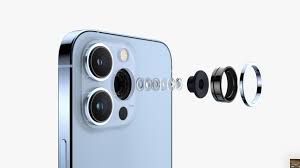
If you’re an iPhone 13 user, then you’re in for a real treat – the latest iPhone comes equipped with a powerful macro camera that is perfect for taking close-up shots of your subject. The macro lens, which is located within the wide-angle camera, lets you capture stunning detail that you may have never noticed before. In this article, we’ll provide you with some tips on how to use macro photography on iPhone 13.

1. Understand Macro Photography

Before you start taking photos with the macro camera, it’s important to understand what macro photography is all about. Macro photography is a genre of photography that involves taking close-up shots of small subjects. The idea behind macro photography is to highlight the intricate details of your subject that are usually invisible to the naked eye.

2. Get Close to Your Subject

When taking a macro shot, it’s important to get as close to your subject as possible. If you don’t get close enough, your subject may appear blurry or out of focus. To get close to your subject, you can use the zoom function on your iPhone or physically move closer to your subject.

3. Use Good Lighting

Good lighting is essential when taking macro shots. Since you’re capturing small details, you’ll want to make sure that your subject is well-lit. The best lighting for macro photography is natural light. You can take your photos outside during the day or near a window. If you need to take photos indoors, consider using a lamp or a ring light to help light up your subject.

4. Steady Your iPhone

When taking macro shots, it’s important to keep your iPhone steady to prevent blurry photos. You can use a tripod, a stable surface, or even your hand to steady your iPhone. You can also use the Burst mode feature to take multiple shots at once to ensure that you capture the perfect shot.

5. Experiment with Different Angles and Focus

When taking macro shots, it’s important to experiment with different angles and focus points. Try taking photos from different angles and focusing on different parts of your subject. This will help you find the best possible composition for your shot.

6. Edit Your Photos

After you’ve taken your macro shots, you can edit them using the built-in editing tools on your iPhone. You can adjust the brightness, contrast, and other settings to make your photos look even better. You can also use third-party editing apps like VSCO or Adobe Lightroom to fine-tune your photos.

Macro photography is a great way to capture stunning close-up shots of your subject. With the iPhone 13’s powerful macro camera, taking macro shots has never been easier. By following these tips, you can take amazing macro photos that showcase the intricate details of your subject.


Previous Article

What’s the Definition of a Data Bus?

Next Article

What Is an ADTS File?

Matthew Lynch

Related articles More from author

  • Digital & Mobile Technology

    Best Websites You Can Use to Find a Nanny

    August 5, 2023
    By Matthew Lynch
  • Digital & Mobile Technology

    All the Ways to Change How Your iPhone Lock Screen Behaves

    June 6, 2023
    By Matthew Lynch
  • Digital & Mobile Technology

    How to Fix the “Failed to Attach the USB Device” Error in VirtualBox on Windows

    August 3, 2023
    By Matthew Lynch
  • Digital & Mobile Technology

    How Secure Is Microsoft OneDrive?

    June 10, 2023
    By Matthew Lynch
  • Digital & Mobile Technology

    Everything You Need to Know About the Twofish Encryption Algorithm

    June 23, 2023
    By Matthew Lynch
  • Digital & Mobile Technology

    How to Find Out Who Your Landline Phone Service Provider Is?

    May 28, 2023
    By Matthew Lynch

Search

Login & Registration

  • Register
  • Log in
  • Entries feed
  • Comments feed
  • WordPress.org

Newsletter

Signup for The Tech Edvocate Newsletter and have the latest in EdTech news and opinion delivered to your email address!

About Us

Since technology is not going anywhere and does more good than harm, adapting is the best course of action. That is where The Tech Edvocate comes in. We plan to cover the PreK-12 and Higher Education EdTech sectors and provide our readers with the latest news and opinion on the subject. From time to time, I will invite other voices to weigh in on important issues in EdTech. We hope to provide a well-rounded, multi-faceted look at the past, present, the future of EdTech in the US and internationally.

We started this journey back in June 2016, and we plan to continue it for many more years to come. I hope that you will join us in this discussion of the past, present and future of EdTech and lend your own insight to the issues that are discussed.

Newsletter

Signup for The Tech Edvocate Newsletter and have the latest in EdTech news and opinion delivered to your email address!

Contact Us

The Tech Edvocate
910 Goddin Street
Richmond, VA 23231
(601) 630-5238
[email protected]

Copyright © 2025 Matthew Lynch. All rights reserved.