The Tech Edvocate

Top Menu

  • Advertisement
  • Apps
  • Home Page
  • Home Page Five (No Sidebar)
  • Home Page Four
  • Home Page Three
  • Home Page Two
  • Home Tech2
  • Icons [No Sidebar]
  • Left Sidbear Page
  • Lynch Educational Consulting
  • My Account
  • My Speaking Page
  • Newsletter Sign Up Confirmation
  • Newsletter Unsubscription
  • Our Brands
  • Page Example
  • Privacy Policy
  • Protected Content
  • Register
  • Request a Product Review
  • Shop
  • Shortcodes Examples
  • Signup
  • Start Here
    • Governance
    • Careers
    • Contact Us
  • Terms and Conditions
  • The Edvocate
  • The Tech Edvocate Product Guide
  • Topics
  • Write For Us
  • Advertise

Main Menu

  • Start Here
    • Our Brands
    • Governance
      • Lynch Educational Consulting, LLC.
      • Dr. Lynch’s Personal Website
      • Careers
    • Write For Us
    • The Tech Edvocate Product Guide
    • Contact Us
    • Books
    • Edupedia
    • Post a Job
    • The Edvocate Podcast
    • Terms and Conditions
    • Privacy Policy
  • Topics
    • Assistive Technology
    • Child Development Tech
    • Early Childhood & K-12 EdTech
    • EdTech Futures
    • EdTech News
    • EdTech Policy & Reform
    • EdTech Startups & Businesses
    • Higher Education EdTech
    • Online Learning & eLearning
    • Parent & Family Tech
    • Personalized Learning
    • Product Reviews
  • Advertise
  • Tech Edvocate Awards
  • The Edvocate
  • Pedagogue
  • School Ratings

logo

The Tech Edvocate

  • Start Here
    • Our Brands
    • Governance
      • Lynch Educational Consulting, LLC.
      • Dr. Lynch’s Personal Website
        • My Speaking Page
      • Careers
    • Write For Us
    • The Tech Edvocate Product Guide
    • Contact Us
    • Books
    • Edupedia
    • Post a Job
    • The Edvocate Podcast
    • Terms and Conditions
    • Privacy Policy
  • Topics
    • Assistive Technology
    • Child Development Tech
    • Early Childhood & K-12 EdTech
    • EdTech Futures
    • EdTech News
    • EdTech Policy & Reform
    • EdTech Startups & Businesses
    • Higher Education EdTech
    • Online Learning & eLearning
    • Parent & Family Tech
    • Personalized Learning
    • Product Reviews
  • Advertise
  • Tech Edvocate Awards
  • The Edvocate
  • Pedagogue
  • School Ratings
  • RayNeo iO Smart Glasses: A Comprehensive Review

  • Glo Skin Beauty: The Aesthetician-Backed Brand Taking 25% Off for October Prime Day

  • The Shocking Truth: ESG Training Programs Are Quietly Reshaping Your Career Path

  • Why Millions of People Are Switching to These Green Energy Certifications Right Now

  • The green skills gap in 2026: How to address this growing problem

  • The Shocking Truth: Your Degree Won’t Land You the Best IT Jobs in 2026

  • The Brutal Truth About Degrees: Why Micro-Credentials Are Quietly Dominating Careers by 2026

  • Why 96% of Employers Now Prefer Skills Over Degrees: The Micro-Credential Revolution

  • This Crucial Mistake With AI Is Stunting Student Minds: Here’s How to Fix It

  • The AI ‘Cognitive Surrender’ Crisis: 7 Tools Every Educator Needs NOW

Digital & Mobile Technology
Home›Digital & Mobile Technology›How to Use an Echo Dot as an Intercom

How to Use an Echo Dot as an Intercom
By Matthew Lynch
February 26, 2023
0
Spread the love

If you’re lucky enough to own an Echo Dot, you’re already familiar with the convenience and versatility this device brings to your home. But did you know that your Echo Dot can also function as an intercom?

Using your Echo Dot as an intercom can be extremely helpful, especially for larger homes or households with multiple floors. Here’s a quick guide on how to set up and use this feature:

Step 1: Enable the Drop In Feature

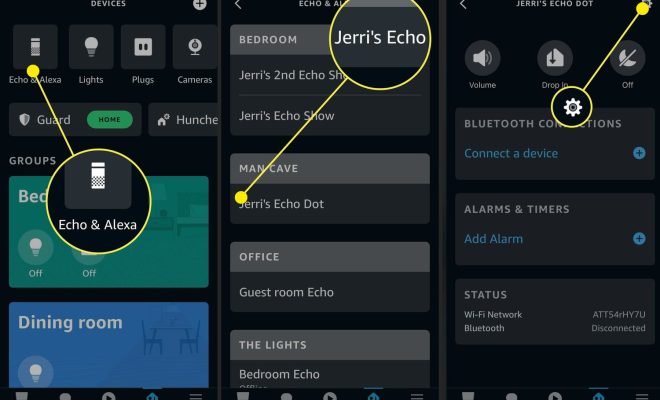
Before you can use your Echo Dot as an intercom, you need to make sure that the Drop In feature is enabled. To do this, open your Alexa app and navigate to the settings section. From there, select the “Device Settings” tab and choose your Echo Dot. You should see an option for “Drop In,” which you can toggle on.

Step 2: Set Up Your Household Profile

If you haven’t done so already, you’ll want to set up a household profile on your Alexa app. This will allow you to easily access and manage all of the devices in your home, making it easier to use your Echo Dot as an intercom. To create a household profile, navigate to the “Settings” section and select “Your Profile.” From there, you can add and manage members of your household.

Step 3: Use Your Echo Dot as an Intercom

Once you have Drop In enabled and your household profile set up, you’re ready to start using your Echo Dot as an intercom. To do this, simply say “Alexa, drop in on [name of Echo Dot].” This will activate the microphone on the other Echo Dot, allowing you to speak with whoever is in that room. You can also use the Alexa app to drop in on specific devices.

It’s worth noting that you’ll want to make sure that the volume on the receiving Echo Dot is turned up so you can hear each other clearly. You can also adjust the volume by saying “Alexa, turn up/down the volume.”

Conclusion

Using your Echo Dot as an intercom is a great way to stay connected with your household members, especially in larger homes. By following these simple steps, you can easily set up and use this feature with ease. Give it a try and see how it improves communication within your home!

Previous Article

Common IEP Misconceptions: Everything You Need to ...

Next Article

Considerations for eLearning Gamification

Matthew Lynch

Related articles More from author

  • Digital & Mobile Technology

    iPhone vs Android: Which Is Better For You?

    June 4, 2023
    By Matthew Lynch
  • Digital & Mobile Technology

    How to Erase Everything on an SD Card

    June 23, 2023
    By Matthew Lynch
  • Digital & Mobile Technology

    How to Make Notepad++ Compare Two Files With a Plugin

    August 5, 2023
    By Matthew Lynch
  • Digital & Mobile Technology

    How to Use YouTube’s Pinch to Zoom Feature

    August 3, 2023
    By Matthew Lynch
  • Digital & Mobile Technology

    What Is Salting in Password Security and How Does It Work?

    September 8, 2023
    By Matthew Lynch
  • Digital & Mobile Technology

    What Are the Best Spotify Equalizer Settings?

    June 22, 2023
    By Matthew Lynch

Search

Login & Registration

  • Log in
  • Entries feed
  • Comments feed
  • WordPress.org

Newsletter

Signup for The Tech Edvocate Newsletter and have the latest in EdTech news and opinion delivered to your email address!

About Us

Since technology is not going anywhere and does more good than harm, adapting is the best course of action. That is where The Tech Edvocate comes in. We plan to cover the PreK-12 and Higher Education EdTech sectors and provide our readers with the latest news and opinion on the subject. From time to time, I will invite other voices to weigh in on important issues in EdTech. We hope to provide a well-rounded, multi-faceted look at the past, present, the future of EdTech in the US and internationally.

We started this journey back in June 2016, and we plan to continue it for many more years to come. I hope that you will join us in this discussion of the past, present and future of EdTech and lend your own insight to the issues that are discussed.

Newsletter

Signup for The Tech Edvocate Newsletter and have the latest in EdTech news and opinion delivered to your email address!

Contact Us

The Tech Edvocate
910 Goddin Street
Richmond, VA 23231
(601) 630-5238
[email protected]

Copyright © 2026 Matthew Lynch. All rights reserved.