The Tech Edvocate

Top Menu

  • Advertisement
  • Apps
  • Home Page
  • Home Page Five (No Sidebar)
  • Home Page Four
  • Home Page Three
  • Home Page Two
  • Home Tech2
  • Icons [No Sidebar]
  • Left Sidbear Page
  • Lynch Educational Consulting
  • My Account
  • My Speaking Page
  • Newsletter Sign Up Confirmation
  • Newsletter Unsubscription
  • Our Brands
  • Page Example
  • Privacy Policy
  • Protected Content
  • Register
  • Request a Product Review
  • Shop
  • Shortcodes Examples
  • Signup
  • Start Here
    • Governance
    • Careers
    • Contact Us
  • Terms and Conditions
  • The Edvocate
  • The Tech Edvocate Product Guide
  • Topics
  • Write For Us
  • Advertise

Main Menu

  • Start Here
    • Our Brands
    • Governance
      • Lynch Educational Consulting, LLC.
      • Dr. Lynch’s Personal Website
      • Careers
    • Write For Us
    • The Tech Edvocate Product Guide
    • Contact Us
    • Books
    • Edupedia
    • Post a Job
    • The Edvocate Podcast
    • Terms and Conditions
    • Privacy Policy
  • Topics
    • Assistive Technology
    • Child Development Tech
    • Early Childhood & K-12 EdTech
    • EdTech Futures
    • EdTech News
    • EdTech Policy & Reform
    • EdTech Startups & Businesses
    • Higher Education EdTech
    • Online Learning & eLearning
    • Parent & Family Tech
    • Personalized Learning
    • Product Reviews
  • Advertise
  • Tech Edvocate Awards
  • The Edvocate
  • Pedagogue
  • School Ratings

logo

The Tech Edvocate

  • Start Here
    • Our Brands
    • Governance
      • Lynch Educational Consulting, LLC.
      • Dr. Lynch’s Personal Website
        • My Speaking Page
      • Careers
    • Write For Us
    • The Tech Edvocate Product Guide
    • Contact Us
    • Books
    • Edupedia
    • Post a Job
    • The Edvocate Podcast
    • Terms and Conditions
    • Privacy Policy
  • Topics
    • Assistive Technology
    • Child Development Tech
    • Early Childhood & K-12 EdTech
    • EdTech Futures
    • EdTech News
    • EdTech Policy & Reform
    • EdTech Startups & Businesses
    • Higher Education EdTech
    • Online Learning & eLearning
    • Parent & Family Tech
    • Personalized Learning
    • Product Reviews
  • Advertise
  • Tech Edvocate Awards
  • The Edvocate
  • Pedagogue
  • School Ratings
  • Nostalgija kot oblikovalski jezik sodobnih spletnih igralniških iger

  • Piedzīvojuma naratīvs spēļu automātu bonusu ainās

  • Kā bingo elementi parādās mūsdienu kazino spēļu bibliotēkās

  • Luksusa tēli kazino spēļu vizuālajā valodā

  • Les studios de casino en direct rapprochent le jeu en ligne de l’expérience audiovisuelle

  • Wie Spieletitel Thema und Genre vor dem Start vermitteln

  • Wie Vorschaubilder die Orientierung in digitalen Casino Lobbys prägen

  • This One Privacy Camera Feature Could Change Smart Homes Forever

  • Unprecedented: White House Mandates AI Security Incident Reporting After Troubling Breaches

  • The AI Storm Tracker Predicting Viral Narratives Just Landed $7 Million – Here’s Why It Matters

Digital & Mobile Technology
Home›Digital & Mobile Technology›How to Update Your Router’s Firmware

How to Update Your Router’s Firmware
By Matthew Lynch
May 30, 2023
0
Spread the love

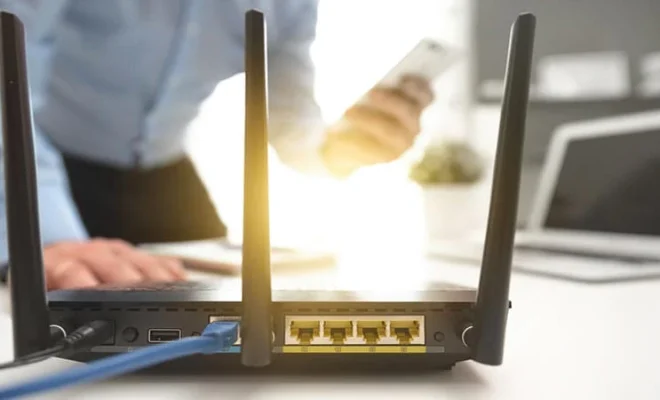
Routers are responsible for connecting multiple devices to the internet, hence they should be running on the latest firmware to ensure optimal performance and security. Updating your router’s firmware may not be as easy as updating your phone, but it is a task you need to do periodically to keep your router functioning optimally.

Step-by-Step Guide to Update Your Router’s Firmware:

Step 1: Check your Router Model

Before you start the update process, you should know the model of your router to download the latest firmware. You can find the router model on the back or bottom of the device.

Step 2: Download the Firmware

The next step is to download the firmware from the manufacturer’s website. Make sure you have the correct firmware for your model number.

Step 3: Backup your Router Settings

It’s recommended that you back up your router’s settings just in case the firmware update goes wrong. To do this, navigate to the router’s web interface, and look for the backup settings option.

Step 4: Connect to Your Router

Connect to your router’s web management interface through a web browser. You can do this by typing the router’s IP address into the browser’s address bar. The address is usually available on the back or bottom of the device.

Step 5: Enter your Login details

After accessing the web interface, enter your router’s login credentials. If you don’t know them, try looking at the default login details in the user manual.

Step 6: Begin the Firmware Update

Once logged in, navigate to the firmware upgrade section or any area that relates to updating the device’s firmware. You can find this option in the system or administration section in most routers.

Step 7: Upload the Firmware

In this step, locate the downloaded firmware update file on your computer and upload it to the router. Wait for the firmware to upload completely.

Step 8: Wait for the Update to Complete

Your router will now commence with the firmware update progress, which could take a few minutes to complete. Avoid disturbance or unplugging the router during this process.

Step 9: Restart the Router

After the firmware update is complete, it’s essential to restart your router to complete the process. Restart your router on the web interface, or disconnect and reconnect the power source.

Step 10: Restore Router’s Settings

If you experience any issues with your network, try to restore the backed-up settings to your router’s web interface.

Conclusion

Updating your router’s firmware improves security and enhances overall performance. Routinely check for any available firmware updates for your router model and follow these easy steps for the update process. Always remember to back up your router settings before updating and follow the instructions cautiously.


Previous Article

How to Update Your Roku Device Manually

Next Article

How to Update Your Mac and What ...

Matthew Lynch

Related articles More from author

  • Digital & Mobile Technology

    Reasons Password Managers Are Not as Safe as You Think

    June 11, 2023
    By Matthew Lynch
  • Digital & Mobile Technology

    What You Need to Know About the New Microsoft Edge Browser?

    May 16, 2023
    By Matthew Lynch
  • Digital & Mobile Technology

    The Different Shades of the Color Navy Blue

    July 6, 2023
    By Matthew Lynch
  • Digital & Mobile Technology

    The Best Free Streaming News Channels to Watch Online

    June 6, 2023
    By Matthew Lynch
  • Digital & Mobile Technology

    Where to Download Manuals for Every iPad Model

    June 23, 2023
    By Matthew Lynch
  • Digital & Mobile Technology

    How Quantum Computing Could Protect Your Next Phone

    June 15, 2023
    By Matthew Lynch

Search

Login & Registration

  • Log in
  • Entries feed
  • Comments feed
  • WordPress.org

Newsletter

Signup for The Tech Edvocate Newsletter and have the latest in EdTech news and opinion delivered to your email address!

About Us

Since technology is not going anywhere and does more good than harm, adapting is the best course of action. That is where The Tech Edvocate comes in. We plan to cover the PreK-12 and Higher Education EdTech sectors and provide our readers with the latest news and opinion on the subject. From time to time, I will invite other voices to weigh in on important issues in EdTech. We hope to provide a well-rounded, multi-faceted look at the past, present, the future of EdTech in the US and internationally.

We started this journey back in June 2016, and we plan to continue it for many more years to come. I hope that you will join us in this discussion of the past, present and future of EdTech and lend your own insight to the issues that are discussed.

Newsletter

Signup for The Tech Edvocate Newsletter and have the latest in EdTech news and opinion delivered to your email address!

Contact Us

The Tech Edvocate
910 Goddin Street
Richmond, VA 23231
(601) 630-5238
[email protected]

Copyright © 2026 Matthew Lynch. All rights reserved.