How to turn off activity status on Instagram
“`html
In the age of social media, privacy has become an increasingly pressing issue. With platforms like Instagram giving users insight into when their friends are online through the activity status feature, many individuals are seeking ways to maintain their privacy. If you’ve ever wanted to turn off Instagram activity status, you’re not alone. This comprehensive guide will walk you through the reasons you might want to do this, the steps involved, and additional privacy tips to enhance your experience on Instagram.
1. Understanding Instagram Activity Status
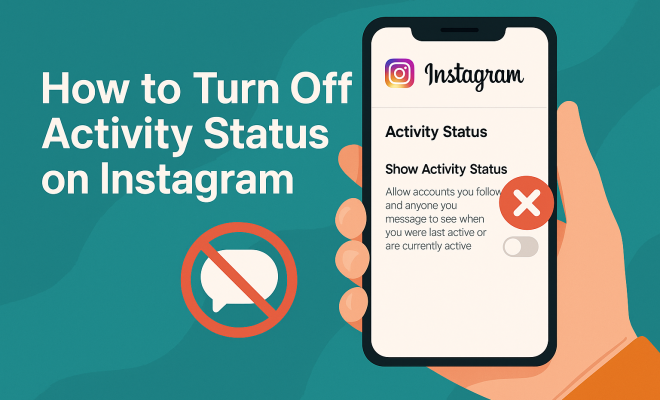
Before diving into how to turn off Instagram activity status, it’s essential to understand what it actually entails. Instagram’s activity status feature indicates when a user is online or was last active on the platform. This can be seen by your followers and people you message on Instagram Direct. The green dot next to a user’s profile picture signifies that they are currently active, while timestamp notifications indicate when they were last active.
This feature can be useful for maintaining connections, as it allows users to know when others might be available to chat. However, it can also lead to situations where users feel pressured to respond immediately or worry about being monitored. This duality is why many opt to disable this feature.
2. Reasons to Turn Off Activity Status
There are several compelling reasons why you might consider disabling your activity status on Instagram. First and foremost, privacy is a significant concern. By turning off your activity status, you can engage with the platform without the constant scrutiny of others regarding your online presence.
Secondly, it helps reduce the pressure to respond promptly. When your friends and followers can see when you’re online, they might expect quick replies. Disabling this feature allows you to browse Instagram at your leisure without the obligation to engage immediately.
Lastly, if you’re simply looking for a more relaxed social media experience, turning off activity status can help you enjoy Instagram without the stress of being constantly connected.
Additionally, turning off your activity status can help mitigate the feeling of FOMO (Fear of Missing Out). When you see your friends active and posting, it can sometimes lead to anxiety about missing out on social interactions. Disabling this feature allows you to step back and engage with the platform at your own pace, reducing the compulsion to view and respond to every notification immediately.
3. How to Turn Off Activity Status on Instagram (iOS)
Disabling your activity status on Instagram is a straightforward process, especially on iOS devices. Here’s how you can do it:
- Open the Instagram app on your iPhone.
- Tap on your profile icon in the bottom right corner to go to your profile.
- Tap the three lines in the top right corner to open the menu.
- Select Settings.
- Tap on Privacy.
- Scroll down to the Activity Status section.
- Toggle off the option that says Show Activity Status.
Once you complete these steps, your followers will no longer see your online status or when you were last active.
4. How to Turn Off Activity Status on Instagram (Android)
For Android users, the procedure is almost identical to that of iOS. Follow these steps to turn off Instagram activity status: Explore privacy options offers useful background here.
- Launch the Instagram app on your Android device.
- Go to your profile by tapping on your profile picture at the bottom right.
- Tap the three horizontal lines in the upper right corner to access the menu.
- Choose Settings.
- Select Privacy.
- Locate Activity Status and toggle it off.
By doing this, you’ll ensure that your activity status remains hidden from others. (See: Internet safety and security.)
5. How to Turn Off Activity Status on Instagram (Desktop)
While most users access Instagram through mobile applications, the desktop version is still quite popular. Here’s how to disable activity status on your computer:
- Log in to your Instagram account via your preferred web browser.
- Click on your profile picture in the top right corner and select Settings.
- From the menu on the left, click on Privacy and Security.
- Uncheck the box next to Show Activity Status.
Once these steps are completed, your activity status will be hidden from all users.
6. What Happens When You Turn Off Your Activity Status?
After you turn off Instagram activity status, you might wonder how this affects your interactions on the platform. The most immediate change is that your followers and friends will no longer see when you are online or when you were last active.
It’s worth noting that disabling your activity status is a two-way street. While you won’t be visible to others, you also won’t be able to see their activity status either. This can create a more private browsing experience, but it might also mean missing out on knowing when friends are available for direct messaging. See also Learn about COPPA.
Despite these potential downsides, many users find that the benefits of privacy outweigh the costs of losing visibility into others’ online behaviors.
One significant advantage of turning off your activity status is the reduction of social pressure. When users are aware that they are not being observed, they often feel more at ease, enabling them to enjoy content without the constant need for interaction. You can scroll through your feed, view stories, and even check out new posts without feeling the urgency to respond or engage immediately, which can lead to a healthier and more enjoyable social media experience.
7. Additional Privacy Settings on Instagram
Turning off your activity status is just one way to bolster your privacy on Instagram. Here are a few other settings you might consider adjusting:
- Profile Privacy: You can switch your profile from public to private, ensuring that only approved followers can see your posts.
- Story Controls: You can limit who sees your stories by customizing your audience settings.
- Message Controls: Adjust who can send you direct messages, giving you complete control over your inbox.
- Blocking Users: If certain users make you uncomfortable, blocking them is a straightforward way to maintain your peace.
- Two-Factor Authentication: Activating this feature adds an extra layer of security to your account, making it harder for unauthorized users to access your profile.
By adjusting these settings, you can create a more tailored and secure experience on Instagram.
8. What If You Want to Re-Enable Activity Status?
Should you ever decide that you want to turn your activity status back on, the process is just as simple as turning it off. Whether on iOS, Android, or desktop, you’ll just follow the same steps to access the settings and toggle the activity status back on.
Keep in mind that if you re-enable activity status, you’ll start appearing online to others again. This can lead to the resumption of expectations for quick responses and online engagement, so make sure that this aligns with the experience you want on Instagram.
It’s also worth noting that re-enabling your activity status can foster more interaction. If you’re trying to reconnect with friends or grow your presence on the platform, being visible can help facilitate those connections. Weighing the pros and cons of each choice is vital for curating your desired Instagram experience.
9. Balancing Engagement and Privacy on Social Media
In our hyper-connected world, finding the right balance between social media engagement and privacy can be challenging. While platforms like Instagram offer tools to connect with others, protecting your personal space is just as vital. By turning off your activity status, you’re taking a proactive step in managing your online persona and ensuring that you only interact on your terms.
Consider your motivations for using Instagram. Are you there to keep in touch with friends, promote a business, or simply to browse? Each use case may require different levels of engagement and privacy considerations. Tailoring your settings can enhance your experience, ensuring that it meets your personal needs. For instance, influencers might prefer to keep their activity status on to appear more accessible to followers, while casual users may favor greater privacy. (See: Online safety resources.)
10. Final Thoughts
Choosing to turn off Instagram activity status is a small yet significant step towards maintaining your privacy on social media. With the potential for online stress and the pressure of immediate responses, adjusting your settings can lead to a more enjoyable Instagram experience.
As social media continues to evolve, being aware of your privacy options is essential. Whether you’re looking to disconnect for a while or just want to engage on your terms, know that you have the power to shape your online presence. So go ahead, take control of your Instagram activity status, and enjoy a more relaxed social media experience.
11. Exploring the Impact of Activity Status on Mental Well-being
Understanding the psychological implications of features like activity status is crucial. For many users, seeing their friends online can lead to feelings of anxiety or inadequacy if they don’t receive a response in a timely manner. The pressure to maintain constant availability can be overwhelming and detracts from the enjoyment of the platform. Studies have suggested that social media can significantly impact mental health, leading to increased stress and even depression in some individuals.
By turning off your activity status, you’re not just reclaiming your privacy; you’re also setting boundaries that can lead to a healthier online experience. Freeing yourself from the need to be ‘always on’ allows for a more mindful approach to social media usage, encouraging users to engage on their terms rather than feeling compelled by the expectations of others.
Research indicates that users who take intentional breaks or set boundaries around their social media use report improved mental health and well-being. These boundaries can include turning off activity status, managing notification settings, or designating specific times to engage with social media platforms. Finding a balance that works for you can lead to a more positive online environment.
12. Social Media Alternatives for Enhanced Privacy
If you find that Instagram’s features like activity status are too intrusive, there are various social media platforms that prioritize user privacy. For example, platforms like Signal and Telegram focus heavily on secure messaging and offer more control over who can see your online status. These alternatives can provide a sanctuary from the pressures associated with more mainstream social networks.
Additionally, using private messaging apps allows for conversations without the prying eyes of a broader audience. If your main concern is staying connected without compromising privacy, these alternatives might be worth exploring. Platforms like MeWe and Minds are also gaining popularity among users who wish for a more privacy-centric experience compared to traditional social media giants.
13. Frequently Asked Questions (FAQ)
Q1: Will turning off my activity status affect my ability to interact with others?
A1: Not at all! Turning off your activity status will only hide your online presence from others. You’ll still be able to send messages, like posts, and engage with the platform as usual. For more on this, see Check your Instagram follows.
Q2: Can I still see others’ activity status if I turn mine off?
A2: No. Disabling your activity status means you will not see the activity status of others as well. This can provide a more private browsing experience. We covered Understand student data privacy in more detail.
Q3: How does turning off activity status impact my direct messages?
A3: Turning off your activity status will not affect your ability to send or receive direct messages. You can still communicate with your friends and followers without revealing your online status.
Q4: If I turn off my activity status, how will others know I’m not available?
A4: Since your activity status will be hidden, others will not be able to see your online status. They won’t know if you’re active, which can help reduce the pressure to respond immediately. (See: Latest news on social media privacy.)
Q5: Are there any other features similar to activity status that I should be aware of?
A5: Yes, features like read receipts in direct messages also indicate when someone has seen your message. You can turn off read receipts in the same privacy settings menu, which can further enhance your privacy on the platform.
Q6: Can turning off my activity status affect my follower count or engagement?
A6: Turning off your activity status should not directly affect your follower count or engagement. However, it may result in less interaction since your friends won’t see when you are available. Engaging on your own terms can lead to more meaningful connections.
Q7: How can my privacy settings on Instagram protect me from harassment?
A7: By making your profile private and controlling who can send you messages and see your stories, you can significantly reduce the risk of harassment. Blocking users who are disrespectful or cause discomfort is also an essential part of maintaining a safe space on the platform.
14. The Evolution of Privacy in Social Media
As social media platforms adapt to changing user preferences and concerns, privacy features are becoming more nuanced. Instagram, like many other platforms, is continuously updating its privacy settings to provide users with more control over their online experiences. The rise of data breaches and increasing awareness around privacy rights have prompted many users to be more vigilant about their digital footprints.
As social networks evolve, it’s essential to stay informed about the features available to protect your privacy. Keeping up with updates and understanding how to utilize them effectively allows users to navigate social media with confidence. The more you know about these tools, the more empowered you will feel in managing your online presence, ensuring it aligns with your comfort level.
In fact, as awareness grows about data privacy, many users are opting to explore platforms that offer better transparency regarding data usage. This shift indicates a cultural change in the way users perceive privacy and security on social media, encouraging companies to prioritize user trust and safety.
15. Privacy Beyond Instagram: Best Practices for All Social Media
While Instagram offers specific settings for privacy, there are general best practices that apply to all social media platforms. Here are some tips to keep in mind:
- Regularly Review Your Privacy Settings: Frequently check the privacy settings on all your social accounts to ensure they align with your comfort level.
- Be Mindful of What You Share: Think twice before posting personal information, as it can remain online indefinitely.
- Limit Third-Party App Access: Be cautious of granting permissions to third-party applications that may access your social media accounts.
- Educate Yourself About Data Usage: Understand how your data is used by different platforms and adjust your settings accordingly.
- Encourage Friends to Respect Privacy: Ask friends to be mindful of tagging you in posts or stories that you may not want shared publicly.
- Use Strong Passwords: Create complex passwords and change them regularly to prevent unauthorized access.
By being proactive about your privacy, you can enjoy the benefits of social media while mitigating potential risks. Whether you’re connecting with family or promoting a business, being aware of your online presence is crucial for a safe and enjoyable social media experience.
“`
Trending Now
Frequently Asked Questions
How do I turn off activity status on Instagram?
To turn off activity status on Instagram, go to your profile, tap the three lines in the top right corner, select 'Settings', then 'Privacy'. Under 'Activity Status', toggle off 'Show Activity Status'. This will prevent others from seeing when you are online or last active.
What does the activity status mean on Instagram?
The activity status on Instagram indicates when a user is online or was last active. A green dot next to a profile picture shows that the user is currently active, while a timestamp indicates their last activity. This feature helps users gauge when others are available to chat.
Why should I turn off my activity status on Instagram?
Turning off your activity status on Instagram enhances your privacy by preventing others from monitoring your online presence. It also reduces the pressure to respond immediately to messages since your friends won't know when you're online or active.
Can I hide my online status on Instagram?
Yes, you can hide your online status on Instagram by turning off the activity status feature. This will ensure that your followers and contacts cannot see when you are online or when you were last active on the platform.
Does turning off activity status affect my ability to see others' statuses?
Yes, if you turn off your activity status on Instagram, you will also lose the ability to see the activity status of others. This is a mutual feature, meaning if you hide yours, you won't be able to view others' online statuses either.
What did we miss? Let us know in the comments and join the conversation.