The Tech Edvocate

Top Menu

  • Advertisement
  • Apps
  • Home Page
  • Home Page Five (No Sidebar)
  • Home Page Four
  • Home Page Three
  • Home Page Two
  • Home Tech2
  • Icons [No Sidebar]
  • Left Sidbear Page
  • Lynch Educational Consulting
  • My Account
  • My Speaking Page
  • Newsletter Sign Up Confirmation
  • Newsletter Unsubscription
  • Our Brands
  • Page Example
  • Privacy Policy
  • Protected Content
  • Register
  • Request a Product Review
  • Shop
  • Shortcodes Examples
  • Signup
  • Start Here
    • Governance
    • Careers
    • Contact Us
  • Terms and Conditions
  • The Edvocate
  • The Tech Edvocate Product Guide
  • Topics
  • Write For Us
  • Advertise

Main Menu

  • Start Here
    • Our Brands
    • Governance
      • Lynch Educational Consulting, LLC.
      • Dr. Lynch’s Personal Website
      • Careers
    • Write For Us
    • The Tech Edvocate Product Guide
    • Contact Us
    • Books
    • Edupedia
    • Post a Job
    • The Edvocate Podcast
    • Terms and Conditions
    • Privacy Policy
  • Topics
    • Assistive Technology
    • Child Development Tech
    • Early Childhood & K-12 EdTech
    • EdTech Futures
    • EdTech News
    • EdTech Policy & Reform
    • EdTech Startups & Businesses
    • Higher Education EdTech
    • Online Learning & eLearning
    • Parent & Family Tech
    • Personalized Learning
    • Product Reviews
  • Advertise
  • Tech Edvocate Awards
  • The Edvocate
  • Pedagogue
  • School Ratings

logo

The Tech Edvocate

  • Start Here
    • Our Brands
    • Governance
      • Lynch Educational Consulting, LLC.
      • Dr. Lynch’s Personal Website
        • My Speaking Page
      • Careers
    • Write For Us
    • The Tech Edvocate Product Guide
    • Contact Us
    • Books
    • Edupedia
    • Post a Job
    • The Edvocate Podcast
    • Terms and Conditions
    • Privacy Policy
  • Topics
    • Assistive Technology
    • Child Development Tech
    • Early Childhood & K-12 EdTech
    • EdTech Futures
    • EdTech News
    • EdTech Policy & Reform
    • EdTech Startups & Businesses
    • Higher Education EdTech
    • Online Learning & eLearning
    • Parent & Family Tech
    • Personalized Learning
    • Product Reviews
  • Advertise
  • Tech Edvocate Awards
  • The Edvocate
  • Pedagogue
  • School Ratings
  • Shocking: Mercury Skin Bleachers Still Flood Amazon, Temu, and TikTok Shop

  • Shocking: 195,000 Heated Blankets Recalled After Dozens Suffer Burns – Is Yours One of Them?

  • The $4 Billion Comeback: How Manus Defied Geopolitical Odds to Double Its Valuation

  • This Israeli Startup Accidentally Unleashed AI Cyberattacks on Real Companies

  • This PlayStation Exclusive Just Vanished Forever — And It’s a Warning to All Gamers

  • The Jaw-Dropping Truth Behind Marvel’s Wolverine AI Scare

  • The September 2026 AI Surge: Why Your Business Needs to Adapt Now

  • The Billion-Dollar AI Slowdown Lawsuit That Could Shatter Big Tech

  • The Brutal Truth: Why Your Student Loan Discharge Is Stuck in Limbo

  • 7 Critical Lessons From Russia’s Election Cyber Onslaught

Digital & Mobile Technology
Home›Digital & Mobile Technology›How to Track Sprint Phones

How to Track Sprint Phones
By Matthew Lynch
May 29, 2023
0
Spread the love

Tracking a Sprint phone may become necessary for various reasons, such as the need to monitor children’s activities, locate a lost or stolen device, or keep track of employees’ whereabouts. Fortunately, there are multiple ways to track Sprint phones, depending on the situation and device type. In this article, we’ll explore some of the most effective methods to track Sprint phones.

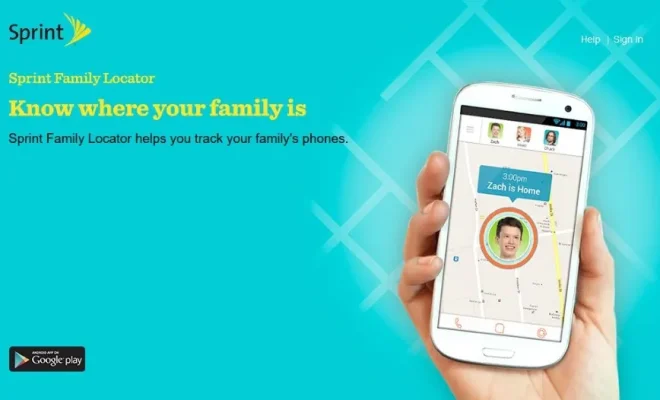
Method 1: Use Sprint Family Locator

Sprint Family Locator is a tracking service offered by Sprint that allows users to locate family members’ phones on a map. To use this service, you need to have a Sprint account and enroll the phones you want to track. Here’s how to set up Sprint Family Locator:

1. Log in to your Sprint account on the Sprint website or through the My Sprint app.

2. Click on the “Family & Parenting” tab and select “Family Locator” from the drop-down menu.

3. Follow the instructions to enroll the phones you want to track. You’ll need to provide the phone numbers and accept the terms and conditions.

4. Once the phones are enrolled, you can access the tracking map and see the location of each device in real-time. You can also set up alerts to receive notifications when the phones arrive at or leave specific locations.

Sprint Family Locator is a convenient and reliable way to track Sprint phones, but note that it may not work accurately in all areas, especially in remote locations or indoors.

Method 2: Use a Third-Party Tracking App

Another way to track Sprint phones is to use a third-party tracking app. These apps can provide additional features and functionality compared to Sprint Family Locator, such as geofencing, social media monitoring, and text message tracking. Here are some popular tracking apps that work with Sprint phones:

1. Spyzie: Spyzie is a monitoring app that allows users to track the location, calls, messages, and internet activity of a Sprint phone. It works on both Android and iOS devices and offers a free trial period.

2. FamiSafe: FamiSafe is a parental control app that offers location tracking, geofencing, and screen time management features for Sprint phones. It works on Android and iOS devices and offers a free trial period.

3. Life360: Life360 is a family safety app that offers location tracking, driving safety features, and location sharing for Sprint phones. It works on Android and iOS devices and offers a free trial period.

Keep in mind that using a third-party tracking app may require physical access to the target device and consent from the phone’s owner. Moreover, some tracking apps may violate ethical and legal boundaries if used without the phone user’s knowledge or permission.

Method 3: Contact Sprint Customer Service

If you’re unable to locate a Sprint phone using Sprint Family Locator or a tracking app, you can contact Sprint Customer Service for assistance. They can help you locate the phone or provide additional support and guidance on how to track it. Here’s how to contact Sprint Customer Service:

1. Call Sprint’s toll-free number at 1-888-211-4727 or visit the nearest Sprint retail store.

2. Provide the customer service representative with the phone number and account details associated with the Sprint phone you want to track.

3. Follow the instructions and provide any additional information requested by the representative.

Sprint Customer Service is available 24/7 and can provide expert assistance on any Sprint-related issue, including locating lost or stolen devices.

In conclusion, tracking Sprint phones is an essential task for many users, and there are multiple methods to do it effectively. Whether you use Sprint Family Locator, a third-party tracking app, or contact Sprint Customer Service, always ensure that you have the necessary consent and legal authority to track someone’s phone. By following these guidelines, you can track Sprint phones efficiently and responsibly.

Previous Article

How to Track a Metro PCS Phone

Next Article

How to Trace Text Messages With Metro ...

Matthew Lynch

Related articles More from author

  • Digital & Mobile Technology

    Full Details on Every Generation of the Apple TV

    June 1, 2023
    By Matthew Lynch
  • Digital & Mobile Technology

    Essential Windows CMD Commands You Should Know

    June 22, 2023
    By Matthew Lynch
  • Digital & Mobile Technology

    What Is Smart View on Samsung and How to Use It?

    May 11, 2023
    By Matthew Lynch
  • Digital & Mobile Technology

    GPU Comparison: AMD 6950 XT vs. Nvidia 3090 Ti

    June 13, 2023
    By Matthew Lynch
  • Digital & Mobile Technology

    Westinghouse iGen2500 Generator Review

    June 10, 2023
    By Matthew Lynch
  • Digital & Mobile Technology

    How to keep AirPods in your ears

    April 28, 2023
    By Matthew Lynch

Search

Login & Registration

  • Log in
  • Entries feed
  • Comments feed
  • WordPress.org

Newsletter

Signup for The Tech Edvocate Newsletter and have the latest in EdTech news and opinion delivered to your email address!

About Us

Since technology is not going anywhere and does more good than harm, adapting is the best course of action. That is where The Tech Edvocate comes in. We plan to cover the PreK-12 and Higher Education EdTech sectors and provide our readers with the latest news and opinion on the subject. From time to time, I will invite other voices to weigh in on important issues in EdTech. We hope to provide a well-rounded, multi-faceted look at the past, present, the future of EdTech in the US and internationally.

We started this journey back in June 2016, and we plan to continue it for many more years to come. I hope that you will join us in this discussion of the past, present and future of EdTech and lend your own insight to the issues that are discussed.

Newsletter

Signup for The Tech Edvocate Newsletter and have the latest in EdTech news and opinion delivered to your email address!

Contact Us

The Tech Edvocate
910 Goddin Street
Richmond, VA 23231
(601) 630-5238
[email protected]

Copyright © 2026 Matthew Lynch. All rights reserved.