How to share Prezi presentation
“`html
In an increasingly digital world, presentations have evolved beyond traditional PowerPoints. Prezi offers a unique way to share ideas visually and engagingly. But how exactly do you share a Prezi presentation? With its dynamic interface and innovative features, sharing a Prezi presentation can be as simple as a few clicks, but there are nuances for making it effective. In this article, we’ll explore 10 essential tips to ensure your Prezi presentations reach your audience with maximum impact.
1. Understanding Prezi: An Overview
Before we dive into sharing techniques, it’s essential to understand what Prezi is. Founded in 2009, Prezi has revolutionized the way presentations are designed. Unlike traditional slideshows that advance linearly, Prezi allows users to create a canvas where they can zoom in and out, moving between ideas fluidly. This visual storytelling aspect can be particularly engaging, making it a popular choice among educators, marketers, and business professionals.
With its cloud-based platform, Prezi enables users to create and share presentations from anywhere. This accessibility is vital in today’s remote working environment, where sharing presentations with teams or clients can happen instantly online.
2. Creating Your Prezi Presentation: The First Step
The first step in sharing a Prezi presentation is, of course, creating it. Start by logging into your Prezi account and selecting a template that fits your subject matter. Prezi offers numerous templates suitable for various contexts, from academic to corporate presentations. Choosing the right template not only gives your presentation a professional look but also helps your audience engage with the content effectively.
While building your Prezi, remember to focus on clarity and coherence. Use images, videos, and text strategically to keep your audience’s attention. Incorporate transitions and animations that enhance your message rather than distract from it. The goal is to create a presentation that complements your narrative while making it visually stimulating.
3. Saving Your Prezi: Best Practices
Once your presentation is crafted, saving your work properly is crucial. Prezi allows you to save presentations automatically to the cloud, but it’s wise to double-check. Ensure that your presentation is saved in your Prezi account and consider downloading a local copy for backup. This way, you can avoid last-minute surprises if you experience connectivity issues during your sharing session.
Moreover, consider organizing your Prezi presentations into folders based on themes or projects. This organizational strategy not only saves time when locating your presentations later but also enhances your workflow efficiency.
4. Sharing Options: What Are Your Choices?
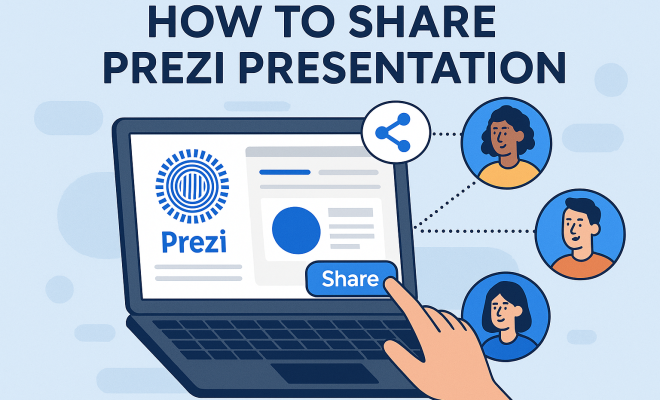
When it comes to sharing your Prezi presentation, there are several options available, each serving different needs. You can share your presentation directly via Prezi’s platform, send a link, or even download it for offline use. Each method has its advantages, so consider your audience when choosing a sharing method.
- Direct Share: You can share your Prezi directly from the platform with colleagues or clients by entering their email addresses. This is ideal for collaborative settings.
- Link Sharing: By generating a shareable link, you allow others to access your Prezi without needing an account. This method is great for larger audiences who may not be familiar with Prezi.
- Download Options: For those who prefer to present offline, Prezi offers a download option, enabling you to save your presentation in PDF or portable format.
5. Sharing with Collaborators: Enhancing Team Efforts
Collaboration is vital in many professional environments, and Prezi facilitates this through its sharing features. You can invite collaborators to work on your presentation, allowing multiple users to edit and contribute ideas in real-time.
This functionality is particularly useful in team settings where creativity and input from various stakeholders are required. Each collaborator can leave comments and feedback, enhancing the quality of the final product. Ensure that you set appropriate permissions—whether viewers can edit or only comment—to maintain control over your presentation’s direction.
6. Using Prezi Video: A New Dimension of Sharing
One of the innovative features of Prezi is Prezi Video, which allows you to create engaging video presentations. This tool combines your Prezi presentation with a video of you speaking, making your message more personal and relatable. Sharing a Prezi Video adds another layer of connection with your audience, especially in virtual meetings or webinars. (See: Overview of presentation software.)
To use Prezi Video, simply select your presentation and record yourself as you present the slides. This is particularly effective for remote presentations where face-to-face interaction may be lacking. Once recorded, you can share your video on various platforms, such as YouTube or social media, extending your reach beyond a live audience.
7. Presenting Live: Tips for Effective Delivery
Sharing your Prezi during a live presentation calls for strategic preparation. If you’re presenting in person or virtually, rehearse your delivery to ensure you’re comfortable with the flow of your Prezi. Familiarize yourself with the zooming features, and practice navigating between topics smoothly to maintain your audience’s attention.
Engaging with your audience during the presentation is equally important. Ask questions, encourage interaction, and be responsive to feedback. This two-way communication can enhance engagement and retention rates, making your presentation more memorable.
8. Sharing on Social Media: Expanding Your Reach
In addition to traditional sharing methods, consider leveraging social media to share your Prezi presentations. Platforms like LinkedIn, Facebook, and Twitter can enhance visibility and engage a broader audience. By sharing the link or embedding your Prezi on these platforms, you allow others to access your work easily.
Remember to tailor your message to the platform and audience. For instance, on LinkedIn, focus on the professional implications of your presentation, while on Facebook, you might take a more casual tone. Use engaging visuals and snippets from your Prezi to attract attention and encourage clicks.
9. Feedback and Analytics: Measuring Engagement
After sharing your Prezi presentation, gathering feedback is essential for growth. Prezi offers analytics features that allow you to see how many people viewed your presentation and how they interacted with it. This data is invaluable for assessing the effectiveness of your presentation and identifying areas for improvement.
Encourage your audience to provide feedback directly or through surveys after the presentation. This input can help refine your future presentations and enhance your overall communication skills, ensuring that you connect with your audience effectively every time.
10. Staying Updated with Prezi: Keeping Your Skills Sharp
Prezi constantly evolves, introducing new features and updates to enhance user experience. Regularly checking for updates or new functionalities can give you an edge in your presentations. Consider joining the Prezi community for tips, tutorials, and inspiration from other users.
Investing time in learning advanced features can also set you apart. Explore options like custom branding, analytics tools, and collaborative features to take your presentations to the next level. Keeping your skills sharp ensures that you’re always prepared to share Prezi presentations that impress.
11. Creating Interactive Presentations: Engage Your Audience
One of the standout features of Prezi is its ability to create interactive presentations. By incorporating hyperlinks and embedded content, you can lead your audience through a more engaging experience. For instance, you can direct viewers to additional resources, videos, or even other Prezi presentations. This not only enriches the content but allows for a deeper exploration of the topic at hand.
Consider adding quizzes or polls within your presentation to actively involve your audience. Tools like Mentimeter can easily integrate with your Prezi to create interactive elements that promote participation. When your audience is actively involved, they are more likely to retain the information presented.
12. Optimizing Your Presentation for Different Platforms
When sharing a Prezi presentation, it’s essential to consider the platform where your presentation will be viewed. Each platform has its quirks and limitations. For instance, while Prezi works seamlessly on its own platform, some viewers may struggle when embedded in a website or shared via email.
To optimize your presentation, test it across various devices and platforms before sharing. Ensure that the zooming and transitions work well on smartphones, tablets, and computers alike. Always review how your Prezi appears when shared on different social media platforms. You might need to adjust the design or layout to ensure it looks good no matter where it’s viewed. (See: Effective presentation techniques.)
13. Utilizing Prezi Analytics: Understanding Your Audience
Prezi Analytics is a powerful tool that helps you understand how your audience engages with your presentation. You can track the number of views, engagement time, and even which parts of the presentation held the most attention. This data can be critical in refining your future presentations.
Use these insights to identify trends in your audience’s preferences. For example, if you notice that viewers spend more time on specific slides or sections, consider expanding on those topics in future presentations. Conversely, if certain areas see quick drop-offs, it may be a signal to adjust your content or delivery style.
14. Common Mistakes to Avoid: Ensuring Presentation Success
Even seasoned presenters can fall into traps that undermine their message. Here are some common mistakes to avoid when sharing your Prezi presentation:
- Overloading Slides with Content: Too much information can overwhelm your audience. Stick to key points and use visuals to reinforce your message.
- Neglecting the Audience: Failing to engage with your audience can result in disengagement. Encourage questions and interaction to keep them involved.
- Ignoring Technical Issues: Always check your equipment beforehand. Technical glitches can derail your presentation and frustrate your audience.
- Forgetting to Practice: Rehearse your presentation multiple times. Familiarity with your material will boost your confidence and delivery.
15. FAQ: All You Need to Know About Sharing Prezi Presentations
What formats can I share my Prezi presentation in?
You can share your Prezi presentation in several formats, including direct sharing through Prezi, generating a link for online access, downloading as a PDF, or exporting it into a portable format.
Can I share a Prezi presentation with someone who doesn’t have an account?
Yes! You can generate a shareable link that allows anyone to view your presentation without needing to create a Prezi account. This is ideal for reaching a broader audience.
Is Prezi free to use?
Prezi offers a free version with basic features, but for advanced functionalities such as offline access, custom branding, and analytics, you may need to subscribe to one of their paid plans.
How can I ensure my Prezi presentation looks good on different devices?
To ensure your presentation looks great on various devices, test it on different platforms before sharing. Adjust your design and layout as needed to accommodate different screen sizes and formats.
Can I edit my presentation after sharing it?
Yes, you can edit your presentation even after sharing it. Any updates or changes will be reflected in real-time for viewers who access it via the link.
What should I do if my presentation doesn’t load for viewers?
If your Prezi presentation doesn’t load, check the internet connection and test it on different devices. It can also be helpful to share it in a different format, like PDF, as a backup.
16. Advanced Sharing Techniques: Going Beyond Basics
To make sharing your Prezi presentations even more effective, consider some advanced techniques. For instance, embedding your Prezi into a blog or website can create a seamless experience for viewers. This not only increases visibility but also encourages users to engage with your content in a familiar environment. (See: Research on presentation software.)
Furthermore, using QR codes to share your presentation can be particularly effective in physical settings. Attendees at conferences or workshops can scan a QR code to access your Prezi instantly, allowing for a smoother transition from presentation to discussion.
17. Case Studies: Successful Prezi Presentations
Looking at successful examples of Prezi presentations can provide inspiration for your own work. For instance, several universities have adopted Prezi for their teaching methods, using it to present complex topics in an engaging, visually stimulating format. Companies like Airbnb and Deloitte have also utilized Prezi for corporate training and client presentations, showcasing the platform’s versatility across different industries.
Analyzing these successful cases can reveal effective strategies and design choices that resonate well with audiences. Consider how they structured their presentations, the types of visuals they used, and how they engaged their viewers. This can help you craft your own presentations with greater impact.
18. Statistics on Presentation Effectiveness
Understanding the impact of effective presentations can be eye-opening. Research shows that visuals can increase retention rates by up to 65%. Furthermore, presentations that incorporate storytelling, which is easily achieved through Prezi’s dynamic format, can improve persuasion by 20 times compared to those that don’t.
Additionally, a study found that people remember 10% of what they hear, 20% of what they read, and 80% of what they see and do. By leveraging Prezi’s interactive features, you can significantly enhance audience retention and engagement.
19. Utilizing Feedback for Future Presentations
Feedback is crucial not just for assessing a single presentation but also for shaping your future work. After sharing your Prezi, consider creating a simple survey that asks specific questions about what the audience liked and what they think could be improved. This approach gives you concrete data which can guide your next presentation.
Don’t shy away from direct conversation either. Engaging with your audience post-presentation can provide insights that surveys may not capture, such as emotional reactions and spontaneous thoughts. Use this feedback as a tool for continuous improvement.
20. Conclusion: Mastering the Art of Sharing Prezi Presentations
Whether you’re sharing with a small team or a large audience, knowing how to effectively share a Prezi presentation can elevate your communication game. From understanding the platform to utilizing advanced features, each aspect plays a crucial role in ensuring your presentation resonates with your audience. Now that you have these insights, it’s time to get out there and share your Prezi presentations with confidence!
“`
Trending Now
Frequently Asked Questions
How do I share my Prezi presentation?
To share your Prezi presentation, log into your Prezi account, select the presentation you want to share, and click the 'Share' button. You can then choose to share via a link, email, or directly on social media platforms, ensuring your audience can access it easily.
Can I share a Prezi presentation without an account?
No, you need a Prezi account to share presentations. However, you can share a link to your presentation with others, allowing them to view it without needing to log in, as long as you have set the appropriate sharing permissions.
What are the benefits of using Prezi for presentations?
Prezi offers a dynamic and visually engaging platform that allows users to create presentations that move fluidly between ideas. Its zooming interface enhances storytelling, making it ideal for capturing audience attention, especially in educational and corporate settings.
What should I consider when creating a Prezi presentation?
When creating a Prezi presentation, focus on clarity and coherence. Choose a suitable template, strategically use images and videos, and incorporate transitions that enhance your message. This ensures an engaging and professional presentation that resonates with your audience.
Is Prezi suitable for business presentations?
Yes, Prezi is highly suitable for business presentations. Its unique visual storytelling capabilities and cloud-based accessibility make it an excellent choice for engaging clients and team members, facilitating effective communication of ideas and strategies.
What’s your take on this? Share your thoughts in the comments below — we read every one.