The Tech Edvocate

Top Menu

  • Advertisement
  • Apps
  • Home Page
  • Home Page Five (No Sidebar)
  • Home Page Four
  • Home Page Three
  • Home Page Two
  • Home Tech2
  • Icons [No Sidebar]
  • Left Sidbear Page
  • Lynch Educational Consulting
  • My Account
  • My Speaking Page
  • Newsletter Sign Up Confirmation
  • Newsletter Unsubscription
  • Our Brands
  • Page Example
  • Privacy Policy
  • Protected Content
  • Register
  • Request a Product Review
  • Shop
  • Shortcodes Examples
  • Signup
  • Start Here
    • Governance
    • Careers
    • Contact Us
  • Terms and Conditions
  • The Edvocate
  • The Tech Edvocate Product Guide
  • Topics
  • Write For Us
  • Advertise

Main Menu

  • Start Here
    • Our Brands
    • Governance
      • Lynch Educational Consulting, LLC.
      • Dr. Lynch’s Personal Website
      • Careers
    • Write For Us
    • The Tech Edvocate Product Guide
    • Contact Us
    • Books
    • Edupedia
    • Post a Job
    • The Edvocate Podcast
    • Terms and Conditions
    • Privacy Policy
  • Topics
    • Assistive Technology
    • Child Development Tech
    • Early Childhood & K-12 EdTech
    • EdTech Futures
    • EdTech News
    • EdTech Policy & Reform
    • EdTech Startups & Businesses
    • Higher Education EdTech
    • Online Learning & eLearning
    • Parent & Family Tech
    • Personalized Learning
    • Product Reviews
  • Advertise
  • Tech Edvocate Awards
  • The Edvocate
  • Pedagogue
  • School Ratings

logo

The Tech Edvocate

  • Start Here
    • Our Brands
    • Governance
      • Lynch Educational Consulting, LLC.
      • Dr. Lynch’s Personal Website
        • My Speaking Page
      • Careers
    • Write For Us
    • The Tech Edvocate Product Guide
    • Contact Us
    • Books
    • Edupedia
    • Post a Job
    • The Edvocate Podcast
    • Terms and Conditions
    • Privacy Policy
  • Topics
    • Assistive Technology
    • Child Development Tech
    • Early Childhood & K-12 EdTech
    • EdTech Futures
    • EdTech News
    • EdTech Policy & Reform
    • EdTech Startups & Businesses
    • Higher Education EdTech
    • Online Learning & eLearning
    • Parent & Family Tech
    • Personalized Learning
    • Product Reviews
  • Advertise
  • Tech Edvocate Awards
  • The Edvocate
  • Pedagogue
  • School Ratings
  • A Visitor’s Guide to Fresno (CA), United States

  • A Visitors Guide to New Orleans (LA), United States

  • A Visitors Guide to Sacramento (CA), United States

  • A Visitors Guide to Lyon, France

  • JisuLife Ultra2 Portable Fan: A Powerful Multi-Function Cooling Solution

  • A Visitors Guide to Viña del Mar, Chile

  • A Visitors Guide to Århus, Denmark

  • A Visitors Guide to Bakersfield (CA), United States

  • A Visitors Guide to Aurora (CO), United States

  • A Visitor’s Guide to Toledo (OH), United States

Digital & Mobile Technology
Home›Digital & Mobile Technology›How to Share Internet Access

How to Share Internet Access
By Matthew Lynch
July 31, 2023
0
Spread the love

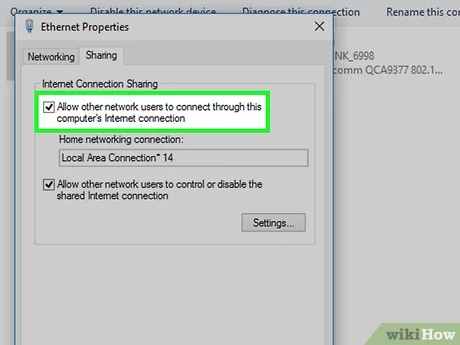
Sharing internet access is an important part of modern life because it allows multiple devices to access the internet simultaneously. In this article, we will discuss the different methods to share internet access and the pros and cons of each.

1. Wi-Fi Hotspot

Wi-Fi hotspot is an easy and convenient way to share internet access. It allows you to connect multiple devices to the internet through a single device. To set up a Wi-Fi hotspot, you need to have a smartphone or a modem/router with a built-in hotspot feature. Follow these steps to set up a Wi-Fi hotspot:

a. Turn on the ‘Hotspot’ feature on your smartphone or modem/router.
b. Set a network name (SSID) and a password so that other devices can connect to the hotspot.
c. Connect your device(s) to the hotspot using the SSID and password.

Pros: Easy to set up, no additional hardware required, supports multiple devices.

Cons: Dependent on the range of the hotspot, limited security features, may incur additional data charges.

2. Wi-Fi Router

A Wi-Fi router is a device that allows multiple devices to connect to the internet via an Ethernet cable or wirelessly. To set up a Wi-Fi router, you must have a broadband internet connection and a compatible router. Follow these steps to set up a Wi-Fi router:

a. Connect the router to your modem using an Ethernet cable.
b. Open the router’s web interface and follow the setup wizard.
c. Set a network name (SSID) and a password to secure your wireless network.
d. Connect your devices wirelessly to the router using the SSID and password.

Pros: Provides a wider range of coverage, better security features, supports multiple devices.

Cons: Initial setup can be complicated, may require additional hardware, may require an Ethernet cable for some devices.

3. Ethernet Cable

An Ethernet cable is a wired connection that allows devices to access the internet directly from a modem or router. To set up an Ethernet cable, you need to have a modem or router with an available Ethernet port and an Ethernet cable. Follow these steps to set up an Ethernet cable:

a. Connect one end of the Ethernet cable to the modem or router’s Ethernet port.
b. Connect the other end of the Ethernet cable to the device you want to use to access the internet.

Pros: Provides a reliable and fast connection, no need for additional hardware, can support multiple devices using a network switch.

Cons: Restrictive range due to the length of the Ethernet cable, only supports a limited number of devices.

Conclusion

Sharing internet access can be done through several ways, each with its advantages and disadvantages. Ultimately, the perfect method for you depends on your needs, preferences, and budget. A Wi-Fi hotspot is the easiest way to share internet access, while a Wi-Fi router provides wider coverage and better security features. An Ethernet cable provides a reliable and fast connection but can be restrictive in range. Whichever method you choose, make sure to secure your network with a strong password and keep your devices updated and protected with antivirus software.

Previous Article

How to Make Windows 10 Look Like ...

Next Article

How to Add, Delete, and Resize Your ...

Matthew Lynch

Related articles More from author

  • Digital & Mobile Technology

    The First Email Message: A Brief History

    June 21, 2023
    By Matthew Lynch
  • Digital & Mobile Technology

    How to Uninstall Dropbox on a Mac

    June 9, 2023
    By Matthew Lynch
  • Digital & Mobile Technology

    The Best Role-Playing Games for Mac

    June 23, 2023
    By Matthew Lynch
  • Digital & Mobile Technology

    How to Use AirPlay on Roku

    May 30, 2023
    By Matthew Lynch
  • Digital & Mobile Technology

    Best Online FPS Browser Games

    August 5, 2023
    By Matthew Lynch
  • Digital & Mobile Technology

    How to Use the Grease Pencil In Blender: A Beginner’s Guide

    August 5, 2023
    By Matthew Lynch

Search

Login & Registration

  • Register
  • Log in
  • Entries feed
  • Comments feed
  • WordPress.org

Newsletter

Signup for The Tech Edvocate Newsletter and have the latest in EdTech news and opinion delivered to your email address!

About Us

Since technology is not going anywhere and does more good than harm, adapting is the best course of action. That is where The Tech Edvocate comes in. We plan to cover the PreK-12 and Higher Education EdTech sectors and provide our readers with the latest news and opinion on the subject. From time to time, I will invite other voices to weigh in on important issues in EdTech. We hope to provide a well-rounded, multi-faceted look at the past, present, the future of EdTech in the US and internationally.

We started this journey back in June 2016, and we plan to continue it for many more years to come. I hope that you will join us in this discussion of the past, present and future of EdTech and lend your own insight to the issues that are discussed.

Newsletter

Signup for The Tech Edvocate Newsletter and have the latest in EdTech news and opinion delivered to your email address!

Contact Us

The Tech Edvocate
910 Goddin Street
Richmond, VA 23231
(601) 630-5238
[email protected]

Copyright © 2025 Matthew Lynch. All rights reserved.