The Tech Edvocate

Top Menu

  • Advertisement
  • Apps
  • Home Page
  • Home Page Five (No Sidebar)
  • Home Page Four
  • Home Page Three
  • Home Page Two
  • Home Tech2
  • Icons [No Sidebar]
  • Left Sidbear Page
  • Lynch Educational Consulting
  • My Account
  • My Speaking Page
  • Newsletter Sign Up Confirmation
  • Newsletter Unsubscription
  • Our Brands
  • Page Example
  • Privacy Policy
  • Protected Content
  • Register
  • Request a Product Review
  • Shop
  • Shortcodes Examples
  • Signup
  • Start Here
    • Governance
    • Careers
    • Contact Us
  • Terms and Conditions
  • The Edvocate
  • The Tech Edvocate Product Guide
  • Topics
  • Write For Us
  • Advertise

Main Menu

  • Start Here
    • Our Brands
    • Governance
      • Lynch Educational Consulting, LLC.
      • Dr. Lynch’s Personal Website
      • Careers
    • Write For Us
    • The Tech Edvocate Product Guide
    • Contact Us
    • Books
    • Edupedia
    • Post a Job
    • The Edvocate Podcast
    • Terms and Conditions
    • Privacy Policy
  • Topics
    • Assistive Technology
    • Child Development Tech
    • Early Childhood & K-12 EdTech
    • EdTech Futures
    • EdTech News
    • EdTech Policy & Reform
    • EdTech Startups & Businesses
    • Higher Education EdTech
    • Online Learning & eLearning
    • Parent & Family Tech
    • Personalized Learning
    • Product Reviews
  • Advertise
  • Tech Edvocate Awards
  • The Edvocate
  • Pedagogue
  • School Ratings

logo

The Tech Edvocate

  • Start Here
    • Our Brands
    • Governance
      • Lynch Educational Consulting, LLC.
      • Dr. Lynch’s Personal Website
        • My Speaking Page
      • Careers
    • Write For Us
    • The Tech Edvocate Product Guide
    • Contact Us
    • Books
    • Edupedia
    • Post a Job
    • The Edvocate Podcast
    • Terms and Conditions
    • Privacy Policy
  • Topics
    • Assistive Technology
    • Child Development Tech
    • Early Childhood & K-12 EdTech
    • EdTech Futures
    • EdTech News
    • EdTech Policy & Reform
    • EdTech Startups & Businesses
    • Higher Education EdTech
    • Online Learning & eLearning
    • Parent & Family Tech
    • Personalized Learning
    • Product Reviews
  • Advertise
  • Tech Edvocate Awards
  • The Edvocate
  • Pedagogue
  • School Ratings
  • A Visitors Guide to Long Beach (CA), United States

  • A Visitor’s Guide to Fresno (CA), United States

  • A Visitors Guide to New Orleans (LA), United States

  • A Visitors Guide to Sacramento (CA), United States

  • A Visitors Guide to Lyon, France

  • JisuLife Ultra2 Portable Fan: A Powerful Multi-Function Cooling Solution

  • A Visitors Guide to Viña del Mar, Chile

  • A Visitors Guide to Århus, Denmark

  • A Visitors Guide to Bakersfield (CA), United States

  • A Visitors Guide to Aurora (CO), United States

Digital & Mobile Technology
Home›Digital & Mobile Technology›How to Set Up HTC Vive Full Body Tracking

How to Set Up HTC Vive Full Body Tracking
By Matthew Lynch
June 10, 2023
0
Spread the love

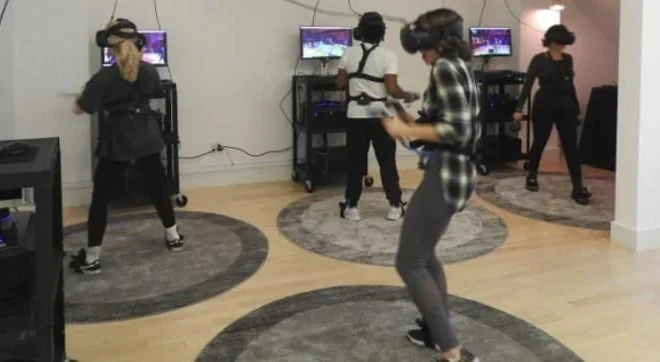
Are you ready to take your virtual reality experience to the next level? Full body tracking with the HTC Vive can provide an even more immersive VR experience. Here are some steps to help you set up your HTC Vive full body tracking.

Step 1: Purchase the HTC Vive Tracker

To fully experience full body tracking, you will need to purchase the HTC Vive Tracker. You can purchase these trackers from the official HTC Vive website or other retailers that sell Vive accessories.

Step 2: Position the Trackers

Each tracker requires its own mounting bracket. You will need to attach a bracket to each tracker and then securely fasten it to each designated body part. For example, the tracker for the hips should be attached to a belt, while the one for the feet should be attached to ankle straps.

The placement of the trackers will depend on your specific body proportions and size. You can experiment with different placements to see what works best for you. It’s important to make sure the trackers are secure, as they will move around as you move.

Step 3: Sync Up the Devices

Once you have attached your trackers, you will need to sync them up with your HTC Vive headset. To do this, turn on the headset and the trackers, then open the SteamVR application. Make sure the trackers are properly connected by checking the SteamVR settings.

Step 4: Calibrate Your Body Tracking

Next, you will need to calibrate your body tracking so that the HTC Vive can accurately track your movements. To do this, stand in front of your HTC Vive lighthouse sensors and ensure the trackers are visible.

Then, access the SteamVR settings menu and select “Devices”, then “Configure Controller”. You should see an option for “Full Body Tracking”. Follow the prompts to calibrate your devices, stepping forward, backward, and turning in a circle to ensure everything is working properly.

Step 5:Enjoy Your New Full Body Tracking Experience!

Once everything is set up, you’re free to enjoy your new full body tracking experience. You’ll be able to see your whole body in virtual reality, allowing for a more immersive VR experience.

Full body tracking with the HTC Vive can require some extra time and effort to set up, but it’s definitely worth it for the enhanced VR experience. With the proper equipment and setup, you’ll be ready to jump into the virtual world with all of your movements fully tracked in real-time.

Previous Article

The Ultimate Destiny 2 Lumina Quest Guide: ...

Next Article

All About iPhone Tethering and Personal Hotspot

Matthew Lynch

Related articles More from author

  • Digital & Mobile Technology

    What Is a DVR (Digital Video Recorder)?

    June 8, 2023
    By Matthew Lynch
  • Text-To-Speech on Discord
    Digital & Mobile TechnologyOnline Learning & eLearning

    How to Use Text-To-Speech on Discord

    March 25, 2023
    By Matthew Lynch
  • Digital & Mobile Technology

    Best Walkie-Talkies of 2023

    June 6, 2023
    By Matthew Lynch
  • Digital & Mobile Technology

    How to Effectively Use the “On This Day” Feature on Facebook

    August 5, 2023
    By Matthew Lynch
  • Digital & Mobile Technology

    What Is a RAR File?

    July 6, 2023
    By Matthew Lynch
  • Digital & Mobile Technology

    How to Sell Used Stereos Online

    June 12, 2023
    By Matthew Lynch

Search

Login & Registration

  • Register
  • Log in
  • Entries feed
  • Comments feed
  • WordPress.org

Newsletter

Signup for The Tech Edvocate Newsletter and have the latest in EdTech news and opinion delivered to your email address!

About Us

Since technology is not going anywhere and does more good than harm, adapting is the best course of action. That is where The Tech Edvocate comes in. We plan to cover the PreK-12 and Higher Education EdTech sectors and provide our readers with the latest news and opinion on the subject. From time to time, I will invite other voices to weigh in on important issues in EdTech. We hope to provide a well-rounded, multi-faceted look at the past, present, the future of EdTech in the US and internationally.

We started this journey back in June 2016, and we plan to continue it for many more years to come. I hope that you will join us in this discussion of the past, present and future of EdTech and lend your own insight to the issues that are discussed.

Newsletter

Signup for The Tech Edvocate Newsletter and have the latest in EdTech news and opinion delivered to your email address!

Contact Us

The Tech Edvocate
910 Goddin Street
Richmond, VA 23231
(601) 630-5238
[email protected]

Copyright © 2025 Matthew Lynch. All rights reserved.