The Tech Edvocate

Top Menu

  • Advertisement
  • Apps
  • Home Page
  • Home Page Five (No Sidebar)
  • Home Page Four
  • Home Page Three
  • Home Page Two
  • Home Tech2
  • Icons [No Sidebar]
  • Left Sidbear Page
  • Lynch Educational Consulting
  • My Account
  • My Speaking Page
  • Newsletter Sign Up Confirmation
  • Newsletter Unsubscription
  • Our Brands
  • Page Example
  • Privacy Policy
  • Protected Content
  • Register
  • Request a Product Review
  • Shop
  • Shortcodes Examples
  • Signup
  • Start Here
    • Governance
    • Careers
    • Contact Us
  • Terms and Conditions
  • The Edvocate
  • The Tech Edvocate Product Guide
  • Topics
  • Write For Us
  • Advertise

Main Menu

  • Start Here
    • Our Brands
    • Governance
      • Lynch Educational Consulting, LLC.
      • Dr. Lynch’s Personal Website
      • Careers
    • Write For Us
    • The Tech Edvocate Product Guide
    • Contact Us
    • Books
    • Edupedia
    • Post a Job
    • The Edvocate Podcast
    • Terms and Conditions
    • Privacy Policy
  • Topics
    • Assistive Technology
    • Child Development Tech
    • Early Childhood & K-12 EdTech
    • EdTech Futures
    • EdTech News
    • EdTech Policy & Reform
    • EdTech Startups & Businesses
    • Higher Education EdTech
    • Online Learning & eLearning
    • Parent & Family Tech
    • Personalized Learning
    • Product Reviews
  • Advertise
  • Tech Edvocate Awards
  • The Edvocate
  • Pedagogue
  • School Ratings

logo

The Tech Edvocate

  • Start Here
    • Our Brands
    • Governance
      • Lynch Educational Consulting, LLC.
      • Dr. Lynch’s Personal Website
        • My Speaking Page
      • Careers
    • Write For Us
    • The Tech Edvocate Product Guide
    • Contact Us
    • Books
    • Edupedia
    • Post a Job
    • The Edvocate Podcast
    • Terms and Conditions
    • Privacy Policy
  • Topics
    • Assistive Technology
    • Child Development Tech
    • Early Childhood & K-12 EdTech
    • EdTech Futures
    • EdTech News
    • EdTech Policy & Reform
    • EdTech Startups & Businesses
    • Higher Education EdTech
    • Online Learning & eLearning
    • Parent & Family Tech
    • Personalized Learning
    • Product Reviews
  • Advertise
  • Tech Edvocate Awards
  • The Edvocate
  • Pedagogue
  • School Ratings
  • Ramp’s Staggering $60 Billion Valuation: 8 Reasons Why Investors Are Piling In

  • Uncovering the Cost: Why This AI Startup’s Collapse Is a Troubling Sign for Tech

  • The Silent Crisis: Why Your Next Console Will Cost a Fortune

  • Advisers urged to steer clear of ‘hyperscale’ AI models

  • The Quiet Crisis: Is AI in Education Creating an ‘Illusion of Learning’?

  • 84% of Ransomware Attacks Use AI: This Is How Your Own Systems Are Turning Against You

  • The Staggering Truth About Healthcare Cyberattacks: 76.6 Million Records Exposed in 2026

  • This Crucial Deadline For Rogue AI Is Much Closer Than You Think

  • This RNA Breakthrough Could Rewrite Alzheimer’s Treatment

  • This One Thing Is Silently Crushing US Consumer Inflation — And Your Wallet

Tech Advice
Home›Tech Advice›How to Set Up Bluetooth Audio on a Nintendo Switch — and Why it’s Worth Doing

How to Set Up Bluetooth Audio on a Nintendo Switch — and Why it’s Worth Doing
By Matthew Lynch
July 24, 2023
0
Spread the love

Introduction

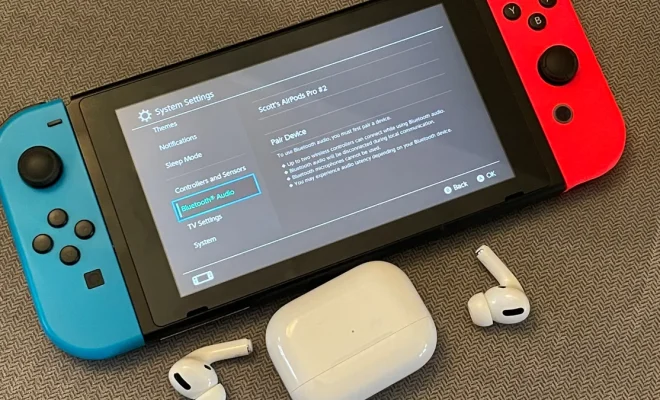
The Nintendo Switch has been an innovative game changer in the world of home entertainment, but one feature that seems to be lacking is Bluetooth audio support. Many users may not realize just how easy this can be resolved, or the benefits it can bring. In this article, we’ll go through the process of setting up Bluetooth audio on your Nintendo Switch, and why it’s worth taking the time to do so.

Why Bluetooth Audio is Worth It

1. No Wires: Wires can be quite limiting, especially when playing on-the-go or moving around. By switching to Bluetooth audio, you’ll enjoy a truly wireless gaming experience without sacrificing sound quality.

2. More Speaker Options: When connecting your Nintendo Switch to your TV, you’re limited to the built-in speakers or a wired connection. With Bluetooth audio enabled, you’ll have access to a wider variety of speaker options including soundbars, surround sound systems, and portable speakers.

3. Multi-player Sessions: A major benefit with Bluetooth audio connectivity is volume control for each person. Each player can connect their own wireless headset and regulate their own volume levels during multi-player sessions.

4. Improved Battery Life: Wired headphones generally draw more power from your device when compared with connecting over Bluetooth. By using Bluetooth audio devices, you can potentially extend the battery life of your Nintendo Switch during long gaming sessions.

Setting Up Bluetooth Audio on Your Nintendo Switch

To set up Bluetooth audio on your Nintendo Switch, you will need a compatible Bluetooth audio transmitter designed for the console. Follow these steps for an easy setup:

Step 1: Purchase a Bluetooth Audio Transmitter

There are numerous reliable options available online specifically made for the Nintendo Switch. Look for features like low latency support and compatibility with most Bluetooth headphone brands.

Step 2: Attach the Transmitter

Connect the transmitter’s USB-C or USB-A connector (depending on the model) to the bottom of the Nintendo Switch or to the USB port on the dock. Make sure it is securely attached.

Step 3: Pair Your Bluetooth Audio Device

Turn on your Bluetooth headphones, speaker, or earbuds, and place them in pairing mode. Then, press and hold the pairing button on your Bluetooth transmitter until it enters pairing mode. The LED indicator will usually blink to indicate that it is searching for a device. Your headphones or speakers should automatically connect after a few moments.

Step 4: Verify Audio Output

Once connected, check if the audio is now playing through your Bluetooth device. You may need to adjust your Nintendo Switch’s audio settings by navigating to “System Settings” > “TV Settings” > “TV Sound”.

Conclusion

Enabling Bluetooth audio on your Nintendo Switch can greatly enhance your gaming experience by providing wire-free convenience and better sound options. With this simple setup guide, you’ll be ready to enjoy all the benefits that come with wireless audio on one of the most popular gaming consoles in no time.


Previous Article

Counter-Strike 2 Coming This Summer as Free ...

Next Article

Pokemon Go’s Buddy system: Everything you need ...

Matthew Lynch

Related articles More from author

  • Tech Advice

    2024 Mercedes-Benz CLE Coupe First Look: Dream Car?

    August 19, 2023
    By Matthew Lynch
  • Tech Advice

    Search Engine You.com Unveils ChatGPT-Style Chatbot

    July 24, 2023
    By Matthew Lynch
  • Tech Advice

    SSH tip: Send commands remotely

    July 14, 2023
    By Matthew Lynch
  • Tech Advice

    Not All 5G Is the Same: All the Flavors and Names Explained

    July 14, 2023
    By Matthew Lynch
  • Tech Advice

    Brother HL-3170CDW Review: A Cheap and Charming Color Laser Printer

    July 11, 2023
    By Matthew Lynch
  • Tech Advice

    How to Use Your Digital Camera as a Webcam

    July 23, 2023
    By Matthew Lynch

Search

Login & Registration

  • Log in
  • Entries feed
  • Comments feed
  • WordPress.org

Newsletter

Signup for The Tech Edvocate Newsletter and have the latest in EdTech news and opinion delivered to your email address!

About Us

Since technology is not going anywhere and does more good than harm, adapting is the best course of action. That is where The Tech Edvocate comes in. We plan to cover the PreK-12 and Higher Education EdTech sectors and provide our readers with the latest news and opinion on the subject. From time to time, I will invite other voices to weigh in on important issues in EdTech. We hope to provide a well-rounded, multi-faceted look at the past, present, the future of EdTech in the US and internationally.

We started this journey back in June 2016, and we plan to continue it for many more years to come. I hope that you will join us in this discussion of the past, present and future of EdTech and lend your own insight to the issues that are discussed.

Newsletter

Signup for The Tech Edvocate Newsletter and have the latest in EdTech news and opinion delivered to your email address!

Contact Us

The Tech Edvocate
910 Goddin Street
Richmond, VA 23231
(601) 630-5238
[email protected]

Copyright © 2026 Matthew Lynch. All rights reserved.