The Tech Edvocate

Top Menu

  • Advertisement
  • Apps
  • Home Page
  • Home Page Five (No Sidebar)
  • Home Page Four
  • Home Page Three
  • Home Page Two
  • Home Tech2
  • Icons [No Sidebar]
  • Left Sidbear Page
  • Lynch Educational Consulting
  • My Account
  • My Speaking Page
  • Newsletter Sign Up Confirmation
  • Newsletter Unsubscription
  • Our Brands
  • Page Example
  • Privacy Policy
  • Protected Content
  • Register
  • Request a Product Review
  • Shop
  • Shortcodes Examples
  • Signup
  • Start Here
    • Governance
    • Careers
    • Contact Us
  • Terms and Conditions
  • The Edvocate
  • The Tech Edvocate Product Guide
  • Topics
  • Write For Us
  • Advertise

Main Menu

  • Start Here
    • Our Brands
    • Governance
      • Lynch Educational Consulting, LLC.
      • Dr. Lynch’s Personal Website
      • Careers
    • Write For Us
    • The Tech Edvocate Product Guide
    • Contact Us
    • Books
    • Edupedia
    • Post a Job
    • The Edvocate Podcast
    • Terms and Conditions
    • Privacy Policy
  • Topics
    • Assistive Technology
    • Child Development Tech
    • Early Childhood & K-12 EdTech
    • EdTech Futures
    • EdTech News
    • EdTech Policy & Reform
    • EdTech Startups & Businesses
    • Higher Education EdTech
    • Online Learning & eLearning
    • Parent & Family Tech
    • Personalized Learning
    • Product Reviews
  • Advertise
  • Tech Edvocate Awards
  • The Edvocate
  • Pedagogue
  • School Ratings

logo

The Tech Edvocate

  • Start Here
    • Our Brands
    • Governance
      • Lynch Educational Consulting, LLC.
      • Dr. Lynch’s Personal Website
        • My Speaking Page
      • Careers
    • Write For Us
    • The Tech Edvocate Product Guide
    • Contact Us
    • Books
    • Edupedia
    • Post a Job
    • The Edvocate Podcast
    • Terms and Conditions
    • Privacy Policy
  • Topics
    • Assistive Technology
    • Child Development Tech
    • Early Childhood & K-12 EdTech
    • EdTech Futures
    • EdTech News
    • EdTech Policy & Reform
    • EdTech Startups & Businesses
    • Higher Education EdTech
    • Online Learning & eLearning
    • Parent & Family Tech
    • Personalized Learning
    • Product Reviews
  • Advertise
  • Tech Edvocate Awards
  • The Edvocate
  • Pedagogue
  • School Ratings
  • 100 Best Consulting Apps

  • 100 Best Insurance Apps

  • 100 Best Legal Apps

  • 100 Best Payroll Apps

  • 100 Best HR Apps

  • 100 Best Project Management Apps

  • 100 Best Invoicing Apps

  • 100 Best CRM Apps

  • The Game-Changing September Beauty Products You Need to Try

  • Revelado: El Secreto Detrás de los Productos Más Vendidos de Septiembre que Querrás Tener

Assistive Technology
Home›Assistive Technology›How to Set Up an Apple Recovery Key on Your iPhone, iPad, or Mac

How to Set Up an Apple Recovery Key on Your iPhone, iPad, or Mac
By Matthew Lynch
June 15, 2023
0
Spread the love

For many years Apple users have relied on a simple yet effective way to secure their accounts: two-factor authentication (2FA). First introduced back in 2015, the feature requires users to enter a verification code sent to a trusted device when logging into their Apple ID on a new device. However, with iOS 15 and macOS Monterey, Apple has announced an additional security layer known as the recovery key.

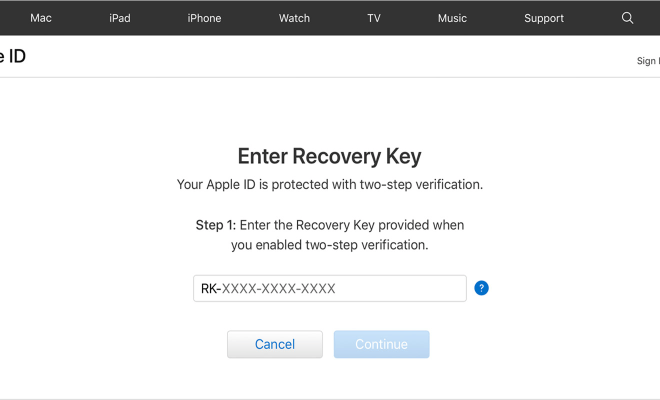
The Apple recovery key is a 28-character code that can be used to regain access to your account in case you forget your password, lose your trusted device or it gets stolen, or if two-factor authentication fails for some reason. This extra security step aims to make it even harder for attackers to gain unauthorized access to your Apple ID, making it a crucial step for every Apple user.

Here’s how to set up an Apple recovery key:

1. On your iPhone or iPad, go to Settings.

2. Tap on your name at the top of the screen, then select “Password & Security.”

3. Tap “Set Up an Alternate Second Factor.”

4. Select the “Recovery Key” option, then follow the on-screen instructions.

5. Once you’ve written down your recovery key, store it in a safe place, preferably offline (e.g., a safe deposit box or a locked drawer).

To set up a recovery key on your Mac, you’ll need macOS Monterey or later:

1. Click on the Apple menu, then select “System Preferences.”

2. Click on “Apple ID,” then select “Password & Security.”

3. Click on “Replace this recovery key.”

4. Select “Continue,” then follow the on-screen instructions.

5. Once you’ve written down your recovery key, store it in a safe place, preferably offline (e.g., a safe deposit box or a locked drawer).

It’s important to remember that your Apple recovery key is unique, so you can’t use someone else’s recovery key, and you can’t recover it if you lose it. Therefore, it’s crucial to store it somewhere safe and accessible in case you ever need it.

Previous Article

How to Add or Remove Startup Programs ...

Next Article

Learn How to Create Classes in Java

Matthew Lynch

Related articles More from author

  • Assistive Technology

    How to Fix It When Disney Plus Is Not Working on Fire Stick

    June 6, 2023
    By Matthew Lynch
  • Assistive Technology

    How to Create a Microsoft Word Flowchart

    June 10, 2023
    By Matthew Lynch
  • Assistive Technology

    How to Increase Your PS5 Storage Space and Manage What You Already Have

    June 22, 2023
    By Matthew Lynch
  • Assistive Technology

    How to Ban Someone From a Facebook Page

    June 21, 2023
    By Matthew Lynch
  • Assistive Technology

    How to Refriend Someone You Blocked on Facebook

    June 23, 2023
    By Matthew Lynch
  • Assistive Technology

    How to Block Ads in Safari on the iPhone

    June 14, 2023
    By Matthew Lynch

Search

Login & Registration

  • Log in
  • Entries feed
  • Comments feed
  • WordPress.org

Newsletter

Signup for The Tech Edvocate Newsletter and have the latest in EdTech news and opinion delivered to your email address!

About Us

Since technology is not going anywhere and does more good than harm, adapting is the best course of action. That is where The Tech Edvocate comes in. We plan to cover the PreK-12 and Higher Education EdTech sectors and provide our readers with the latest news and opinion on the subject. From time to time, I will invite other voices to weigh in on important issues in EdTech. We hope to provide a well-rounded, multi-faceted look at the past, present, the future of EdTech in the US and internationally.

We started this journey back in June 2016, and we plan to continue it for many more years to come. I hope that you will join us in this discussion of the past, present and future of EdTech and lend your own insight to the issues that are discussed.

Newsletter

Signup for The Tech Edvocate Newsletter and have the latest in EdTech news and opinion delivered to your email address!

Contact Us

The Tech Edvocate
910 Goddin Street
Richmond, VA 23231
(601) 630-5238
[email protected]

Copyright © 2026 Matthew Lynch. All rights reserved.