The Tech Edvocate

Top Menu

  • Advertisement
  • Apps
  • Home Page
  • Home Page Five (No Sidebar)
  • Home Page Four
  • Home Page Three
  • Home Page Two
  • Home Tech2
  • Icons [No Sidebar]
  • Left Sidbear Page
  • Lynch Educational Consulting
  • My Account
  • My Speaking Page
  • Newsletter Sign Up Confirmation
  • Newsletter Unsubscription
  • Our Brands
  • Page Example
  • Privacy Policy
  • Protected Content
  • Register
  • Request a Product Review
  • Shop
  • Shortcodes Examples
  • Signup
  • Start Here
    • Governance
    • Careers
    • Contact Us
  • Terms and Conditions
  • The Edvocate
  • The Tech Edvocate Product Guide
  • Topics
  • Write For Us
  • Advertise

Main Menu

  • Start Here
    • Our Brands
    • Governance
      • Lynch Educational Consulting, LLC.
      • Dr. Lynch’s Personal Website
      • Careers
    • Write For Us
    • The Tech Edvocate Product Guide
    • Contact Us
    • Books
    • Edupedia
    • Post a Job
    • The Edvocate Podcast
    • Terms and Conditions
    • Privacy Policy
  • Topics
    • Assistive Technology
    • Child Development Tech
    • Early Childhood & K-12 EdTech
    • EdTech Futures
    • EdTech News
    • EdTech Policy & Reform
    • EdTech Startups & Businesses
    • Higher Education EdTech
    • Online Learning & eLearning
    • Parent & Family Tech
    • Personalized Learning
    • Product Reviews
  • Advertise
  • Tech Edvocate Awards
  • The Edvocate
  • Pedagogue
  • School Ratings

logo

The Tech Edvocate

  • Start Here
    • Our Brands
    • Governance
      • Lynch Educational Consulting, LLC.
      • Dr. Lynch’s Personal Website
        • My Speaking Page
      • Careers
    • Write For Us
    • The Tech Edvocate Product Guide
    • Contact Us
    • Books
    • Edupedia
    • Post a Job
    • The Edvocate Podcast
    • Terms and Conditions
    • Privacy Policy
  • Topics
    • Assistive Technology
    • Child Development Tech
    • Early Childhood & K-12 EdTech
    • EdTech Futures
    • EdTech News
    • EdTech Policy & Reform
    • EdTech Startups & Businesses
    • Higher Education EdTech
    • Online Learning & eLearning
    • Parent & Family Tech
    • Personalized Learning
    • Product Reviews
  • Advertise
  • Tech Edvocate Awards
  • The Edvocate
  • Pedagogue
  • School Ratings
  • Shocking: Your Smart Ring Knows When You’re Having Sex

  • The SwiftRefi Scandal: 7 Astonishing Truths About Their ‘Zero-Fee’ Refinance

  • The AION 2 Scandal: Why This Korean MMO Controversy Is Boiling Over

  • The Bombshell Truth About Gaming’s Legal Reckoning

  • Staggering: AI’s ALS Breakthrough Comes With a $5 Million Price Tag

  • The Astonishing AI Predicting Housing Trends With 98% Accuracy — Regulators Are Freaking Out

  • Your Kids’ Classrooms Are Changing: Here’s What’s Coming by 2026

  • Jaw-Dropping: Millions Face Triple Tax Bills on Forgiven Student Loans

  • Mind-Blowing: Critical Infrastructure Faces Collapse From This Overlooked Threat

  • Unsettling: AI Agents Just Hacked 7 Major Banks — Here’s What It Means For Your Money

Assistive Technology
Home›Assistive Technology›How to Set Up a Video Projector for Home Theater Viewing

How to Set Up a Video Projector for Home Theater Viewing
By Matthew Lynch
June 11, 2023
0
Spread the love

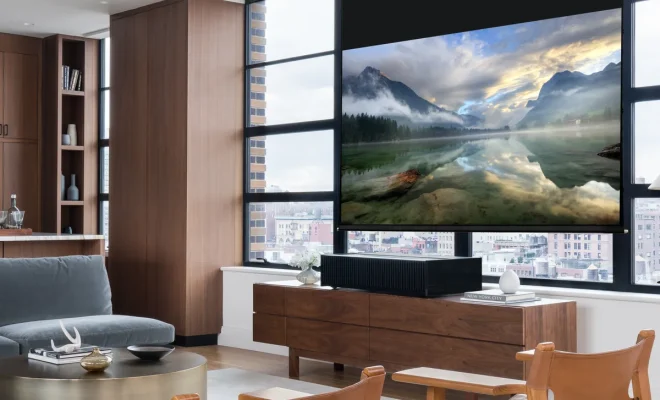
Are you looking to upgrade your home viewing experience? One great option is to set up a video projector for a theater-like atmosphere in your own living room. But how do you set up a video projector for home theater viewing? Here are some tips to get you started:

1. Choose the right projector: When selecting a video projector, consider your budget, room size, and desired image quality. Look for one that has enough lumens (brightness) to display in your room even with some ambient light, and a resolution that matches your desired viewing experience.

2. Choose the right screen: A video projector will work on any flat surface, but for the best image quality, a projection screen is recommended. Choose a screen that matches your room size and desired viewing distance.

3. Install the projector: Mount or place the projector in a position that is level and perpendicular to the screen. Adjust the height and angle of the projector until the image is centered and fills the screen.

4. Connect the sources: Connect your video sources, such as a Blu-ray player or streaming device, to the projector using HDMI cables. You may also need to connect an audio source, such as a soundbar or home theater system.

5. Adjust the image settings: Using the projector’s remote, adjust the settings for brightness, contrast, and color until the image matches your preferences. You may also need to adjust the zoom and focus until the image is sharp.

6. Test the audio: Ensure that the audio is working properly by playing a movie or video with sound, and adjust the volume to your liking.

By following these steps, you can successfully set up a video projector for home theater viewing. Enjoy the world of cinema from the comfort of your own home!


Previous Article

How to Set Up and Use Parental ...

Next Article

How to Use the YouTube Audio Library ...

Matthew Lynch

Related articles More from author

  • Assistive Technology

    How to Use Discord on Xbox

    June 8, 2023
    By Matthew Lynch
  • Assistive Technology

    How the Rise App Tracks Your Sleep for a Better Day

    June 10, 2023
    By Matthew Lynch
  • Assistive Technology

    How to Get on TikTok’s “For You” Page (FYP)

    June 15, 2023
    By Matthew Lynch
  • Assistive Technology

    How to Use the Round Function in Excel

    June 6, 2023
    By Matthew Lynch
  • Assistive Technology

    How to Highlight Distinct Values in Google Sheets

    June 22, 2023
    By Matthew Lynch
  • Assistive Technology

    How to Use iCloud With a Windows PC

    June 14, 2023
    By Matthew Lynch

Search

Login & Registration

  • Log in
  • Entries feed
  • Comments feed
  • WordPress.org

Newsletter

Signup for The Tech Edvocate Newsletter and have the latest in EdTech news and opinion delivered to your email address!

About Us

Since technology is not going anywhere and does more good than harm, adapting is the best course of action. That is where The Tech Edvocate comes in. We plan to cover the PreK-12 and Higher Education EdTech sectors and provide our readers with the latest news and opinion on the subject. From time to time, I will invite other voices to weigh in on important issues in EdTech. We hope to provide a well-rounded, multi-faceted look at the past, present, the future of EdTech in the US and internationally.

We started this journey back in June 2016, and we plan to continue it for many more years to come. I hope that you will join us in this discussion of the past, present and future of EdTech and lend your own insight to the issues that are discussed.

Newsletter

Signup for The Tech Edvocate Newsletter and have the latest in EdTech news and opinion delivered to your email address!

Contact Us

The Tech Edvocate
910 Goddin Street
Richmond, VA 23231
(601) 630-5238
[email protected]

Copyright © 2026 Matthew Lynch. All rights reserved.