The Tech Edvocate

Top Menu

  • Advertisement
  • Apps
  • Home Page
  • Home Page Five (No Sidebar)
  • Home Page Four
  • Home Page Three
  • Home Page Two
  • Home Tech2
  • Icons [No Sidebar]
  • Left Sidbear Page
  • Lynch Educational Consulting
  • My Account
  • My Speaking Page
  • Newsletter Sign Up Confirmation
  • Newsletter Unsubscription
  • Our Brands
  • Page Example
  • Privacy Policy
  • Protected Content
  • Register
  • Request a Product Review
  • Shop
  • Shortcodes Examples
  • Signup
  • Start Here
    • Governance
    • Careers
    • Contact Us
  • Terms and Conditions
  • The Edvocate
  • The Tech Edvocate Product Guide
  • Topics
  • Write For Us
  • Advertise

Main Menu

  • Start Here
    • Our Brands
    • Governance
      • Lynch Educational Consulting, LLC.
      • Dr. Lynch’s Personal Website
      • Careers
    • Write For Us
    • The Tech Edvocate Product Guide
    • Contact Us
    • Books
    • Edupedia
    • Post a Job
    • The Edvocate Podcast
    • Terms and Conditions
    • Privacy Policy
  • Topics
    • Assistive Technology
    • Child Development Tech
    • Early Childhood & K-12 EdTech
    • EdTech Futures
    • EdTech News
    • EdTech Policy & Reform
    • EdTech Startups & Businesses
    • Higher Education EdTech
    • Online Learning & eLearning
    • Parent & Family Tech
    • Personalized Learning
    • Product Reviews
  • Advertise
  • Tech Edvocate Awards
  • The Edvocate
  • Pedagogue
  • School Ratings

logo

The Tech Edvocate

  • Start Here
    • Our Brands
    • Governance
      • Lynch Educational Consulting, LLC.
      • Dr. Lynch’s Personal Website
        • My Speaking Page
      • Careers
    • Write For Us
    • The Tech Edvocate Product Guide
    • Contact Us
    • Books
    • Edupedia
    • Post a Job
    • The Edvocate Podcast
    • Terms and Conditions
    • Privacy Policy
  • Topics
    • Assistive Technology
    • Child Development Tech
    • Early Childhood & K-12 EdTech
    • EdTech Futures
    • EdTech News
    • EdTech Policy & Reform
    • EdTech Startups & Businesses
    • Higher Education EdTech
    • Online Learning & eLearning
    • Parent & Family Tech
    • Personalized Learning
    • Product Reviews
  • Advertise
  • Tech Edvocate Awards
  • The Edvocate
  • Pedagogue
  • School Ratings
  • Viaim Opennote Review: The AI Note-Taker That Disappears Into Your Daily Routine

  • A Visitors Guide to Long Beach (CA), United States

  • A Visitor’s Guide to Fresno (CA), United States

  • A Visitors Guide to New Orleans (LA), United States

  • A Visitors Guide to Sacramento (CA), United States

  • A Visitors Guide to Lyon, France

  • JisuLife Ultra2 Portable Fan: A Powerful Multi-Function Cooling Solution

  • A Visitors Guide to Viña del Mar, Chile

  • A Visitors Guide to Århus, Denmark

  • A Visitors Guide to Bakersfield (CA), United States

Assistive Technology
Home›Assistive Technology›How to Search All Streaming Services At Once

How to Search All Streaming Services At Once
By Matthew Lynch
June 23, 2023
0
Spread the love

With so many streaming services available today, it can be overwhelming to figure out which ones have the shows and movies you want to watch. However, there’s a simple solution to this problem – searching all streaming services at once. This can save you time and hassle, as you won’t have to jump from one app to another to find what you’re looking for.

Here are some ways to search all streaming services simultaneously:

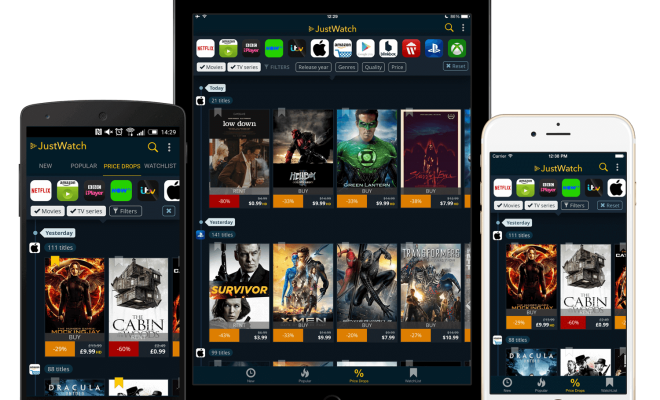
1. JustWatch: JustWatch is a free online streaming search engine that allows you to search for titles across multiple streaming platforms, including Netflix, Amazon Prime Video, Hulu, and more. You simply enter the name of the TV show or movie you’re looking for, and JustWatch scours more than 20 streaming services to find where it’s available. Once you find the right service, you can click on the link to start watching instantly.

2. Reelgood: Reelgood is a streaming search engine that aggregates content from more than 300 streaming services, including Netflix, HBO, Hulu, Disney+, and others. With Reelgood, you can search for movies and TV shows, and even create a personal watchlist. Whether you’re looking for something that’s currently trending or an old classic, Reelgood has you covered.

3. StreamLocator: StreamLocator is a device that can help you access geo-blocked content and search for titles across all streaming services at once. Simply plug in the device, connect to your Wi-Fi network, and start searching for the shows and movies you want to watch. StreamLocator works with popular streaming services like Netflix, Amazon Prime Video, Disney+, and others, providing you with access to content that might otherwise be unavailable in your region.

4. Google Search: Another way to search all streaming services at once is to use Google. Simply type the name of the TV show or movie you’re looking for into the search bar, followed by the word ‘streaming,’ and Google will provide you with a list of available streaming services. You can then click on each link to see if the show or movie is available to watch on that platform. While this method isn’t exclusive to streaming services, it’s a useful way to quickly find what you’re looking for.


Previous Article

ChatGPT vs. Bing Chat: What’s the Best ...

Next Article

How to Use the head and tail ...

Matthew Lynch

Related articles More from author

  • Assistive Technology

    What Are Instagram Collections and How Do They Work?

    June 6, 2023
    By Matthew Lynch
  • Assistive Technology

    Fixes to Try if You Can’t Open Windows Settings

    June 21, 2023
    By Matthew Lynch
  • Assistive Technology

    Ways to Fix the Windows PowerShell When It Pops Up on Restart

    June 14, 2023
    By Matthew Lynch
  • Assistive Technology

    How to Fix It When a Laptop Microphone is Not Working

    June 8, 2023
    By Matthew Lynch
  • Assistive Technology

    How to Back up Your Mac to an External Hard Drive with Time Machine

    June 6, 2023
    By Matthew Lynch
  • Assistive Technology

    How to Use Linktree to Add Links to Instagram

    June 10, 2023
    By Matthew Lynch

Search

Login & Registration

  • Register
  • Log in
  • Entries feed
  • Comments feed
  • WordPress.org

Newsletter

Signup for The Tech Edvocate Newsletter and have the latest in EdTech news and opinion delivered to your email address!

About Us

Since technology is not going anywhere and does more good than harm, adapting is the best course of action. That is where The Tech Edvocate comes in. We plan to cover the PreK-12 and Higher Education EdTech sectors and provide our readers with the latest news and opinion on the subject. From time to time, I will invite other voices to weigh in on important issues in EdTech. We hope to provide a well-rounded, multi-faceted look at the past, present, the future of EdTech in the US and internationally.

We started this journey back in June 2016, and we plan to continue it for many more years to come. I hope that you will join us in this discussion of the past, present and future of EdTech and lend your own insight to the issues that are discussed.

Newsletter

Signup for The Tech Edvocate Newsletter and have the latest in EdTech news and opinion delivered to your email address!

Contact Us

The Tech Edvocate
910 Goddin Street
Richmond, VA 23231
(601) 630-5238
[email protected]

Copyright © 2025 Matthew Lynch. All rights reserved.