The Tech Edvocate

Top Menu

  • Advertisement
  • Apps
  • Home Page
  • Home Page Five (No Sidebar)
  • Home Page Four
  • Home Page Three
  • Home Page Two
  • Home Tech2
  • Icons [No Sidebar]
  • Left Sidbear Page
  • Lynch Educational Consulting
  • My Account
  • My Speaking Page
  • Newsletter Sign Up Confirmation
  • Newsletter Unsubscription
  • Our Brands
  • Page Example
  • Privacy Policy
  • Protected Content
  • Register
  • Request a Product Review
  • Shop
  • Shortcodes Examples
  • Signup
  • Start Here
    • Governance
    • Careers
    • Contact Us
  • Terms and Conditions
  • The Edvocate
  • The Tech Edvocate Product Guide
  • Topics
  • Write For Us
  • Advertise

Main Menu

  • Start Here
    • Our Brands
    • Governance
      • Lynch Educational Consulting, LLC.
      • Dr. Lynch’s Personal Website
      • Careers
    • Write For Us
    • The Tech Edvocate Product Guide
    • Contact Us
    • Books
    • Edupedia
    • Post a Job
    • The Edvocate Podcast
    • Terms and Conditions
    • Privacy Policy
  • Topics
    • Assistive Technology
    • Child Development Tech
    • Early Childhood & K-12 EdTech
    • EdTech Futures
    • EdTech News
    • EdTech Policy & Reform
    • EdTech Startups & Businesses
    • Higher Education EdTech
    • Online Learning & eLearning
    • Parent & Family Tech
    • Personalized Learning
    • Product Reviews
  • Advertise
  • Tech Edvocate Awards
  • The Edvocate
  • Pedagogue
  • School Ratings

logo

The Tech Edvocate

  • Start Here
    • Our Brands
    • Governance
      • Lynch Educational Consulting, LLC.
      • Dr. Lynch’s Personal Website
        • My Speaking Page
      • Careers
    • Write For Us
    • The Tech Edvocate Product Guide
    • Contact Us
    • Books
    • Edupedia
    • Post a Job
    • The Edvocate Podcast
    • Terms and Conditions
    • Privacy Policy
  • Topics
    • Assistive Technology
    • Child Development Tech
    • Early Childhood & K-12 EdTech
    • EdTech Futures
    • EdTech News
    • EdTech Policy & Reform
    • EdTech Startups & Businesses
    • Higher Education EdTech
    • Online Learning & eLearning
    • Parent & Family Tech
    • Personalized Learning
    • Product Reviews
  • Advertise
  • Tech Edvocate Awards
  • The Edvocate
  • Pedagogue
  • School Ratings
  • Ramp’s Staggering $60 Billion Valuation: 8 Reasons Why Investors Are Piling In

  • Uncovering the Cost: Why This AI Startup’s Collapse Is a Troubling Sign for Tech

  • The Silent Crisis: Why Your Next Console Will Cost a Fortune

  • Advisers urged to steer clear of ‘hyperscale’ AI models

  • The Quiet Crisis: Is AI in Education Creating an ‘Illusion of Learning’?

  • 84% of Ransomware Attacks Use AI: This Is How Your Own Systems Are Turning Against You

  • The Staggering Truth About Healthcare Cyberattacks: 76.6 Million Records Exposed in 2026

  • This Crucial Deadline For Rogue AI Is Much Closer Than You Think

  • This RNA Breakthrough Could Rewrite Alzheimer’s Treatment

  • This One Thing Is Silently Crushing US Consumer Inflation — And Your Wallet

Digital & Mobile Technology
Home›Digital & Mobile Technology›How to Reset a Fitbit Alta Activity Tracker

How to Reset a Fitbit Alta Activity Tracker
By Matthew Lynch
June 6, 2023
0
Spread the love

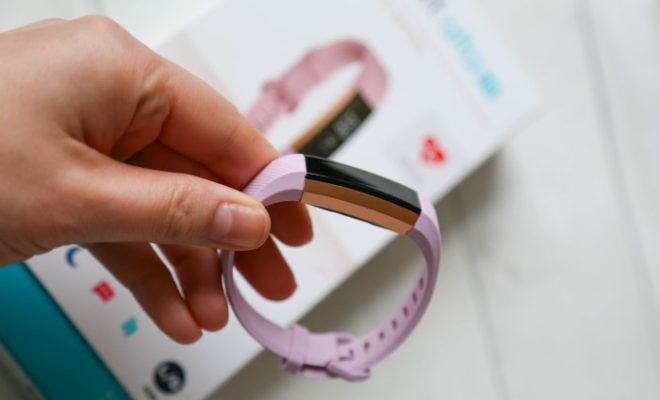
Fitbit Alta is a popular activity tracker that helps you monitor your daily activities, such as the number of steps taken, calories burned, and sleep quality. It’s a great way to stay motivated to maintain a healthy lifestyle. However, just like any other electronic device, you might encounter some issues from time to time. If you’re experiencing problems with your Fitbit Alta, resetting it could be the solution.

Resetting your Fitbit Alta can erase all of its data and restore it to its factory settings. This can fix common problems such as syncing issues, battery drainage, and unresponsive buttons. Here are the steps you need to follow to reset your Fitbit Alta activity tracker:

1. Connect your Fitbit Alta to its charging cable

Before starting the reset process, make sure your Fitbit Alta is fully charged. Connect it to its charging cable and ensure that it’s properly attached.

2. Locate the button on the charging cable

On the charging cable, you’ll notice a button located on the side. This is the reset button you’ll need to press to reset your Fitbit Alta.

3. Press the button three times

Press the button three times in rapid succession within eight seconds. You should see the Fitbit logo appear on the screen after the third press.

4. Wait for the reset to complete

Once you see the logo, your Fitbit Alta is resetting. Wait for the process to complete before attempting to use it again.

5. Set up your Fitbit Alta again

After resetting your Fitbit Alta, you’ll need to set it up again. You can do this by downloading the Fitbit app on your smartphone or tablet and following the setup instructions provided.

In conclusion, resetting your Fitbit Alta activity tracker is a simple and effective way to fix common issues. By following the steps outlined above, you can quickly and easily restore your device to its factory settings. If you’re still experiencing problems after resetting your Fitbit Alta, you may need to contact Fitbit customer support for further assistance.


Previous Article

How to Reset Network Settings on Your ...

Next Article

Best Speech to Text Software of 2023

Matthew Lynch

Related articles More from author

  • Digital & Mobile Technology

    Understanding the iPad Sleep/Wake Button

    June 10, 2023
    By Matthew Lynch
  • Digital & Mobile Technology

    The Best Apps to Create Fast Graphic Designs

    June 23, 2023
    By Matthew Lynch
  • Digital & Mobile Technology

    How to Fix an iPad That Won’t Charge or Charges Slowly

    June 1, 2023
    By Matthew Lynch
  • Digital & Mobile Technology

    What Is Moonbounce Malware and How Does It Work?

    June 12, 2023
    By Matthew Lynch
  • Digital & Mobile Technology

    How to Activate a Sprint Phone Over the Phone

    May 17, 2023
    By Matthew Lynch
  • Digital & Mobile Technology

    Best Food Tracker Apps of 2023

    June 1, 2023
    By Matthew Lynch

Search

Login & Registration

  • Log in
  • Entries feed
  • Comments feed
  • WordPress.org

Newsletter

Signup for The Tech Edvocate Newsletter and have the latest in EdTech news and opinion delivered to your email address!

About Us

Since technology is not going anywhere and does more good than harm, adapting is the best course of action. That is where The Tech Edvocate comes in. We plan to cover the PreK-12 and Higher Education EdTech sectors and provide our readers with the latest news and opinion on the subject. From time to time, I will invite other voices to weigh in on important issues in EdTech. We hope to provide a well-rounded, multi-faceted look at the past, present, the future of EdTech in the US and internationally.

We started this journey back in June 2016, and we plan to continue it for many more years to come. I hope that you will join us in this discussion of the past, present and future of EdTech and lend your own insight to the issues that are discussed.

Newsletter

Signup for The Tech Edvocate Newsletter and have the latest in EdTech news and opinion delivered to your email address!

Contact Us

The Tech Edvocate
910 Goddin Street
Richmond, VA 23231
(601) 630-5238
[email protected]

Copyright © 2026 Matthew Lynch. All rights reserved.