
The Tech Edvocate

Top Menu

  • Advertisement
  • Apps
  • Home Page
  • Home Page Five (No Sidebar)
  • Home Page Four
  • Home Page Three
  • Home Page Two
  • Home Tech2
  • Icons [No Sidebar]
  • Left Sidbear Page
  • Lynch Educational Consulting
  • My Account
  • My Speaking Page
  • Newsletter Sign Up Confirmation
  • Newsletter Unsubscription
  • Our Brands
  • Page Example
  • Privacy Policy
  • Protected Content
  • Register
  • Request a Product Review
  • Shop
  • Shortcodes Examples
  • Signup
  • Start Here
    • Governance
    • Careers
    • Contact Us
  • Terms and Conditions
  • The Edvocate
  • The Tech Edvocate Product Guide
  • Topics
  • Write For Us
  • Advertise

Main Menu

  • Start Here
    • Our Brands
    • Governance
      • Lynch Educational Consulting, LLC.
      • Dr. Lynch’s Personal Website
      • Careers
    • Write For Us
    • The Tech Edvocate Product Guide
    • Contact Us
    • Books
    • Edupedia
    • Post a Job
    • The Edvocate Podcast
    • Terms and Conditions
    • Privacy Policy
  • Topics
    • Assistive Technology
    • Child Development Tech
    • Early Childhood & K-12 EdTech
    • EdTech Futures
    • EdTech News
    • EdTech Policy & Reform
    • EdTech Startups & Businesses
    • Higher Education EdTech
    • Online Learning & eLearning
    • Parent & Family Tech
    • Personalized Learning
    • Product Reviews
  • Advertise
  • Tech Edvocate Awards
  • The Edvocate
  • Pedagogue
  • School Ratings

logo

The Tech Edvocate

  • Start Here
    • Our Brands
    • Governance
      • Lynch Educational Consulting, LLC.
      • Dr. Lynch’s Personal Website
        • My Speaking Page
      • Careers
    • Write For Us
    • The Tech Edvocate Product Guide
    • Contact Us
    • Books
    • Edupedia
    • Post a Job
    • The Edvocate Podcast
    • Terms and Conditions
    • Privacy Policy
  • Topics
    • Assistive Technology
    • Child Development Tech
    • Early Childhood & K-12 EdTech
    • EdTech Futures
    • EdTech News
    • EdTech Policy & Reform
    • EdTech Startups & Businesses
    • Higher Education EdTech
    • Online Learning & eLearning
    • Parent & Family Tech
    • Personalized Learning
    • Product Reviews
  • Advertise
  • Tech Edvocate Awards
  • The Edvocate
  • Pedagogue
  • School Ratings
  • Baffling: CrowdStrike’s $500 Million AI Bet Reshapes Cybersecurity

  • This Crucial Autonomous Driving Rule Could Cost You Everything

  • Baffling: Microsoft AI CEO Demands Halt to Conscious AI Development

  • O seară în ritmul tău: atmosfera divertismentului de cazinou pe internet

  • Outrageous: AppLovin Hit With Lawsuit Over AI Claims — What Investors Need to Know

  • 9 Critical Ways AI Investment Fraud Is Quietly Draining Your Bank Account

  • Is the AI Bubble Bursting? OpenAI’s Funding Woes Revealed

  • Why Millions Are Skipping College for These 7 Online Courses Right Now

  • The Astonishing Truth About PS5 Pro vs Xbox Ally X Financing

  • The Urgent Truth About 2026 Privacy Laws: Why Your Business Could Face Catastrophic Fines

How To
Home›How To›How to Report Someone on eBay: 8 Steps

How to Report Someone on eBay: 8 Steps
By Matthew Lynch
March 23, 2024
0
Spread the love

Introduction:

eBay is an online marketplace that strives to provide a safe and secure platform for users to buy or sell items. To maintain this environment, they have strict policies against users who violate their terms and conditions. If you encounter someone on eBay who is not adhering to these rules, it’s essential to report them promptly. In this article, we’ll walk you through the 8 simple steps on how to report someone on eBay.

Step 1: Identify the Issue

Before starting a report, make sure you have a legitimate reason for reporting a user. Issues such as harassment, fraud, or sale of prohibited items are valid reasons for reporting users.

Step 2: Document Your Encounter

Gather relevant information such as screenshots, messages, or other documentation that shows the violation. This evidence will be essential in supporting your claim when submitting a report.

Step 3: Sign In to Your eBay Account

To report an issue, first sign in to your eBay account. If you haven’t registered yet, create a new account at www.ebay.com.

Step 4: Visit the “Help & Contact” Section

Click on the “Help & Contact” button located at the top of the page. This will redirect you to the help section where you can find various topics related to reporting issues.

Step 5: Access the “Report an Issue” Feature

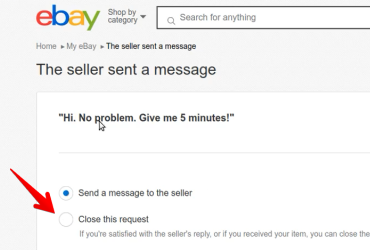
In the “Help & Contact” section, search for “Report an issue.” Click on the appropriate result, which will direct you to a page where you can specify details about your concerns.

Step 6: Choose the Right Category

Depending on what type of violation occurred, select the appropriate category from the list provided. Examples of categories include “Unwanted and offensive emails,” “Problems with sellers,” and “Counterfeit goods.”

Step 7: Detailed Reporting

After selecting the right category, provide specific information about your concerns. Attach any relevant screenshots or documentation related to the violation and ensure your descriptions are clear and concise.

Step 8: Submit the Report

Once all information has been entered, click on “Submit report.” eBay will review your submission, and if they find that there has been a violation of their policies, they will take appropriate action against the user.

Conclusion:

Reporting someone on eBay is a necessary step to ensure a safer environment for all users. By following these 8 steps, you can play an important role in maintaining the integrity of the platform. Remember that timely reporting allows eBay to address violations promptly, helping protect buyers and sellers alike.


Previous Article

How to Measure Viscosity: 10 Steps

Next Article

How to Create a How-to Website: 8 ...

Matthew Lynch

Related articles More from author

  • How To

    How to Clean Mold in a Basement

    October 16, 2023
    By Matthew Lynch
  • How To

    3 Ways to Cite a YouTube Video

    January 29, 2024
    By Matthew Lynch
  • How To

    4 Ways to Improvise a Small Bandage

    December 16, 2023
    By Matthew Lynch
  • How To

    How to Clean White Furniture: 14 Steps

    March 6, 2024
    By Matthew Lynch
  • How To

    3 Ways to Save a Google Doc

    January 29, 2024
    By Matthew Lynch
  • How To

    How to Play Castanets: 14 Steps

    October 7, 2023
    By Matthew Lynch

Search

Login & Registration

  • Log in
  • Entries feed
  • Comments feed
  • WordPress.org

Newsletter

Signup for The Tech Edvocate Newsletter and have the latest in EdTech news and opinion delivered to your email address!

About Us

Since technology is not going anywhere and does more good than harm, adapting is the best course of action. That is where The Tech Edvocate comes in. We plan to cover the PreK-12 and Higher Education EdTech sectors and provide our readers with the latest news and opinion on the subject. From time to time, I will invite other voices to weigh in on important issues in EdTech. We hope to provide a well-rounded, multi-faceted look at the past, present, the future of EdTech in the US and internationally.

We started this journey back in June 2016, and we plan to continue it for many more years to come. I hope that you will join us in this discussion of the past, present and future of EdTech and lend your own insight to the issues that are discussed.

Newsletter

Signup for The Tech Edvocate Newsletter and have the latest in EdTech news and opinion delivered to your email address!

Contact Us

The Tech Edvocate
910 Goddin Street
Richmond, VA 23231
(601) 630-5238
[email protected]

Copyright © 2026 Matthew Lynch. All rights reserved.