The Tech Edvocate

Top Menu

  • Advertisement
  • Apps
  • Home Page
  • Home Page Five (No Sidebar)
  • Home Page Four
  • Home Page Three
  • Home Page Two
  • Home Tech2
  • Icons [No Sidebar]
  • Left Sidbear Page
  • Lynch Educational Consulting
  • My Account
  • My Speaking Page
  • Newsletter Sign Up Confirmation
  • Newsletter Unsubscription
  • Our Brands
  • Page Example
  • Privacy Policy
  • Protected Content
  • Register
  • Request a Product Review
  • Shop
  • Shortcodes Examples
  • Signup
  • Start Here
    • Governance
    • Careers
    • Contact Us
  • Terms and Conditions
  • The Edvocate
  • The Tech Edvocate Product Guide
  • Topics
  • Write For Us
  • Advertise

Main Menu

  • Start Here
    • Our Brands
    • Governance
      • Lynch Educational Consulting, LLC.
      • Dr. Lynch’s Personal Website
      • Careers
    • Write For Us
    • The Tech Edvocate Product Guide
    • Contact Us
    • Books
    • Edupedia
    • Post a Job
    • The Edvocate Podcast
    • Terms and Conditions
    • Privacy Policy
  • Topics
    • Assistive Technology
    • Child Development Tech
    • Early Childhood & K-12 EdTech
    • EdTech Futures
    • EdTech News
    • EdTech Policy & Reform
    • EdTech Startups & Businesses
    • Higher Education EdTech
    • Online Learning & eLearning
    • Parent & Family Tech
    • Personalized Learning
    • Product Reviews
  • Advertise
  • Tech Edvocate Awards
  • The Edvocate
  • Pedagogue
  • School Ratings

logo

The Tech Edvocate

  • Start Here
    • Our Brands
    • Governance
      • Lynch Educational Consulting, LLC.
      • Dr. Lynch’s Personal Website
        • My Speaking Page
      • Careers
    • Write For Us
    • The Tech Edvocate Product Guide
    • Contact Us
    • Books
    • Edupedia
    • Post a Job
    • The Edvocate Podcast
    • Terms and Conditions
    • Privacy Policy
  • Topics
    • Assistive Technology
    • Child Development Tech
    • Early Childhood & K-12 EdTech
    • EdTech Futures
    • EdTech News
    • EdTech Policy & Reform
    • EdTech Startups & Businesses
    • Higher Education EdTech
    • Online Learning & eLearning
    • Parent & Family Tech
    • Personalized Learning
    • Product Reviews
  • Advertise
  • Tech Edvocate Awards
  • The Edvocate
  • Pedagogue
  • School Ratings
  • The Narwal Freo Z20 Is the Prime Day Gift That Actually Saves Time

  • Capsaicinens rolle: kultur, helse og dyrking av chilipepper

  • Study: Nearly all personal care and cleaning products contain undisclosed chemicals

Tech Advice
Home›Tech Advice›How to Protect Your Facebook Profile Picture

How to Protect Your Facebook Profile Picture
By Matthew Lynch
July 17, 2023
0
Spread the love

Your profile picture is one of the most visible aspects of your Facebook presence. It represents you across the platform and can be viewed by friends, acquaintances, and even strangers. To ensure that your profile picture remains secure and protected, it’s important to take a few precautionary measures. In this article, we will guide you through some steps on how to protect your Facebook profile picture.

Step 1: Adjusting Privacy Settings

Facebook provides various privacy settings that allow you to control who can see your profile picture:

1. Log in to your Facebook account using a web browser.

2. Navigate to your profile page by clicking on your name or profile picture.

3. Once on your profile page, click on the current profile picture.

4. From the options presented, select “Edit Privacy”.

5. Choose from the available privacy settings:

• Public: Anyone can view and download your profile picture.

• Friends: Only people who are added as friends on Facebook can view and download.

• Only Me: Your profile picture will remain private.

6 . Select the desired option based on your preference for viewing accessibility.

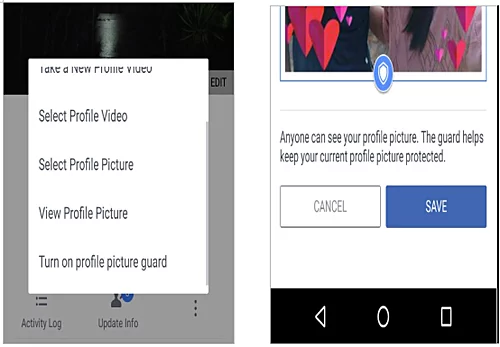
Step 2: Enabling Profile Picture Guard

Facebook offers an additional feature called “Profile Picture Guard” designed specifically for protecting against misuse of images:

1 . Follow steps 1-4 from above to access Edit Privacy options for your current profile picture.

2 . Below the privacy settings options, locate “Turn On Profile Picture Guard” or similar wording.

3 . Click/tap on this option—this will add extra layers of protection such as preventing others from taking screenshots or downloading.

Step 3: Avoid Using Personal Photos as Profile Pictures

To minimize potential risks associated with sharing personal photos:

• Consider using non-personal images like nature scenery or abstract art instead of actual photographs.

Conclusion

Protecting your Facebook profile picture is essential to maintain your privacy and control over how others perceive you on the platform. By adjusting privacy settings, enabling Profile Picture Guard, and being mindful of the images you choose for your profile picture, you can enhance the security of your online presence.

Remember that while these measures help protect against unauthorized downloads or misuse, it’s impossible to completely prevent someone from taking a screenshot or manually saving an image. Therefore, always exercise caution when sharing personal information or sensitive images online.
Take control of your Facebook profile picture today and enjoy a safer social media experience!

Previous Article

How to Share Spotify Premium with Your ...

Next Article

iPhone 14 Reveal Happening in Minutes: Rumors ...

Matthew Lynch

Related articles More from author

  • Tech Advice

    How Much Does Climate Control Affect EV Range?

    August 19, 2023
    By Matthew Lynch
  • Tech Advice

    The Cheapest Moving Container Companies For Your Move In 2023

    August 9, 2023
    By Matthew Lynch
  • Tech Advice

    Hellcat the Chrysler Pacifica: Unleashing the Beast in a Family Van

    August 19, 2023
    By Matthew Lynch
  • Tech Advice

    What to Do When Your Ice Maker Stops Making Ice

    July 9, 2023
    By Matthew Lynch
  • Tech Advice

    2024 RAM 3500 Big Horn 4×4 Regular Cab 8 ft. box 140 in. WB Truck: Trim Details, Reviews, Prices, Specs, ...

    August 21, 2023
    By Matthew Lynch
  • Tech Advice

    Forza Horizon 5 (for Xbox Series S) Preview

    July 20, 2023
    By Matthew Lynch

Search

Login & Registration

  • Log in
  • Entries feed
  • Comments feed
  • WordPress.org

Newsletter

Signup for The Tech Edvocate Newsletter and have the latest in EdTech news and opinion delivered to your email address!

About Us

Since technology is not going anywhere and does more good than harm, adapting is the best course of action. That is where The Tech Edvocate comes in. We plan to cover the PreK-12 and Higher Education EdTech sectors and provide our readers with the latest news and opinion on the subject. From time to time, I will invite other voices to weigh in on important issues in EdTech. We hope to provide a well-rounded, multi-faceted look at the past, present, the future of EdTech in the US and internationally.

We started this journey back in June 2016, and we plan to continue it for many more years to come. I hope that you will join us in this discussion of the past, present and future of EdTech and lend your own insight to the issues that are discussed.

Newsletter

Signup for The Tech Edvocate Newsletter and have the latest in EdTech news and opinion delivered to your email address!

Contact Us

The Tech Edvocate
910 Goddin Street
Richmond, VA 23231
(601) 630-5238
[email protected]

Copyright © 2026 Matthew Lynch. All rights reserved.