The Tech Edvocate

Top Menu

  • Advertisement
  • Apps
  • Home Page
  • Home Page Five (No Sidebar)
  • Home Page Four
  • Home Page Three
  • Home Page Two
  • Home Tech2
  • Icons [No Sidebar]
  • Left Sidbear Page
  • Lynch Educational Consulting
  • My Account
  • My Speaking Page
  • Newsletter Sign Up Confirmation
  • Newsletter Unsubscription
  • Our Brands
  • Page Example
  • Privacy Policy
  • Protected Content
  • Register
  • Request a Product Review
  • Shop
  • Shortcodes Examples
  • Signup
  • Start Here
    • Governance
    • Careers
    • Contact Us
  • Terms and Conditions
  • The Edvocate
  • The Tech Edvocate Product Guide
  • Topics
  • Write For Us
  • Advertise

Main Menu

  • Start Here
    • Our Brands
    • Governance
      • Lynch Educational Consulting, LLC.
      • Dr. Lynch’s Personal Website
      • Careers
    • Write For Us
    • The Tech Edvocate Product Guide
    • Contact Us
    • Books
    • Edupedia
    • Post a Job
    • The Edvocate Podcast
    • Terms and Conditions
    • Privacy Policy
  • Topics
    • Assistive Technology
    • Child Development Tech
    • Early Childhood & K-12 EdTech
    • EdTech Futures
    • EdTech News
    • EdTech Policy & Reform
    • EdTech Startups & Businesses
    • Higher Education EdTech
    • Online Learning & eLearning
    • Parent & Family Tech
    • Personalized Learning
    • Product Reviews
  • Advertise
  • Tech Edvocate Awards
  • The Edvocate
  • Pedagogue
  • School Ratings

logo

The Tech Edvocate

  • Start Here
    • Our Brands
    • Governance
      • Lynch Educational Consulting, LLC.
      • Dr. Lynch’s Personal Website
        • My Speaking Page
      • Careers
    • Write For Us
    • The Tech Edvocate Product Guide
    • Contact Us
    • Books
    • Edupedia
    • Post a Job
    • The Edvocate Podcast
    • Terms and Conditions
    • Privacy Policy
  • Topics
    • Assistive Technology
    • Child Development Tech
    • Early Childhood & K-12 EdTech
    • EdTech Futures
    • EdTech News
    • EdTech Policy & Reform
    • EdTech Startups & Businesses
    • Higher Education EdTech
    • Online Learning & eLearning
    • Parent & Family Tech
    • Personalized Learning
    • Product Reviews
  • Advertise
  • Tech Edvocate Awards
  • The Edvocate
  • Pedagogue
  • School Ratings
  • The Chew That Changed My Training: Why Nitraflex Pre-Workout Chews Deliver Unbelievable Pumps

  • The Brutal Truth: Why Your AI Skills Training Is Failing (And How to Fix It)

  • 8 Essential AI Upskilling Programs Your Business Needs to Thrive Now

  • One Critical Mistake Companies Make With AI Skills Training

  • The AI Career Showdown: Which Path Pays More And Fits You Best?

  • The Shocking Truth About the Highest Paying AI Jobs in 2026

  • The Staggering Truth About 5 AI Job Roles That Will Redefine Your Career by 2026

  • Crypto Crackdown: Is the FCA’s Iron Fist Crushing Innovation, or Just Protecting You?

  • 7 Critical Steps to Survive the Crypto Crackdown: How to Navigate FCA Regulations

  • This One Thing Is Quietly Reshaping Illegal Crypto Trading — And Regulators Are Panicking

Digital & Mobile Technology
Home›Digital & Mobile Technology›How to Project a TV to a Wall

How to Project a TV to a Wall
By Matthew Lynch
May 2, 2023
0
Spread the love

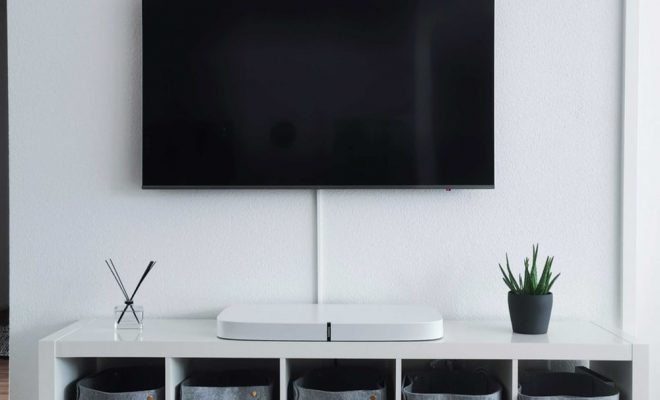
In today’s world, people love to watch their favorite TV shows, movies, and sports on a big screen. A projector can turn your living room into a home cinema, and it is a great way to enjoy your favorite shows with family and friends. If you are planning to project a TV to a wall, then this article will give you some useful tips to get started.

Step 1: Get a Projector and a Screen

The first step is to get a projector and a screen. You can either buy a projector or rent it from a local store. When choosing a projector, consider the brightness, resolution, and connectivity options. A good projector should have at least 2000 lumens of brightness, a resolution of 1080p, and support for HDMI or VGA connectors.

You can also buy a projector screen or use a plain white wall as a screen. A screen will enhance the image quality and provide a better viewing experience. If you are using a wall, make sure to clean it and remove any obstacles or decorations that can affect the image quality.

Step 2: Placement of Projector and Screen

The next step is to choose the placement of the projector and screen. The projector should be positioned in front of the screen and elevated to project the image at the desired height. The distance between the projector and screen should be determined by the throw ratio of the projector. A short-throw projector is ideal for small rooms, while a long-throw projector is suitable for larger rooms.

Once you have determined the placement, use a stand or a ceiling mount to secure the projector. Make sure the projector is level and aligned with the screen. If you are using a screen, use a tape measure to find the center of the screen and mark it with a chalk or a pen.

Step 3: Connect the Projector to the TV

The next step is to connect the projector to the TV. Most projectors have HDMI or VGA ports that can be used to connect to the TV. If you have multiple devices like a Blu-ray player or a sound system, connect them to the projector as well. Make sure all the cables are securely plugged in, and the input source is set to the correct device.

Step 4: Adjust the Image and Sound

The last step is to adjust the image and sound. Most projectors have built-in settings that can be adjusted for brightness, color, contrast, and sharpness. Use the remote control or the buttons on the projector to find the optimal settings for the room lighting and viewing distance.

If you are using external speakers, connect them to the projector or the TV to enhance the sound quality. Adjust the volume and balance of the speakers to match the image quality, and ensure that the sound is synchronized with the video.

Conclusion

Projecting a TV to a wall is a great way to enjoy your favorite shows, movies, and sports on a big screen. With these tips, you can set up your projector in no time and enjoy the cinematic experience in your living room. Remember to choose the right projector, place it at the optimal distance, connect it to the TV, and adjust the image and sound for the best viewing experience. Happy projecting!   

Previous Article

How to Program VTech Cordless Phones

Next Article

How to Properly Pack a TV for ...

Matthew Lynch

Related articles More from author

  • Digital & Mobile Technology

    How to Check Battery Life on Apple Watch

    June 23, 2023
    By Matthew Lynch
  • Digital & Mobile Technology

    How to Fix Nvidia GeForce Drivers Not Downloading or Installing

    June 6, 2023
    By Matthew Lynch
  • Digital & Mobile Technology

    How to Change Your Modem Password

    July 29, 2023
    By Matthew Lynch
  • Digital & Mobile Technology

    How to Send Anonymous Emails: 5 Stealthy Methods

    June 22, 2023
    By Matthew Lynch
  • Digital & Mobile Technology

    How to View the Clipboard History on a Mac

    August 5, 2023
    By Matthew Lynch
  • Digital & Mobile Technology

    What Is Retina Display?

    June 23, 2023
    By Matthew Lynch

Search

Login & Registration

  • Log in
  • Entries feed
  • Comments feed
  • WordPress.org

Newsletter

Signup for The Tech Edvocate Newsletter and have the latest in EdTech news and opinion delivered to your email address!

About Us

Since technology is not going anywhere and does more good than harm, adapting is the best course of action. That is where The Tech Edvocate comes in. We plan to cover the PreK-12 and Higher Education EdTech sectors and provide our readers with the latest news and opinion on the subject. From time to time, I will invite other voices to weigh in on important issues in EdTech. We hope to provide a well-rounded, multi-faceted look at the past, present, the future of EdTech in the US and internationally.

We started this journey back in June 2016, and we plan to continue it for many more years to come. I hope that you will join us in this discussion of the past, present and future of EdTech and lend your own insight to the issues that are discussed.

Newsletter

Signup for The Tech Edvocate Newsletter and have the latest in EdTech news and opinion delivered to your email address!

Contact Us

The Tech Edvocate
910 Goddin Street
Richmond, VA 23231
(601) 630-5238
[email protected]

Copyright © 2026 Matthew Lynch. All rights reserved.