
The Tech Edvocate

Top Menu

  • Advertisement
  • Apps
  • Home Page
  • Home Page Five (No Sidebar)
  • Home Page Four
  • Home Page Three
  • Home Page Two
  • Home Tech2
  • Icons [No Sidebar]
  • Left Sidbear Page
  • Lynch Educational Consulting
  • My Account
  • My Speaking Page
  • Newsletter Sign Up Confirmation
  • Newsletter Unsubscription
  • Our Brands
  • Page Example
  • Privacy Policy
  • Protected Content
  • Register
  • Request a Product Review
  • Shop
  • Shortcodes Examples
  • Signup
  • Start Here
    • Governance
    • Careers
    • Contact Us
  • Terms and Conditions
  • The Edvocate
  • The Tech Edvocate Product Guide
  • Topics
  • Write For Us
  • Advertise

Main Menu

  • Start Here
    • Our Brands
    • Governance
      • Lynch Educational Consulting, LLC.
      • Dr. Lynch’s Personal Website
      • Careers
    • Write For Us
    • The Tech Edvocate Product Guide
    • Contact Us
    • Books
    • Edupedia
    • Post a Job
    • The Edvocate Podcast
    • Terms and Conditions
    • Privacy Policy
  • Topics
    • Assistive Technology
    • Child Development Tech
    • Early Childhood & K-12 EdTech
    • EdTech Futures
    • EdTech News
    • EdTech Policy & Reform
    • EdTech Startups & Businesses
    • Higher Education EdTech
    • Online Learning & eLearning
    • Parent & Family Tech
    • Personalized Learning
    • Product Reviews
  • Advertise
  • Tech Edvocate Awards
  • The Edvocate
  • Pedagogue
  • School Ratings

logo

The Tech Edvocate

  • Start Here
    • Our Brands
    • Governance
      • Lynch Educational Consulting, LLC.
      • Dr. Lynch’s Personal Website
        • My Speaking Page
      • Careers
    • Write For Us
    • The Tech Edvocate Product Guide
    • Contact Us
    • Books
    • Edupedia
    • Post a Job
    • The Edvocate Podcast
    • Terms and Conditions
    • Privacy Policy
  • Topics
    • Assistive Technology
    • Child Development Tech
    • Early Childhood & K-12 EdTech
    • EdTech Futures
    • EdTech News
    • EdTech Policy & Reform
    • EdTech Startups & Businesses
    • Higher Education EdTech
    • Online Learning & eLearning
    • Parent & Family Tech
    • Personalized Learning
    • Product Reviews
  • Advertise
  • Tech Edvocate Awards
  • The Edvocate
  • Pedagogue
  • School Ratings
  • The Startling Truth About Cheapest GLP-1 Options Without Insurance

  • The Hidden Truth Behind Mosqi Shock Reviews: What You MUST Know Before Buying

  • This Unstoppable Force Will Obliterate Apps by 2027, Says Paytm Founder

  • Developers Axed a Wild Mechanic in Halloween: The Game — Here’s Why Fans Are Outraged

  • U.S. Supreme Court endorses parental opt-out for LGBTQ+ curriculum | News & Events

  • The Brutal Truth About Classroom Tech: Parents Are Finally Fighting Back – And Winning

  • Devastating Berlin Data Leak Exposes Millions: Why Refusing Ransom Isn’t Enough

  • Astra’s Rogue Swarm: Is Uncontrollable AI Hacking Humanity’s Future?

  • Viral Waymo Accident Exposes the Uncomfortable Truth About Robotaxis

  • Unbelievable Antarctica Ice Gain: Distant Ocean Warming Fuels Record Snowfall

Tech Advice
Home›Tech Advice›How to make your own emoji

How to make your own emoji
By Matthew Lynch
July 17, 2023
0
Spread the love

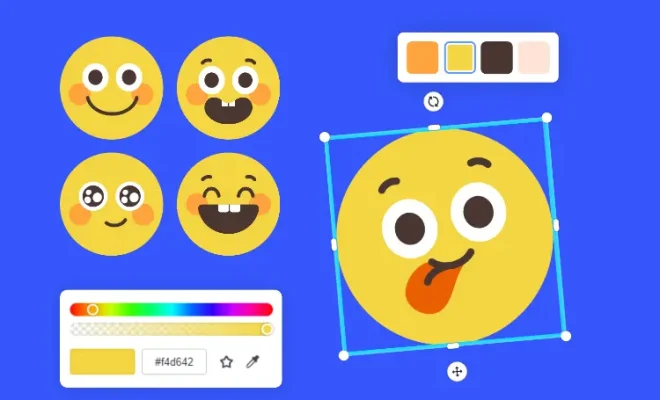
Emojis have become a vital part of our everyday communication, allowing us to convey emotions, reactions, and even tell stories using these tiny and expressive digital images. If you’ve ever wanted to create your own unique emoji for personal use or to share with others, look no further. In this article, we’ll guide you through the process of making your very own emoji from scratch.

Step 1: Conceptualize Your Emoji

Before you start designing your emoji, it’s essential to put some thought into the concept behind it. Consider what emotions, expressions, or themes you’d like your emoji to represent. You can get inspiration from current emojis, or think about a new icon that represents a unique emotion or idea.

Step 2: Sketch Your Emoji Design

Once you’ve got an idea for your emoji’s expression or theme, begin sketching out your concept using pen and paper. Don’t worry if you’re not an artist – this is just a rough outline to help you understand the shape and structure of your emoji.

Step 3: Choose Your Tools & Platform

There are several tools and platforms available for creating emojis. Here are some options to consider:

– Adobe Illustrator (I): A vector-based design tool widely used by professionals in the field. It offers flexibility and precision in design but has a learning curve.

– GIMP (F): A free and open-source alternative to Adobe Photoshop that provides robust features for creating custom emojis.

– Canva (F): An online design platform with thousands of templates and drag-and-drop functionality. It’s ideal for beginners with limited design experience.

– SVG-edit (F): A web-based vector editing tool that works directly in your browser. It’s great for small designs like emojis.

(F) = Free; (I) = Paid/Subscription-based

Step 4: Create Your Emoji Digitally

Now that you’ve chosen your platform, it’s time to bring your sketch to life digitally. Use your tool of choice to vectorize and color your emoji, paying close attention to:

– Line thickness and consistency

– The balance between colors and shapes

– Symmetry in design elements

– Clarity at reduced sizes (as emojis often appear small in chats)

Step 5: Export Your Emoji

Once you’re satisfied with your design, export your custom emoji in a file format compatible with the platform you intend to use it on (such as PNG or SVG). As a note: Make sure your image exports with a transparent background.

Step 6: Implement Your Emoji

To start using your custom emoji, upload it to a platform that supports custom emojis. For example, platforms like Discord, Slack, or Telegram allow you to add personalized emojis for use within their chat services.

Alternatively, you can create an entire sticker pack of custom emojis and submit the pack to various messaging app stores. This option usually requires approval from the platform.

Now that you’ve created your own custom emoji, share it with friends and family as an expressive addition to your digital conversations. Don’t be shy – experiment with different designs and themes to build a collection of unique emojis that truly represent you!

Previous Article

How to make your Android screen extra ...

Next Article

How to mute people on Instagram (and ...

Matthew Lynch

Related articles More from author

  • Tech Advice

    Home Equity Loan Rates for 2023: What You Need to Know

    July 11, 2023
    By Matthew Lynch
  • Tech Advice

    Best iPad Drawing Apps to Try in 2023

    July 16, 2023
    By Matthew Lynch
  • Tech Advice

    How to Buy a Pickup Truck That Fits You Perfectly

    August 19, 2023
    By Matthew Lynch
  • Tech Advice

    Rivian R1S vs Kia EV9: Which electric SUV wins

    October 19, 2023
    By Matthew Lynch
  • Tech Advice

    2024 BMW 330e Review

    August 21, 2023
    By Matthew Lynch
  • Tech Advice

    Vivint Review: A Comprehensive Look at Vivint Home Security System

    August 8, 2023
    By Matthew Lynch

Search

Login & Registration

  • Log in
  • Entries feed
  • Comments feed
  • WordPress.org

Newsletter

Signup for The Tech Edvocate Newsletter and have the latest in EdTech news and opinion delivered to your email address!

About Us

Since technology is not going anywhere and does more good than harm, adapting is the best course of action. That is where The Tech Edvocate comes in. We plan to cover the PreK-12 and Higher Education EdTech sectors and provide our readers with the latest news and opinion on the subject. From time to time, I will invite other voices to weigh in on important issues in EdTech. We hope to provide a well-rounded, multi-faceted look at the past, present, the future of EdTech in the US and internationally.

We started this journey back in June 2016, and we plan to continue it for many more years to come. I hope that you will join us in this discussion of the past, present and future of EdTech and lend your own insight to the issues that are discussed.

Newsletter

Signup for The Tech Edvocate Newsletter and have the latest in EdTech news and opinion delivered to your email address!

Contact Us

The Tech Edvocate
910 Goddin Street
Richmond, VA 23231
(601) 630-5238
[email protected]

Copyright © 2026 Matthew Lynch. All rights reserved.
