The Tech Edvocate

Top Menu

  • Advertisement
  • Apps
  • Home Page
  • Home Page Five (No Sidebar)
  • Home Page Four
  • Home Page Three
  • Home Page Two
  • Home Tech2
  • Icons [No Sidebar]
  • Left Sidbear Page
  • Lynch Educational Consulting
  • My Account
  • My Speaking Page
  • Newsletter Sign Up Confirmation
  • Newsletter Unsubscription
  • Our Brands
  • Page Example
  • Privacy Policy
  • Protected Content
  • Register
  • Request a Product Review
  • Shop
  • Shortcodes Examples
  • Signup
  • Start Here
    • Governance
    • Careers
    • Contact Us
  • Terms and Conditions
  • The Edvocate
  • The Tech Edvocate Product Guide
  • Topics
  • Write For Us
  • Advertise

Main Menu

  • Start Here
    • Our Brands
    • Governance
      • Lynch Educational Consulting, LLC.
      • Dr. Lynch’s Personal Website
      • Careers
    • Write For Us
    • The Tech Edvocate Product Guide
    • Contact Us
    • Books
    • Edupedia
    • Post a Job
    • The Edvocate Podcast
    • Terms and Conditions
    • Privacy Policy
  • Topics
    • Assistive Technology
    • Child Development Tech
    • Early Childhood & K-12 EdTech
    • EdTech Futures
    • EdTech News
    • EdTech Policy & Reform
    • EdTech Startups & Businesses
    • Higher Education EdTech
    • Online Learning & eLearning
    • Parent & Family Tech
    • Personalized Learning
    • Product Reviews
  • Advertise
  • Tech Edvocate Awards
  • The Edvocate
  • Pedagogue
  • School Ratings

logo

The Tech Edvocate

  • Start Here
    • Our Brands
    • Governance
      • Lynch Educational Consulting, LLC.
      • Dr. Lynch’s Personal Website
        • My Speaking Page
      • Careers
    • Write For Us
    • The Tech Edvocate Product Guide
    • Contact Us
    • Books
    • Edupedia
    • Post a Job
    • The Edvocate Podcast
    • Terms and Conditions
    • Privacy Policy
  • Topics
    • Assistive Technology
    • Child Development Tech
    • Early Childhood & K-12 EdTech
    • EdTech Futures
    • EdTech News
    • EdTech Policy & Reform
    • EdTech Startups & Businesses
    • Higher Education EdTech
    • Online Learning & eLearning
    • Parent & Family Tech
    • Personalized Learning
    • Product Reviews
  • Advertise
  • Tech Edvocate Awards
  • The Edvocate
  • Pedagogue
  • School Ratings
  • Kazino zīmolu un spēļu logotipu sadarbība plašās digitālajās bibliotēkās

  • Kopu formāts un tradicionālās izmaksu līnijas slotos

  • Komiksová estetika mení tón prezentácie automatových hier

  • Tipogrāfija kā tematisko spēļu automātu vizuālās identitātes daļa

  • Bonusa kārtu attīstība mūsdienu spēļu automātu stāstījumā

  • Kā turpinājumi saglabā spēles identitāti, mainot tās mehāniku

  • Kā tiešsaistes kazino piedāvā pazīstamas spēles līdzās jaunākajiem izlaidumiem

  • Kā mobilo ekrānu portreta izkārtojums mainīja spēļu automātu kompozīciju

  • Kazino spēļu vadības elementu un informācijas izkārtojuma pielāgošana dažādiem ekrāniem

  • Kā māksla un mehānika veido spēļu automātu portfeļa atšķirības

Digital & Mobile Technology
Home›Digital & Mobile Technology›How to Make a Campfire in Minecraft

How to Make a Campfire in Minecraft
By Matthew Lynch
May 31, 2023
0
Spread the love

Minecraft has been one of the best-selling games of all time for a reason. With its open-world sandbox gameplay, it’s a perfect playground for creative minds. One of the most fun things to do in Minecraft is to build a campfire. It’s a great way to add a bit of ambiance to your game, and it’s also very useful for cooking food and keeping mobs at bay.

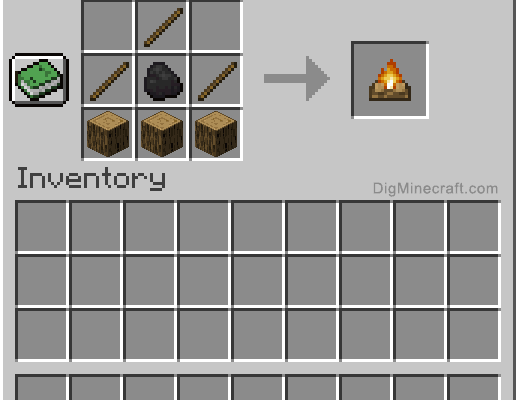
Here’s a step-by-step guide on how to make a campfire in Minecraft.

Step 1: Gather the Ingredients

To make a campfire in Minecraft, you’ll need three ingredients:

– Stick: You can find sticks by breaking trees or use your axe to chop down branches.

– Coal or Charcoal: You can obtain coal by mining coal ore blocks underground or by killing certain types of mobs. You can also make charcoal by burning wood blocks in a furnace.

– Wood Log or Stripped Log: To get wood logs or stripped logs, you’ll need to chop down trees using an axe. You can use any type of wood log or stripped log for this recipe.

Step 2: Open the Crafting Menu

Once you have gathered the ingredients, you need to open the crafting menu. To do this, you need to press “E” on your keyboard or “Y” on your Xbox controller.

Step 3: Arrange the Ingredients

In the crafting menu, you’ll see a 3×3 grid. Arrange the ingredients in the following pattern:

– Place one coal or charcoal in the center square.

– Place one stick in the square to the left of the coal or charcoal.

– Place one stick in the square to the right of the coal or charcoal.

– Place one wood log or stripped log in the square below the coal or charcoal.

Step 4: Craft the Campfire

Once you have arranged the ingredients correctly, the campfire will appear in the result box on the right side of the crafting grid. Click on it to transfer it to your inventory.

Step 5: Place the Campfire

Now that you’ve crafted your campfire, it’s time to place it. You can place it on any block that allows it, such as dirt, grass, sand, or cobblestone. To place the campfire, select it from your inventory, then right-click on the block where you want to put it.

Step 6: Use the Campfire

Once you’ve placed the campfire, you can use it in different ways, such as:

– Cooking food: You can place raw food on top of the campfire to cook it. It’s a great way to get cooked meat, fish, or vegetables.

– Lighting up the area: Campfires provide light and warmth, so they are perfect for lighting up your base or campsite while also keeping mobs away.

– Sitting around the campfire: You can use a campfire as a social gathering spot. Invite some friends over and enjoy the warmth and light of the fire while telling stories and having fun.

Conclusion

Making a campfire in Minecraft is easy and fun. It’s a great way to add a bit of ambiance to your game and make your base or campsite feel like home. So, gather your ingredients, open your crafting menu, arrange your ingredients correctly, and craft your campfire. Don’t forget to use it for cooking, lighting, and socializing. Happy camping!


Previous Article

How to Fix a 401 Unauthorized Error

Next Article

How to Fix Roblox Not Updating on ...

Matthew Lynch

Related articles More from author

  • Digital & Mobile Technology

    How to Add the Google Chrome Dinosaur Game to Your Android

    August 5, 2023
    By Matthew Lynch
  • Digital & Mobile Technology

    How to Enable Android Nougat’s Cat-Collecting Easter Egg)

    May 28, 2023
    By Matthew Lynch
  • Digital & Mobile Technology

    Tools to Write Better Emails That People Will Read and Reply To

    June 12, 2023
    By Matthew Lynch
  • Digital & Mobile Technology

    Send a Text Message to a Landline Telephone

    June 9, 2023
    By Matthew Lynch
  • Digital & Mobile Technology

    What Is Microphone Gain & How Does It Affect Recording Volume?

    August 5, 2023
    By Matthew Lynch
  • Digital & Mobile Technology

    Minimize Outlook Email to the System Tray for Efficiency

    June 4, 2023
    By Matthew Lynch

Search

Login & Registration

  • Log in
  • Entries feed
  • Comments feed
  • WordPress.org

Newsletter

Signup for The Tech Edvocate Newsletter and have the latest in EdTech news and opinion delivered to your email address!

About Us

Since technology is not going anywhere and does more good than harm, adapting is the best course of action. That is where The Tech Edvocate comes in. We plan to cover the PreK-12 and Higher Education EdTech sectors and provide our readers with the latest news and opinion on the subject. From time to time, I will invite other voices to weigh in on important issues in EdTech. We hope to provide a well-rounded, multi-faceted look at the past, present, the future of EdTech in the US and internationally.

We started this journey back in June 2016, and we plan to continue it for many more years to come. I hope that you will join us in this discussion of the past, present and future of EdTech and lend your own insight to the issues that are discussed.

Newsletter

Signup for The Tech Edvocate Newsletter and have the latest in EdTech news and opinion delivered to your email address!

Contact Us

The Tech Edvocate
910 Goddin Street
Richmond, VA 23231
(601) 630-5238
[email protected]

Copyright © 2026 Matthew Lynch. All rights reserved.