The Tech Edvocate

Top Menu

  • Advertisement
  • Apps
  • Home Page
  • Home Page Five (No Sidebar)
  • Home Page Four
  • Home Page Three
  • Home Page Two
  • Home Tech2
  • Icons [No Sidebar]
  • Left Sidbear Page
  • Lynch Educational Consulting
  • My Account
  • My Speaking Page
  • Newsletter Sign Up Confirmation
  • Newsletter Unsubscription
  • Our Brands
  • Page Example
  • Privacy Policy
  • Protected Content
  • Register
  • Request a Product Review
  • Shop
  • Shortcodes Examples
  • Signup
  • Start Here
    • Governance
    • Careers
    • Contact Us
  • Terms and Conditions
  • The Edvocate
  • The Tech Edvocate Product Guide
  • Topics
  • Write For Us
  • Advertise

Main Menu

  • Start Here
    • Our Brands
    • Governance
      • Lynch Educational Consulting, LLC.
      • Dr. Lynch’s Personal Website
      • Careers
    • Write For Us
    • The Tech Edvocate Product Guide
    • Contact Us
    • Books
    • Edupedia
    • Post a Job
    • The Edvocate Podcast
    • Terms and Conditions
    • Privacy Policy
  • Topics
    • Assistive Technology
    • Child Development Tech
    • Early Childhood & K-12 EdTech
    • EdTech Futures
    • EdTech News
    • EdTech Policy & Reform
    • EdTech Startups & Businesses
    • Higher Education EdTech
    • Online Learning & eLearning
    • Parent & Family Tech
    • Personalized Learning
    • Product Reviews
  • Advertise
  • Tech Edvocate Awards
  • The Edvocate
  • Pedagogue
  • School Ratings

logo

The Tech Edvocate

  • Start Here
    • Our Brands
    • Governance
      • Lynch Educational Consulting, LLC.
      • Dr. Lynch’s Personal Website
        • My Speaking Page
      • Careers
    • Write For Us
    • The Tech Edvocate Product Guide
    • Contact Us
    • Books
    • Edupedia
    • Post a Job
    • The Edvocate Podcast
    • Terms and Conditions
    • Privacy Policy
  • Topics
    • Assistive Technology
    • Child Development Tech
    • Early Childhood & K-12 EdTech
    • EdTech Futures
    • EdTech News
    • EdTech Policy & Reform
    • EdTech Startups & Businesses
    • Higher Education EdTech
    • Online Learning & eLearning
    • Parent & Family Tech
    • Personalized Learning
    • Product Reviews
  • Advertise
  • Tech Edvocate Awards
  • The Edvocate
  • Pedagogue
  • School Ratings
  • Nočno sijajanje zaslonov: estetski pregled spletne igralniške izkušnje

  • This Nordstrom Fall Beauty Product Delivers a ‘Filter Effect’ — Without the Filter

  • Your Smart Devices ARE Listening: The Multi-Million Dollar Deception Revealed

  • The Shocking Truth About AquaHarvest’s Water Footprint in Our Deserts

  • MindLink’s BCI Scandal: 10 Urgent Questions About Your Brain Data

  • Level-5’s AI Apology: Why Fans Are Furious Over One Small Detail

  • This Crucial New Law Just Changed Everything for Kids Online

  • Humanity’s Reckoning? This Viral AI Extinction Warning Ignited a Firestorm

  • Unveiling the Battle: Why Teachers Unions in New York Are Fighting This Federal Program

  • Unbelievable: This Private School Twitter Challenge Is Sparking Outrage

Digital & Mobile Technology
Home›Digital & Mobile Technology›How to Make a Background Transparent Using Canva

How to Make a Background Transparent Using Canva
By Matthew Lynch
June 15, 2023
0
Spread the love

Canva is a leading and easy-to-use graphic design platform that has been growing in popularity due to its simplicity and flexibility. Users can create professional-looking designs, from invitations to social media graphics, with minimal effort using the platform’s drag-and-drop interface. One of the most useful features that Canva offers is the ability to create a transparent background for your designs. The transparent background can be useful when creating logos, images for websites, and other marketing materials. In this article, we will teach you how to make a background transparent using Canva.

Step One – Setting up your Design

The first step is to set up your design canvas. To do this, log in to your Canva account, go to the ‘Create a Design’ button, and select any size that is suitable for your project. If you are unsure, you can always use the custom size option to set up a specific dimension for your design.

Step Two- Creating your Design

After setting up your design canvas, you can select the design elements that you want to include in your project. This can include text, images, and other graphics that will be part of your design. For example, we can select a text box and type in the text that we want to use in our design.

Step Three – Selecting your Background

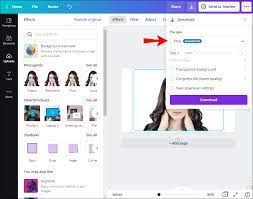
To make the background transparent, select the ‘Background’ in the side panel, and click on the ‘Transparent’ option. This sets the background of your design to transparency. In addition, you can also adjust the transparency settings to make the background more opaque.

Step four – Save your Design

Once you have completed your design and adjusted the transparency settings, you can save your work. To do this, click on the ‘Download’ button, select the file format that you want to use, and then click on the ‘Download’ button again. This will save the design to your computer in the desired file format with the transparent background.

Conclusion

Creating a transparent background for your designs is a useful and effective strategy that can help improve the overall quality of your marketing materials. By using Canva, you can make a background transparent quickly and easily with just a few simple steps. We hope that this guide will assist you in creating visually appealing designs that stand out amongst the crowd. Happy designing!

Previous Article

How to Hard Refresh Your Browser

Next Article

How to Enable and Customize the Touch ...

Matthew Lynch

Related articles More from author

  • Digital & Mobile Technology

    6 of the Best Sites to Track Recent Celebrity News

    July 14, 2023
    By Matthew Lynch
  • Digital & Mobile Technology

    Best Tools to Open RAR Files

    June 22, 2023
    By Matthew Lynch
  • Digital & Mobile Technology

    Easy Ways to Check PC Health

    April 10, 2023
    By Matthew Lynch
  • Digital & Mobile Technology

    Where to Find Dogs & Puppies for Sale Near You: Ethical Sites

    June 7, 2023
    By Matthew Lynch
  • Digital & Mobile Technology

    How to Get Coordinates From Google Maps

    June 3, 2023
    By Matthew Lynch
  • Digital & Mobile Technology

    How to Insert a SIM Card Into a Smartphone

    June 1, 2023
    By Matthew Lynch

Search

Login & Registration

  • Log in
  • Entries feed
  • Comments feed
  • WordPress.org

Newsletter

Signup for The Tech Edvocate Newsletter and have the latest in EdTech news and opinion delivered to your email address!

About Us

Since technology is not going anywhere and does more good than harm, adapting is the best course of action. That is where The Tech Edvocate comes in. We plan to cover the PreK-12 and Higher Education EdTech sectors and provide our readers with the latest news and opinion on the subject. From time to time, I will invite other voices to weigh in on important issues in EdTech. We hope to provide a well-rounded, multi-faceted look at the past, present, the future of EdTech in the US and internationally.

We started this journey back in June 2016, and we plan to continue it for many more years to come. I hope that you will join us in this discussion of the past, present and future of EdTech and lend your own insight to the issues that are discussed.

Newsletter

Signup for The Tech Edvocate Newsletter and have the latest in EdTech news and opinion delivered to your email address!

Contact Us

The Tech Edvocate
910 Goddin Street
Richmond, VA 23231
(601) 630-5238
[email protected]

Copyright © 2026 Matthew Lynch. All rights reserved.