The Tech Edvocate

Top Menu

  • Advertisement
  • Apps
  • Home Page
  • Home Page Five (No Sidebar)
  • Home Page Four
  • Home Page Three
  • Home Page Two
  • Home Tech2
  • Icons [No Sidebar]
  • Left Sidbear Page
  • Lynch Educational Consulting
  • My Account
  • My Speaking Page
  • Newsletter Sign Up Confirmation
  • Newsletter Unsubscription
  • Our Brands
  • Page Example
  • Privacy Policy
  • Protected Content
  • Register
  • Request a Product Review
  • Shop
  • Shortcodes Examples
  • Signup
  • Start Here
    • Governance
    • Careers
    • Contact Us
  • Terms and Conditions
  • The Edvocate
  • The Tech Edvocate Product Guide
  • Topics
  • Write For Us
  • Advertise

Main Menu

  • Start Here
    • Our Brands
    • Governance
      • Lynch Educational Consulting, LLC.
      • Dr. Lynch’s Personal Website
      • Careers
    • Write For Us
    • The Tech Edvocate Product Guide
    • Contact Us
    • Books
    • Edupedia
    • Post a Job
    • The Edvocate Podcast
    • Terms and Conditions
    • Privacy Policy
  • Topics
    • Assistive Technology
    • Child Development Tech
    • Early Childhood & K-12 EdTech
    • EdTech Futures
    • EdTech News
    • EdTech Policy & Reform
    • EdTech Startups & Businesses
    • Higher Education EdTech
    • Online Learning & eLearning
    • Parent & Family Tech
    • Personalized Learning
    • Product Reviews
  • Advertise
  • Tech Edvocate Awards
  • The Edvocate
  • Pedagogue
  • School Ratings

logo

The Tech Edvocate

  • Start Here
    • Our Brands
    • Governance
      • Lynch Educational Consulting, LLC.
      • Dr. Lynch’s Personal Website
        • My Speaking Page
      • Careers
    • Write For Us
    • The Tech Edvocate Product Guide
    • Contact Us
    • Books
    • Edupedia
    • Post a Job
    • The Edvocate Podcast
    • Terms and Conditions
    • Privacy Policy
  • Topics
    • Assistive Technology
    • Child Development Tech
    • Early Childhood & K-12 EdTech
    • EdTech Futures
    • EdTech News
    • EdTech Policy & Reform
    • EdTech Startups & Businesses
    • Higher Education EdTech
    • Online Learning & eLearning
    • Parent & Family Tech
    • Personalized Learning
    • Product Reviews
  • Advertise
  • Tech Edvocate Awards
  • The Edvocate
  • Pedagogue
  • School Ratings
  • How to create estimates in Buildertrend

  • How to use Bluebeam for punch lists

  • Procore vs Viewpoint features

  • How to submit invoices in Procore

  • How to set up Monday.com for contractors

  • Can PlanGrid track punch lists

  • How to create selections in CoConstruct

  • How to markup drawings in PlanGrid

  • How to use PlanGrid for blueprints

  • How to create custom tools in Bluebeam

Assistive Technology
Home›Assistive Technology›How to Get Into and Out of iPhone Recovery Mode

How to Get Into and Out of iPhone Recovery Mode
By Matthew Lynch
June 7, 2023
0
Spread the love

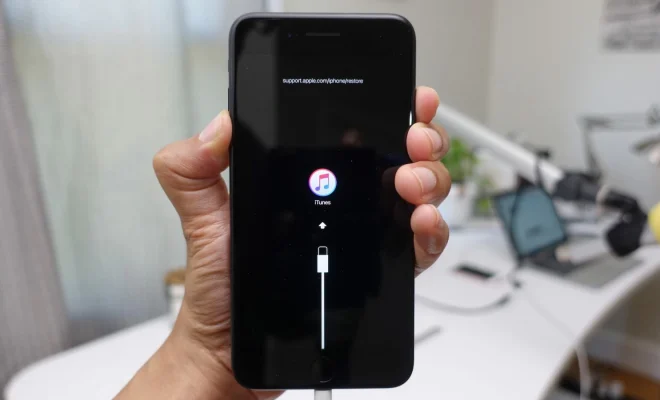
iPhone recovery mode is a useful feature that helps you fix various problems with your device. It is a mode that you can put your iPhone in when you are experiencing issues with the operating system, such as when the device is stuck on the Apple logo or when the screen is frozen. Recovery mode allows you to restore your iPhone to its original state, which can help fix any issues you are facing.

However, getting into and out of iPhone recovery mode can be challenging, especially if you are not familiar with the process. In this article, we will show you how to get into and out of iPhone recovery mode.

How to Get Into iPhone Recovery Mode

Before we show you the steps, it is essential to know that the process of getting into iPhone recovery mode depends on what iPhone model you are using.

For iPhone 8 or Later Models:

Hold the power button and either volume button (up or down) simultaneously.

Release the buttons as soon as an Apple logo appears.

Hold down the side button until the “Connect to iTunes” screen pops up on your iPhone.

For iPhone 7 and 7 Plus Models:

Hold the volume button and power button simultaneously.

Release the buttons as soon as an Apple logo appears.

Hold the volume down button until the “Connect to iTunes” screen pops up on your iPhone.

For iPhone 6s and Earlier Models:

Hold down both the home and power buttons at the same time.

Release both buttons as soon as an Apple logo appears.

Hold down the home button until the “Connect to iTunes” screen pops up on your iPhone.

How to Get Out of iPhone Recovery Mode

Getting out of iPhone recovery mode is also a crucial process that you need to know. Apple designed iPhone recovery mode to be a temporary solution to fix any issues with your device. So, if you leave your iPhone in recovery mode for an extended period, you might end up losing data or damaging the operating system.

Follow these steps to exit iPhone recovery mode.

For iPhone 8 or Later Models:

Hold down the power button and the volume button (up or down) simultaneously.

Keep holding the buttons until the Apple logo appears on your screen.

For iPhone 7 and 7 Plus Models:

Hold down the volume down button and the power button simultaneously.

Keep holding the buttons until the Apple logo appears on your screen.

For iPhone 6s and Earlier Models:

Hold down the home button and power button at the same time.

Keep holding the buttons until the Apple logo appears on your screen.

Conclusion

In conclusion, iPhone recovery mode is a useful feature that you can use to fix various issues with your device’s operating system. However, getting into and out of iPhone recovery mode can be a bit challenging, especially if you are not familiar with the process.

If you follow the steps mentioned above, you can easily put your iPhone into and out of recovery mode without losing any data or damaging the operating system.

We hope this article has helped you understand how to get into and out of iPhone recovery mode. If you have any questions, feel free to ask them in the comments below.


Previous Article

How to Use VRChat on Meta (Oculus) ...

Next Article

Why Isn’t My Car Key Remote Working?

Matthew Lynch

Related articles More from author

  • Assistive Technology

    What Is Mailchimp, and How Does It Work?

    June 6, 2023
    By Matthew Lynch
  • Assistive Technology

    How to Enable and Use Word Wise on Your Kindle

    June 6, 2023
    By Matthew Lynch
  • Assistive Technology

    How to Screenshot on Samsung S21

    June 11, 2023
    By Matthew Lynch
  • Assistive Technology

    How to Add an NFT as Your Profile Picture on Twitter

    September 7, 2023
    By Matthew Lynch
  • Assistive Technology

    How to Create and Use Microsoft Word Templates

    June 10, 2023
    By Matthew Lynch
  • Assistive Technology

    How to Create a Stocks Watchlist on Google Finance

    June 21, 2023
    By Matthew Lynch

Search

Login & Registration

  • Log in
  • Entries feed
  • Comments feed
  • WordPress.org

Newsletter

Signup for The Tech Edvocate Newsletter and have the latest in EdTech news and opinion delivered to your email address!

About Us

Since technology is not going anywhere and does more good than harm, adapting is the best course of action. That is where The Tech Edvocate comes in. We plan to cover the PreK-12 and Higher Education EdTech sectors and provide our readers with the latest news and opinion on the subject. From time to time, I will invite other voices to weigh in on important issues in EdTech. We hope to provide a well-rounded, multi-faceted look at the past, present, the future of EdTech in the US and internationally.

We started this journey back in June 2016, and we plan to continue it for many more years to come. I hope that you will join us in this discussion of the past, present and future of EdTech and lend your own insight to the issues that are discussed.

Newsletter

Signup for The Tech Edvocate Newsletter and have the latest in EdTech news and opinion delivered to your email address!

Contact Us

The Tech Edvocate
910 Goddin Street
Richmond, VA 23231
(601) 630-5238
[email protected]

Copyright © 2026 Matthew Lynch. All rights reserved.