The Tech Edvocate

Top Menu

  • Advertisement
  • Apps
  • Home Page
  • Home Page Five (No Sidebar)
  • Home Page Four
  • Home Page Three
  • Home Page Two
  • Home Tech2
  • Icons [No Sidebar]
  • Left Sidbear Page
  • Lynch Educational Consulting
  • My Account
  • My Speaking Page
  • Newsletter Sign Up Confirmation
  • Newsletter Unsubscription
  • Our Brands
  • Page Example
  • Privacy Policy
  • Protected Content
  • Register
  • Request a Product Review
  • Shop
  • Shortcodes Examples
  • Signup
  • Start Here
    • Governance
    • Careers
    • Contact Us
  • Terms and Conditions
  • The Edvocate
  • The Tech Edvocate Product Guide
  • Topics
  • Write For Us
  • Advertise

Main Menu

  • Start Here
    • Our Brands
    • Governance
      • Lynch Educational Consulting, LLC.
      • Dr. Lynch’s Personal Website
      • Careers
    • Write For Us
    • The Tech Edvocate Product Guide
    • Contact Us
    • Books
    • Edupedia
    • Post a Job
    • The Edvocate Podcast
    • Terms and Conditions
    • Privacy Policy
  • Topics
    • Assistive Technology
    • Child Development Tech
    • Early Childhood & K-12 EdTech
    • EdTech Futures
    • EdTech News
    • EdTech Policy & Reform
    • EdTech Startups & Businesses
    • Higher Education EdTech
    • Online Learning & eLearning
    • Parent & Family Tech
    • Personalized Learning
    • Product Reviews
  • Advertise
  • Tech Edvocate Awards
  • The Edvocate
  • Pedagogue
  • School Ratings

logo

The Tech Edvocate

  • Start Here
    • Our Brands
    • Governance
      • Lynch Educational Consulting, LLC.
      • Dr. Lynch’s Personal Website
        • My Speaking Page
      • Careers
    • Write For Us
    • The Tech Edvocate Product Guide
    • Contact Us
    • Books
    • Edupedia
    • Post a Job
    • The Edvocate Podcast
    • Terms and Conditions
    • Privacy Policy
  • Topics
    • Assistive Technology
    • Child Development Tech
    • Early Childhood & K-12 EdTech
    • EdTech Futures
    • EdTech News
    • EdTech Policy & Reform
    • EdTech Startups & Businesses
    • Higher Education EdTech
    • Online Learning & eLearning
    • Parent & Family Tech
    • Personalized Learning
    • Product Reviews
  • Advertise
  • Tech Edvocate Awards
  • The Edvocate
  • Pedagogue
  • School Ratings
  • A Visitors Guide to Long Beach (CA), United States

  • A Visitor’s Guide to Fresno (CA), United States

  • A Visitors Guide to New Orleans (LA), United States

  • A Visitors Guide to Sacramento (CA), United States

  • A Visitors Guide to Lyon, France

  • JisuLife Ultra2 Portable Fan: A Powerful Multi-Function Cooling Solution

  • A Visitors Guide to Viña del Mar, Chile

  • A Visitors Guide to Århus, Denmark

  • A Visitors Guide to Bakersfield (CA), United States

  • A Visitors Guide to Aurora (CO), United States

Digital & Mobile Technology
Home›Digital & Mobile Technology›How to Fix the WHEA Uncorrectable Error on Windows 10

How to Fix the WHEA Uncorrectable Error on Windows 10
By Matthew Lynch
June 6, 2023
0
Spread the love

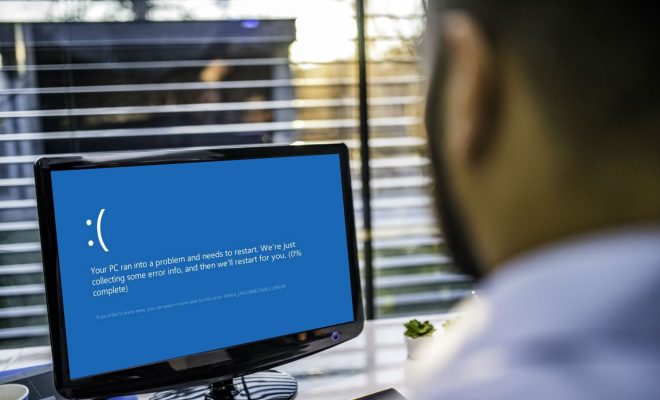
The WHEA Uncorrectable Error on Windows 10 is a common issue faced by many users. This error indicates a hardware problem on your computer, such as issues with the processor, RAM, or the hard drive. It can also indicate software issues like outdated drivers or system files.
If you’re facing the WHEA Uncorrectable Error on your Windows 10 PC, here are some steps you can follow to fix the issue:

1. Update drivers:

To fix the WHEA Uncorrectable Error, you need to ensure that all your drivers are up to date. You can update the drivers manually by visiting the manufacturer’s website or use third-party software such as Driver Booster to update all the drivers with a single click.

2. Check for Hardware Issues:

The WHEA Uncorrectable Error can also be caused due to hardware issues such as an overheating processor. Check for any physical damage on your PC, and ensure that all your components are working correctly. You can use the built-in Windows memory diagnostic tool to check if there are any RAM issues.

3. Perform System Restore:

If you recently installed new software or made changes to your computer, try to restore your system to an earlier date when everything was working fine. To do this, go to the Control Panel> System & Security> System> System Protection> System Restore.

4. Run System File Checker:

Corrupt system files can also cause the WHEA Uncorrectable Error. To fix this, you can run the System File Checker (SFC) tool, which scans for corrupt system files and automatically repairs them. Open Command Prompt as an Administrator and type “sfc/scannow” and hit Enter.

5. Reinstall Windows:

If none of the methods works, it’s time to reinstall Windows. This is a drastic step, but it’s the last resort to fix the WHEA Uncorrectable Error. Before reinstalling Windows, make sure to backup all your important files and data.


Previous Article

How to Design and Print Your Own ...

Next Article

How to Boost Your Wi-Fi Signal and ...

Matthew Lynch

Related articles More from author

  • Digital & Mobile Technology

    Ways You Can Get a Microsoft Office License for Free

    September 8, 2023
    By Matthew Lynch
  • Digital & Mobile Technology

    Easy Video Editing Ideas for Beginners to Try

    June 5, 2023
    By Matthew Lynch
  • Digital & Mobile Technology

    The History of Samsung’s Foldable Galaxy Z Series Phones

    June 15, 2023
    By Matthew Lynch
  • Digital & Mobile Technology

    What Is a Static IP Address? Here’s Why You Don’t Need One

    August 5, 2023
    By Matthew Lynch
  • Digital & Mobile Technology

    The Best Restaurant Picker Apps to Help You Decide Where to Eat

    June 12, 2023
    By Matthew Lynch
  • Digital & Mobile Technology

    Free Entrepreneurship Courses Online for Beginners

    June 5, 2023
    By Matthew Lynch

Search

Login & Registration

  • Register
  • Log in
  • Entries feed
  • Comments feed
  • WordPress.org

Newsletter

Signup for The Tech Edvocate Newsletter and have the latest in EdTech news and opinion delivered to your email address!

About Us

Since technology is not going anywhere and does more good than harm, adapting is the best course of action. That is where The Tech Edvocate comes in. We plan to cover the PreK-12 and Higher Education EdTech sectors and provide our readers with the latest news and opinion on the subject. From time to time, I will invite other voices to weigh in on important issues in EdTech. We hope to provide a well-rounded, multi-faceted look at the past, present, the future of EdTech in the US and internationally.

We started this journey back in June 2016, and we plan to continue it for many more years to come. I hope that you will join us in this discussion of the past, present and future of EdTech and lend your own insight to the issues that are discussed.

Newsletter

Signup for The Tech Edvocate Newsletter and have the latest in EdTech news and opinion delivered to your email address!

Contact Us

The Tech Edvocate
910 Goddin Street
Richmond, VA 23231
(601) 630-5238
[email protected]

Copyright © 2025 Matthew Lynch. All rights reserved.