The Tech Edvocate

Top Menu

  • Advertisement
  • Apps
  • Home Page
  • Home Page Five (No Sidebar)
  • Home Page Four
  • Home Page Three
  • Home Page Two
  • Home Tech2
  • Icons [No Sidebar]
  • Left Sidbear Page
  • Lynch Educational Consulting
  • My Account
  • My Speaking Page
  • Newsletter Sign Up Confirmation
  • Newsletter Unsubscription
  • Our Brands
  • Page Example
  • Privacy Policy
  • Protected Content
  • Register
  • Request a Product Review
  • Shop
  • Shortcodes Examples
  • Signup
  • Start Here
    • Governance
    • Careers
    • Contact Us
  • Terms and Conditions
  • The Edvocate
  • The Tech Edvocate Product Guide
  • Topics
  • Write For Us
  • Advertise

Main Menu

  • Start Here
    • Our Brands
    • Governance
      • Lynch Educational Consulting, LLC.
      • Dr. Lynch’s Personal Website
      • Careers
    • Write For Us
    • The Tech Edvocate Product Guide
    • Contact Us
    • Books
    • Edupedia
    • Post a Job
    • The Edvocate Podcast
    • Terms and Conditions
    • Privacy Policy
  • Topics
    • Assistive Technology
    • Child Development Tech
    • Early Childhood & K-12 EdTech
    • EdTech Futures
    • EdTech News
    • EdTech Policy & Reform
    • EdTech Startups & Businesses
    • Higher Education EdTech
    • Online Learning & eLearning
    • Parent & Family Tech
    • Personalized Learning
    • Product Reviews
  • Advertise
  • Tech Edvocate Awards
  • The Edvocate
  • Pedagogue
  • School Ratings

logo

The Tech Edvocate

  • Start Here
    • Our Brands
    • Governance
      • Lynch Educational Consulting, LLC.
      • Dr. Lynch’s Personal Website
        • My Speaking Page
      • Careers
    • Write For Us
    • The Tech Edvocate Product Guide
    • Contact Us
    • Books
    • Edupedia
    • Post a Job
    • The Edvocate Podcast
    • Terms and Conditions
    • Privacy Policy
  • Topics
    • Assistive Technology
    • Child Development Tech
    • Early Childhood & K-12 EdTech
    • EdTech Futures
    • EdTech News
    • EdTech Policy & Reform
    • EdTech Startups & Businesses
    • Higher Education EdTech
    • Online Learning & eLearning
    • Parent & Family Tech
    • Personalized Learning
    • Product Reviews
  • Advertise
  • Tech Edvocate Awards
  • The Edvocate
  • Pedagogue
  • School Ratings
  • Mark Sprague Takes the Helm as Director of St. Pete-Clearwater International Airport

  • Consumer Attitudes Toward Editing Claim Images: A Growing Concern for Insurers

  • ProstaVive: A Comprehensive Review of the Prostate Health Supplement in 2026

  • Discover Trader Joe’s Top Picks for 2026: Customer Choice Awards Highlights

  • U.S. Stock Market Faces Uncertainty Amid Rising Oil Prices and Geopolitical Tensions

  • Asian Markets Show Mixed Results Amid Rising Oil Prices and U.S. Futures Decline

  • Stability in Fuel Prices Amidst Global Crude Market Turmoil: An Analysis

  • Crude Oil Prices Surge Amid Tensions in the Strait of Hormuz

  • Indian Stock Market Opens Flat Amid Geopolitical Tensions and Oil Price Fluctuations

  • upGrad Expands Its Reach: Major Acquisition of Unacademy Signals Edtech Market Shift

Digital & Mobile Technology
Home›Digital & Mobile Technology›How to Fix the Freezing of a U-verse TV

How to Fix the Freezing of a U-verse TV
By Matthew Lynch
May 28, 2023
0
Spread the love

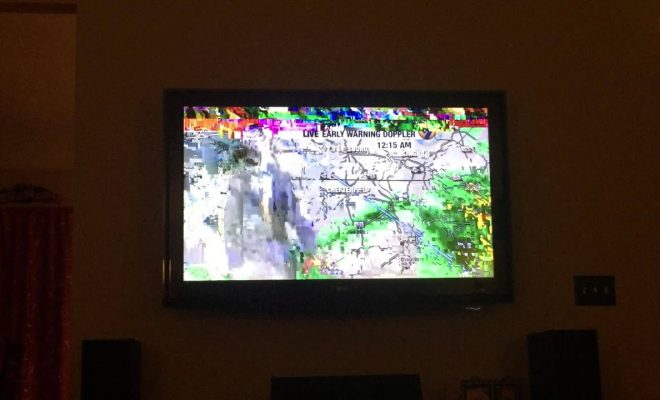
U-verse TV is a digital television service provided by AT&T that offers a variety of features including premium channels, on-demand movies, and live streaming. Unfortunately, like any electronic device, U-verse TV may sometimes freeze or stop working altogether. The good news is that most freezing issues can be resolved relatively quickly and easily with a few simple steps.

1. Check your internet connection

The first step in resolving U-verse TV freezing issues is to ensure that your internet connection is working properly. If your internet connection is weak or unstable, it can cause interruptions in your TV service. Try resetting your modem or router, or contacting your internet service provider for assistance.

2. Restart the U-verse TV box

If your internet connection is working properly, the next step is to restart the U-verse TV box. To do this, unplug the power cord from the back of the box and wait for 30 seconds. Then plug the power cord back in and wait for the box to reset. This should clear any temporary glitches or errors that may be causing the freezing issue.

3. Check for software updates

If the U-verse TV freezing issue persists after restarting the box, check if there are any software updates available for the box. U-verse TV boxes receive automatic updates, but it’s always a good idea to check if a new update is available. You can check for updates through the U-verse TV menu or by contacting AT&T support.

4. Remove any obstructions

Obstructions such as furniture, walls or other electronic devices can interfere with the U-verse TV signal and may cause freezing issues. Make sure there are no obstructions between the box and the TV, and that the TV is positioned in a clear line of sight. Additionally, ensure that the cables connecting the U-verse TV box to the TV are properly secured and not damaged.

5. Contact AT&T support

If the U-verse TV freezing issue persists after trying the above steps, contact AT&T support for further assistance. They may be able to diagnose the problem remotely, or send a technician to your home to resolve the issue.

In conclusion, U-verse TV freezing issues are frustrating but can typically be resolved relatively quickly and easily by checking your internet connection, restarting the U-verse TV box, checking for software updates, removing obstructions and contacting AT&T support if necessary. By following these steps, you can enjoy uninterrupted viewing of your favorite TV shows and movies.


Previous Article

How to Fix the DistributedCOM Error in ...

Next Article

How to Fix the Ubuntu Login Loop

Matthew Lynch

Related articles More from author

  • Digital & Mobile Technology

    The First Email Message: A Brief History

    June 21, 2023
    By Matthew Lynch
  • Digital & Mobile Technology

    How to Add Friends on Animal Crossing

    May 31, 2023
    By Matthew Lynch
  • Digital & Mobile Technology

    Understanding Excel Cells vs. Range Functions in VBA

    June 6, 2023
    By Matthew Lynch
  • Digital & Mobile Technology

    Things You Can Do With Your Chromebook Camera

    June 15, 2023
    By Matthew Lynch
  • Digital & Mobile Technology

    Best Free Driver Updater Tools

    May 30, 2023
    By Matthew Lynch
  • Digital & Mobile Technology

    Audible Alternatives: The Best Free or Cheap Audiobook Apps

    August 5, 2023
    By Matthew Lynch

Search

Login & Registration

  • Register
  • Log in
  • Entries feed
  • Comments feed
  • WordPress.org

Newsletter

Signup for The Tech Edvocate Newsletter and have the latest in EdTech news and opinion delivered to your email address!

About Us

Since technology is not going anywhere and does more good than harm, adapting is the best course of action. That is where The Tech Edvocate comes in. We plan to cover the PreK-12 and Higher Education EdTech sectors and provide our readers with the latest news and opinion on the subject. From time to time, I will invite other voices to weigh in on important issues in EdTech. We hope to provide a well-rounded, multi-faceted look at the past, present, the future of EdTech in the US and internationally.

We started this journey back in June 2016, and we plan to continue it for many more years to come. I hope that you will join us in this discussion of the past, present and future of EdTech and lend your own insight to the issues that are discussed.

Newsletter

Signup for The Tech Edvocate Newsletter and have the latest in EdTech news and opinion delivered to your email address!

Contact Us

The Tech Edvocate
910 Goddin Street
Richmond, VA 23231
(601) 630-5238
[email protected]

Copyright © 2025 Matthew Lynch. All rights reserved.