The Tech Edvocate

Top Menu

  • Advertisement
  • Apps
  • Home Page
  • Home Page Five (No Sidebar)
  • Home Page Four
  • Home Page Three
  • Home Page Two
  • Home Tech2
  • Icons [No Sidebar]
  • Left Sidbear Page
  • Lynch Educational Consulting
  • My Account
  • My Speaking Page
  • Newsletter Sign Up Confirmation
  • Newsletter Unsubscription
  • Our Brands
  • Page Example
  • Privacy Policy
  • Protected Content
  • Register
  • Request a Product Review
  • Shop
  • Shortcodes Examples
  • Signup
  • Start Here
    • Governance
    • Careers
    • Contact Us
  • Terms and Conditions
  • The Edvocate
  • The Tech Edvocate Product Guide
  • Topics
  • Write For Us
  • Advertise

Main Menu

  • Start Here
    • Our Brands
    • Governance
      • Lynch Educational Consulting, LLC.
      • Dr. Lynch’s Personal Website
      • Careers
    • Write For Us
    • The Tech Edvocate Product Guide
    • Contact Us
    • Books
    • Edupedia
    • Post a Job
    • The Edvocate Podcast
    • Terms and Conditions
    • Privacy Policy
  • Topics
    • Assistive Technology
    • Child Development Tech
    • Early Childhood & K-12 EdTech
    • EdTech Futures
    • EdTech News
    • EdTech Policy & Reform
    • EdTech Startups & Businesses
    • Higher Education EdTech
    • Online Learning & eLearning
    • Parent & Family Tech
    • Personalized Learning
    • Product Reviews
  • Advertise
  • Tech Edvocate Awards
  • The Edvocate
  • Pedagogue
  • School Ratings

logo

The Tech Edvocate

  • Start Here
    • Our Brands
    • Governance
      • Lynch Educational Consulting, LLC.
      • Dr. Lynch’s Personal Website
        • My Speaking Page
      • Careers
    • Write For Us
    • The Tech Edvocate Product Guide
    • Contact Us
    • Books
    • Edupedia
    • Post a Job
    • The Edvocate Podcast
    • Terms and Conditions
    • Privacy Policy
  • Topics
    • Assistive Technology
    • Child Development Tech
    • Early Childhood & K-12 EdTech
    • EdTech Futures
    • EdTech News
    • EdTech Policy & Reform
    • EdTech Startups & Businesses
    • Higher Education EdTech
    • Online Learning & eLearning
    • Parent & Family Tech
    • Personalized Learning
    • Product Reviews
  • Advertise
  • Tech Edvocate Awards
  • The Edvocate
  • Pedagogue
  • School Ratings
  • The Narwal Freo Z20 Is the Prime Day Gift That Actually Saves Time

  • Capsaicinens rolle: kultur, helse og dyrking av chilipepper

  • Study: Nearly all personal care and cleaning products contain undisclosed chemicals

Digital & Mobile Technology
Home›Digital & Mobile Technology›How to Fix It When Your Xbox Series X or S Mic Isn’t Working

How to Fix It When Your Xbox Series X or S Mic Isn’t Working
By Matthew Lynch
June 4, 2023
0
Spread the love

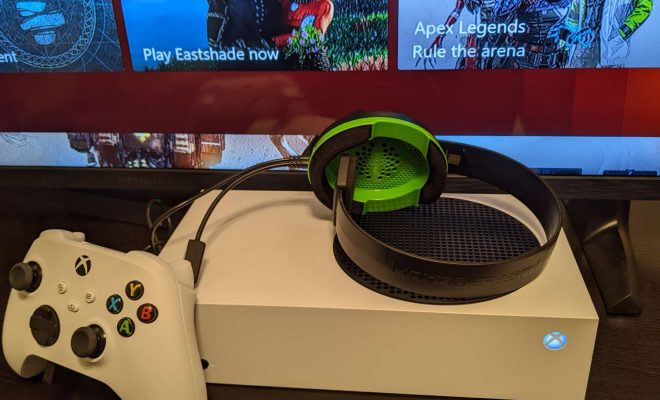
As a gamer, the microphone is an essential piece of equipment that you rely on to communicate with your fellow players. Whether you are playing a first-person shooter or a role-playing game, a working microphone is crucial for teamwork and enjoying the game to the fullest. However, sometimes the microphone on your Xbox Series X or S might stop working, and that can be frustrating. In this article, we will discuss how to fix it when your Xbox Series X or S mic isn’t working.

Check Your Settings

The first thing you should do when your Xbox Series X or S mic isn’t working is to check your settings. Often, the problem can be fixed by adjusting the settings on your console. Here are the steps you should take:

1. Go to the Settings menu on your Xbox Series X or S.

2. Select the Audio option.

3. Verify that the correct microphone is selected in the Input device section.

4. Check that the microphone is not muted.

5. You can adjust the microphone’s volume by moving the slider in the Volume section.

Restart Your Xbox

If the settings are correct, the next step is to restart your Xbox Series X or S. Sometimes the microphone may not work correctly because of a software glitch, and restarting your console can help fix the problem. Here’s how to restart your Xbox:

1. Press and hold the Xbox button on your controller.

2. Select Restart Console from the menu.

3. Confirm that you want to restart your console.

4. Wait for your console to restart.

Update Your Controller

If restarting your console doesn’t work, you should check whether your controller needs an update. The microphone might not work correctly if your controller’s firmware is outdated. Here’s how to check for updates:

1. Press the Xbox button on your controller.

2. Go to the Profile & system tab.

3. Select Settings.

4. Choose Devices & connections.

5. Select your controller.

6. Select the ellipsis (…) button.

7. Choose Firmware version.

8. If a firmware update is available, you will see a prompt to download it. Follow the on-screen instructions to download and install the update.

Try Another Mic

If you’ve tried all the above solutions, and your Xbox Series X or S mic still isn’t working, it might be a hardware issue. Try using another microphone to see if the issue persists. If the new mic works correctly, the problem might be with your original microphone. If not, there could be a problem with your controller or console, and you should contact Microsoft support.

In conclusion, a malfunctioning microphone can be a frustrating issue for gamers on an Xbox Series X or S console. However, by following the steps above, you can quickly identify and resolve the issue. Remember to check your settings, restart your console, update your controller’s firmware, and try another mic to fix your Xbox Series X or S mic issue.


Previous Article

How to Add Money to Apple Pay

Next Article

How to Transfer Data From Mac to ...

Matthew Lynch

Related articles More from author

  • Digital & Mobile Technology

    Easy Fixes for Audio Problems on Mac

    June 4, 2023
    By Matthew Lynch
  • Digital & Mobile Technology

    What is IT strategist (information technology strategist)?

    May 23, 2023
    By Matthew Lynch
  • Digital & Mobile Technology

    How to Change the Time on a Kindle Paperwhite

    July 6, 2023
    By Matthew Lynch
  • Digital & Mobile Technology

    How to Type Copyright and Trademark Symbols on Mac

    June 8, 2023
    By Matthew Lynch
  • Digital & Mobile Technology

    How to Block Incoming Text Messages on Verizon Wireless

    May 19, 2023
    By Matthew Lynch
  • Digital & Mobile Technology

    Best Free Email Accounts for 2023

    May 30, 2023
    By Matthew Lynch

Search

Login & Registration

  • Log in
  • Entries feed
  • Comments feed
  • WordPress.org

Newsletter

Signup for The Tech Edvocate Newsletter and have the latest in EdTech news and opinion delivered to your email address!

About Us

Since technology is not going anywhere and does more good than harm, adapting is the best course of action. That is where The Tech Edvocate comes in. We plan to cover the PreK-12 and Higher Education EdTech sectors and provide our readers with the latest news and opinion on the subject. From time to time, I will invite other voices to weigh in on important issues in EdTech. We hope to provide a well-rounded, multi-faceted look at the past, present, the future of EdTech in the US and internationally.

We started this journey back in June 2016, and we plan to continue it for many more years to come. I hope that you will join us in this discussion of the past, present and future of EdTech and lend your own insight to the issues that are discussed.

Newsletter

Signup for The Tech Edvocate Newsletter and have the latest in EdTech news and opinion delivered to your email address!

Contact Us

The Tech Edvocate
910 Goddin Street
Richmond, VA 23231
(601) 630-5238
[email protected]

Copyright © 2026 Matthew Lynch. All rights reserved.