The Tech Edvocate

Top Menu

  • Advertisement
  • Apps
  • Home Page
  • Home Page Five (No Sidebar)
  • Home Page Four
  • Home Page Three
  • Home Page Two
  • Home Tech2
  • Icons [No Sidebar]
  • Left Sidbear Page
  • Lynch Educational Consulting
  • My Account
  • My Speaking Page
  • Newsletter Sign Up Confirmation
  • Newsletter Unsubscription
  • Our Brands
  • Page Example
  • Privacy Policy
  • Protected Content
  • Register
  • Request a Product Review
  • Shop
  • Shortcodes Examples
  • Signup
  • Start Here
    • Governance
    • Careers
    • Contact Us
  • Terms and Conditions
  • The Edvocate
  • The Tech Edvocate Product Guide
  • Topics
  • Write For Us
  • Advertise

Main Menu

  • Start Here
    • Our Brands
    • Governance
      • Lynch Educational Consulting, LLC.
      • Dr. Lynch’s Personal Website
      • Careers
    • Write For Us
    • The Tech Edvocate Product Guide
    • Contact Us
    • Books
    • Edupedia
    • Post a Job
    • The Edvocate Podcast
    • Terms and Conditions
    • Privacy Policy
  • Topics
    • Assistive Technology
    • Child Development Tech
    • Early Childhood & K-12 EdTech
    • EdTech Futures
    • EdTech News
    • EdTech Policy & Reform
    • EdTech Startups & Businesses
    • Higher Education EdTech
    • Online Learning & eLearning
    • Parent & Family Tech
    • Personalized Learning
    • Product Reviews
  • Advertise
  • Tech Edvocate Awards
  • The Edvocate
  • Pedagogue
  • School Ratings

logo

The Tech Edvocate

  • Start Here
    • Our Brands
    • Governance
      • Lynch Educational Consulting, LLC.
      • Dr. Lynch’s Personal Website
        • My Speaking Page
      • Careers
    • Write For Us
    • The Tech Edvocate Product Guide
    • Contact Us
    • Books
    • Edupedia
    • Post a Job
    • The Edvocate Podcast
    • Terms and Conditions
    • Privacy Policy
  • Topics
    • Assistive Technology
    • Child Development Tech
    • Early Childhood & K-12 EdTech
    • EdTech Futures
    • EdTech News
    • EdTech Policy & Reform
    • EdTech Startups & Businesses
    • Higher Education EdTech
    • Online Learning & eLearning
    • Parent & Family Tech
    • Personalized Learning
    • Product Reviews
  • Advertise
  • Tech Edvocate Awards
  • The Edvocate
  • Pedagogue
  • School Ratings
  • Is the AI Bubble Bursting? OpenAI’s Funding Woes Revealed

  • Why Millions Are Skipping College for These 7 Online Courses Right Now

  • The Astonishing Truth About PS5 Pro vs Xbox Ally X Financing

  • The Urgent Truth About 2026 Privacy Laws: Why Your Business Could Face Catastrophic Fines

  • Shocking: Esports Pros Reveal the Critical Steps to Protect Your Earnings

  • The Staggering Truth About These New Weight Loss Drugs — And Why You Need to Know

  • The Quiet Crisis: Why Your Auto Loan Interest Rates Are Still Skyrocketing

  • Elvis’s Ghost Haunts AI: The $41 Million Anthropic Copyright Lawsuit Explained

  • 7 Micro-SaaS Tools Quietly Transforming Freelance Productivity — Don’t Miss Out!

  • Who Really Owns the Moon? The Shocking Truth About Lunar Real Estate

Digital & Mobile Technology
Home›Digital & Mobile Technology›How to Fix it When Your PS4 Is Overheating

How to Fix it When Your PS4 Is Overheating
By Matthew Lynch
June 1, 2023
0
Spread the love

The PlayStation 4 is one of the most popular gaming consoles available today, and it is known for its high-quality graphics and immersive gameplay. However, even the best gadgets can experience problems, and one common issue that PS4 owners face is overheating. When your PS4 is overheating, it can cause the console to shut down, damage components and cause other issues. But don’t worry, this article will walk you through some simple steps to fix overheating issues on your PS4.

1. Find the source of the problem

Before you can fix your PS4 overheating issue, you need to identify what is causing it. There are many factors that can make your PS4 overheat, including a dirty fan, poorly-ventilated area, or clogged air vents. Once you identify what is causing the overheating, you can then work to fix the problem.

2. Clean the air vents

One of the most common reasons for your PS4 overheating is a clogged and dirty air vent. The ventilation system inside the console is what keeps the components cool while in use. If this system is clogged with dust, it can lead to overheating. To fix this issue, you need to clean the air vents. You can use a can of compressed air or a vacuum cleaner to remove the dust and debris that has built up inside the vents.

3. Give your PS4 some space

Another reason why your PS4 may overheat is due to poor ventilation. It is important to give your console plenty of space to breathe. If your PS4 is tucked away in an enclosed area, it can get hot and struggle to cool itself down. To fix this issue, you need to move your PS4 to a better-ventilated area or add some fans to the space it is kept in.

4. Check the PS4 Fan

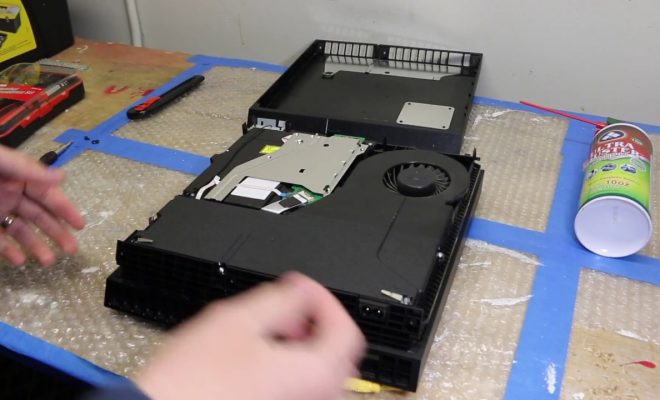
The fan is the primary cooling mechanism of your PS4. If it is not working correctly, your PS4 can overheat. You can check the fan by turning off your PS4 and unplugging the power cord. Then, unscrew the back cover and gently remove it. Inspect the fan to make sure there is no visible damage, and if there is, replace it.

Also, ensure the fan is spinning smoothly and doesn’t produce any unusual noises. It is also worth noting that if you’ve made any modifications to your PS4, such as adding a hard drive or replacing a component, it could be causing the overheating issue.

5. Reapply the Thermal Paste

Thermal paste is a substance that is applied to the processor and GPU of your PS4 to help transfer heat away from the components. Over time, the thermal paste can dry out, leading to overheating issues. If this is the case, you need to reapply the thermal paste. This process involves opening the PS4 and removing the heat sink to access the processor and GPU. You can then apply a new layer of thermal paste to the heat sink and reassemble the console.

In conclusion, if your PS4 is overheating, it can be frustrating, but it is not impossible to fix. Cleaning the air vents, checking the fan, and making sure your PS4 has plenty of space are simple yet effective ways to prevent overheating. Reapplying thermal paste and checking for possible modifications are more extensive fixes that require some technical expertise. Remember to always exercise caution when opening your PS4, and if you’re not confident, it’s better to seek professional help. By following the above steps, you should be able to fix any overheating issue and get back to gaming in no time.


Previous Article

Is Myspace Dead or Does It Still ...

Next Article

How to See Who Shared Your TikTok

Matthew Lynch

Related articles More from author

  • Digital & Mobile Technology

    Duolingo vs. Rosetta Stone: How to choose the best language-learning app

    April 13, 2023
    By Matthew Lynch
  • Digital & Mobile Technology

    Snapchat Accounts You Need to Follow Right Now

    September 7, 2023
    By Matthew Lynch
  • Digital & Mobile Technology

    What Makes the Crypto Currency Market Volatile? Key Reasons

    June 23, 2023
    By Matthew Lynch
  • Digital & Mobile Technology

    How to Update Audio Drivers on Windows

    August 5, 2023
    By Matthew Lynch
  • Digital & Mobile Technology

    A Simple Trick for Cleaning Under Your Keyboard’s Keys

    August 5, 2023
    By Matthew Lynch
  • Digital & Mobile Technology

    Data Sanitization Methods

    August 5, 2023
    By Matthew Lynch

Search

Login & Registration

  • Log in
  • Entries feed
  • Comments feed
  • WordPress.org

Newsletter

Signup for The Tech Edvocate Newsletter and have the latest in EdTech news and opinion delivered to your email address!

About Us

Since technology is not going anywhere and does more good than harm, adapting is the best course of action. That is where The Tech Edvocate comes in. We plan to cover the PreK-12 and Higher Education EdTech sectors and provide our readers with the latest news and opinion on the subject. From time to time, I will invite other voices to weigh in on important issues in EdTech. We hope to provide a well-rounded, multi-faceted look at the past, present, the future of EdTech in the US and internationally.

We started this journey back in June 2016, and we plan to continue it for many more years to come. I hope that you will join us in this discussion of the past, present and future of EdTech and lend your own insight to the issues that are discussed.

Newsletter

Signup for The Tech Edvocate Newsletter and have the latest in EdTech news and opinion delivered to your email address!

Contact Us

The Tech Edvocate
910 Goddin Street
Richmond, VA 23231
(601) 630-5238
[email protected]

Copyright © 2026 Matthew Lynch. All rights reserved.