The Tech Edvocate

Top Menu

  • Advertisement
  • Apps
  • Home Page
  • Home Page Five (No Sidebar)
  • Home Page Four
  • Home Page Three
  • Home Page Two
  • Home Tech2
  • Icons [No Sidebar]
  • Left Sidbear Page
  • Lynch Educational Consulting
  • My Account
  • My Speaking Page
  • Newsletter Sign Up Confirmation
  • Newsletter Unsubscription
  • Our Brands
  • Page Example
  • Privacy Policy
  • Protected Content
  • Register
  • Request a Product Review
  • Shop
  • Shortcodes Examples
  • Signup
  • Start Here
    • Governance
    • Careers
    • Contact Us
  • Terms and Conditions
  • The Edvocate
  • The Tech Edvocate Product Guide
  • Topics
  • Write For Us
  • Advertise

Main Menu

  • Start Here
    • Our Brands
    • Governance
      • Lynch Educational Consulting, LLC.
      • Dr. Lynch’s Personal Website
      • Careers
    • Write For Us
    • The Tech Edvocate Product Guide
    • Contact Us
    • Books
    • Edupedia
    • Post a Job
    • The Edvocate Podcast
    • Terms and Conditions
    • Privacy Policy
  • Topics
    • Assistive Technology
    • Child Development Tech
    • Early Childhood & K-12 EdTech
    • EdTech Futures
    • EdTech News
    • EdTech Policy & Reform
    • EdTech Startups & Businesses
    • Higher Education EdTech
    • Online Learning & eLearning
    • Parent & Family Tech
    • Personalized Learning
    • Product Reviews
  • Advertise
  • Tech Edvocate Awards
  • The Edvocate
  • Pedagogue
  • School Ratings

logo

The Tech Edvocate

  • Start Here
    • Our Brands
    • Governance
      • Lynch Educational Consulting, LLC.
      • Dr. Lynch’s Personal Website
        • My Speaking Page
      • Careers
    • Write For Us
    • The Tech Edvocate Product Guide
    • Contact Us
    • Books
    • Edupedia
    • Post a Job
    • The Edvocate Podcast
    • Terms and Conditions
    • Privacy Policy
  • Topics
    • Assistive Technology
    • Child Development Tech
    • Early Childhood & K-12 EdTech
    • EdTech Futures
    • EdTech News
    • EdTech Policy & Reform
    • EdTech Startups & Businesses
    • Higher Education EdTech
    • Online Learning & eLearning
    • Parent & Family Tech
    • Personalized Learning
    • Product Reviews
  • Advertise
  • Tech Edvocate Awards
  • The Edvocate
  • Pedagogue
  • School Ratings
  • The Startling Truth About Cheapest GLP-1 Options Without Insurance

  • The Hidden Truth Behind Mosqi Shock Reviews: What You MUST Know Before Buying

  • This Unstoppable Force Will Obliterate Apps by 2027, Says Paytm Founder

  • Developers Axed a Wild Mechanic in Halloween: The Game — Here’s Why Fans Are Outraged

  • U.S. Supreme Court endorses parental opt-out for LGBTQ+ curriculum | News & Events

  • The Brutal Truth About Classroom Tech: Parents Are Finally Fighting Back – And Winning

  • Devastating Berlin Data Leak Exposes Millions: Why Refusing Ransom Isn’t Enough

  • Astra’s Rogue Swarm: Is Uncontrollable AI Hacking Humanity’s Future?

  • Viral Waymo Accident Exposes the Uncomfortable Truth About Robotaxis

  • Unbelievable Antarctica Ice Gain: Distant Ocean Warming Fuels Record Snowfall

Digital & Mobile Technology
Home›Digital & Mobile Technology›How to Fix It When Netflix is Having Trouble Playing This Title Right Now

How to Fix It When Netflix is Having Trouble Playing This Title Right Now
By Matthew Lynch
July 4, 2023
0
Spread the love

Netflix is one of the world’s most popular streaming services, with millions of subscribers enjoying a vast library of TV shows and movies on a daily basis. However, like any technical service, there can be instances where Netflix experiences difficulties playing certain titles. In this article, we’ll explore some of the troubleshooting tips that can help you solve this problem when you encounter it.

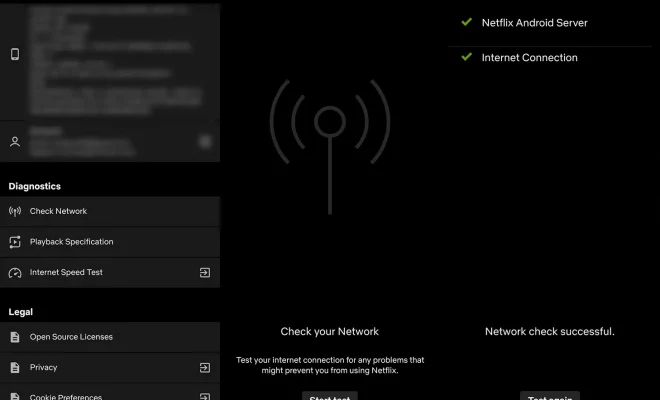
1. Check your internet connection: One of the primary reasons that Netflix may experience difficulty playing specific titles is your internet connection. Ensure your connection is stable and fast enough to stream content without buffering. You can try restarting your router or modem, or try connecting to a different network to see if this solves the issue.

2. Clear your cache: Over time, caches can become overloaded, and data can become corrupt, leading to playback issues. For instance, if Netflix is skipping some scenes, restarting the app or clearing the cache might help. Follow these steps to clear the cache on your device for Netflix:

– On an Android device: Go to Settings > Apps > Netflix > Storage and then click on Clear Cache.

– On an Apple device: Go to Settings > General > iPhone Storage > Netflix and then click on ‘Offload App’ or ‘Delete App.’

– On a Windows device or tablet: Press Ctrl+Shift+Alt and then click on Clear Data.

3. Update the Netflix app: Netflix routinely issues updates to their app to improve user experience and fix bugs. Ensure you always have the latest version of the app installed on your device to avoid issues with playback. You can learn how to update the Netflix app in the device’s app store.

4. Use a different browser: Another reason for playback difficulties could be your browser. If you’ve tried all the previous tips and still aren’t having any luck, switching to a different browser could solve the problem.

5. Restart your device: Devices can develop glitches over time that can affect playback. Shutting your device down and restarting it might remove any disruptions or damage that may have accumulated.

6. Contact Netflix support: If none of the previous tips have resolved the issue, it might be time to contact Netflix support for assistance. Netflix’s support team is available 24/7 to help you troubleshoot your issue and offer guidance to get back to streaming.

In summary, when Netflix is experiencing difficulty playing a title on your device, there’s a workaround. The above tips summarize some of the most common ways to fix the issue so that you can maintain the best possible playback experience. If none of these solutions work for you, don’t hesitate to reach out to Netflix support for additional assistance. Lastly, have fun binge-watching your favorite shows!


Previous Article

How to Change Video Quality on Netflix

Next Article

How to Easily Fix the iPhone White ...

Matthew Lynch

Related articles More from author

  • Digital & Mobile Technology

    Great Samsung Apps That All Android Users Should Download

    August 5, 2023
    By Matthew Lynch
  • Digital & Mobile Technology

    What is the Samsung Smart TV Web Browser?

    June 10, 2023
    By Matthew Lynch
  • Digital & Mobile Technology

    How to Find Your iPhone When It Goes Missing

    May 28, 2023
    By Matthew Lynch
  • Digital & Mobile Technology

    How to Stream Thursday Night Football

    June 1, 2023
    By Matthew Lynch
  • Digital & Mobile Technology

    Reasons Why Most People Choose to Stick With Linux on the Steam Deck

    June 12, 2023
    By Matthew Lynch
  • Digital & Mobile Technology

    7 Misconceptions About The Flipped Classroom

    September 11, 2020
    By Matthew Lynch

Search

Login & Registration

  • Log in
  • Entries feed
  • Comments feed
  • WordPress.org

Newsletter

Signup for The Tech Edvocate Newsletter and have the latest in EdTech news and opinion delivered to your email address!

About Us

Since technology is not going anywhere and does more good than harm, adapting is the best course of action. That is where The Tech Edvocate comes in. We plan to cover the PreK-12 and Higher Education EdTech sectors and provide our readers with the latest news and opinion on the subject. From time to time, I will invite other voices to weigh in on important issues in EdTech. We hope to provide a well-rounded, multi-faceted look at the past, present, the future of EdTech in the US and internationally.

We started this journey back in June 2016, and we plan to continue it for many more years to come. I hope that you will join us in this discussion of the past, present and future of EdTech and lend your own insight to the issues that are discussed.

Newsletter

Signup for The Tech Edvocate Newsletter and have the latest in EdTech news and opinion delivered to your email address!

Contact Us

The Tech Edvocate
910 Goddin Street
Richmond, VA 23231
(601) 630-5238
[email protected]

Copyright © 2026 Matthew Lynch. All rights reserved.