The Tech Edvocate

Top Menu

  • Advertisement
  • Apps
  • Home Page
  • Home Page Five (No Sidebar)
  • Home Page Four
  • Home Page Three
  • Home Page Two
  • Home Tech2
  • Icons [No Sidebar]
  • Left Sidbear Page
  • Lynch Educational Consulting
  • My Account
  • My Speaking Page
  • Newsletter Sign Up Confirmation
  • Newsletter Unsubscription
  • Our Brands
  • Page Example
  • Privacy Policy
  • Protected Content
  • Register
  • Request a Product Review
  • Shop
  • Shortcodes Examples
  • Signup
  • Start Here
    • Governance
    • Careers
    • Contact Us
  • Terms and Conditions
  • The Edvocate
  • The Tech Edvocate Product Guide
  • Topics
  • Write For Us
  • Advertise

Main Menu

  • Start Here
    • Our Brands
    • Governance
      • Lynch Educational Consulting, LLC.
      • Dr. Lynch’s Personal Website
      • Careers
    • Write For Us
    • The Tech Edvocate Product Guide
    • Contact Us
    • Books
    • Edupedia
    • Post a Job
    • The Edvocate Podcast
    • Terms and Conditions
    • Privacy Policy
  • Topics
    • Assistive Technology
    • Child Development Tech
    • Early Childhood & K-12 EdTech
    • EdTech Futures
    • EdTech News
    • EdTech Policy & Reform
    • EdTech Startups & Businesses
    • Higher Education EdTech
    • Online Learning & eLearning
    • Parent & Family Tech
    • Personalized Learning
    • Product Reviews
  • Advertise
  • Tech Edvocate Awards
  • The Edvocate
  • Pedagogue
  • School Ratings

logo

The Tech Edvocate

  • Start Here
    • Our Brands
    • Governance
      • Lynch Educational Consulting, LLC.
      • Dr. Lynch’s Personal Website
        • My Speaking Page
      • Careers
    • Write For Us
    • The Tech Edvocate Product Guide
    • Contact Us
    • Books
    • Edupedia
    • Post a Job
    • The Edvocate Podcast
    • Terms and Conditions
    • Privacy Policy
  • Topics
    • Assistive Technology
    • Child Development Tech
    • Early Childhood & K-12 EdTech
    • EdTech Futures
    • EdTech News
    • EdTech Policy & Reform
    • EdTech Startups & Businesses
    • Higher Education EdTech
    • Online Learning & eLearning
    • Parent & Family Tech
    • Personalized Learning
    • Product Reviews
  • Advertise
  • Tech Edvocate Awards
  • The Edvocate
  • Pedagogue
  • School Ratings
  • A Visitors Guide to Long Beach (CA), United States

  • A Visitor’s Guide to Fresno (CA), United States

  • A Visitors Guide to New Orleans (LA), United States

  • A Visitors Guide to Sacramento (CA), United States

  • A Visitors Guide to Lyon, France

  • JisuLife Ultra2 Portable Fan: A Powerful Multi-Function Cooling Solution

  • A Visitors Guide to Viña del Mar, Chile

  • A Visitors Guide to Århus, Denmark

  • A Visitors Guide to Bakersfield (CA), United States

  • A Visitors Guide to Aurora (CO), United States

Assistive Technology
Home›Assistive Technology›How to Fix It When an Apple Watch Is Not Getting Texts

How to Fix It When an Apple Watch Is Not Getting Texts
By Matthew Lynch
June 9, 2023
0
Spread the love

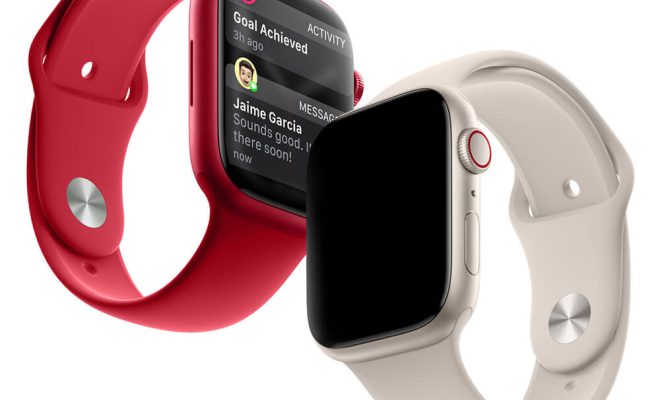
The Apple Watch is a fantastic device that can do many things, but one of the most useful features it offers is the ability to receive texts. Unfortunately, sometimes this feature stops working, and your watch may suddenly stop receiving texts. If you are experiencing this issue, don’t worry – there are several things you can do to fix it. In this article, we’ll talk about some of the most effective solutions for fixing an Apple Watch when it is not getting texts.

Check Your iPhone

The first thing you should do is check your iPhone. The Apple Watch relies heavily on the iPhone to function properly, and sometimes problems can arise when the two devices are not cooperating. If your Apple Watch is not receiving texts, check your iPhone to see if it is receiving them correctly. If your iPhone is not receiving texts, then your Apple Watch won’t either. Therefore, you want to make sure that your iPhone’s cellular data or Wi-Fi is available and working correctly. Go to the Settings App on your iPhone and check if the cellular or Wi-Fi is working correctly.

Check Your Apple Watch Settings

If your iPhone is working correctly, then the next step is to check the settings on your Apple Watch. Go to the Settings app on your Apple Watch and check the Do Not Disturb mode. If your Apple Watch is in Do Not Disturb mode or Silent mode, it will not receive notifications. Tap on the “Do Not Disturb” button to turn it off.

Additionally, check if your Apple Watch has a reliable connection to your iPhone. If not, it may have trouble receiving texts. To check, go to Control Center by swiping up from the bottom of the screen and checking the connectivity with the iPhone. If it says “Disconnected” or “No iPhone,” then the watch is not connected to the iPhone, and you may want to restart your Apple Watch or your iPhone to reconnect the devices.

Check Network Settings

Sometimes, Apple Watch may have difficulty receiving texts due to problems with the cellular or Wi-Fi network. If you’re experiencing this issue, try resetting the network settings on your Apple Watch. Go to Settings, scroll down to General, and select Reset. Then, select Reset Network Settings. This process will reset all network settings, including Wi-Fi and cellular data, and force the watch to reconnect to the network.

Check Your Software Version

Your Apple Watch may not be receiving texts because your device software may be outdated. When your Apple Watch is not updated, it can cause conflicts with other Apple devices like your iPhone. So, check if your Apple Watch has the latest software update. Go to the Watch app on your iPhone > General > Software Update. If an update is available, download and install it.

Unpair and Re-pair

One final step is to unpair your Apple Watch from your iPhone and then re-pair it. This process will reset both devices and can help resolve any issues that may be preventing your Apple Watch from receiving texts. To unpair your Apple Watch, open the Watch app on your iPhone, select your watch, then tap on “i” icon beside your smartwatch’s name. Select “Unpair Apple Watch.”

Once you’ve completed these steps, restart your iPhone and Apple Watch, and then pair them again to restore the connection between the two devices. Once complete, try sending a text message to check if the Apple watch can receive texts.

Final Thoughts

If your Apple Watch is not receiving texts, don’t get frustrated. With a little troubleshooting, most issues can be resolved quickly. What we’ve shared above are the most common causes and solutions to fix the problem. If none of these solutions worked for you, contact an Apple support technician to help you resolve the issue.

Previous Article

How to Choose an Alternator: Can High ...

Next Article

Molex 4-pin Peripheral Power Connector Pinout

Matthew Lynch

Related articles More from author

  • Assistive Technology

    How to Show the Hard Disk on Your Mac Desktop

    June 15, 2023
    By Matthew Lynch
  • Assistive Technology

    Make Windows 11 Look Like Windows 10 With ExplorerPatcher

    September 7, 2023
    By Matthew Lynch
  • Assistive Technology

    How to Create a Spider Web in Adobe Illustrator

    June 23, 2023
    By Matthew Lynch
  • Assistive Technology

    Best Ways to Batch Rename Files in Linux

    June 15, 2023
    By Matthew Lynch
  • Assistive Technology

    How to Hide or Fake Your Location in Chrome, Firefox, and Microsoft Edge

    June 12, 2023
    By Matthew Lynch
  • Assistive Technology

    How to Fix It When Discovery Plus Is Not Working

    June 8, 2023
    By Matthew Lynch

Search

Login & Registration

  • Register
  • Log in
  • Entries feed
  • Comments feed
  • WordPress.org

Newsletter

Signup for The Tech Edvocate Newsletter and have the latest in EdTech news and opinion delivered to your email address!

About Us

Since technology is not going anywhere and does more good than harm, adapting is the best course of action. That is where The Tech Edvocate comes in. We plan to cover the PreK-12 and Higher Education EdTech sectors and provide our readers with the latest news and opinion on the subject. From time to time, I will invite other voices to weigh in on important issues in EdTech. We hope to provide a well-rounded, multi-faceted look at the past, present, the future of EdTech in the US and internationally.

We started this journey back in June 2016, and we plan to continue it for many more years to come. I hope that you will join us in this discussion of the past, present and future of EdTech and lend your own insight to the issues that are discussed.

Newsletter

Signup for The Tech Edvocate Newsletter and have the latest in EdTech news and opinion delivered to your email address!

Contact Us

The Tech Edvocate
910 Goddin Street
Richmond, VA 23231
(601) 630-5238
[email protected]

Copyright © 2025 Matthew Lynch. All rights reserved.