The Tech Edvocate

Top Menu

  • Advertisement
  • Apps
  • Home Page
  • Home Page Five (No Sidebar)
  • Home Page Four
  • Home Page Three
  • Home Page Two
  • Home Tech2
  • Icons [No Sidebar]
  • Left Sidbear Page
  • Lynch Educational Consulting
  • My Account
  • My Speaking Page
  • Newsletter Sign Up Confirmation
  • Newsletter Unsubscription
  • Our Brands
  • Page Example
  • Privacy Policy
  • Protected Content
  • Register
  • Request a Product Review
  • Shop
  • Shortcodes Examples
  • Signup
  • Start Here
    • Governance
    • Careers
    • Contact Us
  • Terms and Conditions
  • The Edvocate
  • The Tech Edvocate Product Guide
  • Topics
  • Write For Us
  • Advertise

Main Menu

  • Start Here
    • Our Brands
    • Governance
      • Lynch Educational Consulting, LLC.
      • Dr. Lynch’s Personal Website
      • Careers
    • Write For Us
    • The Tech Edvocate Product Guide
    • Contact Us
    • Books
    • Edupedia
    • Post a Job
    • The Edvocate Podcast
    • Terms and Conditions
    • Privacy Policy
  • Topics
    • Assistive Technology
    • Child Development Tech
    • Early Childhood & K-12 EdTech
    • EdTech Futures
    • EdTech News
    • EdTech Policy & Reform
    • EdTech Startups & Businesses
    • Higher Education EdTech
    • Online Learning & eLearning
    • Parent & Family Tech
    • Personalized Learning
    • Product Reviews
  • Advertise
  • Tech Edvocate Awards
  • The Edvocate
  • Pedagogue
  • School Ratings

logo

The Tech Edvocate

  • Start Here
    • Our Brands
    • Governance
      • Lynch Educational Consulting, LLC.
      • Dr. Lynch’s Personal Website
        • My Speaking Page
      • Careers
    • Write For Us
    • The Tech Edvocate Product Guide
    • Contact Us
    • Books
    • Edupedia
    • Post a Job
    • The Edvocate Podcast
    • Terms and Conditions
    • Privacy Policy
  • Topics
    • Assistive Technology
    • Child Development Tech
    • Early Childhood & K-12 EdTech
    • EdTech Futures
    • EdTech News
    • EdTech Policy & Reform
    • EdTech Startups & Businesses
    • Higher Education EdTech
    • Online Learning & eLearning
    • Parent & Family Tech
    • Personalized Learning
    • Product Reviews
  • Advertise
  • Tech Edvocate Awards
  • The Edvocate
  • Pedagogue
  • School Ratings
  • How to create estimates in Buildertrend

  • How to use Bluebeam for punch lists

  • Procore vs Viewpoint features

  • How to submit invoices in Procore

  • How to set up Monday.com for contractors

  • Can PlanGrid track punch lists

  • How to create selections in CoConstruct

  • How to markup drawings in PlanGrid

  • How to use PlanGrid for blueprints

  • How to create custom tools in Bluebeam

Digital & Mobile Technology
Home›Digital & Mobile Technology›How to Fix It When a PS4 Controller Won’t Connect to PS4

How to Fix It When a PS4 Controller Won’t Connect to PS4
By Matthew Lynch
May 31, 2023
0
Spread the love

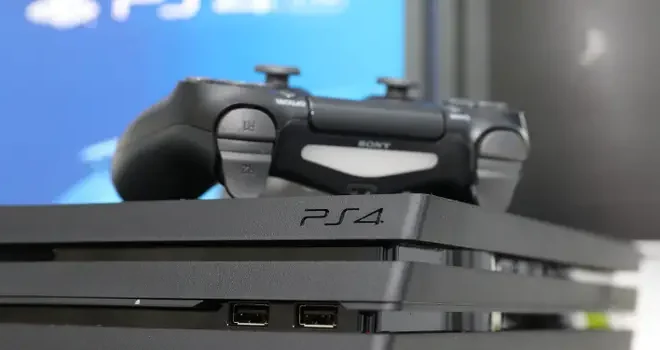
As a PlayStation 4 owner, there’s nothing more frustrating than trying to sit down for a gaming session only to find out that your PS4 controller won’t connect to your console. Whether it’s a new controller or one that you’ve been using for a while, there are a few troubleshooting steps that you can take to get your controller connected and ready to play.

Step 1: Check the connection

The first thing you should do is check the connection between your controller and your PS4. Make sure your controller is turned on and press the PlayStation button in the center of the controller. This should cause the controller to connect to the console automatically.

If the controller still won’t connect, try plugging it into the PS4 with a USB cable. If the light on the front of the controller blinks a few times and then turns off, this usually means that the controller is charging but not connecting. You may need to use a different USB cable or try a different USB port on your console.

Step 2: Reset the controller

If your PS4 controller is still having trouble connecting, you may need to reset it. To do this, look for a small hole on the back of the controller, near the L2 button. Use a paperclip or something similar to press and hold the button inside the hole for a few seconds. This will reset the controller, and you should be able to pair it with your console again.

Step 3: Restart your PS4

If your controller still won’t connect after resetting it, it’s time to try restarting your PS4. Hold down the power button on the front of your console until it turns off, then unplug it from the wall. Wait a few minutes before plugging it back in and turning it back on. Once your PS4 has restarted, try connecting your controller again.

Step 4: Pair the controller manually

If none of the above steps have worked, you may need to pair your controller with your PS4 manually. To do this, turn off your PS4 and plug your controller into the console with a USB cable. Press the PlayStation button on the controller and turn on your PS4. The console should recognize the controller and pair it automatically.

If your PS4 controller still won’t connect after trying all of these steps, it may be a hardware issue that needs to be fixed by a professional. However, in most cases, these troubleshooting steps should help you get your controller connected and ready to play.


Previous Article

How to Fix It When Copy and ...

Next Article

What Is GSM in Cellular Networking?

Matthew Lynch

Related articles More from author

  • Digital & Mobile Technology

    How to Boot From a CD, DVD, or BD Disc

    June 10, 2023
    By Matthew Lynch
  • Digital & Mobile Technology

    Can You Use PS4 Controllers on a PS5?

    June 30, 2023
    By Matthew Lynch
  • Digital & Mobile Technology

    What is an Enterprise Application?

    May 5, 2023
    By Matthew Lynch
  • Digital & Mobile Technology

    3 Perks of Network Management on a University Campus

    February 16, 2021
    By Matthew Lynch
  • Digital & Mobile Technology

    What Is Google Photos, and Should You Be Using It?

    June 3, 2023
    By Matthew Lynch
  • Digital & Mobile Technology

    Why Are Email Files so Large?

    June 4, 2023
    By Matthew Lynch

Search

Login & Registration

  • Log in
  • Entries feed
  • Comments feed
  • WordPress.org

Newsletter

Signup for The Tech Edvocate Newsletter and have the latest in EdTech news and opinion delivered to your email address!

About Us

Since technology is not going anywhere and does more good than harm, adapting is the best course of action. That is where The Tech Edvocate comes in. We plan to cover the PreK-12 and Higher Education EdTech sectors and provide our readers with the latest news and opinion on the subject. From time to time, I will invite other voices to weigh in on important issues in EdTech. We hope to provide a well-rounded, multi-faceted look at the past, present, the future of EdTech in the US and internationally.

We started this journey back in June 2016, and we plan to continue it for many more years to come. I hope that you will join us in this discussion of the past, present and future of EdTech and lend your own insight to the issues that are discussed.

Newsletter

Signup for The Tech Edvocate Newsletter and have the latest in EdTech news and opinion delivered to your email address!

Contact Us

The Tech Edvocate
910 Goddin Street
Richmond, VA 23231
(601) 630-5238
[email protected]

Copyright © 2026 Matthew Lynch. All rights reserved.