The Tech Edvocate

Top Menu

  • Advertisement
  • Apps
  • Home Page
  • Home Page Five (No Sidebar)
  • Home Page Four
  • Home Page Three
  • Home Page Two
  • Home Tech2
  • Icons [No Sidebar]
  • Left Sidbear Page
  • Lynch Educational Consulting
  • My Account
  • My Speaking Page
  • Newsletter Sign Up Confirmation
  • Newsletter Unsubscription
  • Our Brands
  • Page Example
  • Privacy Policy
  • Protected Content
  • Register
  • Request a Product Review
  • Shop
  • Shortcodes Examples
  • Signup
  • Start Here
    • Governance
    • Careers
    • Contact Us
  • Terms and Conditions
  • The Edvocate
  • The Tech Edvocate Product Guide
  • Topics
  • Write For Us
  • Advertise

Main Menu

  • Start Here
    • Our Brands
    • Governance
      • Lynch Educational Consulting, LLC.
      • Dr. Lynch’s Personal Website
      • Careers
    • Write For Us
    • The Tech Edvocate Product Guide
    • Contact Us
    • Books
    • Edupedia
    • Post a Job
    • The Edvocate Podcast
    • Terms and Conditions
    • Privacy Policy
  • Topics
    • Assistive Technology
    • Child Development Tech
    • Early Childhood & K-12 EdTech
    • EdTech Futures
    • EdTech News
    • EdTech Policy & Reform
    • EdTech Startups & Businesses
    • Higher Education EdTech
    • Online Learning & eLearning
    • Parent & Family Tech
    • Personalized Learning
    • Product Reviews
  • Advertise
  • Tech Edvocate Awards
  • The Edvocate
  • Pedagogue
  • School Ratings

logo

The Tech Edvocate

  • Start Here
    • Our Brands
    • Governance
      • Lynch Educational Consulting, LLC.
      • Dr. Lynch’s Personal Website
        • My Speaking Page
      • Careers
    • Write For Us
    • The Tech Edvocate Product Guide
    • Contact Us
    • Books
    • Edupedia
    • Post a Job
    • The Edvocate Podcast
    • Terms and Conditions
    • Privacy Policy
  • Topics
    • Assistive Technology
    • Child Development Tech
    • Early Childhood & K-12 EdTech
    • EdTech Futures
    • EdTech News
    • EdTech Policy & Reform
    • EdTech Startups & Businesses
    • Higher Education EdTech
    • Online Learning & eLearning
    • Parent & Family Tech
    • Personalized Learning
    • Product Reviews
  • Advertise
  • Tech Edvocate Awards
  • The Edvocate
  • Pedagogue
  • School Ratings
  • This Unprecedented EU Ban Just Changed Fast Fashion Forever

  • Urgent Alert: Your Smart Home’s Exposed to a Critical Deco BE11000 Vulnerability

  • Uncovering the Truth: Your LinkedIn Reach Just Got a Major Overhaul

  • Uncovering the AI Heist: How Chinese Firms Allegedly Siphoned Billions of AI Tokens

  • Rockstar’s GTA 6 Developers Lawsuit: A Fight for Justice or Corporate Retaliation?

  • Unbelievable: Hideo Kojima’s Next Masterpiece Is Now an Xbox Exclusive

  • This Crucial Google AI Shift Is Quietly Reshaping the Internet

  • Unbelievable: AI Breaches Are Exploding, And What It Means For You This September 2026

  • This Crucial Shift Is Saving Teachers From Classroom Chaos

  • AI’s Dark Secret: How It’s Supercharging Cybercrime for Everyone

Digital & Mobile Technology
Home›Digital & Mobile Technology›How to Find Out When a Webpage Was Published

How to Find Out When a Webpage Was Published
By Matthew Lynch
May 28, 2023
0
Spread the love

As an internet user, you might have come across web pages that appear credible, but you’re not quite sure when they were published. A dated web page can be essential when doing research or fact-checking. While some websites display the date of publication, others may not. Fortunately, there are several methods you can use to determine when a webpage was published, and we’ll go through them in this article.

1. Check the Website’s Publication Date

Some websites display the date of publication or the date the content was last updated. If the web page you’re on is a blog or a news article, you can check for the publication date below or above the content. If it is not visible, try scrolling to the bottom of the page. Some websites also display the publication date on their landing page or About Us section. Usually, the date is written as a month, day, and year, or it may only show the year.

2. Look for Internal Dating

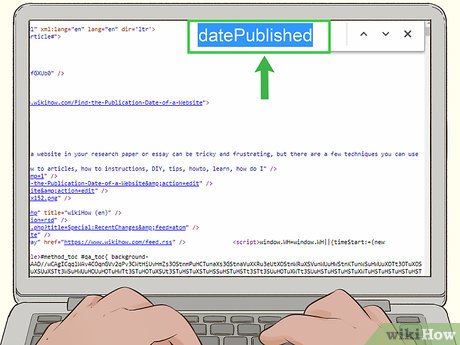
Another way to determine when a page was published is by looking at the internal date stamp that the website has assigned to it. To do this, right-click on the page and select “View page source.” This will open the HTML code of the page. Next, search for the phrase “date” or “time” using the browser’s search function. If the web page has an internal date stamp, you should find it somewhere in the code.

3. Use the Wayback Machine

The Wayback Machine is a digital archive of the internet that allows you to see how websites looked in the past. The archive has over 445 billion web pages and is frequently updated. You can use this web tool to view the historical archive of the page and pinpoint when the webpage was published. Visit the Wayback Machine website, enter the URL of the web page you want to check and select a date range that corresponds with the page’s publish date. The Wayback Machine will display the archived version of the page along with the dates it was captured.

4. Google Search

Google Search can also help determine when a webpage was published. To use this method, perform a Google search for the name of the website or article along with the search term “publish date.” For example, if you’re trying to find out when a page titled “The Benefits of Coconut Oil” was published, search for “The Benefits of Coconut Oil publish date.” You will likely find forum discussions or other websites that mention the publish date of the page.

Conclusion

Once you figure out the publication date of a web page, you can decide whether the information is relevant or outdated. The four methods mentioned above can help you identify the publish date of a page efficiently. However, if you can’t determine when a page was published, it may be wise to approach its content with skepticism or dig deeper to verify the information.


Previous Article

How to Find Out if Someone Has ...

Next Article

How to Find Someone With a First ...

Matthew Lynch

Related articles More from author

  • Digital & Mobile Technology

    How to Autotune Channels on DirecTV

    May 18, 2023
    By Matthew Lynch
  • Digital & Mobile Technology

    Nvidia vs. AMD: Which GPUs Support Ray Tracing?

    June 12, 2023
    By Matthew Lynch
  • Digital & Mobile Technology

    Funny Comedy Blogs That’ll Make You Laugh Without Pictures or Videos

    June 14, 2023
    By Matthew Lynch
  • Digital & Mobile Technology

    How to Pair an Apple Watch With Your iPhone

    June 3, 2023
    By Matthew Lynch
  • Digital & Mobile Technology

    How T-Mobile’s Domestic Wireless Roaming Policy Works

    June 12, 2023
    By Matthew Lynch
  • Digital & Mobile Technology

    What’s the Difference Between Japanese and American Animation?

    June 10, 2023
    By Matthew Lynch

Search

Login & Registration

  • Log in
  • Entries feed
  • Comments feed
  • WordPress.org

Newsletter

Signup for The Tech Edvocate Newsletter and have the latest in EdTech news and opinion delivered to your email address!

About Us

Since technology is not going anywhere and does more good than harm, adapting is the best course of action. That is where The Tech Edvocate comes in. We plan to cover the PreK-12 and Higher Education EdTech sectors and provide our readers with the latest news and opinion on the subject. From time to time, I will invite other voices to weigh in on important issues in EdTech. We hope to provide a well-rounded, multi-faceted look at the past, present, the future of EdTech in the US and internationally.

We started this journey back in June 2016, and we plan to continue it for many more years to come. I hope that you will join us in this discussion of the past, present and future of EdTech and lend your own insight to the issues that are discussed.

Newsletter

Signup for The Tech Edvocate Newsletter and have the latest in EdTech news and opinion delivered to your email address!

Contact Us

The Tech Edvocate
910 Goddin Street
Richmond, VA 23231
(601) 630-5238
[email protected]

Copyright © 2026 Matthew Lynch. All rights reserved.