The Tech Edvocate

Top Menu

  • Advertisement
  • Apps
  • Home Page
  • Home Page Five (No Sidebar)
  • Home Page Four
  • Home Page Three
  • Home Page Two
  • Home Tech2
  • Icons [No Sidebar]
  • Left Sidbear Page
  • Lynch Educational Consulting
  • My Account
  • My Speaking Page
  • Newsletter Sign Up Confirmation
  • Newsletter Unsubscription
  • Our Brands
  • Page Example
  • Privacy Policy
  • Protected Content
  • Register
  • Request a Product Review
  • Shop
  • Shortcodes Examples
  • Signup
  • Start Here
    • Governance
    • Careers
    • Contact Us
  • Terms and Conditions
  • The Edvocate
  • The Tech Edvocate Product Guide
  • Topics
  • Write For Us
  • Advertise

Main Menu

  • Start Here
    • Our Brands
    • Governance
      • Lynch Educational Consulting, LLC.
      • Dr. Lynch’s Personal Website
      • Careers
    • Write For Us
    • The Tech Edvocate Product Guide
    • Contact Us
    • Books
    • Edupedia
    • Post a Job
    • The Edvocate Podcast
    • Terms and Conditions
    • Privacy Policy
  • Topics
    • Assistive Technology
    • Child Development Tech
    • Early Childhood & K-12 EdTech
    • EdTech Futures
    • EdTech News
    • EdTech Policy & Reform
    • EdTech Startups & Businesses
    • Higher Education EdTech
    • Online Learning & eLearning
    • Parent & Family Tech
    • Personalized Learning
    • Product Reviews
  • Advertise
  • Tech Edvocate Awards
  • The Edvocate
  • Pedagogue
  • School Ratings

logo

The Tech Edvocate

  • Start Here
    • Our Brands
    • Governance
      • Lynch Educational Consulting, LLC.
      • Dr. Lynch’s Personal Website
        • My Speaking Page
      • Careers
    • Write For Us
    • The Tech Edvocate Product Guide
    • Contact Us
    • Books
    • Edupedia
    • Post a Job
    • The Edvocate Podcast
    • Terms and Conditions
    • Privacy Policy
  • Topics
    • Assistive Technology
    • Child Development Tech
    • Early Childhood & K-12 EdTech
    • EdTech Futures
    • EdTech News
    • EdTech Policy & Reform
    • EdTech Startups & Businesses
    • Higher Education EdTech
    • Online Learning & eLearning
    • Parent & Family Tech
    • Personalized Learning
    • Product Reviews
  • Advertise
  • Tech Edvocate Awards
  • The Edvocate
  • Pedagogue
  • School Ratings
  • The Brutal Truth: 8 Lies Scammers Tell About Your Student Loans

  • New Student Loan Rules: The Shocking Truth About 2026 Relief Programs

  • New Repayment Plan Changes Trigger Student Loan Scam Epidemic

  • Why Millions Are Ditching Degrees for This One Skill-Boosting Secret

  • The Quiet Revolution: How Micro-Credentials Are Reshaping Tech Careers

  • Why 96% of Employers Are Now Demanding Micro-Credentials

  • This One Incident Exposed How Vulnerable Your Student Data Really Is

  • The Brutal Truth About EdTech Security: 10 Solutions to Prevent Another Canvas LMS Disaster

  • The Billion-User Data Heist: Why Your Child’s School Data Is Under Attack

  • This Crucial Mistake Is Killing Your Tech Career (It’s Not What You Think)

Tech Advice
Home›Tech Advice›How to enable or disable hibernate in Windows 10

How to enable or disable hibernate in Windows 10
By Matthew Lynch
July 13, 2023
0
Spread the love

Introduction:

Hibernate is a power-saving feature in Windows 10 that allows your computer to save its current state and effectively ‘pause’ everything, so you can resume from where you left off later. This feature is particularly useful for laptops, as it helps conserve battery life. In this article, we will explore step-by-step instructions on how to enable or disable hibernate in Windows 10.

Enabling Hibernate in Windows 10:

Step 1: Open the Power Options

Navigate to the search bar located on the taskbar and type ‘Power Options.’ Click on the Power Options result that appears.

Step 2: Access Advanced Power Settings

In the Power Options window, locate ‘Choose what the power buttons do,’ which is found on the left side of the window. Click on it to access advanced power settings.

Step 3: Modify Settings

Click on ‘Change settings that are currently unavailable’ near the top of the new window. This will allow you to edit your power button actions and shutdown options.

Step 4: Enable Hibernate

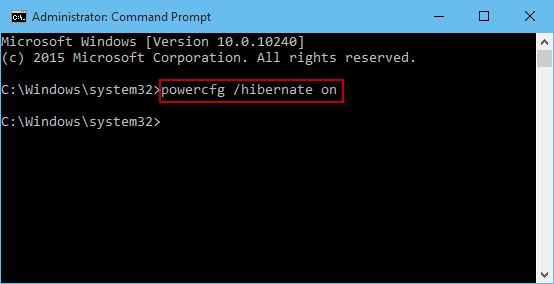
Scroll down until you find ‘Shutdown settings.’ Among these settings, you should see an option for ‘Hibernate.’ Check the box next to ‘Hibernate’ to enable it. Finally, click ‘Save changes’ at the bottom of the window, and hibernate will now be enabled on your computer.

Disabling Hibernate in Windows 10:

To disable hibernate, follow steps 1-3 above. Then, simply uncheck the box next to ‘Hibernate’ and click ‘Save changes.’ Hibernate is now disabled on your computer.

Conclusion:

Enabling or disabling hibernate in Windows 10 is a straightforward process that takes just a few minutes. If you’re looking for ways to save battery life or want an alternative to shutting down your computer completely, hibernate can be an effective solution. Just follow these steps to enable or disable it as desired.


Previous Article

How to download the original StarCraft for ...

Next Article

How to Factory Reset a MacBook, Windows ...

Matthew Lynch

Related articles More from author

  • Tech Advice

    Cubii Move Review: Simple, Effective Under-the-Desk Workouts on a Budget

    July 6, 2023
    By Matthew Lynch
  • Tech Advice

    Your Guide To Finding the Cheapest Car Insurance

    August 22, 2023
    By Matthew Lynch
  • Tech Advice

    What Is an Index Fund?

    September 6, 2023
    By Matthew Lynch
  • Tech Advice

    Samsung Galaxy Watch 5 and 5 Pro Deals: Save at Amazon, Best Buy, Samsung and More

    July 5, 2023
    By Matthew Lynch
  • Tech Advice

    Buying Car Insurance in San Francisco, California: What You Need To Know

    August 17, 2023
    By Matthew Lynch
  • Tech Advice

    Can’t Install Apps from Microsoft Store? 6 Best Ways to Fix it

    March 26, 2024
    By Matthew Lynch

Search

Login & Registration

  • Log in
  • Entries feed
  • Comments feed
  • WordPress.org

Newsletter

Signup for The Tech Edvocate Newsletter and have the latest in EdTech news and opinion delivered to your email address!

About Us

Since technology is not going anywhere and does more good than harm, adapting is the best course of action. That is where The Tech Edvocate comes in. We plan to cover the PreK-12 and Higher Education EdTech sectors and provide our readers with the latest news and opinion on the subject. From time to time, I will invite other voices to weigh in on important issues in EdTech. We hope to provide a well-rounded, multi-faceted look at the past, present, the future of EdTech in the US and internationally.

We started this journey back in June 2016, and we plan to continue it for many more years to come. I hope that you will join us in this discussion of the past, present and future of EdTech and lend your own insight to the issues that are discussed.

Newsletter

Signup for The Tech Edvocate Newsletter and have the latest in EdTech news and opinion delivered to your email address!

Contact Us

The Tech Edvocate
910 Goddin Street
Richmond, VA 23231
(601) 630-5238
[email protected]

Copyright © 2026 Matthew Lynch. All rights reserved.