The Tech Edvocate

Top Menu

  • Advertisement
  • Apps
  • Home Page
  • Home Page Five (No Sidebar)
  • Home Page Four
  • Home Page Three
  • Home Page Two
  • Home Tech2
  • Icons [No Sidebar]
  • Left Sidbear Page
  • Lynch Educational Consulting
  • My Account
  • My Speaking Page
  • Newsletter Sign Up Confirmation
  • Newsletter Unsubscription
  • Our Brands
  • Page Example
  • Privacy Policy
  • Protected Content
  • Register
  • Request a Product Review
  • Shop
  • Shortcodes Examples
  • Signup
  • Start Here
    • Governance
    • Careers
    • Contact Us
  • Terms and Conditions
  • The Edvocate
  • The Tech Edvocate Product Guide
  • Topics
  • Write For Us
  • Advertise

Main Menu

  • Start Here
    • Our Brands
    • Governance
      • Lynch Educational Consulting, LLC.
      • Dr. Lynch’s Personal Website
      • Careers
    • Write For Us
    • The Tech Edvocate Product Guide
    • Contact Us
    • Books
    • Edupedia
    • Post a Job
    • The Edvocate Podcast
    • Terms and Conditions
    • Privacy Policy
  • Topics
    • Assistive Technology
    • Child Development Tech
    • Early Childhood & K-12 EdTech
    • EdTech Futures
    • EdTech News
    • EdTech Policy & Reform
    • EdTech Startups & Businesses
    • Higher Education EdTech
    • Online Learning & eLearning
    • Parent & Family Tech
    • Personalized Learning
    • Product Reviews
  • Advertise
  • Tech Edvocate Awards
  • The Edvocate
  • Pedagogue
  • School Ratings

logo

The Tech Edvocate

  • Start Here
    • Our Brands
    • Governance
      • Lynch Educational Consulting, LLC.
      • Dr. Lynch’s Personal Website
        • My Speaking Page
      • Careers
    • Write For Us
    • The Tech Edvocate Product Guide
    • Contact Us
    • Books
    • Edupedia
    • Post a Job
    • The Edvocate Podcast
    • Terms and Conditions
    • Privacy Policy
  • Topics
    • Assistive Technology
    • Child Development Tech
    • Early Childhood & K-12 EdTech
    • EdTech Futures
    • EdTech News
    • EdTech Policy & Reform
    • EdTech Startups & Businesses
    • Higher Education EdTech
    • Online Learning & eLearning
    • Parent & Family Tech
    • Personalized Learning
    • Product Reviews
  • Advertise
  • Tech Edvocate Awards
  • The Edvocate
  • Pedagogue
  • School Ratings
  • The Narwal Freo Z20 Is the Prime Day Gift That Actually Saves Time

  • Capsaicinens rolle: kultur, helse og dyrking av chilipepper

  • Study: Nearly all personal care and cleaning products contain undisclosed chemicals

  • This One AI Wearable Feature Is Quietly Erasing Public Privacy

Digital & Mobile Technology
Home›Digital & Mobile Technology›How to Downgrade From Windows 11

How to Downgrade From Windows 11
By Matthew Lynch
June 9, 2023
0
Spread the love

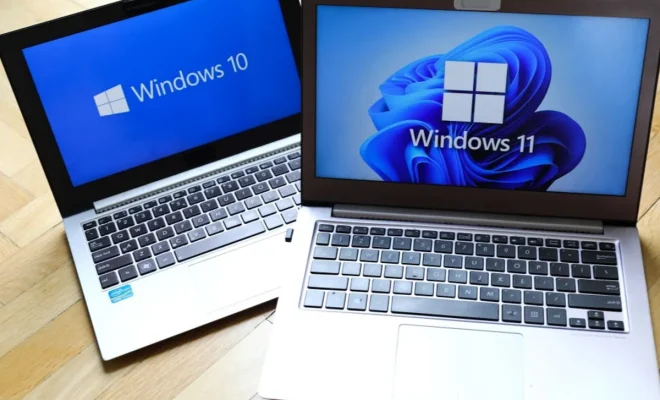
Windows 11 is Microsoft’s latest operating system version that promises a new user interface, improved performance, and several new features. However, some users may wish to revert to Windows 10 due to compatibility issues, functionality problems, or simply because of personal preference.

Before you start the downgrade process, keep in mind that downgrading may cause data loss, programs and app deletion, and other technical difficulties, so it’s highly recommended to backup your important files and data beforehand. Here are the basic steps to downgrade from Windows 11 to Windows 10:

1. Open the Windows Settings app by hitting the Windows key + I.

2. Go to the “System” section and click on “Recovery” on the left side.

3. In the Recovery window, look for “Advanced startup” and click on the “Restart now” button.

4. After the computer restarts, you will see a menu with several options, select “Troubleshoot”.

5. On the troubleshoot screen, select “Advanced options”.

6. Then select “Uninstall updates”.

7. Choose the option “Uninstall the latest feature update to Windows 10” to remove Windows 11 and roll back to Windows 10.

8. Follow the prompts and wait for the process to complete.

9. After Windows 10 is installed, you will need to reconfigure your settings, reinstall apps, and update drivers if necessary.

In some cases, if you didn’t backup essential files before the downgrade or if the process doesn’t go smoothly, you may encounter issues such as missing files, errors, or connectivity problems.

Therefore, it is crucial to backup your files and be prepared for potential problems before you start the downgrade process. If you are unsure of how to downgrade or encounter difficulties along the way, it is always best to ask a professional for assistance.

In conclusion, downgrading from Windows 11 to Windows 10 is possible if done correctly, but it is a process that requires careful attention to detail and patience. Backup your files, be prepared, and follow the steps as outlined to ensure a successful downgrade to Windows 10.

Previous Article

The 5 Best Airport Simulation Games

Next Article

How to Round Numbers Down in Excel ...

Matthew Lynch

Related articles More from author

  • Digital & Mobile Technology

    The 5 Best Free Puzzle Games for Android in 2023

    June 9, 2023
    By Matthew Lynch
  • Digital & Mobile Technology

    How to Use Widgets in Windows 11

    June 3, 2023
    By Matthew Lynch
  • Digital & Mobile Technology

    What Is an Automated Market Maker (AMM) in Crypto?

    June 15, 2023
    By Matthew Lynch
  • Digital & Mobile Technology

    How to Print to PDF on Any Computer, Smartphone, or Tablet

    May 2, 2023
    By Matthew Lynch
  • Digital & Mobile Technology

    What Is the Microsoft Edge Bar and How Do You Use It?

    August 5, 2023
    By Matthew Lynch
  • Digital & Mobile Technology

    How To Remotely Copy Files Over SSH Without Entering Your Password

    May 3, 2023
    By Matthew Lynch

Search

Login & Registration

  • Log in
  • Entries feed
  • Comments feed
  • WordPress.org

Newsletter

Signup for The Tech Edvocate Newsletter and have the latest in EdTech news and opinion delivered to your email address!

About Us

Since technology is not going anywhere and does more good than harm, adapting is the best course of action. That is where The Tech Edvocate comes in. We plan to cover the PreK-12 and Higher Education EdTech sectors and provide our readers with the latest news and opinion on the subject. From time to time, I will invite other voices to weigh in on important issues in EdTech. We hope to provide a well-rounded, multi-faceted look at the past, present, the future of EdTech in the US and internationally.

We started this journey back in June 2016, and we plan to continue it for many more years to come. I hope that you will join us in this discussion of the past, present and future of EdTech and lend your own insight to the issues that are discussed.

Newsletter

Signup for The Tech Edvocate Newsletter and have the latest in EdTech news and opinion delivered to your email address!

Contact Us

The Tech Edvocate
910 Goddin Street
Richmond, VA 23231
(601) 630-5238
[email protected]

Copyright © 2026 Matthew Lynch. All rights reserved.