How to create outro for YouTube video
“`html
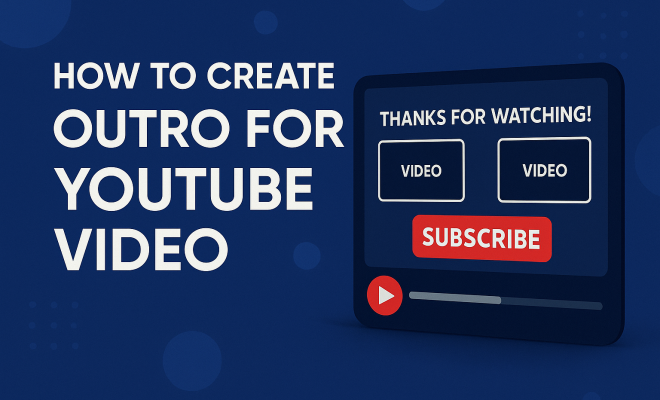
Creating an effective YouTube video outro design is crucial for any content creator looking to boost viewer engagement and increase subscriber numbers. A well-thought-out outro can serve as a powerful tool to not only wrap up your video but also to encourage viewers to take action, whether that’s subscribing, watching another video, or visiting your website. In this article, we’ll explore ten essential tips for crafting the perfect YouTube video outro that resonates with your audience and drives results.
1. Understand the Purpose of Your Outro
The first step in designing an effective outro is understanding its purpose. A typical YouTube video outro design serves several functions: it wraps up your video content, reinforces your brand, and encourages viewer interaction. Think of it as your video’s final pitch; this is your chance to leave a lasting impression. Make sure your outro aligns with the overall message of your video and encourages viewers to take the desired action.
For instance, if your video is a tutorial, your outro could direct viewers to related videos or encourage them to download a resource. If it’s a vlog, you might invite them to check out your other vlogs or subscribe for more content. Understanding these nuances can significantly influence how effectively your outro resonates with your audience.
2. Keep It Short and Sweet
When it comes to video outros, brevity is key. The ideal outro should last between 10-20 seconds. This timeframe is enough to convey your message without losing viewer interest. Remember, your audience is likely to click away if they feel they’re stuck in a lengthy end screen.
To achieve this, focus on the most vital elements of your outro—typically a call to action (CTA) and a brief reminder of your channel’s value. Use concise language and powerful visuals to make every second count. If you can communicate your message clearly in a shorter time, you’ll likely keep more viewers engaged.
3. Incorporate Branding Elements
Your YouTube video outro design should reflect your brand identity. Incorporating consistent visual elements—like logos, color schemes, and fonts—reinforces your brand and makes your content easily recognizable. This consistency builds trust and familiarity among your audience, making them more likely to return.
For instance, if your channel has a particular color palette or style, ensure that these are mirrored in your outro. This not only enhances your brand’s visibility but also creates a cohesive look across all your videos. In a competitive platform like YouTube, establishing a strong brand identity can set you apart from the crowd.
4. Utilize YouTube’s End Screen Feature
YouTube offers an end screen feature that allows you to add interactive elements to your outro. These can include links to other videos, playlists, or even external websites. Utilizing this feature effectively can increase viewer retention and encourage more subscriptions.
When designing your outro, think about which elements you wish to highlight. The end screen is an opportunity to guide your viewers where you want them to go next. For example, you can link to your most popular video or promote a new series you’re launching. This interactive aspect not only engages viewers but also helps to optimize your channel’s growth potential.
5. Add a Call to Action (CTA)
A strong call to action is crucial in any YouTube video outro design. This is your moment to ask viewers to subscribe, like, or check out more content. Be clear about what you want your viewers to do next; don’t leave them guessing. Phrases like “Subscribe for more tips” or “Click here to watch my latest video” are straightforward and effective.
Make sure your CTA is visually prominent, perhaps by using eye-catching graphics or animations. The more compelling and visible your CTA is, the more likely viewers will take action. It’s about creating a pathway for your audience to follow, leading them deeper into your content ecosystem. (See: Understanding YouTube's platform dynamics.)
6. Engage Emotionally with Music and Sound
Music plays a pivotal role in setting the tone of your outro. The right soundtrack can evoke emotions, encouraging viewers to feel more connected to your content. An upbeat, cheerful tune can leave viewers feeling happy and energized, while a more mellow track can create a thoughtful atmosphere.
When choosing music for your outro, consider the vibe of your channel and the message you want to convey. It’s important to select royalty-free music to avoid copyright issues, and ensure it aligns well with your brand identity. The combination of visuals and audio can create a lasting impression that resonates with your audience.
7. Experiment with Different Styles
Your first draft of a YouTube video outro design doesn’t have to be your final version. Experimenting with various styles can reveal what works best for your audience. Try different layouts, colors, and animations to see which combinations generate higher engagement rates.
For example, you might test a more minimalist design against a vibrant, complex one to see which retains viewers better. Analyzing the performance of your outros can provide valuable insights into audience preferences, helping you refine your approach over time. Don’t be afraid to iterate and adapt based on what the data shows.
8. Showcase Related Content
One effective way to keep viewers engaged is to showcase related content in your outro. Highlighting videos that are thematically similar to the current one encourages viewers to continue watching rather than clicking away. This is particularly important for channels focused on specific niches—like tech reviews or lifestyle vlogs—where viewers might be interested in exploring more within that context.
Consider creating a mini playlist within your outro that features 2-3 videos that align with the current topic. This not only adds value to the viewer’s experience but also enhances your channel’s overall watch time, a key metric for YouTube’s algorithm.
9. Analyze Performance Metrics
Once your outro is live, don’t just sit back and watch. It’s essential to analyze performance metrics to understand how well your outro is working. Look at engagement rates, click-through rates on CTAs, and overall viewer retention. These analytics provide insights into what parts of your outro resonate with viewers and what areas may need improvement.
For instance, if you notice a significant drop-off after your outro starts, it may be time to rethink your approach. Use tools like YouTube Analytics to track these metrics closely, and don’t hesitate to make adjustments based on the data to optimize your outro for better performance.
10. Stay Up-to-Date with Trends
The digital landscape is ever-changing, and YouTube is no exception. Trends in video content and viewer preferences evolve rapidly, and your YouTube video outro design should reflect current best practices. Keep an eye on what successful creators in your niche are doing with their outros, and consider how you can adapt those ideas to fit your unique style.
Additionally, stay informed about YouTube’s updates and features. New tools and functionalities can enhance your outro’s effectiveness. Engaging with creator communities can also provide inspiration and help you remain aware of emerging trends that could benefit your channel.
11. Frequently Asked Questions (FAQ)
What makes a good YouTube video outro?
A good YouTube video outro should be visually appealing, short, and include a clear call to action. It should also reflect your brand and provide viewers with options for further engagement, such as links to related content or subscriptions.
How long should a YouTube outro be?
The ideal length for a YouTube outro is between 10 to 20 seconds. This duration is long enough to convey your message without risking viewer drop-off. (See: Research on viewer engagement strategies.)
Can I use copyrighted music in my outro?
No, using copyrighted music without permission can lead to your video being removed or your channel being penalized. Instead, opt for royalty-free music or music you have licensed for use on your channel.
How can I test the effectiveness of my outro?
You can test the effectiveness of your outro by analyzing performance metrics such as viewer retention, click-through rates on CTAs, and overall engagement. Tools like YouTube Analytics can help you track these metrics over time.
Are there any tools to help design a YouTube outro?
Yes, there are several tools available that can assist in designing YouTube outros, including Canva, Adobe Spark, and specialized video editing software like Final Cut Pro or Adobe Premiere Pro. These tools often come with templates that can simplify the design process.
Should I update my outro regularly?
Yes, updating your outro periodically can keep your content fresh and engaging. As your brand evolves and as new trends emerge, refreshing your outro can help maintain viewer interest and relevance.
What are some popular outro styles?
Some popular outro styles include minimalist designs that focus on clean visuals, dynamic animations that grab attention, and interactive elements that encourage viewer participation. Top creators often mix and match styles to find the right balance for their audience.
12. Case Studies of Successful Outros
Channel A: Tech Review Tutorials
Channel A has seen tremendous growth thanks to a well-structured outro that includes a strong CTA and showcases related videos. Their outros are concise, lasting about 15 seconds, and they use a consistent color scheme that aligns with their branding. They also utilize YouTube’s end screen feature creatively, linking to their most popular reviews and upcoming product launches.
Channel B: Lifestyle Vlogs
Channel B’s outro features a cheerful, upbeat track that resonates with their audience. They keep it short and include a simple CTA inviting viewers to subscribe or watch more of their travel vlogs. The outros are visually distinct, with stunning visuals from their travels, which effectively keeps viewers engaged and encourages them to explore more content.
Channel C: Educational Content
Channel C incorporates educational snippets in their outros, giving viewers a glimpse into other relevant videos on the channel. They use engaging graphics and animations to highlight their CTAs, and their consistent branding solidifies their identity among educational channels.
13. Best Practices for YouTube Video Outros
To create an effective YouTube video outro, consider the following best practices:
- Consistency: Maintain a consistent look and feel across all videos to enhance brand identity.
- Clarity: Make sure your message is clear, and your CTAs are straightforward.
- Optimization: Use SEO techniques, including relevant keywords and tags, to enhance discoverability.
- Feedback: Regularly solicit feedback from your audience to understand their preferences and improve your outros.
- A/B Testing: Test different outro designs and analyze performance metrics to find the most effective elements.
14. The Psychology Behind Effective Outros
Understanding the psychological triggers that influence viewer behavior can greatly enhance your outro design. The principle of cognitive fluency suggests that people prefer content that is easy to understand and process. This means your outro should be visually clear and straightforward in its messaging. Simple graphics and clear CTAs can lead to higher engagement rates. (See: Study on video content engagement.)
Additionally, the mere exposure effect indicates that people tend to develop a preference for things simply because they are familiar with them. By consistently using certain colors, fonts, and styles in your outros, you reinforce your brand and increase the likelihood that viewers will subscribe or return for more content.
15. Creating a Dynamic Outro Using Animation
Animation can add a level of engagement that static images simply can’t offer. By incorporating animated elements into your outro, you can grab attention and keep viewers focused until the very end. Simple animations—like moving text or transitioning graphics—can help illustrate your message and make your outro more memorable.
Tools like After Effects, Blender, or even simpler platforms like Animaker can help you create vibrant animations without requiring extensive technical skills. Keep in mind that while animations can enhance engagement, they should not distract from your main message or CTA.
16. The Importance of Mobile Optimization
With a significant portion of YouTube views coming from mobile devices, it’s vital to ensure your outro is mobile-friendly. Elements should be easily readable on smaller screens, and interactive elements must be touch-friendly. Consider the placement of text and graphics to ensure they are not cut off or difficult to click on mobile devices.
Testing your outros on various devices is crucial. Check how they display on smartphones, tablets, and desktops. This way, you can ensure a seamless user experience for all viewers, regardless of how they access your content.
17. Collaborating with Other Creators
Collaborating with other YouTube creators can be a great way to enhance your outro and reach new audiences simultaneously. Consider requesting a short clip from a fellow YouTuber to include in your outro. This not only enriches your content but also encourages cross-promotion, allowing both channels to benefit from increased visibility.
When collaborating, make sure to align with creators whose content complements yours. This synergy can create a more impactful viewing experience, as audiences will likely be interested in both channels. Remember to clearly credit your collaborators in your outro to maintain goodwill and foster future partnerships.
18. Conclusion
Designing an effective YouTube video outro is an art that combines creativity, strategy, and analysis. By implementing these tips, experimenting with styles, and analyzing data, you can create outros that not only wrap up your content beautifully but also drive viewer engagement and growth for your channel. Remember, the outro is not just an end; it’s an invitation for your audience to continue their journey with you.
“`
Trending Now
Frequently Asked Questions
What should I include in my YouTube video outro?
Your YouTube video outro should include a clear call to action (CTA), a reminder of your channel's value, and visually engaging elements. These components encourage viewers to subscribe, watch more videos, or visit your website, effectively wrapping up your content while driving engagement.
How long should a YouTube outro be?
A YouTube outro should ideally last between 10 to 20 seconds. This duration is sufficient to convey your message without losing viewer interest, allowing you to keep your audience engaged until the very end of your video.
Why is a YouTube outro important?
A YouTube outro is important because it serves multiple purposes: it wraps up your video, reinforces your brand, and encourages viewer interaction. A well-designed outro leaves a lasting impression and motivates viewers to take specific actions, such as subscribing or watching more content.
How can I make my YouTube outro more effective?
To make your YouTube outro more effective, keep it concise, focus on your main message, and use powerful visuals. Tailor your outro to align with your video's content and include clear CTAs that guide viewers on what to do next, enhancing viewer engagement.
What is a call to action in a YouTube outro?
A call to action (CTA) in a YouTube outro is a prompt that encourages viewers to take a specific action, such as subscribing to your channel, watching another video, or visiting your website. It's a crucial element that helps convert viewers into subscribers and keeps them engaged with your content.
Have you experienced this yourself? We’d love to hear your story in the comments.