How to create catalog in WhatsApp Business
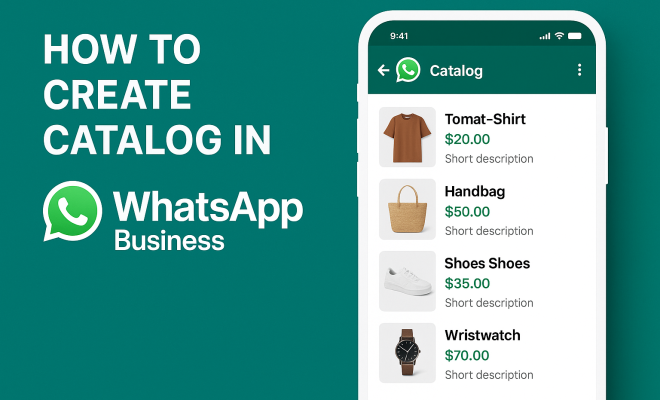
“`html
In a world that’s increasingly reliant on digital communication, businesses must adapt to keep up with their customers’ needs. One of the most versatile tools in this regard is WhatsApp Business, which allows organizations to connect with clients effectively. Among its various features, the ability to create a catalog in WhatsApp Business stands out as one of the most beneficial. This guide offers a detailed look at how to create, manage, and optimize your catalog, enhancing your customer engagement and driving sales.
1. Understanding WhatsApp Business
WhatsApp Business was launched in 2018 as a dedicated platform for small and medium-sized enterprises. Unlike the standard WhatsApp application, WhatsApp Business includes features tailored for business communication, such as automated messages, quick replies, and of course, the product catalog. Recognizing the need for a seamless customer experience, WhatsApp has integrated tools that allow companies to showcase their products or services in an organized manner.
The primary objective of WhatsApp Business is to streamline communication between businesses and their customers. By leveraging features like catalogs, businesses can provide instant access to products without requiring customers to navigate away from their chat interface. This reduces friction in the buying process and enhances overall customer satisfaction.
2. Why Create a Catalog in WhatsApp Business?
Creating a catalog on WhatsApp Business has several advantages. Firstly, it allows businesses to showcase their products in a visual and engaging way, which can significantly boost interest among potential customers. Studies have shown that visuals can increase product sales by up to 80%, making catalogs an essential part of any marketing strategy.
Furthermore, catalogs facilitate easy browsing for consumers. Instead of sifting through endless messages or visiting a website, customers can simply scroll through the catalog. This not only makes it easier for them to find what they are looking for, but it also encourages impulse purchases. With the integration of WhatsApp’s chat feature, customers can inquire about products directly, making the buying process smoother.
3. Step-by-Step Guide to Create a Catalog in WhatsApp Business
Creating a catalog in WhatsApp Business is a straightforward process. Follow these steps to get started:
- Download and Install WhatsApp Business: If you haven’t already, download the WhatsApp Business app from the Google Play Store or Apple App Store and set up your profile.
- Access the Catalog Feature: Open the app, go to the ‘Settings’ tab, then tap on ‘Business Tools’. Here, you will find the ‘Catalog’ option.
- Add Items to Your Catalog: Tap ‘Add New Item’ and fill in details like item name, description, price, and product images. You can add multiple images per item, giving customers a better view of what you’re offering.
- Publish Your Catalog: Once you’ve added all your products, click ‘Save’ or ‘Publish’, and your catalog will be live for your customers to view.
Remember, the quality of your product images and descriptions can directly impact customer decisions. Invest time in crafting appealing content to make your catalog stand out.
4. Best Practices for Catalog Management
Once your catalog is live, managing it effectively is crucial. Here are some best practices:
- Regular Updates: Regularly update your catalog to reflect current stock, new products, and seasonal offerings. This keeps your offerings fresh and ensures customers see what’s available.
- High-Quality Images: Use high-resolution images that accurately represent your products. Poor quality images can deter potential buyers and diminish your brand’s reputation.
- Engaging Descriptions: Write concise yet informative descriptions for each product. Highlight key features, benefits, and any special offers available.
- Customer Feedback: Encourage and monitor customer feedback. Use insights to improve product offerings and catalog visibility.
By implementing these practices, you can create a dynamic catalog that evolves with your business and meets customer needs.
5. Integrating Catalogs with WhatsApp Marketing
Creating a catalog in WhatsApp Business isn’t just about showcasing products; it also plays a vital role in your overall marketing strategy. Integrating your catalog with marketing efforts can enhance visibility and customer engagement. For instance, share your catalog link in promotional emails or on social media platforms to drive traffic to your WhatsApp Business account.
You can also leverage WhatsApp Status to promote new products in your catalog. By sharing engaging stories or updates, you can draw attention to specific items, enticing customers to browse your catalog directly. Additionally, consider using targeted messaging to promote limited-time offers or seasonal sales that highlight select products in your catalog. (See: WhatsApp Business on Wikipedia.)
6. Analytics: Tracking Catalog Performance
One of the most significant advantages of using WhatsApp Business is the ability to track user interactions with your catalog. Although WhatsApp doesn’t provide in-depth analytics directly, you can gauge catalog performance through customer inquiries and sales conversions. Keep track of which products generate the most interest and which messages lead to sales.
Moreover, consider using external tools to monitor engagement metrics. For instance, if customers frequently ask questions about a particular product, this might indicate a need for better descriptions or highlighted features. By analyzing this data, you can refine your catalog and marketing strategies to better meet customer expectations.
7. Customer Engagement through Catalogs
Engagement is a key factor in driving sales, and catalogs on WhatsApp Business offer a unique platform to foster this engagement. With the ability to interact directly with customers, businesses can answer questions, provide recommendations, and even offer personalized service. This level of interaction can significantly enhance customer loyalty.
Consider hosting special promotional events where customers can browse through your catalog in real-time via a WhatsApp chat. This not only makes customers feel valued but also allows for immediate feedback and interaction. Additionally, using features like automated responses can help manage inquiries efficiently while still providing a personal touch.
8. The Future of Catalogs in WhatsApp Business
As WhatsApp continues to evolve, so too will the features available for businesses. The introduction of new tools and enhancements can further transform how businesses utilize catalogs within the platform. For example, the integration of augmented reality (AR) features could allow customers to visualize products in their environment, significantly impacting purchase decisions.
Moreover, as consumer preferences shift towards instant messaging for shopping, the demand for efficient catalog management tools is likely to grow. Businesses that stay ahead of these trends and adapt their strategies accordingly will benefit the most. Keeping an eye on updates from WhatsApp can provide valuable insights into how to further enhance your catalog and overall customer experience.
9. Examples of Successful Catalogs
Understanding how other businesses effectively leverage catalogs in WhatsApp Business can provide valuable insights. For instance, a local bakery that lists its daily specials, alongside high-quality images and descriptions of each item, can entice customers to purchase fresh goods. By showcasing appealing images of cakes and pastries, the bakery can create an inviting atmosphere that encourages sales.
Another example is a fashion retailer that utilizes its catalog to display seasonal collections. By categorizing items into different sections—such as “New Arrivals,” “Sale,” or “Best Sellers”—customers can navigate easily, leading to increased sales. Furthermore, the retailer can share exclusive catalog links through social media and email newsletters to drive traffic and enhance engagement.
Additionally, consider the success of tech companies that showcase their gadgets and accessories in their catalogs. They might include specifications, customer reviews, and videos demonstrating product functionality, which can significantly aid in the decision-making process for potential buyers.
10. Common Mistakes to Avoid When Creating a Catalog
While creating a catalog in WhatsApp Business can enhance your sales, avoiding common pitfalls is crucial. Here are some mistakes to steer clear of:
- Poor Quality Images: Using low-resolution or poorly lit images can dissuade customers from purchasing. Always opt for high-quality visuals that reflect your brand’s professionalism.
- Inconsistent Branding: Ensure that your catalog reflects your brand’s identity. Use consistent colors, fonts, and language throughout to create a cohesive look.
- Neglecting Customer Questions: Ignoring inquiries or failing to respond promptly can frustrate potential buyers. Make it a priority to engage with customers and address their concerns.
- Overloading with Information: While details are important, too much information can overwhelm customers. Keep descriptions concise and focus on key selling points.
Avoiding these mistakes helps position your catalog as a vital tool for driving conversions while maintaining a positive customer experience.
11. Frequently Asked Questions (FAQ)
1. Can I edit my catalog after it’s published?
Yes, you can edit your catalog at any time. Simply access the catalog feature in WhatsApp Business and make the necessary changes. Don’t forget to save your updates! (See: CDC Health Communication Guidelines.)
2. Is there a limit to how many items I can add to my catalog?
WhatsApp Business allows you to add up to 500 items to your catalog. This should be sufficient for most businesses, but if you reach the limit, consider grouping related items or rotating stock based on seasons or promotions.
3. How can I promote my catalog to more customers?
Use various platforms to promote your catalog, such as social media, email newsletters, and even your website. Utilize WhatsApp Status to regularly share updates or highlight specific products. Engaging with customers directly through WhatsApp chats also encourages them to explore your catalog.
4. Can I use WhatsApp Business for customer support as well?
Absolutely! WhatsApp Business allows you to engage in customer support through the same platform. Use quick replies and automated messages to provide timely responses, ensuring customer satisfaction while they browse your catalog.
5. Are there any fees associated with using WhatsApp Business?
No, the WhatsApp Business app is free to download and use. However, if you opt for WhatsApp Business API for larger-scale operations, there may be costs associated with message delivery and other advanced features.
12. Maximizing Your Catalog’s Performance
After creating your catalog, the next step is to ensure it performs optimally. One way to do this is by conducting A/B testing on product descriptions and images to see which variations yield better customer engagement. You might find that certain phrases or visuals resonate more with your audience, leading to higher conversion rates.
Additionally, consider implementing a feedback loop where customers can easily share their thoughts on products. This not only improves engagement but also provides valuable insights that can inform future catalog updates. For instance, if a particular product receives consistent positive feedback, you might want to highlight it more prominently in your catalog or even run promotions around it.
13. Enhancing Catalog Interactivity
To further engage customers, think about integrating interactive elements into your catalog experience. This could include clickable links to videos demonstrating product use, or even virtual try-on features for clothing or accessories. The more interactive your catalog is, the more likely customers are to spend time exploring it.
For example, a beauty brand could create tutorial videos showcasing how to use specific products listed in the catalog. This not only enhances the shopping experience but also positions the business as a helpful resource, likely increasing customer loyalty.
14. Utilizing Customer Insights
Your catalog doesn’t just serve as a sales tool; it can also provide insights into customer preferences and buying behaviors. By analyzing which products are frequently viewed or discussed in chats, you can gather data that informs your inventory decisions and marketing strategies. For instance, if certain products are consistently asked about but not purchased, it may be worth investigating whether the pricing or descriptions are causing potential buyers to hesitate.
Use these insights to refine your offerings and tailor your catalog to better meet customer demands. Regularly reviewing interaction data can help you stay ahead of trends and ensure your catalog remains relevant. (See: New York Times on WhatsApp Business.)
15. Examples of Innovations in Catalog Creation
Looking beyond the basics of catalog creation, innovative examples can inspire your own catalog strategy. Consider the approach taken by a home goods store that utilizes customer-generated content to enrich their catalog. By encouraging customers to share photos of their purchases in use, they can create a more relatable and authentic catalog experience that resonates with potential buyers.
Additionally, some businesses have started to incorporate gamification into their catalog experience, offering rewards or discounts for customers who browse their catalogs thoroughly or engage with specific products. This not only incentivizes interaction but also adds an element of fun to the shopping experience.
16. Preparing for Events and Seasonal Sales
As the seasons change or special holidays approach, adapting your catalog to capitalize on these events can drive significant sales. Create thematic collections that highlight products relevant to the occasion. For example, during the holiday season, a gift shop could have a dedicated section in their catalog for gift ideas, categorizing items by recipient, such as “Gifts for Her” or “Gifts for Tech Lovers.” This makes it easier for customers to find suitable products while also increasing the likelihood of impulse purchases.
Promotion strategies during these times can include countdowns in your WhatsApp Status or exclusive previews of your catalog offerings for loyal customers. This not only builds excitement but also encourages immediate action as customers feel they’re part of an exclusive event.
17. Staying Updated with WhatsApp Business Features
Keeping your catalog fresh and in line with the latest features released by WhatsApp Business is essential. Regularly check for updates and new tools that can enhance your catalog experience. For example, WhatsApp may introduce new catalog layouts, multimedia enhancements, or even tools for tracking performance metrics. Staying informed allows you to take advantage of these features, ensuring your catalog remains competitive and engaging.
By participating in WhatsApp Business forums and communities, you can also gain insights from other businesses and adapt successful strategies to your catalog. Sharing experiences can lead to new ideas and innovations that set your catalog apart in a crowded market.
18. Conclusion: Maximizing Your Catalog Potential
Creating and managing a catalog in WhatsApp Business is more than just a feature; it’s an opportunity to enhance customer interaction, streamline the buying process, and ultimately drive sales. By following the steps outlined in this guide and applying best practices, you can ensure that your catalog is not only visually appealing but also effective in engaging customers. The future of business communication is here, and with tools like WhatsApp Business, you can stay ahead of the competition. So, what are you waiting for? Start building your catalog today and transform how you connect with your customers!
“`
Trending Now
Frequently Asked Questions
How do I create a catalog in WhatsApp Business?
To create a catalog in WhatsApp Business, open the app, go to the 'Settings' tab, select 'Business Tools,' then tap on 'Catalog.' From there, you can add products or services, including images, descriptions, and prices to showcase your offerings effectively.
What are the benefits of using a catalog in WhatsApp Business?
Using a catalog in WhatsApp Business allows businesses to visually showcase products, making it easier for customers to browse and engage. This can lead to increased sales, as studies suggest that visuals can boost interest and conversion rates significantly.
Can customers purchase directly from the WhatsApp Business catalog?
While customers cannot purchase directly through the WhatsApp Business catalog, they can view products and then contact the business via chat to complete their purchase, streamlining the buying process.
Is WhatsApp Business free to use for creating a catalog?
Yes, WhatsApp Business is free to download and use, including the catalog feature. This makes it an accessible tool for small and medium-sized businesses looking to enhance customer engagement without incurring additional costs.
How can I optimize my WhatsApp Business catalog for better sales?
To optimize your WhatsApp Business catalog, use high-quality images, clear descriptions, and competitive pricing. Regularly update your catalog with new products and promotions to keep customers engaged and encourage repeat visits.
What did we miss? Let us know in the comments and join the conversation.