The Tech Edvocate

Top Menu

  • Advertisement
  • Apps
  • Home Page
  • Home Page Five (No Sidebar)
  • Home Page Four
  • Home Page Three
  • Home Page Two
  • Home Tech2
  • Icons [No Sidebar]
  • Left Sidbear Page
  • Lynch Educational Consulting
  • My Account
  • My Speaking Page
  • Newsletter Sign Up Confirmation
  • Newsletter Unsubscription
  • Our Brands
  • Page Example
  • Privacy Policy
  • Protected Content
  • Register
  • Request a Product Review
  • Shop
  • Shortcodes Examples
  • Signup
  • Start Here
    • Governance
    • Careers
    • Contact Us
  • Terms and Conditions
  • The Edvocate
  • The Tech Edvocate Product Guide
  • Topics
  • Write For Us
  • Advertise

Main Menu

  • Start Here
    • Our Brands
    • Governance
      • Lynch Educational Consulting, LLC.
      • Dr. Lynch’s Personal Website
      • Careers
    • Write For Us
    • The Tech Edvocate Product Guide
    • Contact Us
    • Books
    • Edupedia
    • Post a Job
    • The Edvocate Podcast
    • Terms and Conditions
    • Privacy Policy
  • Topics
    • Assistive Technology
    • Child Development Tech
    • Early Childhood & K-12 EdTech
    • EdTech Futures
    • EdTech News
    • EdTech Policy & Reform
    • EdTech Startups & Businesses
    • Higher Education EdTech
    • Online Learning & eLearning
    • Parent & Family Tech
    • Personalized Learning
    • Product Reviews
  • Advertise
  • Tech Edvocate Awards
  • The Edvocate
  • Pedagogue
  • School Ratings

logo

The Tech Edvocate

  • Start Here
    • Our Brands
    • Governance
      • Lynch Educational Consulting, LLC.
      • Dr. Lynch’s Personal Website
        • My Speaking Page
      • Careers
    • Write For Us
    • The Tech Edvocate Product Guide
    • Contact Us
    • Books
    • Edupedia
    • Post a Job
    • The Edvocate Podcast
    • Terms and Conditions
    • Privacy Policy
  • Topics
    • Assistive Technology
    • Child Development Tech
    • Early Childhood & K-12 EdTech
    • EdTech Futures
    • EdTech News
    • EdTech Policy & Reform
    • EdTech Startups & Businesses
    • Higher Education EdTech
    • Online Learning & eLearning
    • Parent & Family Tech
    • Personalized Learning
    • Product Reviews
  • Advertise
  • Tech Edvocate Awards
  • The Edvocate
  • Pedagogue
  • School Ratings
  • Jaw-Dropping Reveals: The Best Game Announcements Tokyo Game Show 2026 Unleashed Before Disaster Struck

  • Typhoon Dujuan Triggers Unprecedented Tokyo Game Show 2026 Cancellation – What It Means for Gaming’s Future

  • Why Insurers Are Ditching Old Tech for AI: Earnix Agent Hub’s Radical Shift

  • This One InsurTech Breakthrough Is Gutting Underwriting Times From Days to Minutes

  • This One InsurTech Move Could Completely Reshape Insurance AI

  • This Virtual Biotech With 37,000 AI Agents Just Blew Away Traditional Drug Discovery

  • This One AI Breakthrough Just Compressed a Century of Drug Discovery Into a Decade

  • This Virtual Biotech With 37,000 AI Agents Just Revolutionized Drug Discovery

  • Outrageous: This University Policy Could Cost Students THOUSANDS More

  • Affordable Housing Options for Sacramento State Students: A Comprehensive Review

Tech Advice
Home›Tech Advice›How to Connect Your USB-C Mac to Older Peripherals

How to Connect Your USB-C Mac to Older Peripherals
By Matthew Lynch
July 29, 2023
0
Spread the love

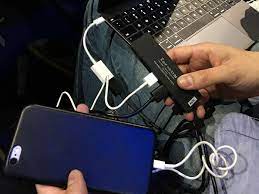
With the rise of USB-C ports on modern computers like the MacBook and MacBook Pro, many users find themselves faced with the challenge of connecting their newer hardware to older peripherals that use USB-A or other legacy connectors. Fortunately, there are several solutions available to help you connect your USB-C Mac to older peripherals. In this article, we’ll take a look at some of the most common options.

1. USB-C to USB-A Adapter

The simplest and most straightforward solution to connect a USB-C Mac to a USB-A peripheral is to use a USB-C to USB-A adapter. These adapters can be found on Amazon or at your local electronics store. The adapter plugs into the USB-C port on your Mac, and the USB-A connector on the other end of the adapter can be used to connect to a peripheral such as a printer or external hard drive.

2. USB-C to HDMI Adapter

If you want to connect your USB-C Mac to an older monitor or TV that uses HDMI, you’ll need a USB-C to HDMI adapter. These adapters can be used to mirror your Mac’s display on an external screen, or extend your desktop to a larger display. Some adapters also include additional USB ports, allowing you to connect other peripherals such as a mouse or keyboard.

3. USB-C Docking Station

A USB-C docking station is a more robust solution for connecting your USB-C Mac to older peripherals. These devices typically offer multiple USB-A ports, HDMI or DisplayPort connections, Ethernet, and audio inputs/outputs. Some even include a built-in card reader and charging capabilities. While they can be more expensive than other options, a docking station provides a full suite of connectivity options in one package.

4. Thunderbolt 3 Docking Station

If your USB-C Mac supports Thunderbolt 3, you can opt for a Thunderbolt 3 docking station instead. These offer the same set of connectivity options as a USB-C docking station but provide even faster data transfer rates. Thunderbolt 3 docking stations are generally more expensive, but they allow you to connect multiple displays, external graphics cards, and other high-power peripherals.

Conclusion

No matter what your specific needs are, there are multiple solutions available to connect your USB-C Mac to older peripherals. From simple adapters to multifunctional docking stations, there is a solution that will work for you. With a bit of research and experimentation, you can find the perfect combination of peripherals to make your USB-C Mac work for you, no matter what kind of legacy devices you need to connect.

Previous Article

How to Use Samsung’s Do Not Disturb ...

Next Article

Fill Text With an Image in Photoshop ...

Matthew Lynch

Related articles More from author

  • Tech Advice

    Should You Buy Ground-Mounted Solar Panels? What to Know

    July 8, 2023
    By Matthew Lynch
  • Tech Advice

    Save on Utility Bills This Summer With These Eco-Friendly Smart Home Devices

    July 8, 2023
    By Matthew Lynch
  • Tech Advice

    What is ESG Investing?

    September 7, 2023
    By Matthew Lynch
  • Tech Advice

    Average Credit Score in America: 2023 Report

    September 5, 2023
    By Matthew Lynch
  • Tech Advice

    Apple iPhone XS Max Review: The Biggest-Screen iPhone with the Biggest Price

    July 11, 2023
    By Matthew Lynch
  • Tech Advice

    2024 Jeep Wrangler 4xe Gets Lower Price, More Features

    July 12, 2023
    By Matthew Lynch

Search

Login & Registration

  • Log in
  • Entries feed
  • Comments feed
  • WordPress.org

Newsletter

Signup for The Tech Edvocate Newsletter and have the latest in EdTech news and opinion delivered to your email address!

About Us

Since technology is not going anywhere and does more good than harm, adapting is the best course of action. That is where The Tech Edvocate comes in. We plan to cover the PreK-12 and Higher Education EdTech sectors and provide our readers with the latest news and opinion on the subject. From time to time, I will invite other voices to weigh in on important issues in EdTech. We hope to provide a well-rounded, multi-faceted look at the past, present, the future of EdTech in the US and internationally.

We started this journey back in June 2016, and we plan to continue it for many more years to come. I hope that you will join us in this discussion of the past, present and future of EdTech and lend your own insight to the issues that are discussed.

Newsletter

Signup for The Tech Edvocate Newsletter and have the latest in EdTech news and opinion delivered to your email address!

Contact Us

The Tech Edvocate
910 Goddin Street
Richmond, VA 23231
(601) 630-5238
[email protected]

Copyright © 2026 Matthew Lynch. All rights reserved.