The Tech Edvocate

Top Menu

  • Advertisement
  • Apps
  • Home Page
  • Home Page Five (No Sidebar)
  • Home Page Four
  • Home Page Three
  • Home Page Two
  • Home Tech2
  • Icons [No Sidebar]
  • Left Sidbear Page
  • Lynch Educational Consulting
  • My Account
  • My Speaking Page
  • Newsletter Sign Up Confirmation
  • Newsletter Unsubscription
  • Our Brands
  • Page Example
  • Privacy Policy
  • Protected Content
  • Register
  • Request a Product Review
  • Shop
  • Shortcodes Examples
  • Signup
  • Start Here
    • Governance
    • Careers
    • Contact Us
  • Terms and Conditions
  • The Edvocate
  • The Tech Edvocate Product Guide
  • Topics
  • Write For Us
  • Advertise

Main Menu

  • Start Here
    • Our Brands
    • Governance
      • Lynch Educational Consulting, LLC.
      • Dr. Lynch’s Personal Website
      • Careers
    • Write For Us
    • The Tech Edvocate Product Guide
    • Contact Us
    • Books
    • Edupedia
    • Post a Job
    • The Edvocate Podcast
    • Terms and Conditions
    • Privacy Policy
  • Topics
    • Assistive Technology
    • Child Development Tech
    • Early Childhood & K-12 EdTech
    • EdTech Futures
    • EdTech News
    • EdTech Policy & Reform
    • EdTech Startups & Businesses
    • Higher Education EdTech
    • Online Learning & eLearning
    • Parent & Family Tech
    • Personalized Learning
    • Product Reviews
  • Advertise
  • Tech Edvocate Awards
  • The Edvocate
  • Pedagogue
  • School Ratings

logo

The Tech Edvocate

  • Start Here
    • Our Brands
    • Governance
      • Lynch Educational Consulting, LLC.
      • Dr. Lynch’s Personal Website
        • My Speaking Page
      • Careers
    • Write For Us
    • The Tech Edvocate Product Guide
    • Contact Us
    • Books
    • Edupedia
    • Post a Job
    • The Edvocate Podcast
    • Terms and Conditions
    • Privacy Policy
  • Topics
    • Assistive Technology
    • Child Development Tech
    • Early Childhood & K-12 EdTech
    • EdTech Futures
    • EdTech News
    • EdTech Policy & Reform
    • EdTech Startups & Businesses
    • Higher Education EdTech
    • Online Learning & eLearning
    • Parent & Family Tech
    • Personalized Learning
    • Product Reviews
  • Advertise
  • Tech Edvocate Awards
  • The Edvocate
  • Pedagogue
  • School Ratings
  • Zola Suite pricing 2026

  • How to become Airbnb Superhost

  • Yelp Elite status how to get

  • Rocket Matter vs CosmoLex comparison

  • Lawyaw vs Documate which is better

  • How to use Yelp for marketing

  • How many templates in Lawyaw

  • Can TripAdvisor reviews be edited

  • How to manage documents in Zola Suite

  • Filevine vs Litify features

Digital & Mobile Technology
Home›Digital & Mobile Technology›How to Connect Your Android Phone to a Projector

How to Connect Your Android Phone to a Projector
By Matthew Lynch
June 9, 2023
0
Spread the love

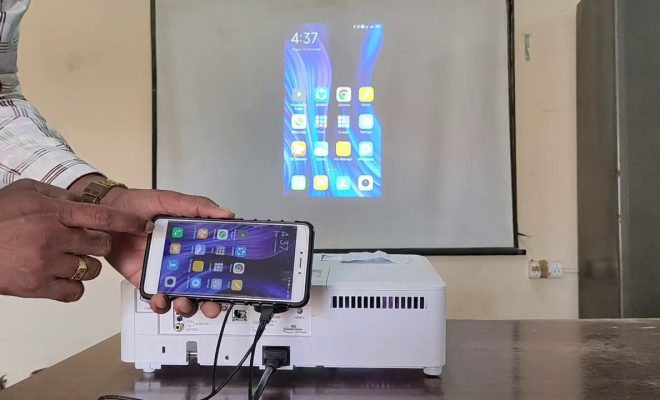
Connecting your Android phone to a projector can be a great way to share photos, videos, and presentations with a larger audience. Perhaps you want to show off your vacation photos to your family, or maybe you need to give a presentation at work. Whatever the reason, connecting your Android phone to a projector is surprisingly simple. Here’s how to do it:

Step 1: Check your phone’s compatibility

Before attempting to connect your Android phone to a projector, you should first make sure that your phone is compatible. The easiest way to do this is to check the owner’s manual or the manufacturer’s website. Most newer Android phones are compatible with projectors, but it’s always best to double-check before you begin.

Step 2: Get the right adapter

Assuming that your phone is compatible, the next step is to get the right adapter. There are two main types of adapters: HDMI and MHL. HDMI adapters are the most common and are compatible with most projectors. MHL adapters are less common and are only compatible with certain projectors. Check your projector’s specifications to determine which type of adapter you need.

Step 3: Connect the adapter to your phone

Once you have the right adapter, the next step is to connect it to your phone. This is usually done by plugging the adapter into your phone’s charging port. Some adapters use a USB-C or Micro USB connection, while others use a lightning connector. Again, check your phone’s owner’s manual or the manufacturer’s website to determine which type of connector you need.

Step 4: Connect the adapter to the projector

With the adapter connected to your phone, the next step is to connect it to the projector. This is usually done by plugging the adapter into the projector’s HDMI or MHL port. Make sure to consult your projector’s manual for specific instructions.

Step 5: Switch to the correct input

Once both the phone and the projector are connected, you need to switch the projector to the correct input. Most projectors have several inputs, such as HDMI and VGA. Use the remote or the on-screen menu to select the correct input (in this case, the HDMI or MHL port).

Step 6: Adjust the settings (if necessary)

Depending on your phone and your projector, you may need to adjust some settings to get the picture to display properly. This may include changing the resolution or aspect ratio, or adjusting the brightness or contrast.

That’s it! With these simple steps, you should be able to connect your Android phone to a projector and start sharing your content with a larger audience. Just remember to double-check your phone’s compatibility, and make sure to get the right adapter for your projector.


Previous Article

Insert Pictures and Clip Art in Microsoft ...

Next Article

Is Discovery Plus Down … Or Is ...

Matthew Lynch

Related articles More from author

  • Digital & Mobile Technology

    Is Apple’s Magic Keyboard for iPad Worth the Price Tag?

    June 12, 2023
    By Matthew Lynch
  • Digital & Mobile Technology

    What is a Systems Analyst?

    April 23, 2023
    By Matthew Lynch
  • Digital & Mobile Technology

    Calculate the Percentage of Specific Values in Excel

    July 31, 2023
    By Matthew Lynch
  • Digital & Mobile Technology

    How to Set Up and Access Medical ID on iPhone

    May 8, 2023
    By Matthew Lynch
  • Digital & Mobile Technology

    How to Change the Still Image That Shows for iPhone Live Photos

    August 3, 2023
    By Matthew Lynch
  • Digital & Mobile Technology

    How to Set Up iCloud Email Access on Android

    May 8, 2023
    By Matthew Lynch

Search

Login & Registration

  • Log in
  • Entries feed
  • Comments feed
  • WordPress.org

Newsletter

Signup for The Tech Edvocate Newsletter and have the latest in EdTech news and opinion delivered to your email address!

About Us

Since technology is not going anywhere and does more good than harm, adapting is the best course of action. That is where The Tech Edvocate comes in. We plan to cover the PreK-12 and Higher Education EdTech sectors and provide our readers with the latest news and opinion on the subject. From time to time, I will invite other voices to weigh in on important issues in EdTech. We hope to provide a well-rounded, multi-faceted look at the past, present, the future of EdTech in the US and internationally.

We started this journey back in June 2016, and we plan to continue it for many more years to come. I hope that you will join us in this discussion of the past, present and future of EdTech and lend your own insight to the issues that are discussed.

Newsletter

Signup for The Tech Edvocate Newsletter and have the latest in EdTech news and opinion delivered to your email address!

Contact Us

The Tech Edvocate
910 Goddin Street
Richmond, VA 23231
(601) 630-5238
[email protected]

Copyright © 2026 Matthew Lynch. All rights reserved.