The Tech Edvocate

Top Menu

  • Advertisement
  • Apps
  • Home Page
  • Home Page Five (No Sidebar)
  • Home Page Four
  • Home Page Three
  • Home Page Two
  • Home Tech2
  • Icons [No Sidebar]
  • Left Sidbear Page
  • Lynch Educational Consulting
  • My Account
  • My Speaking Page
  • Newsletter Sign Up Confirmation
  • Newsletter Unsubscription
  • Our Brands
  • Page Example
  • Privacy Policy
  • Protected Content
  • Register
  • Request a Product Review
  • Shop
  • Shortcodes Examples
  • Signup
  • Start Here
    • Governance
    • Careers
    • Contact Us
  • Terms and Conditions
  • The Edvocate
  • The Tech Edvocate Product Guide
  • Topics
  • Write For Us
  • Advertise

Main Menu

  • Start Here
    • Our Brands
    • Governance
      • Lynch Educational Consulting, LLC.
      • Dr. Lynch’s Personal Website
      • Careers
    • Write For Us
    • The Tech Edvocate Product Guide
    • Contact Us
    • Books
    • Edupedia
    • Post a Job
    • The Edvocate Podcast
    • Terms and Conditions
    • Privacy Policy
  • Topics
    • Assistive Technology
    • Child Development Tech
    • Early Childhood & K-12 EdTech
    • EdTech Futures
    • EdTech News
    • EdTech Policy & Reform
    • EdTech Startups & Businesses
    • Higher Education EdTech
    • Online Learning & eLearning
    • Parent & Family Tech
    • Personalized Learning
    • Product Reviews
  • Advertise
  • Tech Edvocate Awards
  • The Edvocate
  • Pedagogue
  • School Ratings

logo

The Tech Edvocate

  • Start Here
    • Our Brands
    • Governance
      • Lynch Educational Consulting, LLC.
      • Dr. Lynch’s Personal Website
        • My Speaking Page
      • Careers
    • Write For Us
    • The Tech Edvocate Product Guide
    • Contact Us
    • Books
    • Edupedia
    • Post a Job
    • The Edvocate Podcast
    • Terms and Conditions
    • Privacy Policy
  • Topics
    • Assistive Technology
    • Child Development Tech
    • Early Childhood & K-12 EdTech
    • EdTech Futures
    • EdTech News
    • EdTech Policy & Reform
    • EdTech Startups & Businesses
    • Higher Education EdTech
    • Online Learning & eLearning
    • Parent & Family Tech
    • Personalized Learning
    • Product Reviews
  • Advertise
  • Tech Edvocate Awards
  • The Edvocate
  • Pedagogue
  • School Ratings
  • Viaim Opennote Review: The AI Note-Taker That Disappears Into Your Daily Routine

  • A Visitors Guide to Long Beach (CA), United States

  • A Visitor’s Guide to Fresno (CA), United States

  • A Visitors Guide to New Orleans (LA), United States

  • A Visitors Guide to Sacramento (CA), United States

  • A Visitors Guide to Lyon, France

  • JisuLife Ultra2 Portable Fan: A Powerful Multi-Function Cooling Solution

  • A Visitors Guide to Viña del Mar, Chile

  • A Visitors Guide to Århus, Denmark

  • A Visitors Guide to Bakersfield (CA), United States

Digital & Mobile Technology
Home›Digital & Mobile Technology›How to Connect an iPhone to a Mini Projector

How to Connect an iPhone to a Mini Projector
By Matthew Lynch
June 9, 2023
0
Spread the love

As technology continues to evolve, we find ourselves utilizing our mobile devices for more and more tasks. However, sometimes the small screen of our mobile devices just isn’t enough – particularly when sharing content with a group of people. That’s when projectors come in handy. Mini projectors, in particular, are an excellent solution when you need a portable, lightweight device that can be easily connected to your mobile phone. In this article, we’ll guide you through the process of how to connect an iPhone to a mini projector.

1. Check the compatibility of your iPhone and Projector

Before you start, it’s essential to ensure that your iPhone and mini projector are compatible. Check the projector’s manual to see what type of inputs are available. Most modern mini projectors have HDMI or USB inputs, which means you can connect your iPhone with a cable. Some older projectors may only have VGA ports, which your iPhone doesn’t have. If your projector has a VGA port, you may need to purchase an adapter that will convert VGA to HDMI.

2. Purchase the Correct Cable or Adaptor

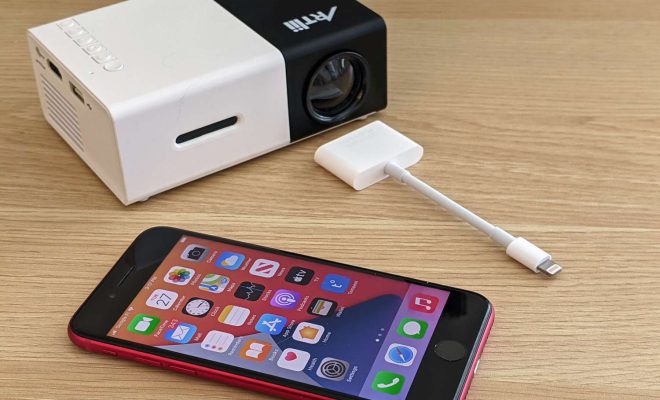
Once you’ve determined what inputs your projector has, you’ll need to purchase the appropriate cable or adaptor. For HDMI input, you’ll need a lightning-to-HDMI cable. For USB input, you’ll need a lightning-to-USB adapter. The lightning connector is the charging port on your iPhone, which is a small, rectangular port found on the bottom of your phone.

3. Connect your iPhone to the Mini Projector

Connect one end of the cable (or adapter) to your iPhone’s lightning port, and the other end to the projector’s input port. Turn on the projector and select the input source that matches the one you’ve plugged the cable into.

4. Adjust the Dimensions and Viewing Settings

Once you have set up your iPhone and the mini projector, you may need to adjust the dimensions and viewing settings. By default, the projector may not display your screen in a way that is desirable. Most projectors come with settings for brightness, contrast, color saturation, and resolution. It is essential to adjust these settings to ensure that the image is clear, sharp, and visible to everyone watching. You can also adjust the projection size of the image. This can be done by moving the projector closer to the screen to make it smaller or moving it further away to create a larger image.

5. Enjoy your Display

And that’s it! After following the above steps, your iPhone should now be connected to your mini projector, and you’re ready to enjoy your content on the big screen. From streaming content to giving presentations, the possibilities are endless. Just remember to disconnect everything when you’re finished, and store the equipment safely to prevent damage.

In conclusion, connecting an iPhone to a mini projector is a straightforward process that can be done with the right cable or adaptor. This will enable you to share content, display images or videos, and entertain a large group of people with ease. By following the steps outlined above, you’ll be able to set up your projector in no time and start enjoying the larger display.

Previous Article

Artificial Intelligence Is Sophisticated, Autonomous, and Maybe ...

Next Article

How to Get the AT&T Military Discount

Matthew Lynch

Related articles More from author

  • Digital & Mobile Technology

    Things You Didn’t Know You Can Do With Google Messages

    June 12, 2023
    By Matthew Lynch
  • Digital & Mobile Technology

    How to Change Lock Screen Wallpaper Automatically on iPhone

    May 20, 2023
    By Matthew Lynch
  • Digital & Mobile Technology

    What Is Microsoft Outlook?

    June 6, 2023
    By Matthew Lynch
  • Digital & Mobile Technology

    Port Numbers Used for Computer Networks

    June 10, 2023
    By Matthew Lynch
  • Digital & Mobile Technology

    How to Install or Update PowerShell on Windows 11

    June 12, 2023
    By Matthew Lynch
  • Digital & Mobile Technology

    How to Run Android Apps on Mac

    May 26, 2023
    By Matthew Lynch

Search

Login & Registration

  • Register
  • Log in
  • Entries feed
  • Comments feed
  • WordPress.org

Newsletter

Signup for The Tech Edvocate Newsletter and have the latest in EdTech news and opinion delivered to your email address!

About Us

Since technology is not going anywhere and does more good than harm, adapting is the best course of action. That is where The Tech Edvocate comes in. We plan to cover the PreK-12 and Higher Education EdTech sectors and provide our readers with the latest news and opinion on the subject. From time to time, I will invite other voices to weigh in on important issues in EdTech. We hope to provide a well-rounded, multi-faceted look at the past, present, the future of EdTech in the US and internationally.

We started this journey back in June 2016, and we plan to continue it for many more years to come. I hope that you will join us in this discussion of the past, present and future of EdTech and lend your own insight to the issues that are discussed.

Newsletter

Signup for The Tech Edvocate Newsletter and have the latest in EdTech news and opinion delivered to your email address!

Contact Us

The Tech Edvocate
910 Goddin Street
Richmond, VA 23231
(601) 630-5238
[email protected]

Copyright © 2025 Matthew Lynch. All rights reserved.