The Tech Edvocate

Top Menu

  • Advertisement
  • Apps
  • Home Page
  • Home Page Five (No Sidebar)
  • Home Page Four
  • Home Page Three
  • Home Page Two
  • Home Tech2
  • Icons [No Sidebar]
  • Left Sidbear Page
  • Lynch Educational Consulting
  • My Account
  • My Speaking Page
  • Newsletter Sign Up Confirmation
  • Newsletter Unsubscription
  • Our Brands
  • Page Example
  • Privacy Policy
  • Protected Content
  • Register
  • Request a Product Review
  • Shop
  • Shortcodes Examples
  • Signup
  • Start Here
    • Governance
    • Careers
    • Contact Us
  • Terms and Conditions
  • The Edvocate
  • The Tech Edvocate Product Guide
  • Topics
  • Write For Us
  • Advertise

Main Menu

  • Start Here
    • Our Brands
    • Governance
      • Lynch Educational Consulting, LLC.
      • Dr. Lynch’s Personal Website
      • Careers
    • Write For Us
    • The Tech Edvocate Product Guide
    • Contact Us
    • Books
    • Edupedia
    • Post a Job
    • The Edvocate Podcast
    • Terms and Conditions
    • Privacy Policy
  • Topics
    • Assistive Technology
    • Child Development Tech
    • Early Childhood & K-12 EdTech
    • EdTech Futures
    • EdTech News
    • EdTech Policy & Reform
    • EdTech Startups & Businesses
    • Higher Education EdTech
    • Online Learning & eLearning
    • Parent & Family Tech
    • Personalized Learning
    • Product Reviews
  • Advertise
  • Tech Edvocate Awards
  • The Edvocate
  • Pedagogue
  • School Ratings

logo

The Tech Edvocate

  • Start Here
    • Our Brands
    • Governance
      • Lynch Educational Consulting, LLC.
      • Dr. Lynch’s Personal Website
        • My Speaking Page
      • Careers
    • Write For Us
    • The Tech Edvocate Product Guide
    • Contact Us
    • Books
    • Edupedia
    • Post a Job
    • The Edvocate Podcast
    • Terms and Conditions
    • Privacy Policy
  • Topics
    • Assistive Technology
    • Child Development Tech
    • Early Childhood & K-12 EdTech
    • EdTech Futures
    • EdTech News
    • EdTech Policy & Reform
    • EdTech Startups & Businesses
    • Higher Education EdTech
    • Online Learning & eLearning
    • Parent & Family Tech
    • Personalized Learning
    • Product Reviews
  • Advertise
  • Tech Edvocate Awards
  • The Edvocate
  • Pedagogue
  • School Ratings
  • 100 Best Resource Management Apps

  • The Startling Truth About Viral Weight Loss Drugs You Need to Know

  • 57% Failure Rate: The Unsettling Truth About AI Financial Advice You Need to Know

  • AI’s Quiet Takeover: 179,542 Tech Layoffs 2023 Signal a Troubling Future

  • The Billion-Dollar Race: Why U.S. Tech Giants Are Scrambling for Israeli Startups

  • The Secret Way Activision Blizzard May Be Exploiting Kids for Millions

  • This One AI Change Could Cost You Thousands in Medical Bills

  • The Billion-Dollar AI Learning Boom: Why Experts Are Sounding the Alarm

  • Your Student Loans Just Got a Massive Overhaul — Here’s What It Means For Your Future

  • Identity Theft Nightmare: Johnson Investment Counsel Data Breach Exposes SSNs

Assistive Technology
Home›Assistive Technology›How to Close Apps on an Apple TV

How to Close Apps on an Apple TV
By Matthew Lynch
June 13, 2023
0
Spread the love

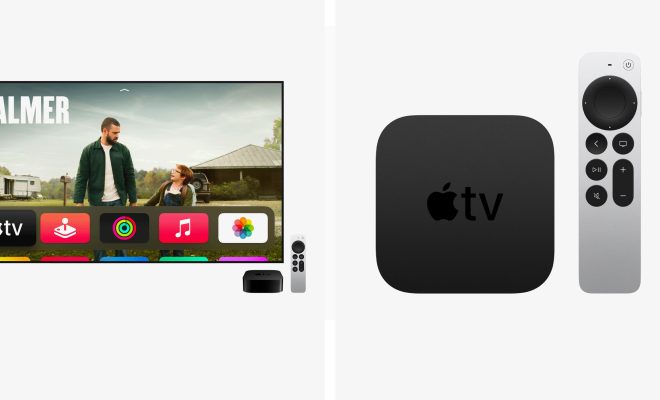
The Apple TV is a powerful multimedia device that provides a wide range of entertainment options for its users. It allows you to stream content from various apps and services such as Netflix, Hulu, and Amazon Prime Video. With the ability to multitask, the Apple TV gives you the ability to run multiple apps simultaneously, all while navigating around the various menus and screens. While this feature can be convenient, it can also eat up a lot of resources and hinder the performance of your device. To ensure that your Apple TV is running smoothly, it is important to learn how to close apps that you are no longer using.

Here’s how to close apps on your Apple TV:

  1. Press the Home button twice on your Apple TV remote control. This will bring up the App Switcher, which displays all the apps that are currently running in the background.
  2. Use the trackpad on your remote to swipe left or right to switch between the open apps. You will see a preview of each app as you swipe.
  3. Once you have found the app you want to close, swipe up on the trackpad. This will force the app to close and free up resources on your Apple TV.
  4. Repeat this process for any other apps that you want to close.
  5. When you have finished closing your apps, press the Home button again to exit the App Switcher and return to the home screen.

It is important to note that closing apps on the Apple TV is different than on an iPhone or iPad. Unlike the iOS devices, closing apps on the Apple TV does not necessarily save battery life or improve performance over time. However, it can help free up resources and reduce memory usage, which can lead to improved performance in the short term.

 

Previous Article

How to Disable Caps Lock in Windows ...

Next Article

Brave vs. Chrome: Which Is the Best ...

Matthew Lynch

Related articles More from author

  • Assistive Technology

    What Is a Subnet? How Do You Calculate Subnets?

    June 15, 2023
    By Matthew Lynch
  • Assistive Technology

    How to Send a Friend Request on Facebook

    June 8, 2023
    By Matthew Lynch
  • Assistive Technology

    How to Find the Serial Number of an HP Laptop

    June 6, 2023
    By Matthew Lynch
  • Assistive Technology

    How to Set Up and Use ADB Wirelessly With Android

    June 11, 2023
    By Matthew Lynch
  • Assistive Technology

    Perform a Clean Install of OS X El Capitan (10.11)

    June 10, 2023
    By Matthew Lynch
  • Assistive Technology

    How to Hide the Red Dot on Apple Watch

    June 10, 2023
    By Matthew Lynch

Search

Login & Registration

  • Log in
  • Entries feed
  • Comments feed
  • WordPress.org

Newsletter

Signup for The Tech Edvocate Newsletter and have the latest in EdTech news and opinion delivered to your email address!

About Us

Since technology is not going anywhere and does more good than harm, adapting is the best course of action. That is where The Tech Edvocate comes in. We plan to cover the PreK-12 and Higher Education EdTech sectors and provide our readers with the latest news and opinion on the subject. From time to time, I will invite other voices to weigh in on important issues in EdTech. We hope to provide a well-rounded, multi-faceted look at the past, present, the future of EdTech in the US and internationally.

We started this journey back in June 2016, and we plan to continue it for many more years to come. I hope that you will join us in this discussion of the past, present and future of EdTech and lend your own insight to the issues that are discussed.

Newsletter

Signup for The Tech Edvocate Newsletter and have the latest in EdTech news and opinion delivered to your email address!

Contact Us

The Tech Edvocate
910 Goddin Street
Richmond, VA 23231
(601) 630-5238
[email protected]

Copyright © 2026 Matthew Lynch. All rights reserved.