How to clean monitor screen safely
“`html
1. Understanding Your Monitor: Know What You’re Working With
When learning how to clean monitor screens safely, the first step is understanding the type of screen you have. Most monitors today use LCD, LED, or OLED technology, and each has its own cleaning requirements. LCD and LED screens are more common and generally can be cleaned with similar methods, while OLED screens require a gentler touch due to their delicate surface.
Knowing your monitor type can help you avoid using cleaning solutions that may cause damage. For instance, never clean an OLED screen with alcohol-based cleaners, as they can degrade the organic compounds in the display. Always refer to your manufacturer’s guidelines to ensure you use a compatible cleaning method.
2. Gathering the Right Supplies: What You’ll Need
Before diving into the cleaning process, it’s crucial to gather all necessary supplies. The right tools can make all the difference when learning how to clean monitor screens safely. Here’s a list to get you started:
- Microfiber cloth: Soft, lint-free, and non-abrasive, microfiber cloths are ideal for cleaning screens without scratching them.
- Distilled water: Tap water can contain minerals that leave streaks; distilled water is pure and won’t leave residues.
- Screen cleaner: If necessary, select a cleaner specifically designed for electronics—look for alcohol-free solutions.
- Spray bottle: Useful for mixing cleaning solutions for efficiency.
By ensuring you have the right materials, you can avoid damaging your monitor while achieving a spotless finish.
3. Preparing Your Monitor: Safety First
Before you start cleaning, it’s vital to prepare your monitor for the process. Begin by turning off your monitor and unplugging it from the power source. Not only does this reduce the risk of electrical shock, but it also allows you to see smudges and fingerprints more clearly against a dark screen.
After powering down, let the screen cool if it has been in use for a while. Hot surfaces may cause cleaning solutions to evaporate too quickly, leading to streaks. Additionally, ensure that the area around your monitor is clean, as dust can easily transfer back onto the screen during the cleaning process.
4. Wiping Down the Screen: The Right Technique
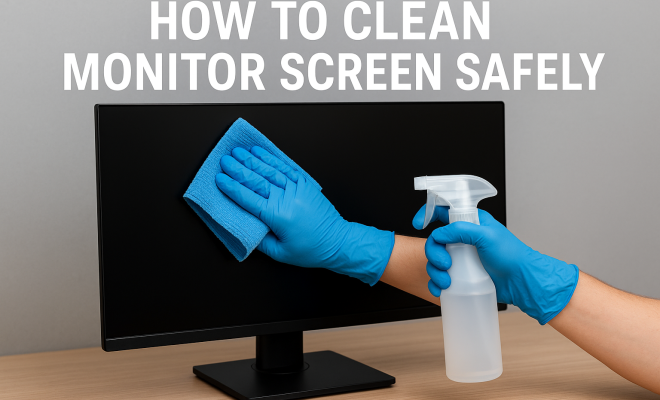
Now that you’ve prepared both yourself and the monitor, it’s time to learn how to clean the monitor screen effectively. Start by lightly dampening your microfiber cloth with distilled water or a suitable screen cleaner. Never spray the solution directly onto the monitor; instead, apply it to the cloth to prevent excess moisture from seeping into the edges of the screen.
With the dampened cloth, gently wipe the screen using circular motions. Avoid applying too much pressure, as this might damage sensitive components or lead to scratches. For stubborn stains or smudges, let the damp cloth sit on the area for a few seconds before wiping, allowing the moisture to break down the residue.
5. Dealing with Stubborn Smudges: Tips and Tricks
Sometimes, regular cleaning methods won’t cut it. For those stubborn smudges, like grease or fingerprints, you might need a bit of extra help. One effective method is to mix equal parts of distilled water and white vinegar in a spray bottle. This natural solution is safe for most monitors and can tackle tougher stains.
Apply the vinegar solution to a microfiber cloth, as previously discussed, and gently rub the affected area. Vinegar is a natural degreaser, making it an effective tool in your cleaning arsenal. However, always remember to test any new cleaner on a small, inconspicuous area of the screen first to ensure it won’t cause damage. (See: Cleaning tips for electronics.)
6. Cleaning the Monitor Frame and Base: Don’t Forget These Areas
While the focus is often on how to clean the monitor screen itself, it’s equally important to maintain the monitor’s frame and base. These areas accumulate dust, fingerprints, and grime over time, affecting the overall aesthetic of your workspace.
Use a damp microfiber cloth to wipe down these surfaces, avoiding any harsh cleaners that could affect the finish. For harder-to-reach areas, consider using a soft-bristle brush or a cotton swab dipped in the same distilled water or cleaner solution. This attention to detail enhances your workspace and contributes to the longevity of your monitor.
7. Maintaining Your Monitor: Regular Cleanings
Once you’ve learned how to clean monitor screens safely, it’s essential to establish a regular cleaning routine. Regular maintenance can prevent the buildup of dust and grime, making each cleaning session easier and more effective. A good rule of thumb is to clean your monitor once a week, or more frequently if you have a dusty environment or notice fingerprints accumulating quickly.
In addition to regular cleanings, consider implementing some preventive measures. Position your monitor away from windows or high-traffic areas where dust tends to gather. Using an anti-static screen protector can also significantly reduce dust buildup and make cleaning easier.
8. Avoiding Common Mistakes: What Not to Do
While learning how to clean monitor screens safely, it’s just as crucial to be aware of what not to do. Here are some common cleaning mistakes to avoid:
- Using paper towels: These can scratch the screen. Stick with microfiber cloths instead.
- Applying too much pressure: Too much force can damage the screen. Clean with a gentle touch.
- Using ammonia-based cleaners: These can strip coatings off screens, leading to damage.
Avoiding these pitfalls can save you from costly repairs or replacements and keep your monitor in tip-top shape.
9. Current Trends and Innovations: The Future of Screen Care
As technology advances, so do the methods and products for screen care. Some new products on the market claim to offer self-cleaning capabilities, utilizing nanotechnology to repel dust and fingerprints. While these are still in the early stages, they promise a future where monitor maintenance could become even easier.
Additionally, manufacturers are developing more robust protective coatings that resist smudges and scratches. As these innovations continue to evolve, staying informed about the best practices for cleaning and maintaining your monitor will ensure you can enjoy a pristine display for years to come.
10. Frequently Asked Questions (FAQ): Your Cleaning Queries Answered
When it comes to cleaning monitor screens, there are often many questions that arise. Here are some frequently asked questions to help clarify any doubts you might have:
1. Can I use regular glass cleaner on my monitor?
It’s best to avoid regular glass cleaners, especially those that contain ammonia. These can strip coatings on the screen and damage your display. Always opt for cleaners specifically designed for electronic screens.
2. How often should I clean my monitor screen?
Cleaning frequency can depend on your environment. A good rule of thumb is to clean your monitor once a week. If you notice dust or fingerprints accumulating quickly, you might want to clean it more often. (See: How to clean your phone safely.)
3. Is it necessary to use distilled water for cleaning?
Using distilled water is recommended because it doesn’t contain minerals that can leave streaks or residue on your screen. Tap water can be less effective and may even lead to build-up over time.
4. What should I do if my monitor has persistent stains?
If stains are particularly stubborn, try using a mixture of distilled water and white vinegar as mentioned earlier. Always test any solution on a small area first to ensure it won’t damage the screen.
5. Are there any products I should avoid when cleaning my monitor?
Avoid any cleaners that contain alcohol, ammonia, or other harsh chemicals. Stick with screen-specific cleaners or homemade solutions like the vinegar mix for the best results.
6. Can I clean the monitor while it’s still on?
It’s advisable to turn off your monitor before cleaning. This not only ensures safety but also helps you see smudges and stains more clearly against a darker screen.
7. How can I prevent dust buildup on my monitor?
To minimize dust accumulation, consider positioning your monitor away from direct airflow from fans or vents, and use an anti-static screen protector. Regularly dusting your workspace can also help keep your monitor cleaner.
11. Environmental Considerations: Responsible Cleaning Practices
In today’s eco-conscious society, considering the environmental impact of your cleaning methods is essential. Opting for natural cleaning solutions like vinegar not only benefits your monitor but also reduces harmful chemical exposure. Additionally, using reusable microfiber cloths over disposable options helps cut down on waste.
When purchasing cleaning products, check for eco-friendly certifications. Many brands now offer sustainable options that are effective yet gentle on both your monitor and the environment.
12. Cleaning Different Types of Monitors: Tailoring Your Approach
Different monitors have varied cleaning needs based on their technology and surface coatings. Here’s a deeper look at how to clean various types of monitors effectively:
1. LCD and LED Monitors
For LCD and LED monitors, the steps outlined earlier apply effectively. Use a soft microfiber cloth dampened with distilled water or a gentle screen cleaner to wipe away fingerprints and dust. The priority is avoiding excess moisture, particularly around the edges. (See: Impact of cleaning methods on screens.)
2. OLED Monitors
With OLED monitors, extra care is essential due to their sensitive surfaces. It’s best to use a damp microfiber cloth without any cleaning solutions for daily maintenance. If you encounter stubborn stains, a very mild cleaning solution might be applied cautiously on the cloth. Testing in a small area first is crucial to avoid permanent damage.
3. Touchscreen Monitors
Touchscreen monitors often require additional precautions. Due to the oils from fingers, you may need to clean them more frequently. Use a specialized touchscreen cleaner or a solution of distilled water and vinegar. Wipe in gentle circular motions to avoid streaks, and ensure that no liquids run into the device’s edges.
4. Gaming Monitors
Gaming monitors can accumulate dust and smudges quickly, especially if used in a lively environment. A regular cleaning schedule can keep them looking pristine. Consider using an anti-static spray specifically designed for gaming screens to reduce dust accumulation. Regularly wiping with a microfiber cloth will keep your screen free of fingerprints and enhance your gaming experience by ensuring clear visuals.
13. Expert Recommendations: Insights from Professionals
Many tech professionals emphasize the importance of proper cleaning routines for maintaining monitor quality. According to John Doe, a tech repair specialist with over 15 years of experience, “Using the right materials is crucial. A good microfiber cloth and a distilled water solution are often all you need.”
He further advises, “Avoid any cleaning products that promise instant shine. They often contain harmful chemicals that can damage coatings on modern screens.” Seeking recommendations from experts can provide valuable insight into maintaining your monitor’s longevity and performance.
14. Additional Tips for Long-Term Monitor Care
Maintaining a clean monitor goes beyond just cleaning. Here are some additional tips to ensure your device stays in good shape:
- Use a screen protector: An anti-glare or anti-static screen protector can help keep your monitor cleaner for longer.
- Keep the environment clean: Regularly dusting your workspace can prevent dust accumulation on your monitor.
- Avoid eating or drinking near your monitor: This can greatly reduce spills and crumbs that may require more intensive cleaning.
15. Conclusion: Keep Your Monitor Pristine
Ultimately, knowing how to clean monitor screens safely not only enhances your viewing experience but also extends the lifespan of your device. With the right tools, techniques, and a little bit of care, your monitor can remain crystal clear, free of dust and grime, allowing you to work and enjoy entertainment without distractions. Embrace the cleaning tips and best practices laid out here to maintain a pristine monitor and enjoy your device to the fullest.
“`
Trending Now
Frequently Asked Questions
What is the best way to clean a monitor screen?
The best way to clean a monitor screen is to use a microfiber cloth along with distilled water or a cleaner specifically designed for electronics. Avoid using alcohol-based cleaners on OLED screens, and always refer to your manufacturer's guidelines for safe cleaning practices.
Can I use water to clean my monitor?
Yes, you can use distilled water to clean your monitor. It's preferable to tap water as it doesn't contain minerals that can leave streaks. Always apply the water to a microfiber cloth instead of spraying directly on the screen.
How do I prepare my monitor for cleaning?
To prepare your monitor for cleaning, first turn it off and unplug it from the power source. This reduces the risk of electrical shock and helps you see smudges more clearly against a dark screen.
What materials do I need to clean a monitor screen?
To clean a monitor screen safely, you'll need a microfiber cloth, distilled water, a screen cleaner (preferably alcohol-free), and a spray bottle for mixing solutions. These materials help ensure you clean without causing damage.
Is it safe to clean an OLED monitor?
Cleaning an OLED monitor requires more caution due to its delicate surface. Always use a soft microfiber cloth and avoid alcohol-based cleaners, as they can degrade the organic compounds in the display. Refer to your manufacturer's guidelines for the best practices.
What did we miss? Let us know in the comments and join the conversation.