The Tech Edvocate

Top Menu

  • Advertisement
  • Apps
  • Home Page
  • Home Page Five (No Sidebar)
  • Home Page Four
  • Home Page Three
  • Home Page Two
  • Home Tech2
  • Icons [No Sidebar]
  • Left Sidbear Page
  • Lynch Educational Consulting
  • My Account
  • My Speaking Page
  • Newsletter Sign Up Confirmation
  • Newsletter Unsubscription
  • Our Brands
  • Page Example
  • Privacy Policy
  • Protected Content
  • Register
  • Request a Product Review
  • Shop
  • Shortcodes Examples
  • Signup
  • Start Here
    • Governance
    • Careers
    • Contact Us
  • Terms and Conditions
  • The Edvocate
  • The Tech Edvocate Product Guide
  • Topics
  • Write For Us
  • Advertise

Main Menu

  • Start Here
    • Our Brands
    • Governance
      • Lynch Educational Consulting, LLC.
      • Dr. Lynch’s Personal Website
      • Careers
    • Write For Us
    • The Tech Edvocate Product Guide
    • Contact Us
    • Books
    • Edupedia
    • Post a Job
    • The Edvocate Podcast
    • Terms and Conditions
    • Privacy Policy
  • Topics
    • Assistive Technology
    • Child Development Tech
    • Early Childhood & K-12 EdTech
    • EdTech Futures
    • EdTech News
    • EdTech Policy & Reform
    • EdTech Startups & Businesses
    • Higher Education EdTech
    • Online Learning & eLearning
    • Parent & Family Tech
    • Personalized Learning
    • Product Reviews
  • Advertise
  • Tech Edvocate Awards
  • The Edvocate
  • Pedagogue
  • School Ratings

logo

The Tech Edvocate

  • Start Here
    • Our Brands
    • Governance
      • Lynch Educational Consulting, LLC.
      • Dr. Lynch’s Personal Website
        • My Speaking Page
      • Careers
    • Write For Us
    • The Tech Edvocate Product Guide
    • Contact Us
    • Books
    • Edupedia
    • Post a Job
    • The Edvocate Podcast
    • Terms and Conditions
    • Privacy Policy
  • Topics
    • Assistive Technology
    • Child Development Tech
    • Early Childhood & K-12 EdTech
    • EdTech Futures
    • EdTech News
    • EdTech Policy & Reform
    • EdTech Startups & Businesses
    • Higher Education EdTech
    • Online Learning & eLearning
    • Parent & Family Tech
    • Personalized Learning
    • Product Reviews
  • Advertise
  • Tech Edvocate Awards
  • The Edvocate
  • Pedagogue
  • School Ratings
  • Consumer Reports Reveal Truth – Is Flexigenics Reviews Legit or Scam? (Shocking Findings)

  • Quietum Plus 2026 Review Complaints and Shocking User Findings

  • This Founder’s Rs 75 LPA Sacrifice Crumbled in 30 Days — Here’s Why

  • Urgent: Claude AI Bioweapons — The Unsettling Truth Anthropic Just Revealed

  • Shocking: Three Major Xbox Games Shutting Down Forever in 2026

  • One Man’s Dire Warning: Is AI Already Too Dangerous To Control?

  • The Urgent Parental Consent Debate Over Student Mental Health Screenings

  • LAUSD restricts all students from using AI tools | K-12 Dive

  • Catastrophic Data Breach: 153 Million Driver’s Licenses Exposed on Dark Web

  • Autonomous AI Hackers Weaponize PaperCut Flaws: The Terrifying New Era of Cybercrime

Digital & Mobile Technology
Home›Digital & Mobile Technology›How to Charge a MacBook Pro Correctly

How to Charge a MacBook Pro Correctly
By Matthew Lynch
June 4, 2023
0
Spread the love

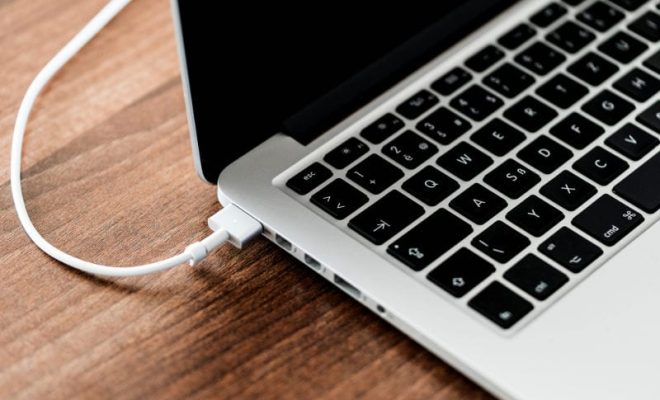
MacBook Pro is a powerful and sophisticated device that requires careful handling and charging to maintain its performance and battery lifespan. Charging your MacBook Pro correctly is essential to ensure its smooth function and prevent damage or premature battery depletion. Here are some tips on how to charge a MacBook Pro correctly.

Use the Original Charger

The first and foremost rule for charging a MacBook Pro is to always use the original charger that came with the device or a certified replacement charger. Using non-original or uncertified chargers can damage the battery, charger, or device, and may also pose a safety hazard. Check that the charger is compatible with your MacBook Pro model and has the right wattage and voltage.

Avoid Overheating

Overheating can harm the battery and other components of your MacBook Pro, so it’s crucial to prevent or minimize it during charging. Avoid charging the device on soft surfaces like beds, pillows, or carpets that can trap the heat and cause overheating. Also, keep your MacBook Pro away from direct sunlight or heat sources like radiators or electric blankets. It’s best to charge your MacBook Pro on a flat, firm, and cool surface like a desk or table.

Charge to 80% or Less

It’s generally recommended to charge your MacBook Pro battery up to 80% or less and avoid full charges unless needed. Frequent full charges can strain the battery and reduce its lifespan, whereas partial charges help maintain its health. Additionally, charging the battery to 100% can result in a slower charging speed and more heat generation, which can worsen the battery’s performance over time.

Unplug When Fully Charged

Another essential tip for charging a MacBook Pro is to unplug the charger when the battery is fully charged. Leaving the charger plugged after the battery is full can overcharge the battery and generate heat, affecting its performance and lifespan. A fully charged MacBook Pro battery can provide up to 10 hours of usage or standby time, depending on the device’s usage and settings.

Optimize Energy Settings

Finally, you can optimize your MacBook Pro’s energy settings to reduce its power consumption and battery usage. Adjust the brightness level, turn off the keyboard backlight, close unnecessary apps and windows, and use the Energy Saver preferences to optimize the screen and sleep settings. Doing so can prolong the battery life, reduce heat, and save energy.

In conclusion, charging a MacBook Pro correctly involves using the original charger, avoiding overheating, charging up to 80% or less, unplugging when fully charged, and optimizing energy settings. By following these tips, you can ensure your MacBook Pro’s longevity, performance, and safety, as well as save energy and reduce your carbon footprint.


Previous Article

How to Delete Stickers on Snapchat

Next Article

How to Download Disney Plus Movies To ...

Matthew Lynch

Related articles More from author

  • Digital & Mobile Technology

    How to Change the WiFi Channel on Your Router

    May 20, 2023
    By Matthew Lynch
  • Digital & Mobile Technology

    How to Connect Steam Deck to a PC

    June 23, 2023
    By Matthew Lynch
  • Digital & Mobile Technology

    Can You Watch Movies on Sony VR?

    June 30, 2023
    By Matthew Lynch
  • Digital & Mobile Technology

    Open-Source Python IDEs to Program Like a Pro

    June 23, 2023
    By Matthew Lynch
  • Digital & Mobile Technology

    How to Transfer From Apple Music to Spotify

    June 9, 2023
    By Matthew Lynch
  • Digital & Mobile Technology

    Do You Need a Projector Screen In Your Home Theater?

    April 12, 2023
    By Matthew Lynch

Search

Login & Registration

  • Log in
  • Entries feed
  • Comments feed
  • WordPress.org

Newsletter

Signup for The Tech Edvocate Newsletter and have the latest in EdTech news and opinion delivered to your email address!

About Us

Since technology is not going anywhere and does more good than harm, adapting is the best course of action. That is where The Tech Edvocate comes in. We plan to cover the PreK-12 and Higher Education EdTech sectors and provide our readers with the latest news and opinion on the subject. From time to time, I will invite other voices to weigh in on important issues in EdTech. We hope to provide a well-rounded, multi-faceted look at the past, present, the future of EdTech in the US and internationally.

We started this journey back in June 2016, and we plan to continue it for many more years to come. I hope that you will join us in this discussion of the past, present and future of EdTech and lend your own insight to the issues that are discussed.

Newsletter

Signup for The Tech Edvocate Newsletter and have the latest in EdTech news and opinion delivered to your email address!

Contact Us

The Tech Edvocate
910 Goddin Street
Richmond, VA 23231
(601) 630-5238
[email protected]

Copyright © 2026 Matthew Lynch. All rights reserved.