The Tech Edvocate

Top Menu

  • Advertisement
  • Apps
  • Home Page
  • Home Page Five (No Sidebar)
  • Home Page Four
  • Home Page Three
  • Home Page Two
  • Home Tech2
  • Icons [No Sidebar]
  • Left Sidbear Page
  • Lynch Educational Consulting
  • My Account
  • My Speaking Page
  • Newsletter Sign Up Confirmation
  • Newsletter Unsubscription
  • Our Brands
  • Page Example
  • Privacy Policy
  • Protected Content
  • Register
  • Request a Product Review
  • Shop
  • Shortcodes Examples
  • Signup
  • Start Here
    • Governance
    • Careers
    • Contact Us
  • Terms and Conditions
  • The Edvocate
  • The Tech Edvocate Product Guide
  • Topics
  • Write For Us
  • Advertise

Main Menu

  • Start Here
    • Our Brands
    • Governance
      • Lynch Educational Consulting, LLC.
      • Dr. Lynch’s Personal Website
      • Careers
    • Write For Us
    • The Tech Edvocate Product Guide
    • Contact Us
    • Books
    • Edupedia
    • Post a Job
    • The Edvocate Podcast
    • Terms and Conditions
    • Privacy Policy
  • Topics
    • Assistive Technology
    • Child Development Tech
    • Early Childhood & K-12 EdTech
    • EdTech Futures
    • EdTech News
    • EdTech Policy & Reform
    • EdTech Startups & Businesses
    • Higher Education EdTech
    • Online Learning & eLearning
    • Parent & Family Tech
    • Personalized Learning
    • Product Reviews
  • Advertise
  • Tech Edvocate Awards
  • The Edvocate
  • Pedagogue
  • School Ratings

logo

The Tech Edvocate

  • Start Here
    • Our Brands
    • Governance
      • Lynch Educational Consulting, LLC.
      • Dr. Lynch’s Personal Website
        • My Speaking Page
      • Careers
    • Write For Us
    • The Tech Edvocate Product Guide
    • Contact Us
    • Books
    • Edupedia
    • Post a Job
    • The Edvocate Podcast
    • Terms and Conditions
    • Privacy Policy
  • Topics
    • Assistive Technology
    • Child Development Tech
    • Early Childhood & K-12 EdTech
    • EdTech Futures
    • EdTech News
    • EdTech Policy & Reform
    • EdTech Startups & Businesses
    • Higher Education EdTech
    • Online Learning & eLearning
    • Parent & Family Tech
    • Personalized Learning
    • Product Reviews
  • Advertise
  • Tech Edvocate Awards
  • The Edvocate
  • Pedagogue
  • School Ratings
  • Sådan former lydoplevelsen forskellige casinospil

  • Kameraføring former oplevelsen af roulette og blackjack på stream

  • Fra enkle browserbaserede casinospil til digitale formater med flere muligheder

  • Fra oldtidens fortællinger til nutidens spiltemaer

  • Čím sa líšia televízne herné formáty od tradičných živých stolov

  • The Astonishing Truth: Why Micro-Credentials Are Crushing Traditional Degrees in Today’s Job Hunt

  • This One Skill Boosts Graduate Salaries By 94% — And Most Grads Don’t Have It

  • Rozdiel medzi okamžitou výhrou a videomatom v hernom rozhraní

  • Why 94% of Employers Are Paying More for This One Qualification

  • The Brutal Truth: 10 Minutes With AI Could Destroy Your Persistence

Digital & Mobile Technology
Home›Digital & Mobile Technology›How to Change Your PS4 Profile Cover Picture

How to Change Your PS4 Profile Cover Picture
By Matthew Lynch
June 14, 2023
0
Spread the love

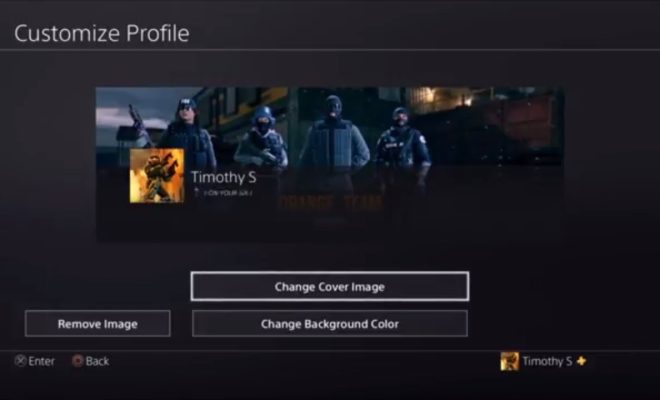
As a PS4 player, customizing your profile is a great way to personalize your gaming experience. One of the easiest ways to do this is by changing your profile cover picture. This not only adds a touch of personality to your online identity but also makes it easier for friends to find and recognize you on the PlayStation Network. Here’s a step-by-step guide on how to change your PS4 profile cover picture.

Step 1: Log in to your PS4

Make sure your PS4 is powered on and connected to the internet. Log in to your PS4 profile by entering your username and password.

Step 2: Navigate to Your Profile

Scroll to the top of the home screen and select the ‘Profile’ icon on the upper right corner of the screen.

Step 3: Select ‘Edit Profile’

Once your profile is loaded, locate and select the ‘Options’ button on your PS4 controller, and then select ‘Edit Profile’ from the list of options.

Step 4: Choose a Pre-Existing Image

Under ‘Edit Profile,’ select the ‘Profile Picture’ option. This will bring up a list of pre-existing images that you can choose from. If you find one you like, select it and move on to the next step. If none of the pre-existing images suit you, consider uploading your own image.

Step 5: Upload Your Image

To upload your own image, choose the ‘Change’ option under ‘Profile Picture.’ This will allow you to upload an image from either your PS4 camera, your screenshots library, or a USB drive. Choose the ‘Select from USB Storage Device’ option if you want to upload an image from a USB device.

Step 6: Crop Your Image

If you’ve uploaded your own image, the PS4 will give you the option to crop the image. Use the PS4 controller’s analog stick to move the cursor to select the area of the image you want to use as your profile cover picture.

Step 7: Save Your Changes

Once you’re satisfied with your profile cover picture, select ‘Apply’ and save changes. Your new profile cover picture will now be visible whenever someone views your PS4 profile.

In conclusion, changing your PS4 profile cover picture is a simple process that can be done in just a few minutes. Whether you prefer to use one of the pre-existing images or upload your own, the process is straightforward and can add a personal touch to your online gaming identity. So go ahead, change your PS4 profile cover picture, and let your friends and followers know that you’re a unique gamer on the PlayStation Network.


Previous Article

How to Watch Facebook Live on PC ...

Next Article

Response to Intervention: A Guide for Educators ...

Matthew Lynch

Related articles More from author

  • Digital & Mobile Technology

    How Big Is the iPad? How Much Does It Weigh?

    June 7, 2023
    By Matthew Lynch
  • Digital & Mobile Technology

    How to Add a Device to Google Play

    June 9, 2023
    By Matthew Lynch
  • Digital & Mobile Technology

    A Quick and Dirty Guide to RAM: What You Need to Know

    August 5, 2023
    By Matthew Lynch
  • Digital & Mobile Technology

    How to Turn On the Flash for Your iPhone Camera

    June 6, 2023
    By Matthew Lynch
  • Digital & Mobile Technology

    Download YouTube Videos to Use in PowerPoint Presentations

    June 22, 2023
    By Matthew Lynch
  • Digital & Mobile Technology

    How to Stop iMessages From Popping up on Other Devices

    June 12, 2023
    By Matthew Lynch

Search

Login & Registration

  • Log in
  • Entries feed
  • Comments feed
  • WordPress.org

Newsletter

Signup for The Tech Edvocate Newsletter and have the latest in EdTech news and opinion delivered to your email address!

About Us

Since technology is not going anywhere and does more good than harm, adapting is the best course of action. That is where The Tech Edvocate comes in. We plan to cover the PreK-12 and Higher Education EdTech sectors and provide our readers with the latest news and opinion on the subject. From time to time, I will invite other voices to weigh in on important issues in EdTech. We hope to provide a well-rounded, multi-faceted look at the past, present, the future of EdTech in the US and internationally.

We started this journey back in June 2016, and we plan to continue it for many more years to come. I hope that you will join us in this discussion of the past, present and future of EdTech and lend your own insight to the issues that are discussed.

Newsletter

Signup for The Tech Edvocate Newsletter and have the latest in EdTech news and opinion delivered to your email address!

Contact Us

The Tech Edvocate
910 Goddin Street
Richmond, VA 23231
(601) 630-5238
[email protected]

Copyright © 2026 Matthew Lynch. All rights reserved.