The Tech Edvocate

Top Menu

  • Advertisement
  • Apps
  • Home Page
  • Home Page Five (No Sidebar)
  • Home Page Four
  • Home Page Three
  • Home Page Two
  • Home Tech2
  • Icons [No Sidebar]
  • Left Sidbear Page
  • Lynch Educational Consulting
  • My Account
  • My Speaking Page
  • Newsletter Sign Up Confirmation
  • Newsletter Unsubscription
  • Our Brands
  • Page Example
  • Privacy Policy
  • Protected Content
  • Register
  • Request a Product Review
  • Shop
  • Shortcodes Examples
  • Signup
  • Start Here
    • Governance
    • Careers
    • Contact Us
  • Terms and Conditions
  • The Edvocate
  • The Tech Edvocate Product Guide
  • Topics
  • Write For Us
  • Advertise

Main Menu

  • Start Here
    • Our Brands
    • Governance
      • Lynch Educational Consulting, LLC.
      • Dr. Lynch’s Personal Website
      • Careers
    • Write For Us
    • The Tech Edvocate Product Guide
    • Contact Us
    • Books
    • Edupedia
    • Post a Job
    • The Edvocate Podcast
    • Terms and Conditions
    • Privacy Policy
  • Topics
    • Assistive Technology
    • Child Development Tech
    • Early Childhood & K-12 EdTech
    • EdTech Futures
    • EdTech News
    • EdTech Policy & Reform
    • EdTech Startups & Businesses
    • Higher Education EdTech
    • Online Learning & eLearning
    • Parent & Family Tech
    • Personalized Learning
    • Product Reviews
  • Advertise
  • Tech Edvocate Awards
  • The Edvocate
  • Pedagogue
  • School Ratings

logo

The Tech Edvocate

  • Start Here
    • Our Brands
    • Governance
      • Lynch Educational Consulting, LLC.
      • Dr. Lynch’s Personal Website
        • My Speaking Page
      • Careers
    • Write For Us
    • The Tech Edvocate Product Guide
    • Contact Us
    • Books
    • Edupedia
    • Post a Job
    • The Edvocate Podcast
    • Terms and Conditions
    • Privacy Policy
  • Topics
    • Assistive Technology
    • Child Development Tech
    • Early Childhood & K-12 EdTech
    • EdTech Futures
    • EdTech News
    • EdTech Policy & Reform
    • EdTech Startups & Businesses
    • Higher Education EdTech
    • Online Learning & eLearning
    • Parent & Family Tech
    • Personalized Learning
    • Product Reviews
  • Advertise
  • Tech Edvocate Awards
  • The Edvocate
  • Pedagogue
  • School Ratings
  • A Visitors Guide to Pittsburgh (PA), United States

  • A Visitors Guide to Colorado Springs (CO), United States

  • 5 Pairs of Shoes That Will Instantly Step Your Shoe Game Up

  • Radiant Youthful Skin is the Perfect Christmas Gift

  • Give Your Loved One the Gift of Youthful, Radiant Skin this Christmas

  • Give Your Loved One the Gift of a Restful Night Sleep this Christmas

  • Nex Playground’s Holiday Sales Bring Active Play Indoors This Seaso

  • A Visitors Guide to Louisville (KY), United States

  • A Visitor’s Guide to Nashville-Davidson (TN), United States

  • A Visitors Guide to Portland (OR), United States

Digital & Mobile Technology
Home›Digital & Mobile Technology›How to Change the Safari Background on iPhone and iPad

How to Change the Safari Background on iPhone and iPad
By Matthew Lynch
June 23, 2023
0
Spread the love

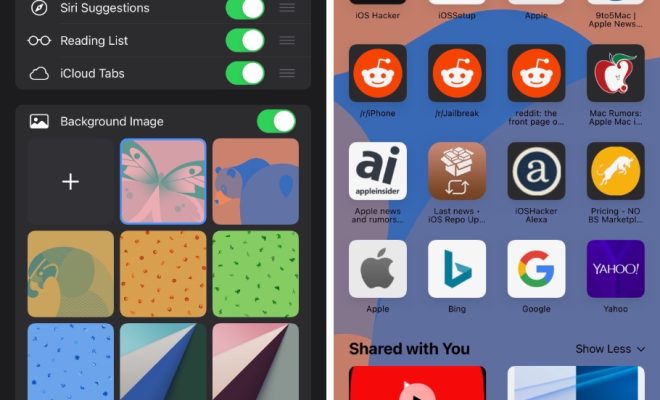
Safari is the default web browser on iPhones and iPads that comes with a standard white background. However, many users may find it boring or monotonous after a while. If you are one of them who wants to add some personalization to your Safari browser, you can easily change its background on your iPhone or iPad. In this article, we will guide you on how to change the Safari background on iPhone and iPad.

Step 1: Launch the Settings app on your iPhone or iPad.

Step 2: Scroll down and tap on “Safari” from the list of options.

Step 3: Tap on “Appearance.”

Step 4: Here, you will see three options to choose from- “Light,” “Dark,” and “Auto”. The “Auto” option will automatically change the Safari background based on your device’s time of day.

Step 5: Tap on your preferred option to apply it. Once you select, the background theme will instantly change across all websites and tabs in Safari.

Alternatively, you can also add your own custom image or picture as the Safari background on your iPhone or iPad. Follow the below steps to do so:

Step 1: Open the Photos app on your iPhone or iPad.

Step 2: Select the photo or image you want to set as the Safari background.

Step 3: Tap on the “Share” button.

Step 4: From the share options, select “Use as Wallpaper.”

Step 5: Adjust the photo’s size and positioning using the blue framing box, and tap “Set.”

Step 6: Select “Set Lock Screen,” “Set Home Screen,” or “Set Both” depending on where you prefer to set the photo as a background image.

After following these steps, the chosen image will become the background of your iPhone or iPad’s lock screen, home screen, and Safari browser.


Previous Article

Samsung QN90A Product Review: The Best Samsung ...

Next Article

How to Enable JavaScript in Chrome

Matthew Lynch

Related articles More from author

  • Digital & Mobile Technology

    Apps That Let You Create Beautifully Customized iPhone Widgets

    September 7, 2023
    By Matthew Lynch
  • Digital & Mobile Technology

    Best Wi-Fi Analyzer Apps for Android

    June 23, 2023
    By Matthew Lynch
  • Digital & Mobile Technology

    How to Mirror Android to TV (Connect Your Phone Wirelessly)

    May 30, 2023
    By Matthew Lynch
  • Digital & Mobile Technology

    How to Fix the Network Error in ChatGPT

    August 5, 2023
    By Matthew Lynch
  • Digital & Mobile Technology

    Best Icon Packs for Windows 10

    June 23, 2023
    By Matthew Lynch
  • Digital & Mobile Technology

    Ways to Get a Live Wallpaper for Your Mac: It’s Easier Than You Think

    August 5, 2023
    By Matthew Lynch

Search

Login & Registration

  • Register
  • Log in
  • Entries feed
  • Comments feed
  • WordPress.org

Newsletter

Signup for The Tech Edvocate Newsletter and have the latest in EdTech news and opinion delivered to your email address!

About Us

Since technology is not going anywhere and does more good than harm, adapting is the best course of action. That is where The Tech Edvocate comes in. We plan to cover the PreK-12 and Higher Education EdTech sectors and provide our readers with the latest news and opinion on the subject. From time to time, I will invite other voices to weigh in on important issues in EdTech. We hope to provide a well-rounded, multi-faceted look at the past, present, the future of EdTech in the US and internationally.

We started this journey back in June 2016, and we plan to continue it for many more years to come. I hope that you will join us in this discussion of the past, present and future of EdTech and lend your own insight to the issues that are discussed.

Newsletter

Signup for The Tech Edvocate Newsletter and have the latest in EdTech news and opinion delivered to your email address!

Contact Us

The Tech Edvocate
910 Goddin Street
Richmond, VA 23231
(601) 630-5238
[email protected]

Copyright © 2025 Matthew Lynch. All rights reserved.