The Tech Edvocate

Top Menu

  • Advertisement
  • Apps
  • Home Page
  • Home Page Five (No Sidebar)
  • Home Page Four
  • Home Page Three
  • Home Page Two
  • Home Tech2
  • Icons [No Sidebar]
  • Left Sidbear Page
  • Lynch Educational Consulting
  • My Account
  • My Speaking Page
  • Newsletter Sign Up Confirmation
  • Newsletter Unsubscription
  • Our Brands
  • Page Example
  • Privacy Policy
  • Protected Content
  • Register
  • Request a Product Review
  • Shop
  • Shortcodes Examples
  • Signup
  • Start Here
    • Governance
    • Careers
    • Contact Us
  • Terms and Conditions
  • The Edvocate
  • The Tech Edvocate Product Guide
  • Topics
  • Write For Us
  • Advertise

Main Menu

  • Start Here
    • Our Brands
    • Governance
      • Lynch Educational Consulting, LLC.
      • Dr. Lynch’s Personal Website
      • Careers
    • Write For Us
    • The Tech Edvocate Product Guide
    • Contact Us
    • Books
    • Edupedia
    • Post a Job
    • The Edvocate Podcast
    • Terms and Conditions
    • Privacy Policy
  • Topics
    • Assistive Technology
    • Child Development Tech
    • Early Childhood & K-12 EdTech
    • EdTech Futures
    • EdTech News
    • EdTech Policy & Reform
    • EdTech Startups & Businesses
    • Higher Education EdTech
    • Online Learning & eLearning
    • Parent & Family Tech
    • Personalized Learning
    • Product Reviews
  • Advertise
  • Tech Edvocate Awards
  • The Edvocate
  • Pedagogue
  • School Ratings

logo

The Tech Edvocate

  • Start Here
    • Our Brands
    • Governance
      • Lynch Educational Consulting, LLC.
      • Dr. Lynch’s Personal Website
        • My Speaking Page
      • Careers
    • Write For Us
    • The Tech Edvocate Product Guide
    • Contact Us
    • Books
    • Edupedia
    • Post a Job
    • The Edvocate Podcast
    • Terms and Conditions
    • Privacy Policy
  • Topics
    • Assistive Technology
    • Child Development Tech
    • Early Childhood & K-12 EdTech
    • EdTech Futures
    • EdTech News
    • EdTech Policy & Reform
    • EdTech Startups & Businesses
    • Higher Education EdTech
    • Online Learning & eLearning
    • Parent & Family Tech
    • Personalized Learning
    • Product Reviews
  • Advertise
  • Tech Edvocate Awards
  • The Edvocate
  • Pedagogue
  • School Ratings
  • Urgent Warning: GitLab AI Gateway Flaw Lets Hackers Take Control

  • Aignosis’ Rs 4 Crore Seed Funding: Why This Startup Could Revolutionize Autism Diagnosis

  • The Billionaire’s Bombshell: Why Startup Funding 2024 Could Be a Minefield

  • A Hacker’s Betrayal? Inside the ‘Rey’ Detention That Rocked ShinyHunters

  • The Astonishing Reason Why China’s AI Education Will Leave the West Behind

  • Jaw-Dropping: This Tiny Student Loan Interest Rate Cut Hides a Massive Secret

  • Urgent: FortiMail Zero-Day Vulnerability Under Attack — Here’s What You Must Do Now

  • Mind-Blowing: AI Cybersecurity Threats Are Giving Hackers a 24-Hour Head Start

  • Minneapolis Mayor Vetoes Human-Monitor Requirement for Robotaxis, Sending Driverless-Vehicle Fight Back to Council

  • Honda’s Astonishing Breakthrough: EVs Get 500-Mile Range Sooner Than You Think

Digital & Mobile Technology
Home›Digital & Mobile Technology›How to Change a Fitbit Versa Band

How to Change a Fitbit Versa Band
By Matthew Lynch
June 3, 2023
0
Spread the love

The Fitbit Versa is a versatile smartwatch that comes with a variety of bands to choose from. However, even with proper care, wear and tear will eventually make it necessary to change the band. Here are the steps to change a Fitbit Versa band.

Step 1: Remove the old band

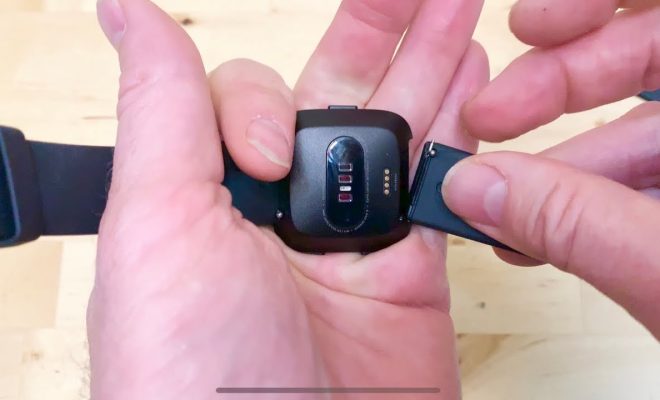
Before starting, make sure your Fitbit is turned off. Lay the watch with the back facing up on a flat surface. Locate the quick-release pins on the back of the watch, just before where the band attaches to the watch. Use your fingers to press the small button on one of the quick-release pins, and gently push it in towards the watch.

While holding down the button, slide the band away from the watch, pulling it towards you. Repeat the process for the other quick-release pin to fully remove the band from the watch.

Step 2: Choose your new band

Fitbit offers a range of interchangeable bands for the Versa, from leather bands to sports bands in a variety of colors. Choose the band that best fits your needs and preferences.

Step 3: Attach the new band

Line up the new band with the slot on the watch body. Ensure that the quick-release pins are lined up with the holes on the band, and then slide the band in place until it clicks into place.

Repeat the process for the other side of the watch, ensuring both quick-release pins are securely locked in place.

Step 4: Adjust the new band

Once the new band is attached, adjust it to fit your wrist. Put the watch on your wrist, and fasten the clasp. Ensure the watch is snug enough to avoid slipping and loose enough to be comfortable.

Changing the band of a Fitbit Versa is a straightforward process that requires no special tools. With this guide, you can change your watch band easily and quickly, giving your Fitbit a new look and feel. Remember to take care of your watch and band to ensure they last as long as possible.


Previous Article

The 6 Best Driverless Car Manufacturers of ...

Next Article

What Is a WPS File?

Matthew Lynch

Related articles More from author

  • Digital & Mobile Technology

    Essential CSS Tips and Tricks Every Developer Should Know

    August 5, 2023
    By Matthew Lynch
  • Best of the Best ListsDigital & Mobile Technology

    The Best To-Do List Apps for Windows 10 & 11

    June 5, 2023
    By Matthew Lynch
  • Digital & Mobile Technology

    What is a Database Report?

    April 17, 2023
    By Matthew Lynch
  • Digital & Mobile Technology

    Geeky Prank Sites to Fool Your Friends

    June 23, 2023
    By Matthew Lynch
  • Digital & Mobile Technology

    How to Set Up Your Comcast Cable Box

    May 8, 2023
    By Matthew Lynch
  • Digital & Mobile Technology

    What Is Hootsuite, and Is It Free to Use?

    June 21, 2023
    By Matthew Lynch

Search

Login & Registration

  • Log in
  • Entries feed
  • Comments feed
  • WordPress.org

Newsletter

Signup for The Tech Edvocate Newsletter and have the latest in EdTech news and opinion delivered to your email address!

About Us

Since technology is not going anywhere and does more good than harm, adapting is the best course of action. That is where The Tech Edvocate comes in. We plan to cover the PreK-12 and Higher Education EdTech sectors and provide our readers with the latest news and opinion on the subject. From time to time, I will invite other voices to weigh in on important issues in EdTech. We hope to provide a well-rounded, multi-faceted look at the past, present, the future of EdTech in the US and internationally.

We started this journey back in June 2016, and we plan to continue it for many more years to come. I hope that you will join us in this discussion of the past, present and future of EdTech and lend your own insight to the issues that are discussed.

Newsletter

Signup for The Tech Edvocate Newsletter and have the latest in EdTech news and opinion delivered to your email address!

Contact Us

The Tech Edvocate
910 Goddin Street
Richmond, VA 23231
(601) 630-5238
[email protected]

Copyright © 2026 Matthew Lynch. All rights reserved.