The Tech Edvocate

Top Menu

  • Advertisement
  • Apps
  • Home Page
  • Home Page Five (No Sidebar)
  • Home Page Four
  • Home Page Three
  • Home Page Two
  • Home Tech2
  • Icons [No Sidebar]
  • Left Sidbear Page
  • Lynch Educational Consulting
  • My Account
  • My Speaking Page
  • Newsletter Sign Up Confirmation
  • Newsletter Unsubscription
  • Our Brands
  • Page Example
  • Privacy Policy
  • Protected Content
  • Register
  • Request a Product Review
  • Shop
  • Shortcodes Examples
  • Signup
  • Start Here
    • Governance
    • Careers
    • Contact Us
  • Terms and Conditions
  • The Edvocate
  • The Tech Edvocate Product Guide
  • Topics
  • Write For Us
  • Advertise

Main Menu

  • Start Here
    • Our Brands
    • Governance
      • Lynch Educational Consulting, LLC.
      • Dr. Lynch’s Personal Website
      • Careers
    • Write For Us
    • The Tech Edvocate Product Guide
    • Contact Us
    • Books
    • Edupedia
    • Post a Job
    • The Edvocate Podcast
    • Terms and Conditions
    • Privacy Policy
  • Topics
    • Assistive Technology
    • Child Development Tech
    • Early Childhood & K-12 EdTech
    • EdTech Futures
    • EdTech News
    • EdTech Policy & Reform
    • EdTech Startups & Businesses
    • Higher Education EdTech
    • Online Learning & eLearning
    • Parent & Family Tech
    • Personalized Learning
    • Product Reviews
  • Advertise
  • Tech Edvocate Awards
  • The Edvocate
  • Pedagogue
  • School Ratings

logo

The Tech Edvocate

  • Start Here
    • Our Brands
    • Governance
      • Lynch Educational Consulting, LLC.
      • Dr. Lynch’s Personal Website
        • My Speaking Page
      • Careers
    • Write For Us
    • The Tech Edvocate Product Guide
    • Contact Us
    • Books
    • Edupedia
    • Post a Job
    • The Edvocate Podcast
    • Terms and Conditions
    • Privacy Policy
  • Topics
    • Assistive Technology
    • Child Development Tech
    • Early Childhood & K-12 EdTech
    • EdTech Futures
    • EdTech News
    • EdTech Policy & Reform
    • EdTech Startups & Businesses
    • Higher Education EdTech
    • Online Learning & eLearning
    • Parent & Family Tech
    • Personalized Learning
    • Product Reviews
  • Advertise
  • Tech Edvocate Awards
  • The Edvocate
  • Pedagogue
  • School Ratings
  • This One Skill Is Quietly Reshaping Every Career — And How to Master It Now

  • The Silent Threat: How AI Is Reshaping Recent College Graduates’ Job Prospects

  • This Crucial Shift in AI Will Devastate Millions of College Grads

  • The Brutal Truth: Zero-Day Exploit Analysis vs. Traditional Cybersecurity Careers — Which Path Pays $300,000?

  • The Urgent Truth: Why These Certifications Are Your Only Defense Against Zero-Day Attacks

  • The FBI Investigates a Zero-Day Attack on Your Job Applications

  • The Startling Truth About AI’s Impact on Your Coding Job by 2026

  • The Shocking Truth About Your Code: AI Is Already Rewriting Your Future

  • Is This Why Code Review Is Dead? AI’s Staggering Impact on Tech Jobs

  • The Shocking Truth About CogniBoost vs Focus Drugs: What No One Is Telling You

Tech Advice
Home›Tech Advice›How to Cancel Your Amazon Prime Subscription and Close Your Account

How to Cancel Your Amazon Prime Subscription and Close Your Account
By Matthew Lynch
July 17, 2023
0
Spread the love

Amazon Prime has become a popular membership service, offering a variety of benefits such as free shipping, streaming services, and exclusive deals. However, circumstances may arise where you decide it’s time to cancel your subscription and close your Amazon account. While this process might seem daunting at first, with the right guidance, cancelling your Amazon Prime subscription and closing your account can be done smoothly. In this article, we’ll walk you through the necessary steps.

Step 1: Consider Your Decision

Before proceeding with cancellation, take some time to evaluate whether cancelling your Amazon Prime subscription is indeed what you want. Review the benefits you receive from the service against its cost and consider if there are alternative options that better suit your needs.

Step 2: Check for Any Active Memberships or Subscriptions

If you have any active memberships or subscriptions associated with Amazon Prime (e.g., Kindle Unlimited), ensure that those are canceled separately before moving forward with closing your account. This will prevent any unexpected charges or complications later on.

Step 3: Manage Your Membership

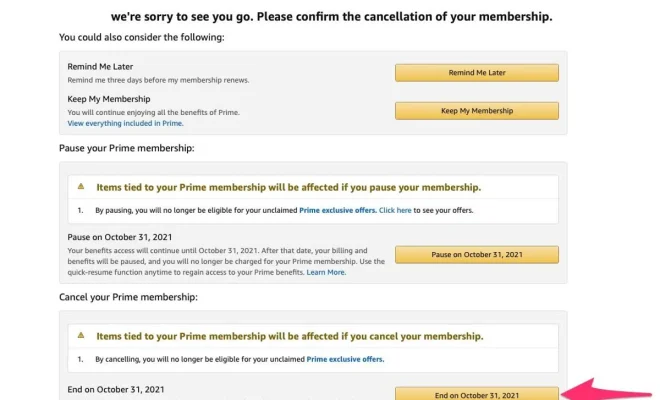
To cancel an existing Amazon Prime membership:

1. Log in to your Amazon account using a web browser on either a computer or mobile device.

2. Go to “Your Account” settings.

3. Under “Account & Lists,” select “Prime Membership.”

4. Click on the option similar to “End Membership” or “Cancel My Benefits.”

Follow any additional prompts provided by Amazon during this process.

Step 4: Verify Cancellation Confirmation

After completing the cancellation process, confirm that your membership has been successfully terminated by checking for confirmation details within “Your Account” settings under the section labeled “Prime Membership.” Ensure that it reflects an end date for access to prime benefits.

Step 5: Empty Shopping Cart & Delete Saved Payment Methods

Before permanently closing your account, make sure there are no pending orders or items in your shopping cart. Additionally, remove any saved payment methods associated with your account to protect your personal information.

Step 6: Contact Amazon Customer Service (Optional)

If you encounter any issues during the cancellation process or need further assistance, don’t hesitate to reach out to Amazon’s customer service for guidance. They are generally available through various contact channels, including live chat, phone support, or email.

Step 7: Close Your Account

To close your Amazon account:

1. Visit the “Contact Us” page on the Amazon website.

2. Select “Prime or Something Else” as the reason for contacting them.

3. Choose a preferred method of communication (e.g., phone call).

4. Request that they assist you in closing your account permanently.

Amazon’s customer service will guide you through the necessary steps and confirm closure of your account after verifying relevant details.

Conclusion

While cancelling an Amazon Prime subscription and closing your account may seem overwhelming at first glance, following these step-by-step instructions can help simplify the process. By carefully considering your decision, canceling any active memberships/subscriptions before ending Prime benefits, managing membership settings correctly within “Your Account,” removing saved payment methods and emptying shopping carts – you’ll be well on track towards successfully discontinuing services with Amazon Prime while ensuring protection of personal data.

Remember that although closing an existing Amazon account is permanent; if circumstances change in the future and you decide to return as a member—Amazon will always be ready to welcome customers back with open arms!


Previous Article

How Do I Delete My Twitter Account? ...

Next Article

How to Bring Pictures to Life Using ...

Matthew Lynch

Related articles More from author

  • Tech Advice

    SimpliSafe vs. ADT: Which Is Best For You?

    August 9, 2023
    By Matthew Lynch
  • Tech Advice

    Why Is My Phone Screen Turning Green

    February 20, 2024
    By Matthew Lynch
  • Tech Advice

    Microsoft Sysinternals: The Best Windows Troubleshooting Tools

    March 6, 2024
    By Matthew Lynch
  • Tech Advice

    Hilo vs. Kona: Which is Best

    October 20, 2023
    By Matthew Lynch
  • Tech Advice

    Microsoft shows off Xbox trailers, hardware, services at E3

    January 31, 2024
    By Matthew Lynch
  • Tech Advice

    Best Jumbo CD Rates for 2023: Maximizing Your Savings

    July 10, 2023
    By Matthew Lynch

Search

Login & Registration

  • Log in
  • Entries feed
  • Comments feed
  • WordPress.org

Newsletter

Signup for The Tech Edvocate Newsletter and have the latest in EdTech news and opinion delivered to your email address!

About Us

Since technology is not going anywhere and does more good than harm, adapting is the best course of action. That is where The Tech Edvocate comes in. We plan to cover the PreK-12 and Higher Education EdTech sectors and provide our readers with the latest news and opinion on the subject. From time to time, I will invite other voices to weigh in on important issues in EdTech. We hope to provide a well-rounded, multi-faceted look at the past, present, the future of EdTech in the US and internationally.

We started this journey back in June 2016, and we plan to continue it for many more years to come. I hope that you will join us in this discussion of the past, present and future of EdTech and lend your own insight to the issues that are discussed.

Newsletter

Signup for The Tech Edvocate Newsletter and have the latest in EdTech news and opinion delivered to your email address!

Contact Us

The Tech Edvocate
910 Goddin Street
Richmond, VA 23231
(601) 630-5238
[email protected]

Copyright © 2026 Matthew Lynch. All rights reserved.