The Tech Edvocate

Top Menu

  • Advertisement
  • Apps
  • Home Page
  • Home Page Five (No Sidebar)
  • Home Page Four
  • Home Page Three
  • Home Page Two
  • Home Tech2
  • Icons [No Sidebar]
  • Left Sidbear Page
  • Lynch Educational Consulting
  • My Account
  • My Speaking Page
  • Newsletter Sign Up Confirmation
  • Newsletter Unsubscription
  • Our Brands
  • Page Example
  • Privacy Policy
  • Protected Content
  • Register
  • Request a Product Review
  • Shop
  • Shortcodes Examples
  • Signup
  • Start Here
    • Governance
    • Careers
    • Contact Us
  • Terms and Conditions
  • The Edvocate
  • The Tech Edvocate Product Guide
  • Topics
  • Write For Us
  • Advertise

Main Menu

  • Start Here
    • Our Brands
    • Governance
      • Lynch Educational Consulting, LLC.
      • Dr. Lynch’s Personal Website
      • Careers
    • Write For Us
    • The Tech Edvocate Product Guide
    • Contact Us
    • Books
    • Edupedia
    • Post a Job
    • The Edvocate Podcast
    • Terms and Conditions
    • Privacy Policy
  • Topics
    • Assistive Technology
    • Child Development Tech
    • Early Childhood & K-12 EdTech
    • EdTech Futures
    • EdTech News
    • EdTech Policy & Reform
    • EdTech Startups & Businesses
    • Higher Education EdTech
    • Online Learning & eLearning
    • Parent & Family Tech
    • Personalized Learning
    • Product Reviews
  • Advertise
  • Tech Edvocate Awards
  • The Edvocate
  • Pedagogue
  • School Ratings

logo

The Tech Edvocate

  • Start Here
    • Our Brands
    • Governance
      • Lynch Educational Consulting, LLC.
      • Dr. Lynch’s Personal Website
        • My Speaking Page
      • Careers
    • Write For Us
    • The Tech Edvocate Product Guide
    • Contact Us
    • Books
    • Edupedia
    • Post a Job
    • The Edvocate Podcast
    • Terms and Conditions
    • Privacy Policy
  • Topics
    • Assistive Technology
    • Child Development Tech
    • Early Childhood & K-12 EdTech
    • EdTech Futures
    • EdTech News
    • EdTech Policy & Reform
    • EdTech Startups & Businesses
    • Higher Education EdTech
    • Online Learning & eLearning
    • Parent & Family Tech
    • Personalized Learning
    • Product Reviews
  • Advertise
  • Tech Edvocate Awards
  • The Edvocate
  • Pedagogue
  • School Ratings
  • The Brutal Truth: 8 Lies Scammers Tell About Your Student Loans

  • New Student Loan Rules: The Shocking Truth About 2026 Relief Programs

  • New Repayment Plan Changes Trigger Student Loan Scam Epidemic

  • Why Millions Are Ditching Degrees for This One Skill-Boosting Secret

  • The Quiet Revolution: How Micro-Credentials Are Reshaping Tech Careers

  • Why 96% of Employers Are Now Demanding Micro-Credentials

  • This One Incident Exposed How Vulnerable Your Student Data Really Is

  • The Brutal Truth About EdTech Security: 10 Solutions to Prevent Another Canvas LMS Disaster

  • The Billion-User Data Heist: Why Your Child’s School Data Is Under Attack

  • This Crucial Mistake Is Killing Your Tech Career (It’s Not What You Think)

Tech Advice
Home›Tech Advice›You’ll Want to Change These Alexa Settings ASAP

You’ll Want to Change These Alexa Settings ASAP
By Matthew Lynch
July 10, 2023
0
Spread the love

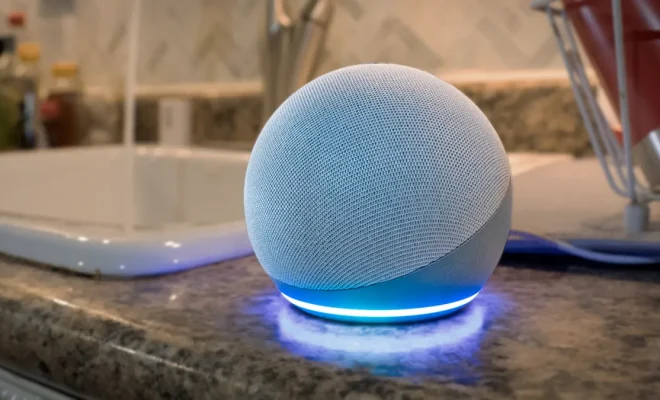
When you bring an Amazon Echo device or any device equipped with the smart voice assistant Alexa into your home, it’s a game-changer. Alexa enables you to manage your routine, play music, and answer any pressing questions you may have. However, straight out of the box, there are a few settings that require some tweaking. Here are seven Alexa settings you need to change ASAP.

1. Privacy settings

Alexa devices are set to continuously listen by default, which can be concerning from a privacy standpoint. It’s essential to modify the settings so that your conversations aren’t recorded unless necessary.

To turn off voice recordings:

– Open the Alexa app

– Go to Settings

– Select Alexa Privacy

– Tap on “Manage Your Alexa Data”

– Switch off “Use Voice Recordings to Improve Amazon Services”

2. Explicit song filter

Not everyone in your household might appreciate mature content in songs. To prevent Alexa from playing explicit tracks across all linked devices:

– Open the Alexa app

– Go to Settings

– Scroll down and select Music & Podcasts

– Tap on “Explicit Filter”

– Toggle “Block explicit songs”

3. Purchase restrictions

You wouldn’t want your child accidentally ordering a product with just their voice. For added security:

– Go to Settings in the Alexa app

– Select Account Settings

– Choose Voice Purchasing

– Set up a four-digit voice code

4. Wake word and confirmation tones

Change the default wake word from “Alexa” to avoid confusion with similar sounding words:

– Open the Alexa app and go to Devices

– Select your device

– Tap on Wake Word and choose another option

Enable confirmation tones for better interaction:

– Go to Device settings in the app

– Enable “Request Sounds” under Notification Sounds

5. Set up routines

For a smoother morning routine or bedtime experience, schedule the lights, thermostat or other smart home devices in one go.

– Go to Routines in the Alexa app

– Tap the “+” button to create new routines

6. Location-based reminders

Get Alexa to remind you of tasks when you reach specific locations:

– Open the Alexa app

– Tap on Reminders & Alarms

– Set up your reminder with “Notify me at this location”

7. Customize your Flash Briefing

Choose your preferred news sources for daily updates:

– Open the Alexa app

– Go to Settings and click on Flash Briefing

– Add or remove content providers according to your interests

With these steps, you can ensure that your Alexa experience is tailored to fit the preferences of you and your household. Change these settings ASAP to create a seamless and personalized experience that everyone can enjoy.

Previous Article

Why Your Ice Maker is Making Hollow ...

Next Article

The Easy Way to Find Out If ...

Matthew Lynch

Related articles More from author

  • Tech Advice

    10 Best gaming monitors: Tested and Reviewed

    October 19, 2023
    By Matthew Lynch
  • Tech Advice

    Pokemon Go Xurkitree Raid Guide: Best Counters and Weaknesses

    July 17, 2023
    By Matthew Lynch
  • Tech Advice

    Apple’s iPod Touch Is Discontinued, Ending the Music Player’s Legacy

    July 17, 2023
    By Matthew Lynch
  • Tech Advice

    Google Pixel Buds Pro Review: Better Fit, Better Sound

    July 17, 2023
    By Matthew Lynch
  • Tech Advice

    6 Best Fixes for Reactions Not Working in Facebook Messenger

    February 20, 2024
    By Matthew Lynch
  • Tech Advice

    Amazon Gives Warehouse Employees Pay Raises Across the Country

    July 14, 2023
    By Matthew Lynch

Search

Login & Registration

  • Log in
  • Entries feed
  • Comments feed
  • WordPress.org

Newsletter

Signup for The Tech Edvocate Newsletter and have the latest in EdTech news and opinion delivered to your email address!

About Us

Since technology is not going anywhere and does more good than harm, adapting is the best course of action. That is where The Tech Edvocate comes in. We plan to cover the PreK-12 and Higher Education EdTech sectors and provide our readers with the latest news and opinion on the subject. From time to time, I will invite other voices to weigh in on important issues in EdTech. We hope to provide a well-rounded, multi-faceted look at the past, present, the future of EdTech in the US and internationally.

We started this journey back in June 2016, and we plan to continue it for many more years to come. I hope that you will join us in this discussion of the past, present and future of EdTech and lend your own insight to the issues that are discussed.

Newsletter

Signup for The Tech Edvocate Newsletter and have the latest in EdTech news and opinion delivered to your email address!

Contact Us

The Tech Edvocate
910 Goddin Street
Richmond, VA 23231
(601) 630-5238
[email protected]

Copyright © 2026 Matthew Lynch. All rights reserved.