The Tech Edvocate

Top Menu

  • Advertisement
  • Apps
  • Home Page
  • Home Page Five (No Sidebar)
  • Home Page Four
  • Home Page Three
  • Home Page Two
  • Home Tech2
  • Icons [No Sidebar]
  • Left Sidbear Page
  • Lynch Educational Consulting
  • My Account
  • My Speaking Page
  • Newsletter Sign Up Confirmation
  • Newsletter Unsubscription
  • Our Brands
  • Page Example
  • Privacy Policy
  • Protected Content
  • Register
  • Request a Product Review
  • Shop
  • Shortcodes Examples
  • Signup
  • Start Here
    • Governance
    • Careers
    • Contact Us
  • Terms and Conditions
  • The Edvocate
  • The Tech Edvocate Product Guide
  • Topics
  • Write For Us
  • Advertise

Main Menu

  • Start Here
    • Our Brands
    • Governance
      • Lynch Educational Consulting, LLC.
      • Dr. Lynch’s Personal Website
      • Careers
    • Write For Us
    • The Tech Edvocate Product Guide
    • Contact Us
    • Books
    • Edupedia
    • Post a Job
    • The Edvocate Podcast
    • Terms and Conditions
    • Privacy Policy
  • Topics
    • Assistive Technology
    • Child Development Tech
    • Early Childhood & K-12 EdTech
    • EdTech Futures
    • EdTech News
    • EdTech Policy & Reform
    • EdTech Startups & Businesses
    • Higher Education EdTech
    • Online Learning & eLearning
    • Parent & Family Tech
    • Personalized Learning
    • Product Reviews
  • Advertise
  • Tech Edvocate Awards
  • The Edvocate
  • Pedagogue
  • School Ratings

logo

The Tech Edvocate

  • Start Here
    • Our Brands
    • Governance
      • Lynch Educational Consulting, LLC.
      • Dr. Lynch’s Personal Website
        • My Speaking Page
      • Careers
    • Write For Us
    • The Tech Edvocate Product Guide
    • Contact Us
    • Books
    • Edupedia
    • Post a Job
    • The Edvocate Podcast
    • Terms and Conditions
    • Privacy Policy
  • Topics
    • Assistive Technology
    • Child Development Tech
    • Early Childhood & K-12 EdTech
    • EdTech Futures
    • EdTech News
    • EdTech Policy & Reform
    • EdTech Startups & Businesses
    • Higher Education EdTech
    • Online Learning & eLearning
    • Parent & Family Tech
    • Personalized Learning
    • Product Reviews
  • Advertise
  • Tech Edvocate Awards
  • The Edvocate
  • Pedagogue
  • School Ratings
  • The Lobby Before the Lights: How Digital Casino Design Sets an Evening in Motion

  • The Lobby Before the Lights: How Small Interface Choices Shape Casino Discovery

  • The Reckless Rise of AI Finance: Why You Could Lose Everything

  • Baffling: Fintech Founder’s $6.7 Million Lie — And How to Spot the Red Flags

  • Dramatic: Teddy AI Funding Ignites Legal Tech’s $60M Consolidation Battle

  • Florida’s Gambling War: Seminole Tribe’s Bold Move Against DraftKings Could Reshape Betting Forever

  • California’s Bold AI Move: Nearly 30 New Laws Reshape Tech’s Future

  • The AI Skills Gap: Why 71% of Companies Are Dramatically Behind — And What It Means For Your Career

  • Unbelievable: AI Deepfake Phishing Attacks Just Got a Whole Lot Scarier

  • This One Reckless Data Breach Just Exposed 50 Million Bank Customers

Tech Advice
Home›Tech Advice›How to Bring Pictures to Life Using the MyHeritage Deep Nostalgia App

How to Bring Pictures to Life Using the MyHeritage Deep Nostalgia App
By Matthew Lynch
July 17, 2023
0
Spread the love

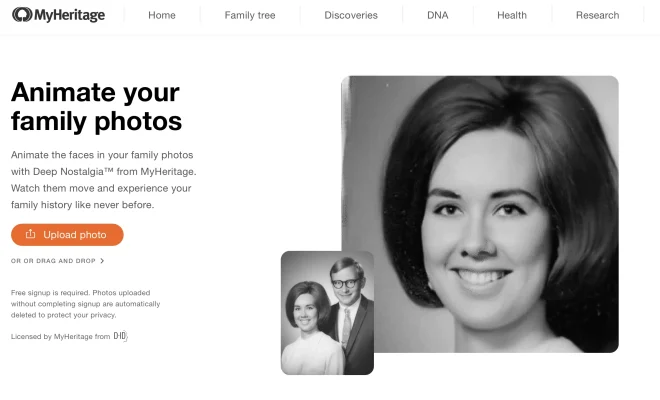
Have you ever wondered what it would be like to see your ancestors or cherished family photos come to life? Thanks to advancements in artificial intelligence (AI) and deep learning technology, it is now possible with the MyHeritage Deep Nostalgia app. This incredible tool allows you to animate old photographs, giving them a new level of depth and realism. In this article, we’ll explore how you can bring pictures to life using the MyHeritage Deep Nostalgia app.

Understanding Deep Nostalgia Technology

The MyHeritage Deep Nostalgia app utilizes AI algorithms developed by D-ID, an Israeli company specializing in image and video manipulation. By leveraging deep learning techniques, the app analyzes facial features from static images and generates realistic movements based on pre-recorded sequences.

These pre-recorded sequences serve as references for various facial expressions such as smiles, nods, blinks, and more. When applied to still images through the app’s algorithmic processing, these movements create a lifelike effect that brings pictures “to life.”

Steps for Using the Deep Nostalgia App

To bring your pictures alive using the MyHeritage Deep Nostalgia app:

1. Download & Install:

Start by downloading and installing the MyHeritage mobile application from either Google Play Store or Apple App Store onto your smartphone or tablet.

2. Sign Up/Login:

Create a new account if you’re a first-time user or log in with your existing credentials if you already have one.

3. Upload Your Photos:

Open the app and navigate to “Deep Nostalgia.” Choose a photo from your device’s gallery that you’d like to animate—a portrait of an ancestor or any other picture you want brought alive.

4. Apply Animation:

Once uploaded successfully, select “Animate” or a similar option. The app will then process the image using AI algorithms to generate lifelike movements.

5. Preview & Share:

After processing, you’ll be able to preview the animated version of your photo. If satisfied, save it to your device or share it with family and friends through various social media platforms directly from within the app.

Tips for Optimal Results

To achieve the best possible outcomes when using MyHeritage Deep Nostalgia:

• Choose Clear Photos:

Select high-quality images that are well-lit and have good facial details. Crisp images provide better results during animation.

• Focus on Faces:

Ensure that the faces in your chosen photos are prominent and easily recognizable for optimal accuracy in generating lifelike movements.

• Experiment with Different Photos:

Try animating multiple pictures to explore different perspectives and expressions. Some photos may yield more captivating animations than others due to their composition or inherent facial features.

Privacy Considerations

MyHeritage takes privacy seriously when using its Deep Nostalgia feature. Any photos uploaded through the app are securely stored on their servers but won’t be shared publicly without explicit permission from users. It’s important, though, always to review an app’s terms of service and understand how your data is handled before proceeding with any image manipulation tools.

Conclusion

The MyHeritage Deep Nostalgia app offers a fascinating way to breathe new life into old photographs by leveraging powerful AI technology. With just a few simple steps, you can animate cherished family portraits or historical images—bringing them closer to reality than ever before.

Remember, while creating these animated versions can evoke strong emotions as we see loved ones come alive digitally, it’s essential not to confuse these animations with actual recordings or representations of past individuals’ personalities or behaviors—they remain artistic interpretations based on limited visual input alone.

So go ahead—explore this exciting realm of bringing pictures alive and enjoy the unique experience of seeing your ancestors or cherished memories in a whole new light with MyHeritage Deep Nostalgia.

Previous Article

How to Cancel Your Amazon Prime Subscription ...

Next Article

How to Cancel Netflix: A Few Extra ...

Matthew Lynch

Related articles More from author

  • Tech Advice

    Find quoted replies and retweets on Twitter with this simple trick

    July 16, 2023
    By Matthew Lynch
  • Tech Advice

    Belkin Boost Up Charge Pro 2-in-1 Wireless Charger Stand with MagSafe Review

    July 20, 2023
    By Matthew Lynch
  • Tech Advice

    10 Ways the Dodge Charger Daytona EV Will Change Muscle Cars Forever

    October 3, 2023
    By Matthew Lynch
  • Tech Advice

    Best Credit Cards for Online Travel-Booking Websites

    October 20, 2023
    By Matthew Lynch
  • Tech Advice

    LG Styler review: LG’s Styler is full of hot air

    July 12, 2023
    By Matthew Lynch
  • Tech Advice

    2024 Ford Mustang RTR Spec 2 Debuts With Adjustable Suspension Upgrades

    August 21, 2023
    By Matthew Lynch

Search

Login & Registration

  • Log in
  • Entries feed
  • Comments feed
  • WordPress.org

Newsletter

Signup for The Tech Edvocate Newsletter and have the latest in EdTech news and opinion delivered to your email address!

About Us

Since technology is not going anywhere and does more good than harm, adapting is the best course of action. That is where The Tech Edvocate comes in. We plan to cover the PreK-12 and Higher Education EdTech sectors and provide our readers with the latest news and opinion on the subject. From time to time, I will invite other voices to weigh in on important issues in EdTech. We hope to provide a well-rounded, multi-faceted look at the past, present, the future of EdTech in the US and internationally.

We started this journey back in June 2016, and we plan to continue it for many more years to come. I hope that you will join us in this discussion of the past, present and future of EdTech and lend your own insight to the issues that are discussed.

Newsletter

Signup for The Tech Edvocate Newsletter and have the latest in EdTech news and opinion delivered to your email address!

Contact Us

The Tech Edvocate
910 Goddin Street
Richmond, VA 23231
(601) 630-5238
[email protected]

Copyright © 2026 Matthew Lynch. All rights reserved.