The Tech Edvocate

Top Menu

  • Advertisement
  • Apps
  • Home Page
  • Home Page Five (No Sidebar)
  • Home Page Four
  • Home Page Three
  • Home Page Two
  • Home Tech2
  • Icons [No Sidebar]
  • Left Sidbear Page
  • Lynch Educational Consulting
  • My Account
  • My Speaking Page
  • Newsletter Sign Up Confirmation
  • Newsletter Unsubscription
  • Our Brands
  • Page Example
  • Privacy Policy
  • Protected Content
  • Register
  • Request a Product Review
  • Shop
  • Shortcodes Examples
  • Signup
  • Start Here
    • Governance
    • Careers
    • Contact Us
  • Terms and Conditions
  • The Edvocate
  • The Tech Edvocate Product Guide
  • Topics
  • Write For Us
  • Advertise

Main Menu

  • Start Here
    • Our Brands
    • Governance
      • Lynch Educational Consulting, LLC.
      • Dr. Lynch’s Personal Website
      • Careers
    • Write For Us
    • The Tech Edvocate Product Guide
    • Contact Us
    • Books
    • Edupedia
    • Post a Job
    • The Edvocate Podcast
    • Terms and Conditions
    • Privacy Policy
  • Topics
    • Assistive Technology
    • Child Development Tech
    • Early Childhood & K-12 EdTech
    • EdTech Futures
    • EdTech News
    • EdTech Policy & Reform
    • EdTech Startups & Businesses
    • Higher Education EdTech
    • Online Learning & eLearning
    • Parent & Family Tech
    • Personalized Learning
    • Product Reviews
  • Advertise
  • Tech Edvocate Awards
  • The Edvocate
  • Pedagogue
  • School Ratings

logo

The Tech Edvocate

  • Start Here
    • Our Brands
    • Governance
      • Lynch Educational Consulting, LLC.
      • Dr. Lynch’s Personal Website
        • My Speaking Page
      • Careers
    • Write For Us
    • The Tech Edvocate Product Guide
    • Contact Us
    • Books
    • Edupedia
    • Post a Job
    • The Edvocate Podcast
    • Terms and Conditions
    • Privacy Policy
  • Topics
    • Assistive Technology
    • Child Development Tech
    • Early Childhood & K-12 EdTech
    • EdTech Futures
    • EdTech News
    • EdTech Policy & Reform
    • EdTech Startups & Businesses
    • Higher Education EdTech
    • Online Learning & eLearning
    • Parent & Family Tech
    • Personalized Learning
    • Product Reviews
  • Advertise
  • Tech Edvocate Awards
  • The Edvocate
  • Pedagogue
  • School Ratings
  • The Brutal Truth: Why 75% of Fintech Startups Collapse in 5 Years

  • This AI Company’s Staggering 14 Million Record Data Leak Is Just The Beginning

  • New York Rep Introduces Bill That Could Keep Games Playable for Longer – PCMag

  • Mind-Blowing: These AI Investment Funds Are Crushing the Market — Here’s How

  • The AI Detector Deception: Why Universities Are Pulling the Plug

  • Stunning: New Student Loan Repayment Rules Could Hike Payments for Millions

  • Shocking: California’s Billion-Dollar Clean Transit Initiative Drove Nowhere

  • Why EV Charging Reliability Soared Despite Cratering Sales

  • A new lithium-ion battery breakthrough could lead to cells that deliver more power for longer — they might be useful for everything from EVs to gaming laptops to robots to drones | TechRadar

  • One Breakthrough: How AI is Reshaping Medicine Faster Than Anyone Imagined

Digital & Mobile Technology
Home›Digital & Mobile Technology›How to Calibrate the Compass for Android

How to Calibrate the Compass for Android
By Matthew Lynch
July 4, 2023
0
Spread the love

Calibrating the compass on your Android device is a simple but essential procedure that can make a big difference in your navigation and location-based apps. The compass relies on the Earth’s magnetic field to determine its orientation, and if it’s not properly calibrated, it can give inaccurate readings, which can be frustrating and even dangerous in some situations. In this article, we’ll guide you through the steps to calibrate the compass on your Android device, whether you have a Samsung, Xiaomi, Huawei, or any other Android smartphone.

Step 1: Check your Phone’s Sensors

Before you start the calibration process, it’s important to make sure that your phone’s sensors are functioning properly. Some Android devices have a built-in app called ‘Device Health Services’ that can diagnose the sensors’ performance. You can find it in the Settings menu under ‘Device care’ or ‘Battery and device care.’ Open the app and select ‘Test hardware’ to run a diagnostic test. If your phone doesn’t have this app, you can download a sensor testing app from the Play Store.

Step 2: Find a Flat and Clear Surface

The compass calibration process requires you to move your phone in specific patterns while keeping it stable and parallel to the ground. Therefore, it’s crucial to find a flat and clear surface, free of any metal objects or other magnetic interference. It’s best to do the calibration outdoors, away from buildings, cars, or electrical appliances.

Step 3: Open the Compass App

Next, open the compass app on your phone. The app may have various names, such as ‘Compass,’ ‘Compass Pro,’ or ‘Orientation Sensor,’ depending on your device model and the version of Android you’re using. You can also use third-party compass apps, but make sure they’re reliable and have good reviews.

Step 4: Calibrate the Compass

To calibrate the compass, follow these steps:

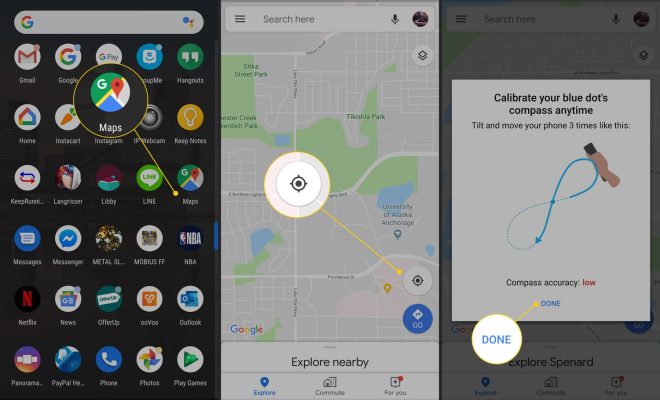
1. Hold your phone parallel to the ground and steadily rotate it three times around its axis in a horizontal figure-eight motion. Make sure you keep the phone level and rotate it in a smooth and continuous movement.

2. Tilt your phone upward and downward three times, making sure the phone is upright and pointing to the sky during the upward movement and to the ground during the downward movement.

3. Move your phone in a circular motion, as if you were drawing a circle in the air, for about 10 seconds. Make sure you keep the phone level and don’t tilt it.

4. Hold your phone steady for a few seconds and check if the compass needle points to the north direction. If not, repeat the calibration process until it’s accurate.

Step 5: Test the Compass

After calibrating the compass, open a location-based app that uses the compass, such as Google Maps or a hiking app. Check if the map orientation matches your actual direction and if the compass needle moves smoothly and accurately. If there are still issues, repeat the calibration process, or try restarting your phone, as software glitches can sometimes affect the compass readings.

In conclusion, calibrating the compass on your Android device is a straightforward process that can enhance your navigation and mapping experience. By following the above steps and keeping your phone free of magnets and other interference, you can ensure that your compass is accurate and reliable, no matter where you go.

Previous Article

A Hello Kitty assault rifle that actually ...

Next Article

Diagnosing a Dead Car Battery

Matthew Lynch

Related articles More from author

  • Digital & Mobile Technology

    Examples of a Strong Password

    June 1, 2023
    By Matthew Lynch
  • Digital & Mobile Technology

    Best Family Cell Phone Plans

    August 4, 2023
    By Matthew Lynch
  • Digital & Mobile Technology

    What Is a Boot File?

    June 3, 2023
    By Matthew Lynch
  • Digital & Mobile Technology

    Using GIMP’s Select By Color Tool

    June 23, 2023
    By Matthew Lynch
  • Digital & Mobile Technology

    MoviePass: What It Is & Where It Works

    July 6, 2023
    By Matthew Lynch
  • Digital & Mobile Technology

    Best iPhone Hacks & Tips for 2023

    June 6, 2023
    By Matthew Lynch

Search

Login & Registration

  • Log in
  • Entries feed
  • Comments feed
  • WordPress.org

Newsletter

Signup for The Tech Edvocate Newsletter and have the latest in EdTech news and opinion delivered to your email address!

About Us

Since technology is not going anywhere and does more good than harm, adapting is the best course of action. That is where The Tech Edvocate comes in. We plan to cover the PreK-12 and Higher Education EdTech sectors and provide our readers with the latest news and opinion on the subject. From time to time, I will invite other voices to weigh in on important issues in EdTech. We hope to provide a well-rounded, multi-faceted look at the past, present, the future of EdTech in the US and internationally.

We started this journey back in June 2016, and we plan to continue it for many more years to come. I hope that you will join us in this discussion of the past, present and future of EdTech and lend your own insight to the issues that are discussed.

Newsletter

Signup for The Tech Edvocate Newsletter and have the latest in EdTech news and opinion delivered to your email address!

Contact Us

The Tech Edvocate
910 Goddin Street
Richmond, VA 23231
(601) 630-5238
[email protected]

Copyright © 2026 Matthew Lynch. All rights reserved.