The Tech Edvocate

Top Menu

  • Advertisement
  • Apps
  • Home Page
  • Home Page Five (No Sidebar)
  • Home Page Four
  • Home Page Three
  • Home Page Two
  • Home Tech2
  • Icons [No Sidebar]
  • Left Sidbear Page
  • Lynch Educational Consulting
  • My Account
  • My Speaking Page
  • Newsletter Sign Up Confirmation
  • Newsletter Unsubscription
  • Our Brands
  • Page Example
  • Privacy Policy
  • Protected Content
  • Register
  • Request a Product Review
  • Shop
  • Shortcodes Examples
  • Signup
  • Start Here
    • Governance
    • Careers
    • Contact Us
  • Terms and Conditions
  • The Edvocate
  • The Tech Edvocate Product Guide
  • Topics
  • Write For Us
  • Advertise

Main Menu

  • Start Here
    • Our Brands
    • Governance
      • Lynch Educational Consulting, LLC.
      • Dr. Lynch’s Personal Website
      • Careers
    • Write For Us
    • The Tech Edvocate Product Guide
    • Contact Us
    • Books
    • Edupedia
    • Post a Job
    • The Edvocate Podcast
    • Terms and Conditions
    • Privacy Policy
  • Topics
    • Assistive Technology
    • Child Development Tech
    • Early Childhood & K-12 EdTech
    • EdTech Futures
    • EdTech News
    • EdTech Policy & Reform
    • EdTech Startups & Businesses
    • Higher Education EdTech
    • Online Learning & eLearning
    • Parent & Family Tech
    • Personalized Learning
    • Product Reviews
  • Advertise
  • Tech Edvocate Awards
  • The Edvocate
  • Pedagogue
  • School Ratings

logo

The Tech Edvocate

  • Start Here
    • Our Brands
    • Governance
      • Lynch Educational Consulting, LLC.
      • Dr. Lynch’s Personal Website
        • My Speaking Page
      • Careers
    • Write For Us
    • The Tech Edvocate Product Guide
    • Contact Us
    • Books
    • Edupedia
    • Post a Job
    • The Edvocate Podcast
    • Terms and Conditions
    • Privacy Policy
  • Topics
    • Assistive Technology
    • Child Development Tech
    • Early Childhood & K-12 EdTech
    • EdTech Futures
    • EdTech News
    • EdTech Policy & Reform
    • EdTech Startups & Businesses
    • Higher Education EdTech
    • Online Learning & eLearning
    • Parent & Family Tech
    • Personalized Learning
    • Product Reviews
  • Advertise
  • Tech Edvocate Awards
  • The Edvocate
  • Pedagogue
  • School Ratings
  • 9 Critical Reasons Why Athexio Might Be The Investment You Need (Or Should Avoid)

  • A Single Breakthrough Could Finally Kill Range Anxiety for Millions of EV Owners

  • Your Money, Their AI: The Secret Agents Invading Bank Accounts

  • US Battery as a Service Market Shifts Toward Fleet-Based Energy

  • The Startling Truth: Why Americans Distrust AI with Their Health

  • This Crucial Deadline for Banks Is Closer Than You Think

  • Baffling: CrowdStrike’s $500 Million AI Bet Reshapes Cybersecurity

  • This Crucial Autonomous Driving Rule Could Cost You Everything

  • Baffling: Microsoft AI CEO Demands Halt to Conscious AI Development

  • O seară în ritmul tău: atmosfera divertismentului de cazinou pe internet

Digital & Mobile Technology
Home›Digital & Mobile Technology›Examples of a Strong Password

Examples of a Strong Password
By Matthew Lynch
June 1, 2023
0
Spread the love

As people continue to rely on technology for online transactions, security breaches have become more and more prevalent. This highlights the importance of using strong passwords to protect personal information stored online. Passwords are the primary defense against cyber threats, so it is crucial to ensure that these are impenetrable. Here are some examples of strong passwords:

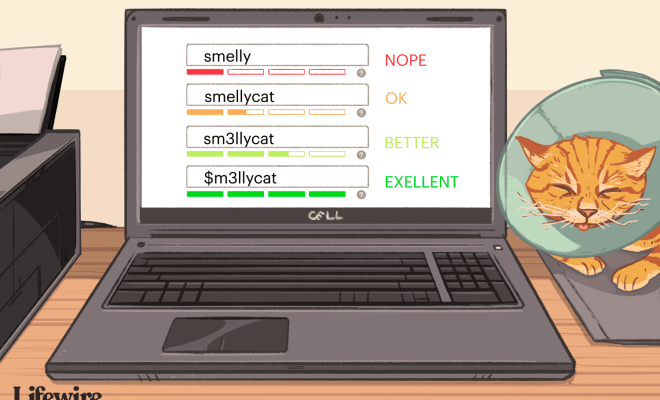
1. Complex sentence: A strong password can be a well-crafted sentence. This sentence can be random or personal, and it should be at least sixteen characters long. The sentence should include uppercase letters, lowercase letters, numbers, and special characters.

Example: “MyFavoriteFoodIsP1za&IAlw@ysG3t1t!”

2. Long passphrase: A passphrase is a lengthy password phrase that can be quite easy to remember. It should be a combination of upper and lowercase letters, characters, and punctuation marks. The key is to use a phrase that is not simple to guess.

Example: “TwinkleTwinkleLittleStarHowIWonderWhatYouAre^_^”

3. Acronym password: An acronym password is formulated using the initials of a phrase or sentence. It should be a combination of upper and lowercase letters, characters, and numbers.

Example: “W3aRsROb3rtPL@y3dF1ndTh3Killer”

4. Keyboard pattern password: A keyboard pattern password is a combination of keys that form a specific pattern. This method requires knowledge of the keyboard layout, and it involves using various keys from different parts of the keyboard.

Example: “1q@w3e$d5t^f6y&h9j!k6m+u8i”

5. Random word combination: A strong password can be a combination of random words that are unrelated to each other. It should be at least twelve characters long and incorporate uppercase letters, lowercase letters, numbers, and symbols.

Example: “CorrectHorseBatteryStaple-4269#”

It is essential to create unique passwords for every online account to reduce the risk of a data breach. Avoid using pet names or birthdays as passwords, as these are easy to guess. The longer and more complex the password, the better protected an account will be against cyber threats.

Remember that complex passwords can be challenging to remember, but they are vital in protecting personal information online. It is advisable to use a password manager to keep track of multiple passwords. With these password examples, it is possible to create strong and unique passwords that will keep an individual’s data secure.

Previous Article

How to Close Your Laptop and Use ...

Next Article

Best Cloud Backup Services Reviewed

Matthew Lynch

Related articles More from author

  • Digital & Mobile Technology

    How to Turn Off Google Assistant on an Android Tablet

    July 6, 2023
    By Matthew Lynch
  • Digital & Mobile Technology

    A Guide to Monaural, Stereo, Multichannel, and Surround Sound

    June 21, 2023
    By Matthew Lynch
  • Digital & Mobile Technology

    Why the Free-to-Play Fall Guys Has Disappeared From Steam

    June 30, 2023
    By Matthew Lynch
  • Digital & Mobile Technology

    What Is PayPal Credit and Where Can You Spend It?

    June 22, 2023
    By Matthew Lynch
  • Digital & Mobile Technology

    How to Access Your Google History and Delete All Activity

    August 5, 2023
    By Matthew Lynch
  • Digital & Mobile Technology

    What Is a Social Media Handle?

    June 5, 2023
    By Matthew Lynch

Search

Login & Registration

  • Log in
  • Entries feed
  • Comments feed
  • WordPress.org

Newsletter

Signup for The Tech Edvocate Newsletter and have the latest in EdTech news and opinion delivered to your email address!

About Us

Since technology is not going anywhere and does more good than harm, adapting is the best course of action. That is where The Tech Edvocate comes in. We plan to cover the PreK-12 and Higher Education EdTech sectors and provide our readers with the latest news and opinion on the subject. From time to time, I will invite other voices to weigh in on important issues in EdTech. We hope to provide a well-rounded, multi-faceted look at the past, present, the future of EdTech in the US and internationally.

We started this journey back in June 2016, and we plan to continue it for many more years to come. I hope that you will join us in this discussion of the past, present and future of EdTech and lend your own insight to the issues that are discussed.

Newsletter

Signup for The Tech Edvocate Newsletter and have the latest in EdTech news and opinion delivered to your email address!

Contact Us

The Tech Edvocate
910 Goddin Street
Richmond, VA 23231
(601) 630-5238
[email protected]

Copyright © 2026 Matthew Lynch. All rights reserved.