The Tech Edvocate

Top Menu

  • Advertisement
  • Apps
  • Home Page
  • Home Page Five (No Sidebar)
  • Home Page Four
  • Home Page Three
  • Home Page Two
  • Home Tech2
  • Icons [No Sidebar]
  • Left Sidbear Page
  • Lynch Educational Consulting
  • My Account
  • My Speaking Page
  • Newsletter Sign Up Confirmation
  • Newsletter Unsubscription
  • Our Brands
  • Page Example
  • Privacy Policy
  • Protected Content
  • Register
  • Request a Product Review
  • Shop
  • Shortcodes Examples
  • Signup
  • Start Here
    • Governance
    • Careers
    • Contact Us
  • Terms and Conditions
  • The Edvocate
  • The Tech Edvocate Product Guide
  • Topics
  • Write For Us
  • Advertise

Main Menu

  • Start Here
    • Our Brands
    • Governance
      • Lynch Educational Consulting, LLC.
      • Dr. Lynch’s Personal Website
      • Careers
    • Write For Us
    • The Tech Edvocate Product Guide
    • Contact Us
    • Books
    • Edupedia
    • Post a Job
    • The Edvocate Podcast
    • Terms and Conditions
    • Privacy Policy
  • Topics
    • Assistive Technology
    • Child Development Tech
    • Early Childhood & K-12 EdTech
    • EdTech Futures
    • EdTech News
    • EdTech Policy & Reform
    • EdTech Startups & Businesses
    • Higher Education EdTech
    • Online Learning & eLearning
    • Parent & Family Tech
    • Personalized Learning
    • Product Reviews
  • Advertise
  • Tech Edvocate Awards
  • The Edvocate
  • Pedagogue
  • School Ratings

logo

The Tech Edvocate

  • Start Here
    • Our Brands
    • Governance
      • Lynch Educational Consulting, LLC.
      • Dr. Lynch’s Personal Website
        • My Speaking Page
      • Careers
    • Write For Us
    • The Tech Edvocate Product Guide
    • Contact Us
    • Books
    • Edupedia
    • Post a Job
    • The Edvocate Podcast
    • Terms and Conditions
    • Privacy Policy
  • Topics
    • Assistive Technology
    • Child Development Tech
    • Early Childhood & K-12 EdTech
    • EdTech Futures
    • EdTech News
    • EdTech Policy & Reform
    • EdTech Startups & Businesses
    • Higher Education EdTech
    • Online Learning & eLearning
    • Parent & Family Tech
    • Personalized Learning
    • Product Reviews
  • Advertise
  • Tech Edvocate Awards
  • The Edvocate
  • Pedagogue
  • School Ratings
  • How to create estimates in Buildertrend

  • How to use Bluebeam for punch lists

  • Procore vs Viewpoint features

  • How to submit invoices in Procore

  • How to set up Monday.com for contractors

  • Can PlanGrid track punch lists

  • How to create selections in CoConstruct

  • How to markup drawings in PlanGrid

  • How to use PlanGrid for blueprints

  • How to create custom tools in Bluebeam

Digital & Mobile Technology
Home›Digital & Mobile Technology›How to Block Unwanted Emails From Senders in Yahoo Mail

How to Block Unwanted Emails From Senders in Yahoo Mail
By Matthew Lynch
July 6, 2023
0
Spread the love

In this day and age, maintaining an organized email inbox is crucial for personal and professional communication. However, unwanted emails can be a hindrance to achieving this goal. Yahoo Mail has an effective way of dealing with unwanted emails from senders. In this article, we’ll be discussing how to block unwanted emails from senders in Yahoo Mail.

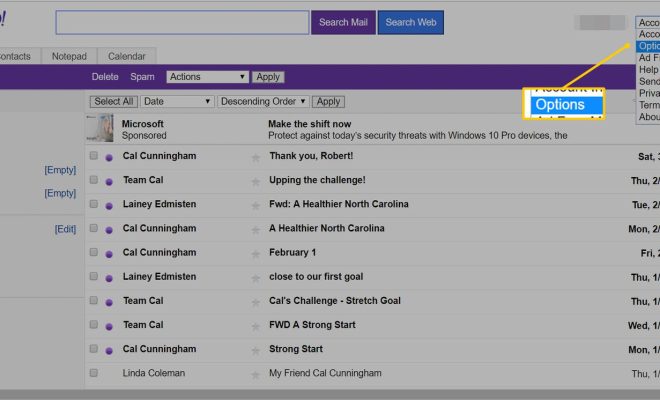
Step 1: Open the unwanted email

The first step in blocking unwanted emails from senders in Yahoo Mail is to open the particular email. Click on the email from the unwanted sender to open it.

Step 2: Select “More”

After opening the email, look at the toolbar located at the top of the message. Click on “More,” and a dropdown menu will appear.

Step 3: Choose “Filter Emails like this”

From the dropdown menu, select “Filter Emails like this.” This option filters all emails that meet the criteria of the selected email.

Step 4: Create a filter

Once “Filter Emails like this” has been chosen, a new pop-up window should appear. Select “Create a Filter” in this window.

Step 5: Select the Filter

A new window will appear, and you will be asked to choose a filter condition. Select the checkboxes next to the criteria you wish to use to filter emails from this sender, such as the sender’s email address or any specific words that appear in the email.

Step 6: Choose the Actions

In this step, select the actions that you want to apply to emails from this sender. You have three options to choose from: “Move the message to a folder,” “Delete the message,” or “Star the message.” Choose one or more actions that match your requirements.

Step 7: Complete the process.

Finally, click “Save” to complete the process. Yahoo Mail will now filter any new emails from that sender by the criteria you set up in step 5.

In conclusion, blocking unwanted emails from senders in Yahoo Mail is an easy process that can be completed in just a few steps. By following these simple instructions, you’ll be able to filter unwanted emails before they clutter your inbox


Previous Article

How to Reset Your Mac’s PRAM or ...

Next Article

What Is USB 1.1?

Matthew Lynch

Related articles More from author

  • Digital & Mobile Technology

    How to Use Hulu Parental Controls

    June 4, 2023
    By Matthew Lynch
  • Digital & Mobile Technology

    What Is HDMI 2.0b?

    June 10, 2023
    By Matthew Lynch
  • Digital & Mobile Technology

    What is a Joystick?

    April 18, 2023
    By Matthew Lynch
  • Digital & Mobile Technology

    How to Deregister an Amazon Alexa Device Before Giving It Away

    May 28, 2023
    By Matthew Lynch
  • Digital & Mobile Technology

    What Is SSH and What Does It Stand For?

    August 5, 2023
    By Matthew Lynch
  • Digital & Mobile Technology

    What’s the Difference Between a Mac and a PC?

    June 1, 2023
    By Matthew Lynch

Search

Login & Registration

  • Log in
  • Entries feed
  • Comments feed
  • WordPress.org

Newsletter

Signup for The Tech Edvocate Newsletter and have the latest in EdTech news and opinion delivered to your email address!

About Us

Since technology is not going anywhere and does more good than harm, adapting is the best course of action. That is where The Tech Edvocate comes in. We plan to cover the PreK-12 and Higher Education EdTech sectors and provide our readers with the latest news and opinion on the subject. From time to time, I will invite other voices to weigh in on important issues in EdTech. We hope to provide a well-rounded, multi-faceted look at the past, present, the future of EdTech in the US and internationally.

We started this journey back in June 2016, and we plan to continue it for many more years to come. I hope that you will join us in this discussion of the past, present and future of EdTech and lend your own insight to the issues that are discussed.

Newsletter

Signup for The Tech Edvocate Newsletter and have the latest in EdTech news and opinion delivered to your email address!

Contact Us

The Tech Edvocate
910 Goddin Street
Richmond, VA 23231
(601) 630-5238
[email protected]

Copyright © 2026 Matthew Lynch. All rights reserved.