The Tech Edvocate

Top Menu

  • Advertisement
  • Apps
  • Home Page
  • Home Page Five (No Sidebar)
  • Home Page Four
  • Home Page Three
  • Home Page Two
  • Home Tech2
  • Icons [No Sidebar]
  • Left Sidbear Page
  • Lynch Educational Consulting
  • My Account
  • My Speaking Page
  • Newsletter Sign Up Confirmation
  • Newsletter Unsubscription
  • Our Brands
  • Page Example
  • Privacy Policy
  • Protected Content
  • Register
  • Request a Product Review
  • Shop
  • Shortcodes Examples
  • Signup
  • Start Here
    • Governance
    • Careers
    • Contact Us
  • Terms and Conditions
  • The Edvocate
  • The Tech Edvocate Product Guide
  • Topics
  • Write For Us
  • Advertise

Main Menu

  • Start Here
    • Our Brands
    • Governance
      • Lynch Educational Consulting, LLC.
      • Dr. Lynch’s Personal Website
      • Careers
    • Write For Us
    • The Tech Edvocate Product Guide
    • Contact Us
    • Books
    • Edupedia
    • Post a Job
    • The Edvocate Podcast
    • Terms and Conditions
    • Privacy Policy
  • Topics
    • Assistive Technology
    • Child Development Tech
    • Early Childhood & K-12 EdTech
    • EdTech Futures
    • EdTech News
    • EdTech Policy & Reform
    • EdTech Startups & Businesses
    • Higher Education EdTech
    • Online Learning & eLearning
    • Parent & Family Tech
    • Personalized Learning
    • Product Reviews
  • Advertise
  • Tech Edvocate Awards
  • The Edvocate
  • Pedagogue
  • School Ratings

logo

The Tech Edvocate

  • Start Here
    • Our Brands
    • Governance
      • Lynch Educational Consulting, LLC.
      • Dr. Lynch’s Personal Website
        • My Speaking Page
      • Careers
    • Write For Us
    • The Tech Edvocate Product Guide
    • Contact Us
    • Books
    • Edupedia
    • Post a Job
    • The Edvocate Podcast
    • Terms and Conditions
    • Privacy Policy
  • Topics
    • Assistive Technology
    • Child Development Tech
    • Early Childhood & K-12 EdTech
    • EdTech Futures
    • EdTech News
    • EdTech Policy & Reform
    • EdTech Startups & Businesses
    • Higher Education EdTech
    • Online Learning & eLearning
    • Parent & Family Tech
    • Personalized Learning
    • Product Reviews
  • Advertise
  • Tech Edvocate Awards
  • The Edvocate
  • Pedagogue
  • School Ratings
  • A Visitor’s Guide to Fresno (CA), United States

  • A Visitors Guide to New Orleans (LA), United States

  • A Visitors Guide to Sacramento (CA), United States

  • A Visitors Guide to Lyon, France

  • JisuLife Ultra2 Portable Fan: A Powerful Multi-Function Cooling Solution

  • A Visitors Guide to Viña del Mar, Chile

  • A Visitors Guide to Århus, Denmark

  • A Visitors Guide to Bakersfield (CA), United States

  • A Visitors Guide to Aurora (CO), United States

  • A Visitor’s Guide to Toledo (OH), United States

Digital & Mobile Technology
Home›Digital & Mobile Technology›How to Add a Paint Drip Effect to a Portrait in Photoshop

How to Add a Paint Drip Effect to a Portrait in Photoshop
By Matthew Lynch
July 31, 2023
0
Spread the love

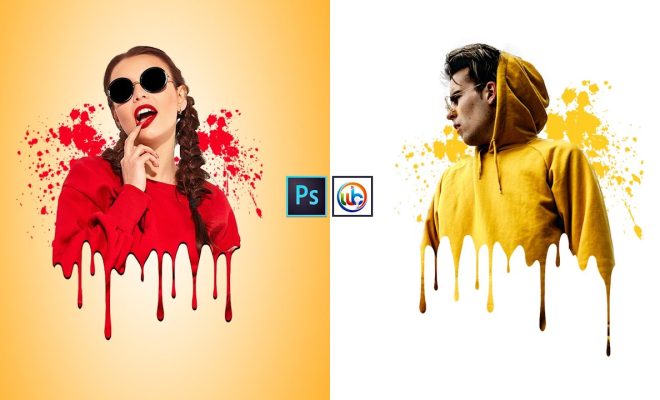
As an AI language model, I don’t have the ability to create visual content, but I can give you a step-by-step guide on how to add paint drip effect to your portrait in Photoshop. So, let’s get started.

Step 1: Choose your portrait and background

First, open up your portrait in Photoshop and choose a suitable background that complements the overall aesthetics of your portrait.

Step 2: Duplicate the layer

Duplicate the layer of your portrait by pressing Ctrl+J (Command+J for Mac users).

Step 3: Apply a filter

Select the duplicated layer and go to Filter > Filter Gallery > Artistic > Paint Daubs. Choose the brush size, sharpness, and brush type you want to use to create a textured look. Make sure you select the “Normal” blending mode for this layer.

Step 4: Add paint drips

Create a new layer above the duplicated layer and choose the “Brush” tool. Select a brush and color of your choice, and paint drips along the edges of your portrait.

Step 5: Apply blending options

Right-click on the “paint drip” layer and choose “Blending Options.” Select “Outer Glow” and choose a suitable color, size, and spread for your paint drips. You can also play around with other blending options such as “Drop Shadow” and “Inner Shadow” to create a more realistic effect.

Step 6: Finishing touches

Play around with the opacity and blending mode of your paint drip layer to create a natural-looking effect. You can also add other elements such as splatters and texture overlays to your portrait to make it more dynamic and engaging.

And there you have it! With these steps, you can easily add a paint drip effect to your portrait in Photoshop. Play around with different filters, blending options, and brushes to create unique and personalized effects. Happy editing!


Previous Article

Toogles: A Minimalistic Interface to Stream YouTube ...

Next Article

What Is NVLink and Is It Better ...

Matthew Lynch

Related articles More from author

  • Digital & Mobile Technology

    Best Free Wallpaper Apps for Your iPhone

    June 6, 2023
    By Matthew Lynch
  • Digital & Mobile Technology

    The Best FPS Boosters for Windows 10

    June 13, 2023
    By Matthew Lynch
  • Digital & Mobile Technology

    Pong: The First Video Game Megahit

    July 25, 2023
    By Matthew Lynch
  • Digital & Mobile Technology

    Ways to Tell If Your Phone Is Being Tapped

    May 31, 2023
    By Matthew Lynch
  • Digital & Mobile Technology

    Best Amazon Fire Stick Apps for Movies, TV, News, and Music for 2023

    June 8, 2023
    By Matthew Lynch
  • Digital & Mobile Technology

    How to Test a Webcam

    June 2, 2023
    By Matthew Lynch

Search

Login & Registration

  • Register
  • Log in
  • Entries feed
  • Comments feed
  • WordPress.org

Newsletter

Signup for The Tech Edvocate Newsletter and have the latest in EdTech news and opinion delivered to your email address!

About Us

Since technology is not going anywhere and does more good than harm, adapting is the best course of action. That is where The Tech Edvocate comes in. We plan to cover the PreK-12 and Higher Education EdTech sectors and provide our readers with the latest news and opinion on the subject. From time to time, I will invite other voices to weigh in on important issues in EdTech. We hope to provide a well-rounded, multi-faceted look at the past, present, the future of EdTech in the US and internationally.

We started this journey back in June 2016, and we plan to continue it for many more years to come. I hope that you will join us in this discussion of the past, present and future of EdTech and lend your own insight to the issues that are discussed.

Newsletter

Signup for The Tech Edvocate Newsletter and have the latest in EdTech news and opinion delivered to your email address!

Contact Us

The Tech Edvocate
910 Goddin Street
Richmond, VA 23231
(601) 630-5238
[email protected]

Copyright © 2025 Matthew Lynch. All rights reserved.