The Tech Edvocate

Top Menu

  • Advertisement
  • Apps
  • Home Page
  • Home Page Five (No Sidebar)
  • Home Page Four
  • Home Page Three
  • Home Page Two
  • Home Tech2
  • Icons [No Sidebar]
  • Left Sidbear Page
  • Lynch Educational Consulting
  • My Account
  • My Speaking Page
  • Newsletter Sign Up Confirmation
  • Newsletter Unsubscription
  • Our Brands
  • Page Example
  • Privacy Policy
  • Protected Content
  • Register
  • Request a Product Review
  • Shop
  • Shortcodes Examples
  • Signup
  • Start Here
    • Governance
    • Careers
    • Contact Us
  • Terms and Conditions
  • The Edvocate
  • The Tech Edvocate Product Guide
  • Topics
  • Write For Us
  • Advertise

Main Menu

  • Start Here
    • Our Brands
    • Governance
      • Lynch Educational Consulting, LLC.
      • Dr. Lynch’s Personal Website
      • Careers
    • Write For Us
    • The Tech Edvocate Product Guide
    • Contact Us
    • Books
    • Edupedia
    • Post a Job
    • The Edvocate Podcast
    • Terms and Conditions
    • Privacy Policy
  • Topics
    • Assistive Technology
    • Child Development Tech
    • Early Childhood & K-12 EdTech
    • EdTech Futures
    • EdTech News
    • EdTech Policy & Reform
    • EdTech Startups & Businesses
    • Higher Education EdTech
    • Online Learning & eLearning
    • Parent & Family Tech
    • Personalized Learning
    • Product Reviews
  • Advertise
  • Tech Edvocate Awards
  • The Edvocate
  • Pedagogue
  • School Ratings

logo

The Tech Edvocate

  • Start Here
    • Our Brands
    • Governance
      • Lynch Educational Consulting, LLC.
      • Dr. Lynch’s Personal Website
        • My Speaking Page
      • Careers
    • Write For Us
    • The Tech Edvocate Product Guide
    • Contact Us
    • Books
    • Edupedia
    • Post a Job
    • The Edvocate Podcast
    • Terms and Conditions
    • Privacy Policy
  • Topics
    • Assistive Technology
    • Child Development Tech
    • Early Childhood & K-12 EdTech
    • EdTech Futures
    • EdTech News
    • EdTech Policy & Reform
    • EdTech Startups & Businesses
    • Higher Education EdTech
    • Online Learning & eLearning
    • Parent & Family Tech
    • Personalized Learning
    • Product Reviews
  • Advertise
  • Tech Edvocate Awards
  • The Edvocate
  • Pedagogue
  • School Ratings
  • A Visitors Guide to Viña del Mar, Chile

  • A Visitors Guide to Århus, Denmark

  • A Visitors Guide to Bakersfield (CA), United States

  • A Visitors Guide to Aurora (CO), United States

  • A Visitor’s Guide to Toledo (OH), United States

  • A Visitors Guide to Cincinnati (OH), United States

  • The MagicEagle Cam 5: Revolutionizing Wildlife Monitoring with Smart 4G Technology

  • A Visitors Guide to Pittsburgh (PA), United States

  • A Visitors Guide to Colorado Springs (CO), United States

  • 5 Pairs of Shoes That Will Instantly Step Your Shoe Game Up

Google ClassroomGoogle Classroom Tips
Home›Google Classroom›How Do I Create a Spreadsheet of the Assignments and Grades From My Google Classroom?

How Do I Create a Spreadsheet of the Assignments and Grades From My Google Classroom?

By Matthew Lynch
October 8, 2020
0
Spread the love

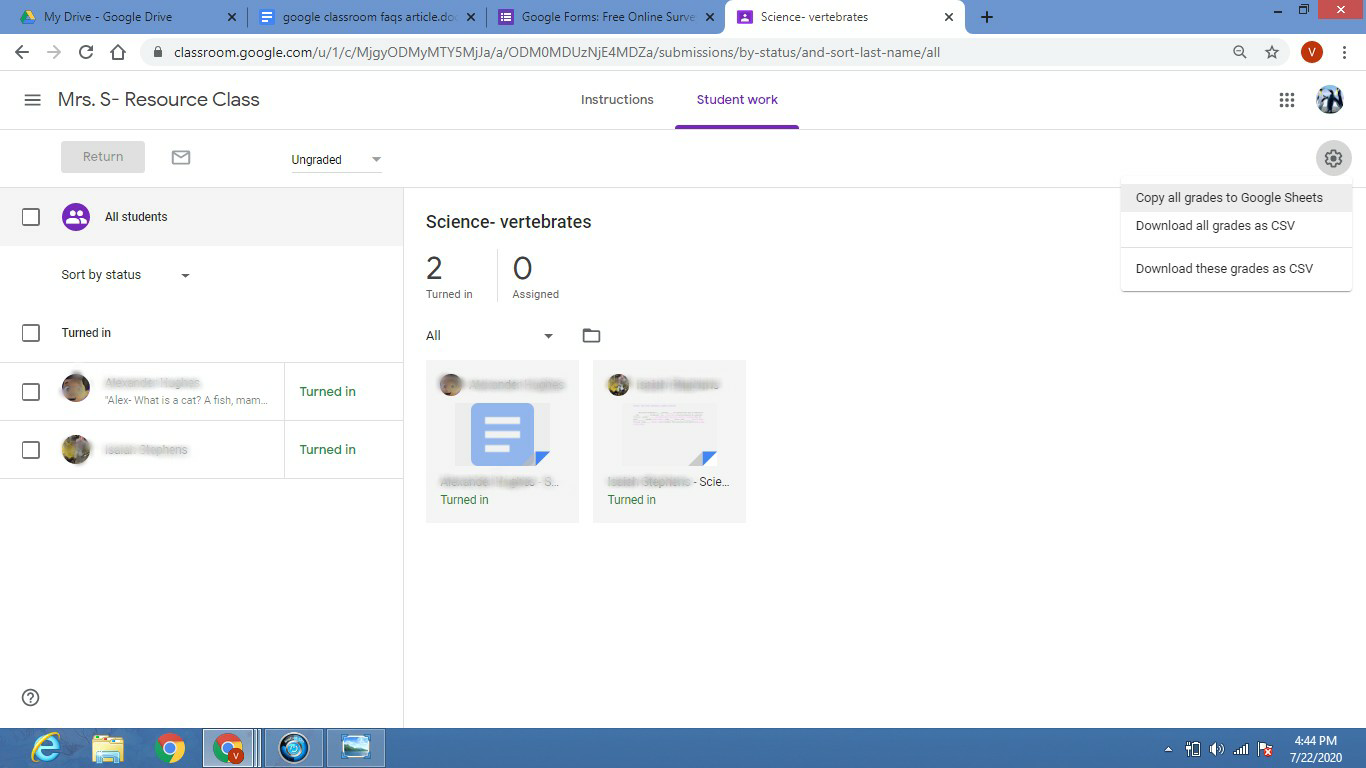
Google Classroom provides an easy to read digital grade book when you click on the “Grades” tab. It lists the assignment title along with the due date due and the grade you assigned to each student. There is even a class average feature, that automatically takes all the grades for the individual assignment listed and calculates the average score. While it is easy to read and maneuver the Grades tab while online,  perhaps you would like to view it in a spreadsheet format.  Google Classroom has a super simple way to transform the online grade book into a Google Sheets spreadsheet. Here are the steps:

  1. Click on the “Grades” tab to open your grade book.
  2. Click on any assignment title, and then go to the Settings icon in the right-hand corner and select “Copy all grades to Google Sheets”.
  1. A spreadsheet will automatically be generated for you, using the data from your Google Classroom grade book, and will open up on your screen for you to view.
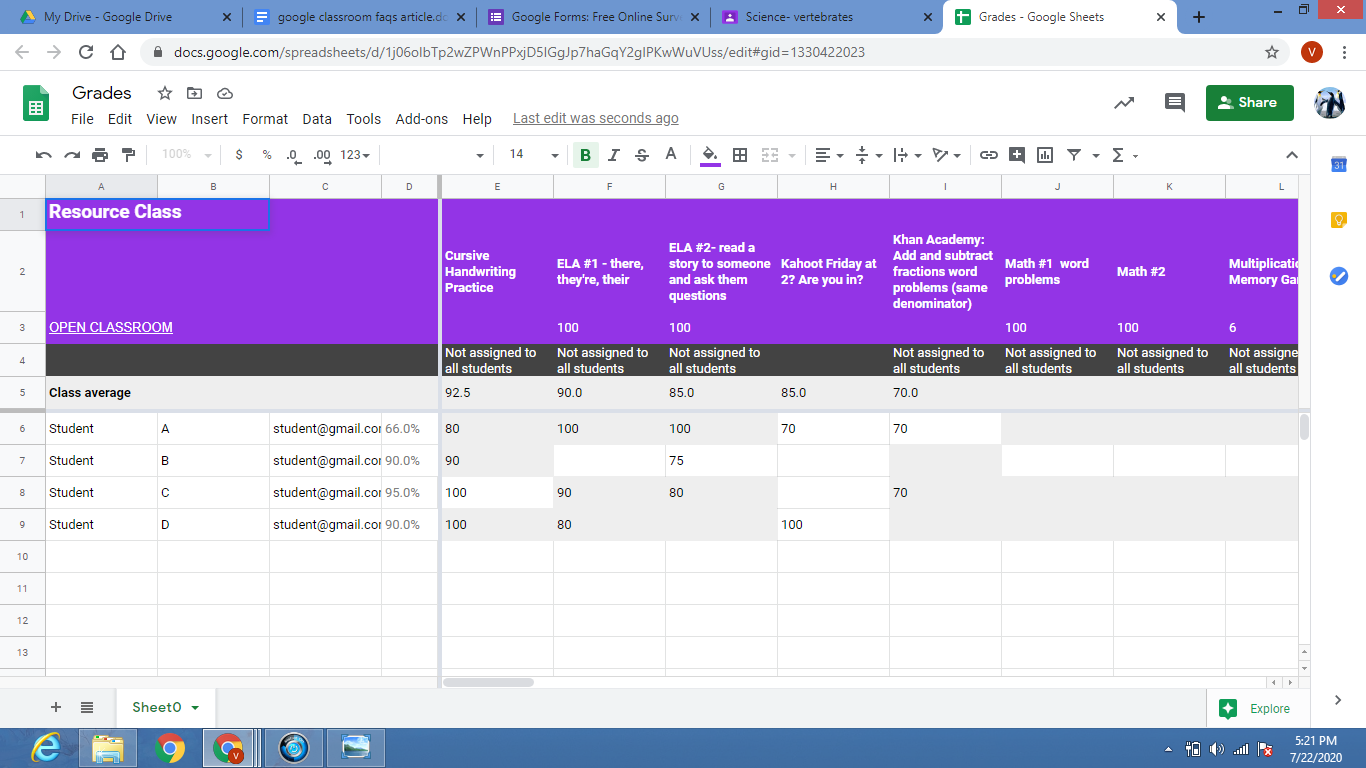
Why would I want to create a spreadsheet? 

  • To have a printable version for your records  
  • Share a copy with your administrator to discuss student progress
  • Make a copy with only a particular student’s info visible, and share it with their parent during a conference
  • Add additional student info
  • Automatically calculates student grade average
Previous Article

What is the Easiest Way to Set ...

Next Article

Designing with Open Educational Resources (OER)

Matthew Lynch

Related articles More from author

  • Google Classroom Tips

    Google Classroom Tip #42: STEM Learning

    December 12, 2018
    By Matthew Lynch
  • Google ClassroomGoogle Classroom Tips

    How Does Google Classroom Manage Student Data and Privacy?

    August 7, 2020
    By Matthew Lynch
  • Google Classroom Tips

    Google Classroom Tip #18: How to Facilitate Collaboration

    November 19, 2018
    By Matthew Lynch
  • Google Classroom Tips

    Google Classroom #49: Supporting the Teaching & Learning Process

    December 19, 2018
    By Matthew Lynch
  • Google Classroom Tips

    Google Classroom Tip #5: Align Curriculum

    November 13, 2018
    By Matthew Lynch
  • Google Classroom

    How to Add Dates Automatically in Google Sheets

    February 19, 2024
    By Matthew Lynch

Search

Login & Registration

  • Register
  • Log in
  • Entries feed
  • Comments feed
  • WordPress.org

Newsletter

Signup for The Tech Edvocate Newsletter and have the latest in EdTech news and opinion delivered to your email address!

About Us

Since technology is not going anywhere and does more good than harm, adapting is the best course of action. That is where The Tech Edvocate comes in. We plan to cover the PreK-12 and Higher Education EdTech sectors and provide our readers with the latest news and opinion on the subject. From time to time, I will invite other voices to weigh in on important issues in EdTech. We hope to provide a well-rounded, multi-faceted look at the past, present, the future of EdTech in the US and internationally.

We started this journey back in June 2016, and we plan to continue it for many more years to come. I hope that you will join us in this discussion of the past, present and future of EdTech and lend your own insight to the issues that are discussed.

Newsletter

Signup for The Tech Edvocate Newsletter and have the latest in EdTech news and opinion delivered to your email address!

Contact Us

The Tech Edvocate
910 Goddin Street
Richmond, VA 23231
(601) 630-5238
[email protected]

Copyright © 2025 Matthew Lynch. All rights reserved.