The Tech Edvocate

Top Menu

  • Advertisement
  • Apps
  • Home Page
  • Home Page Five (No Sidebar)
  • Home Page Four
  • Home Page Three
  • Home Page Two
  • Home Tech2
  • Icons [No Sidebar]
  • Left Sidbear Page
  • Lynch Educational Consulting
  • My Account
  • My Speaking Page
  • Newsletter Sign Up Confirmation
  • Newsletter Unsubscription
  • Our Brands
  • Page Example
  • Privacy Policy
  • Protected Content
  • Register
  • Request a Product Review
  • Shop
  • Shortcodes Examples
  • Signup
  • Start Here
    • Governance
    • Careers
    • Contact Us
  • Terms and Conditions
  • The Edvocate
  • The Tech Edvocate Product Guide
  • Topics
  • Write For Us
  • Advertise

Main Menu

  • Start Here
    • Our Brands
    • Governance
      • Lynch Educational Consulting, LLC.
      • Dr. Lynch’s Personal Website
      • Careers
    • Write For Us
    • The Tech Edvocate Product Guide
    • Contact Us
    • Books
    • Edupedia
    • Post a Job
    • The Edvocate Podcast
    • Terms and Conditions
    • Privacy Policy
  • Topics
    • Assistive Technology
    • Child Development Tech
    • Early Childhood & K-12 EdTech
    • EdTech Futures
    • EdTech News
    • EdTech Policy & Reform
    • EdTech Startups & Businesses
    • Higher Education EdTech
    • Online Learning & eLearning
    • Parent & Family Tech
    • Personalized Learning
    • Product Reviews
  • Advertise
  • Tech Edvocate Awards
  • The Edvocate
  • Pedagogue
  • School Ratings

logo

The Tech Edvocate

  • Start Here
    • Our Brands
    • Governance
      • Lynch Educational Consulting, LLC.
      • Dr. Lynch’s Personal Website
        • My Speaking Page
      • Careers
    • Write For Us
    • The Tech Edvocate Product Guide
    • Contact Us
    • Books
    • Edupedia
    • Post a Job
    • The Edvocate Podcast
    • Terms and Conditions
    • Privacy Policy
  • Topics
    • Assistive Technology
    • Child Development Tech
    • Early Childhood & K-12 EdTech
    • EdTech Futures
    • EdTech News
    • EdTech Policy & Reform
    • EdTech Startups & Businesses
    • Higher Education EdTech
    • Online Learning & eLearning
    • Parent & Family Tech
    • Personalized Learning
    • Product Reviews
  • Advertise
  • Tech Edvocate Awards
  • The Edvocate
  • Pedagogue
  • School Ratings
  • A Visitor’s Guide to Fresno (CA), United States

  • A Visitors Guide to New Orleans (LA), United States

  • A Visitors Guide to Sacramento (CA), United States

  • A Visitors Guide to Lyon, France

  • JisuLife Ultra2 Portable Fan: A Powerful Multi-Function Cooling Solution

  • A Visitors Guide to Viña del Mar, Chile

  • A Visitors Guide to Århus, Denmark

  • A Visitors Guide to Bakersfield (CA), United States

  • A Visitors Guide to Aurora (CO), United States

  • A Visitor’s Guide to Toledo (OH), United States

Digital & Mobile Technology
Home›Digital & Mobile Technology›GUI? What Is a Graphic User Interface?

GUI? What Is a Graphic User Interface?

By Matthew Lynch
August 5, 2023
0
Spread the love

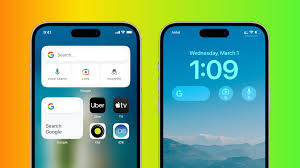
A Graphic User Interface, also known as GUI, is a type of interface that allows users to interact with electronic devices, software, and operating systems through a graphical representation. GUI is an integral part of the modern computing system, which enables users to execute tasks through a user-friendly and visually appealing interface.

A GUI typically consists of menus, toolbars, icons, and various graphical elements such as buttons and lists. The purpose of these elements is to present information or data in a manner that is easily readable and understandable by users.

The first GUI was developed in the 1970s at Xerox’s Palo Alto Research Center (PARC), which was a breakthrough in the computing industry. This GUI was designed to make it easier for users to operate the computer and accomplish tasks seamlessly. Since then, GUI has become more advanced, and today’s interfaces are much more interactive and richly designed.

With the advent of modern computing devices such as smartphones, tablets, and smartwatches, GUI has become more prominent than ever. GUI is designed to take advantage of the full range of the device’s input, including touchscreens, voice recognition, and gesture controls. This makes the interface intuitive, user-friendly, and efficient, even for those who are unfamiliar with the device.

One significant advantage of GUI is its ability to provide feedback to users. For instance, when users click on a button, it will change color, or a pop-up message will confirm the action. This feedback mechanism improves the user experience, making the interface more engaging and interactive.

Another important aspect is the aesthetic design. GUIs are designed to be visually appealing, intuitive, and easy to use, which makes them more productive than their predecessors. Thus, GUI has revolutionized the way people interact with computers, making the experience efficient, stress-free, and visually pleasing.

In conclusion, a Graphic User Interface is a vital component of modern computing, enabling users to interact with electronic devices, software, and operating systems through a visually appealing interface. It plays a significant role in making the user experience effortless, efficient, and interactive. As technology advances, we can expect new and exciting ways to interact with devices through the evolution of GUI.

Previous Article

Inspiring Movies on Netflix That Could Change ...

Next Article

How to Fix the Epic Games Launcher ...

Matthew Lynch

Related articles More from author

  • Digital & Mobile Technology

    5 Weird Noises Inside Your Computer Explained

    August 1, 2023
    By Matthew Lynch
  • Digital & Mobile Technology

    Buyer’s Guide to the Nintendo DS Lite

    June 4, 2023
    By Matthew Lynch
  • Digital & Mobile Technology

    What an Alexa Red Ring Means and How to Fix It

    August 3, 2023
    By Matthew Lynch
  • Digital & Mobile Technology

    How to Show Windows 11’s Hidden Floating Performance Panels

    May 9, 2023
    By Matthew Lynch
  • Digital & Mobile Technology

    How to Make Your Cell Phone Do Auto Redialing

    April 29, 2023
    By Matthew Lynch
  • Digital & Mobile Technology

    How to Use CSS to Change Font Color

    June 22, 2023
    By Matthew Lynch

Search

Login & Registration

  • Register
  • Log in
  • Entries feed
  • Comments feed
  • WordPress.org

Newsletter

Signup for The Tech Edvocate Newsletter and have the latest in EdTech news and opinion delivered to your email address!

About Us

Since technology is not going anywhere and does more good than harm, adapting is the best course of action. That is where The Tech Edvocate comes in. We plan to cover the PreK-12 and Higher Education EdTech sectors and provide our readers with the latest news and opinion on the subject. From time to time, I will invite other voices to weigh in on important issues in EdTech. We hope to provide a well-rounded, multi-faceted look at the past, present, the future of EdTech in the US and internationally.

We started this journey back in June 2016, and we plan to continue it for many more years to come. I hope that you will join us in this discussion of the past, present and future of EdTech and lend your own insight to the issues that are discussed.

Newsletter

Signup for The Tech Edvocate Newsletter and have the latest in EdTech news and opinion delivered to your email address!

Contact Us

The Tech Edvocate
910 Goddin Street
Richmond, VA 23231
(601) 630-5238
[email protected]

Copyright © 2025 Matthew Lynch. All rights reserved.